
How to Pair: Idw26 Smart Sports Watch User Manual
Content
idw26 Smart Sports Watch
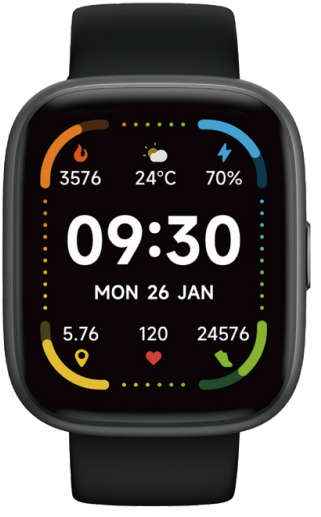
Introduction
The idw26 Smart Sports Watch is a feature-packed wearable designed for fitness enthusiasts, busy professionals, and anyone seeking a reliable health and activity tracker. This sleek, modern smartwatch combines advanced health monitoring, sports tracking, and smart connectivity in a stylish package suitable for both men and women. Whether you're a runner, swimmer, yogi, or just want to keep a closer eye on your well-being, the idw26 offers the tools you need to stay on top of your goals.
One of the standout features of the idw26 is its 24/7 heart rate monitoring, blood oxygen measurement, and stress level tracking, providing comprehensive insights into your physical and mental health throughout the day. Sleep tracking helps you understand your rest patterns, while the built-in Alexa voice assistant lets you manage music, check the weather, set reminders, and more—all with your voice.. The watch also supports Bluetooth calling, so you can make and receive calls directly from your wrist, and it delivers notifications from your favorite social apps.
With over 100 sport modes, IDW2626 Smart Sports Watch caters to a wide range of activities, from running and cycling to swimming and yoga. Its IP68 waterproof rating and 3ATM water resistance make it a dependable companion for swimmers and outdoor adventurers. The 1.83-inch HD touchscreen offers vibrant visuals and intuitive navigation, while multiple customizable watch faces let you personalize your experience..
The idw26 is compatible with both iOS and Android devices, ensuring broad accessibility. It arrives in a stylish gift box, making it an excellent choice for birthdays, holidays, or as a thoughtful present for health-conscious loved ones. Estimated to retail in the $50–$100 range, the idw26 Smart Sports Watch delivers premium features at a competitive price point, widely available through online retailers and select electronics stores.
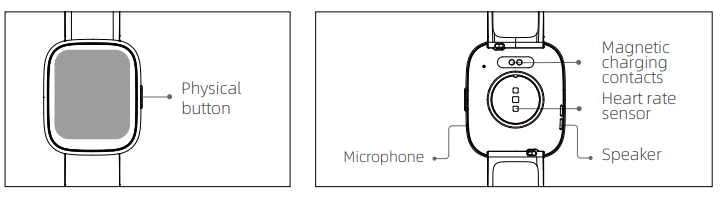
Introduction
- Screen display area
- Function button
- Pressure relief hole
- Heart rate sensor
- Microphone
- Speaker
- Front side
- Back side
Getting started
- Open the package and check the contents.
- Delivery content: 1) IDW26 smart watch (with built-in lithium battery); 2) user manual; 3) original charging cable.
- Charge the watch to activate and turn it on before first use. To charge, simply connect the magnetic charging the charging contacts located on the back of the watch.
- Search for "veryfit" on the App Store, Google, Play, or scan the QR code to download and install the app.
- Log in to the app and set your personal information, as well as your step and weight goals.
- On the "Device" interface, tap the "+" icon in the upper right corner, and your phone starts searching. From the device list found, choose your smart watch name to pair with. You may also link the device directly by scanning the device's QR code using the scan function.

Health
Watch
- The watch will automatically record your data.
- You can measure your heart rate, blood oxygen, en stress level on the watch, or turn on automatic measurement of heart rate, blood oxygen, stress , level,, and sleep on the app to track data the whole day. You can manually or have the watch automatically monitor your health status continuously.
To start an exercise:
- When the watch face interface is displayed, press the physical button to access the application list. Tap the Workout icon to access the icons of different exercise types, then tap the icon of an exercise (such as Outdoor Running) to start the exercise.
- The watch can display up to 20 exercise types by default. On the app's Multi exercise mode, you can add or delete the exercise types displayed on the watch or change their order.
App
- Start "veryfit", enable the Bluetooth feature, and grant the GPS positioning permission.;
- Light up the bracelet screen and bring it close to your phone.
- Click the "+" icon on the App, and select the smart watch model in the search results to bind.
- Confirm the binding request on the smart watch.
- Fill in your information and set your step goal on the App to complete the binding.
Basic Operations
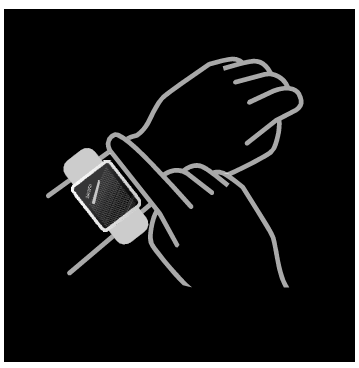
- Wear the watch correctly: ensure that your watch is at least one finger above your wrist bone and that the sensor on the back touches your skin.
- Screen operation: IDW26 has a full touch screen, which supports operations including short tap, swipe left/right,, and swipe up/down.
- Button operation: IDW26 has a physical button; , which supports "short press" and "long press" operations. Short press: to return to the home page/pause exercise. Long press: for 2 seconds to turn on the watch when it is off; to turn on Alexa when the watch is on.
Technical Specifications and Key Features
- Display: 1.83-inch Full HD Touchscreen
- Compatibility: iOS 9.0+, Android 6.0+
- Health Monitoring: 24/7 Heart Rate, Blood Oxygen (SpO2), Stress Levels, Sleep Tracking, Menstrual Cycle Tracking
- Sports & Fitness: 100+ Sport Modes, Real-Time Workout Data, Calories, Steps, Distance Tracking
- Smart Features: Built-in Alexa Voice Assistant, Bluetooth Calling, Message Notifications, Weather Forecast, Music Control, Calendar, Alarm, Timer, Find My Phone
- Durability: IP68 Waterproof (3ATM), Suitable for Swimming
- Battery: 300mAh (typical usage: several days per charge)
- Charging: Magnetic Charging Cable
- Memory: 128MB Storage
- Band: 22mm Width, Replaceable
- Weight: 94g
- Design: Aluminum Alloy Buttons, Lightweight, Modern Aesthetics
Performance & Benchmarks: The idw26 Smart Sports Watch stands out for its accurate health sensors, responsive touchscreen, and long battery life. Compared to similar budget smartwatches, it offers more sport modes, better water resistance, and integrated voice assistant functionality. Its seamless integration with companion apps (such as VeryFit) enhances data tracking and customization, setting it apart from basic fitness bands.
Troubleshooting Common Issues
Common Problems & Solutions
- Watch Not Turning On: Ensure the battery is charged using the original magnetic cable. If unresponsive, hold the power button for 10+ seconds to force a restart.
- Bluetooth Connection Issues: Enable Bluetooth and location permissions on your phone. Unpair and re-pair the device in the app. Restart both the watch and the phone if problems persist.
- Inaccurate Health Data: Wear the watch snugly on your wrist, not too tight or loose. Clean the sensor area regularly for optimal readings.
- App Syncing Problems: Update the companion app to the latest version. Log out and back in, or reinstall the app if necessary.
- Touchscreen Not Responding: Restart the watch. Avoid using the device with wet or gloved hands.
Error Codes & Fixes
While specific error codes are not detailed in available manuals, most issues can be resolved by restarting the device, ensuring a proper fit, and keeping the firmware updated via the companion app.
Preventive Measures
- Avoid exposing the watch to extreme temperatures or direct sunlight for extended periods.
- Regularly clean the watch and charging contacts to prevent corrosion.
- Update the device firmware regularly for improved performance and new features.
Warranty & Support
The idw26 Smart Sports Watch typically comes with a limited manufacturer’s warranty (check your retailer for details). For support, contact the seller directly or reach out to the manufacturer via the contact information provided in your user manual. Online resources, including video tutorials and community forums, can also provide additional troubleshooting assistance.
Pros and Cons of the IDW26 Smart Sports Watch
Advantages
- Comprehensive Health Tracking: Offers 24/7 heart rate, SpO2, stress, and sleep monitoring, rare in this price range.
- Extensive Sport Modes: Over 100 activities tracked, including swimming, with screen lock,k a feature not common in budget smartwatches.
- Smart Connectivity: Built-in Alexa, Bluetooth calling, and app notifications enhance everyday convenience
- Durable Design: IP68 waterproof, aluminum alloy buttons, and a vibrant HD touchscreen.
- Customization: Multiple watch faces and app integration for a personalized experience.
- Value for Money: Premium features at a mid-range price, making it accessible to a wide audience.
Limitations
- Battery Life: While decent, heavy use of GPS or calling may require daily charging, less than some competing models.
- App Dependency: Full functionality requires pairing with a smartphone and specific apps, which may not suit all users.
- Build Quality: While sturdy, it may not match the premium feel of higher-end smartwatches.
- Limited Storage: 128MB is sufficient for basic use,,e but limits music or app storage compared to flagship devices.
Compared to alternatives like the Amazfit Bip series or budget Fitbit models, the idw26 Smart Sports Watch excels in sport mode variety and smart features but may lag slightly in brand recognition and ecosystem integration.
Customer Reviews and Feedback
Users consistently praise the idw26 Smart Sports Watch for its functionality, durability, and value. Many highlight the accuracy of health metrics, ease of use, and the convenience of Alexa integration..n The variety of sport modes and the ability to track swimming with a locked screen are frequently mentioned as a standard feature.
Common compliments include the stylish design, responsive touchscreen, and reliable Bluetooth calling. The watch is often recommended as a great gift for fitness enthusiasts and tech-savvy individuals.
Some users note minor issues with battery life under heavy use and occasional syncing delays with the app. A few mention that the companion app could be more intuitive, but overall satisfaction remains high. Star ratings from major retailers typically range from 4 to 4.5 out of 5, reflecting a strong balance of features, performance, and affordability.
For those seeking a budget-friendly, feature-rich smartwatch, the idw26 Smart Sports Watch is a compelling choice—especially for users who prioritize health tracking, sport versatility, and smart connectivity.
Faqs
How do I set up the idw26 Smart Sports Watch for the first time?
What should I do if the idw26 Smart Sports Watch screen is unresponsive?
How can I use the heart rate and blood oxygen features on the idw26 Smart Sports Watch?
Is the idw26 Smart Sports Watch compatible with both Android and iOS devices?
How can I optimize battery life on my idw26 Smart Sports Watch?
What are the steps to customize watch faces on the idw26 Smart Sports Watch?
How do I troubleshoot Bluetooth connection issues between the idw26 Smart Sports Watch and my phone?
What maintenance is required to keep the idw26 Smart Sports Watch in good condition?
Tags
Leave a Comment