
Setup: Ienyrid M4 Pro S Electric Scooter Owner Manual
Content
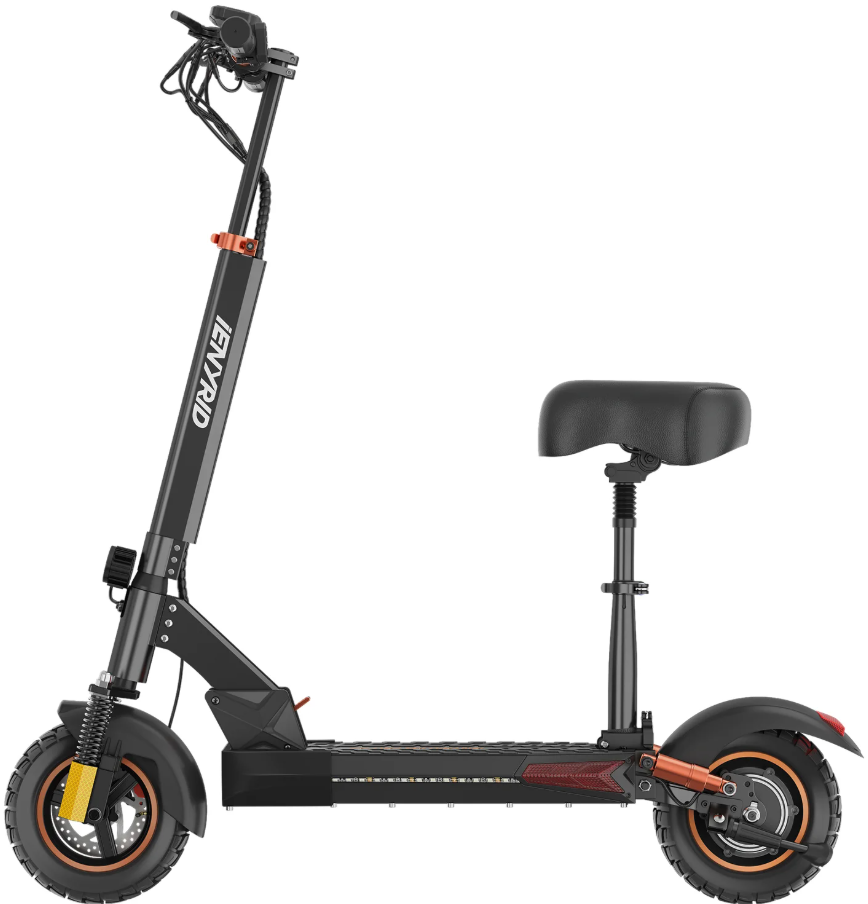
ienyrid M4 Pro S Electric Scooter
Introduction
The ienyrid M4 Pro S Electric Scooter is a cutting-edge, high-performance personal transportation device designed for both urban commuters and recreational enthusiasts. This scooter is engineered with advanced technology, offering a powerful motor and long-lasting battery life, making it an ideal choice for those seeking a reliable and efficient mode of transportation. Key benefits include its sleek design, ease of use, and eco-friendly nature, appealing to a wide range of users from students to professionals. The target audience includes adults over 18 years old who value convenience and sustainability. The ienyrid M4 Pro S is available in the mid to high price range, typically between $800 and $1,200, depending on the retailer and any promotions. It is widely available at major retailers and online marketplaces.
Main Parts
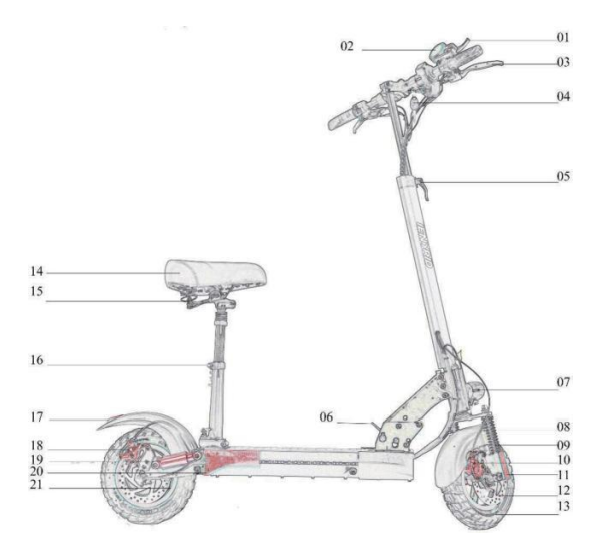
- Accelerator
- Meter
- Rear Brake Control Bar
- Key of Electric Lock
- Height Adjust Lock
- Folding Plug
- Headlight with Horn
- Front Fender
- Front Dampers 10:
- Front Disc Brake 11:
- Reflective Stickers
- Front Disc Plate
- Front Tire
- Seat Bag
- Seat Bag Folding Plug
- Seat Height Adjust Lock
- Taillight
- Rear Disc Brake
- Rear Dampers
- Side Lights
- Hall Motor
Assemble the Electric Scooter
Products' List
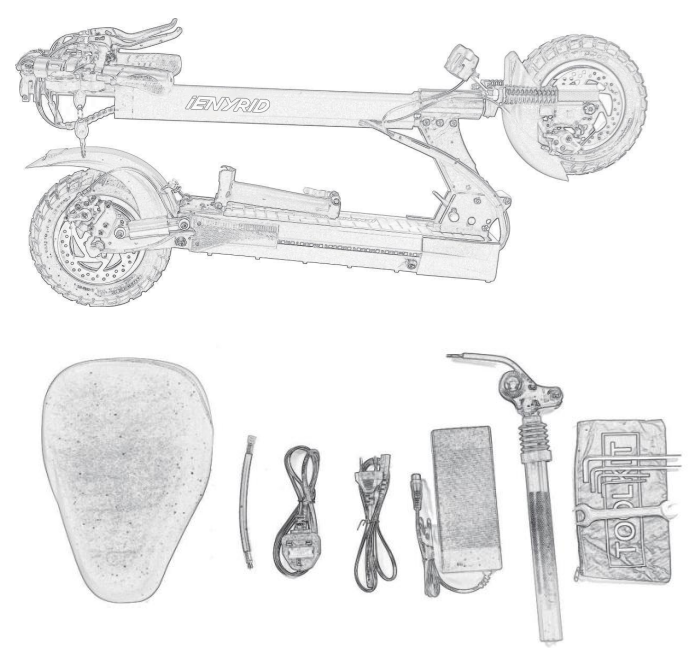
- Electric Scooter
- Seat Bag
- Valve Extension Cable
- UK Charging Plug
- EU Charging Plug
- 110-240V Adopter
- Seat Support Rod
- Simple Tools
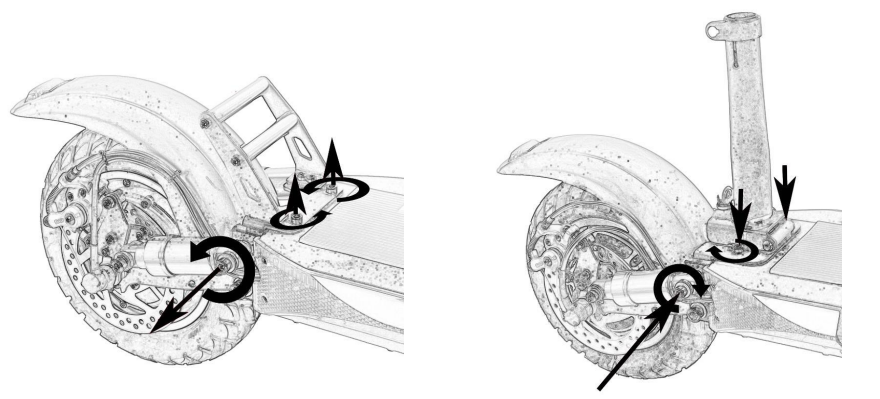
Expend the Electric Scooter
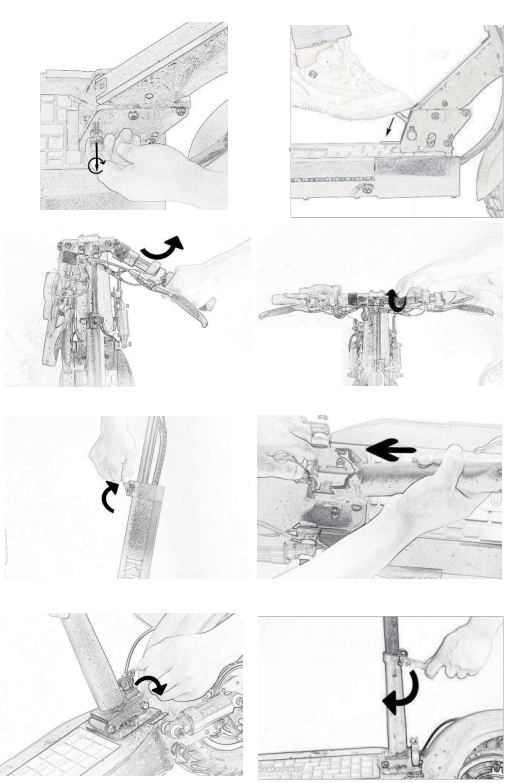
Replace the seat
Checking the Function of the Scooter
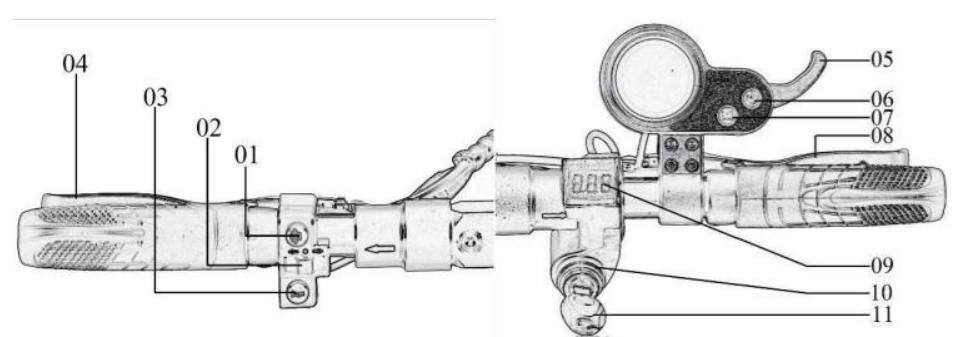
- Driving Light Switch
- Turning Light Switch
- Horn Switch
- Rear Brake Controller Bar
- Accelerator
- Meter Power Button
- Model Button
- Front BrakControllerrer Bar
- Volt Display
- Power Lock
- Power Lock Key
Control before Operating
- Checking the start of the accelerator and steering wheel. Turning the power off, pull the throttle lever a few times. Make sure it returns to its original position.
Please do not pull the tri; ger, work smoothly. - Checking brakes and cables. Check the braking power. If the braking system is weak, please adjust it before use. If the brake is jammed or there is an unusual noise, check the inner brake cable for wear and deformation.
- Check tire pressure and condition. Check the front and rear tires for punctures and tread wear. Make sure the tire pressure is at the recommended level: 23 kg per SQCM. Replace tires by wear degree (damage, tread wear, etc.).
- Checking the folding part and the steering wheel. Folding/Unfolding: Make sure the folding lock lever is locked and in the upright position. Make sure the stand is folding smoothly.
- General condition check: Some parts of the electric scooter require regular maintenance, check: the chassis fork, tires, bearing, cable, and other parts.
Battery and Charger
Battery
- DO NOT turn on the engine while recharging.
- The charge indicator shows only two stages (discharged/charged).
- Do not leave a fully charged battery for a long time (more than two months).
- The battery can be discharged while driving, braking, and the headlight is on.
- DO NOT use the battery:
- If the battery is damaged.
- If the battery heats up or is deformed.
- If the battery leaks.
- If the battery leaks, in any case, do not contact with it. The battery must not be accessible to children and animals.
- A faulty battery can be explosive and cause irreparable damage to health.
- Charge the battery in designated and equipped areas.
Recharging
- The battery of the electric scooter is designed for multiple recharges. Insert the charging cable into the battery port located on the front right under the deck, then connect the cable to the network.
- During charging, the indicator lights up in red.
- The indicator will turn green when the battery is fully charged.
- Do not use the already used or third-party batteries.
- For long periods of downtime, it is recommended to charge the battery at least once a month for 9 hours, . Each trip, it can take up to 12 hours to recharge.
- Before installing, repairing,, or removing the battery, MAKE SURE that the electric scooter is unplugged. Otherwise, it can lead to a short circuit and completely take the electric scooter will out of operation.
- DO NOT use disparate objects and equipment of other manufacturers not specified in construction for recharging; this may result in the ignition or leakage of toxic elements from the battery. USE only the equipment supplied with the electric scooter.
Display
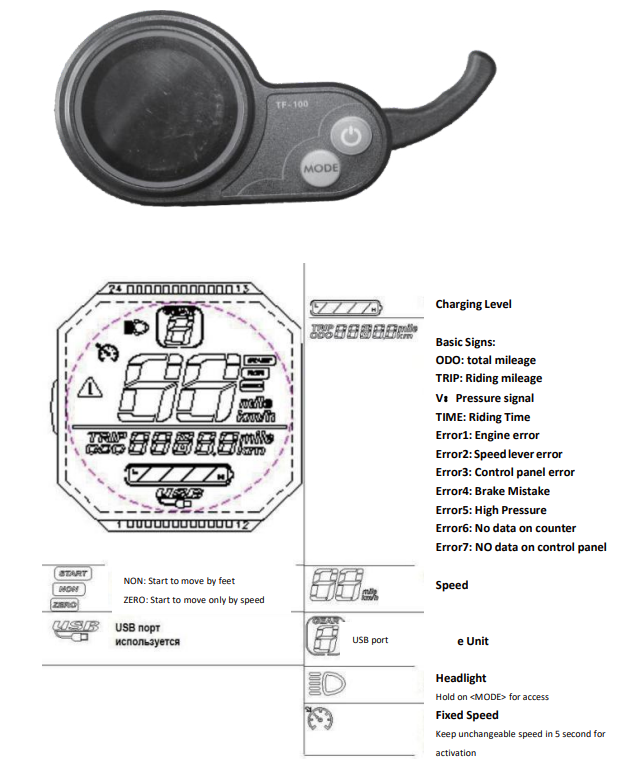
Control
- Safe driving
For safe driving, you should first be very familiar with the product, and select a suitable open place for riding. Drive carefully, reduce speed before cornering, and brake slowly when speed decreases. - Start of movement
Put one foot next to the electric scooter; the other foot on the deck closer to the helm. Make sure you stand steadily, then gently push the electric scooter forward with your foot on the ground, just like with an ordinary scooter. Put the other foot on the deck closer to the rear bumper. When the body is leaning forward, press the acceleration button. Start to increase speed. - Start of sitting
Sit on the seat of the electric scooter, put one foot on the deck, and leave the other on the ground. Gently press the acceleration button, and when the electric scooter begins to move at the needed speed, put your second foot on the deck. Start of sitting Turning:
Use the steering wheel to turn, but do not forget to keep your hands parallel to your body, when looking around,, and make sure the maneuver is safe - Braking:
Slowly brake and remember the center of gravity. Recommend leaning back a little when you need to brake.
Maintenance
Grease:
- Every 6 months, you should grease the guiding mechanics,, folding, ng, and shock absorption with silicone. Also, check the bolts; tighten if necessary.
- Caution: Do not use rust-resistant grease. Do not lubricate the wheel tread.
Brake
- Check the braking power. If the braking system is weak, please adjust it before use. If the brake is jammed or there is an unusual noise, check the inner brake cable for wear and deformation.
- The battery supplied with the equipment can be charged at least 800 times. If necessary (mileage loss), replace the battery.
Specification
- Model:
- JENYRID M4 PRO S
- Body:
- Aluminium alloy
- Motor:
- 48V 600W single stage
- Battery:
- 48V 10Amp Lithium
- Adapter:
- Incoming 100-240 V, Outgoing 54.6 V 2A
- Brakes:
- Mechanical disc brake
- Tires:
- 80/65-6 Pneumatic dirt tires
- Lights:
- Front LED headlight, turn signals,, and taillight
- Max. loading:
- 150 kg
- Max. speed:
- 40-45 Km/h
- Trip distance:
- 30-50 Km without recharging
- Charging time:
- 6-8 hours
- Gradeability:
- 10 degrees
- Wheelbase:
- 85 cm.
- Dimensions:
- 119.5*26*50.5cm
- Product weight:
- 23.9 kg
Troubleshooting
Common issues with electric scooters include faulty batteries, motor malfunctions, and connectivity problems. Here are some solutions:
- Battery Not Charging: Ensure the charging cable is securely connected to both the scooter and the power outlet. Check for any damage to the charging port or cable.
- Motor Not Engaging: Make sure the scooter is on a flat surface and that the throttle is functioning correctly. Check for any blockages in the wheel.
- Connection Issues: Restart the scooter and ensure Bluetooth is enabled. Update the app if necessary.
Preventive measures include regular cleaning and maintenance of the scooter, storing it in a cool, dry place, and ensuring proper charging practices. For more complex issues, contact the manufacturer's support team for assistance under the warranty.
For any technical support or warranty inquiries, please visit the official ienyrid website or contact their customer service team via phone or email.
Pros & Cons of the ienyrid M4 Pro S Electric Scooter
Pros
- Powerful Performance: Equipped with a strong motor, providing a smooth ride on various terrains.
- Long Battery Life: Offers extended use without needing frequent recharges.
- Eco-Friendly: Zero emissions contribute to a cleaner environment.
- Portability: Lightweight and foldable for easy storage and transport.
Cons
- Higher Cost: Priced at a premium compared to some competitors.
- Weight Limit: Maximum load capacity limits heavy users.
- Learning Curve: Beginners may need time to adjust to its speed and handling.
Overall, the ienyrid M4 Pro S offers excellent value for money due to its durability and performance, though it may not be the best choice for those on a tight budget.
Customer Reviews
Users of the ienyrid M4 Pro S Electric Scooter have praised its speed and efficiency, with many noting it as a reliable means of transportation. Common praises include its robust build quality and long battery life. However, some users have mentioned a slight learning curve due to its powerful motor. On average, the scooter receives a 4.5-star rating, with many recommending it for daily commutes. Some users have noted minor issues with connectivity, but these are generally resolved through updates or customer support.
For those considering purchasing, it's recommended to read through detailed reviews and compare features with other models like the Razor C35 SLA or the E-TWOW GTS.
Conclusion
The ienyrid M4 Pro S Electric Scooter is a top choice for anyone seeking a reliable and efficient mode of personal transportation. With its powerful motor and long-lasting battery, it stands out in the market. While it may have a higher price point, its durability and performance make it a worthwhile investment for frequent users.
Faqs
How do I set up the ienyrid M4 Pro S Electric Scooter for the first time?
What should I do if my ienyrid M4 Pro S Electric Scooter is not working properly?
Can I use the ienyrid M4 Pro S Electric Scooter on various terrains?
How often should I maintain the ienyrid M4 Pro S Electric Scooter?
What are the key features that make the ienyrid M4 Pro S Electric Scooter different?
How do I optimize the performance of the ienyrid M4 Pro S Electric Scooter?
Is the ienyrid M4 Pro S Electric Scooter compatible with accessories like a seat?
What safety features does the ienyrid M4 Pro S Electric Scooter have?
Leave a Comment