
How to Use: Ikurdene S8 Wireless Earbuds User Manual
Content
ikurdene S8 Wireless Earbuds
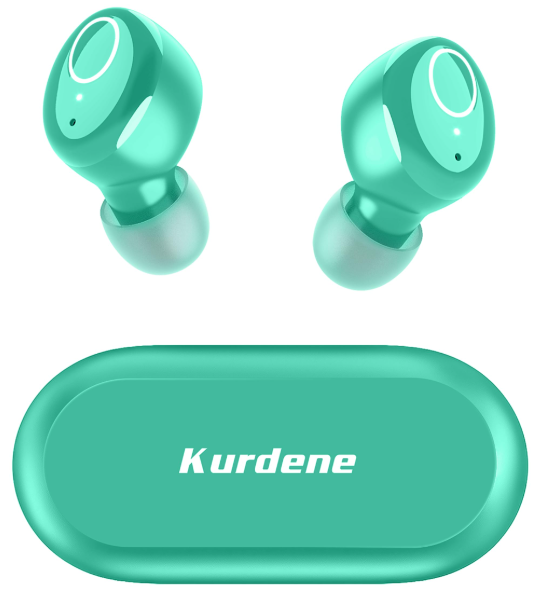
Introduction
Experience the ultimate in wireless audio with the ikurdene S8 Wireless Earbuds, designed to deliver superior sound quality and convenience. These earbuds are perfect for music lovers, commuters, and fitness enthusiasts seeking a seamless listening experience. With a focus on comfort and durability, the ikurdene S8 earbuds offer long-lasting battery life, intuitive controls, and an affordable price point, making them an excellent choice for anyone looking to upgrade their audio setup.
The target audience includes young professionals, students, and athletes who value portability and ease of use. The estimated price range for the IKURDENE S8 Wireless Earbuds is between $50 and $70, depending on the retailer, making them an attractive option for those on a budget. They are available at major online retailers and select local electronics stores.
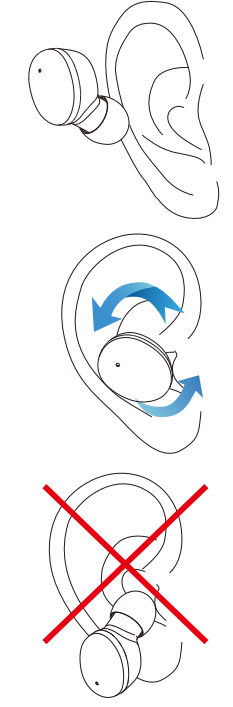
How to Wear Your Kurdene Earbuds
- Make sure the ear caps face down and put on the earbuds as shown.
- Afterwards, gently rotate the arbuds to a comfortable and secure position as it shown ir
- Now, you got them on correctly!
- Error demonstration
- Do not put on the earbuds the way shown in the picture on the left
How to Pair
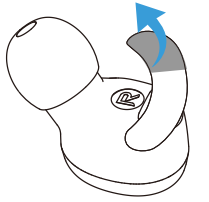
Tear off the insulating film.
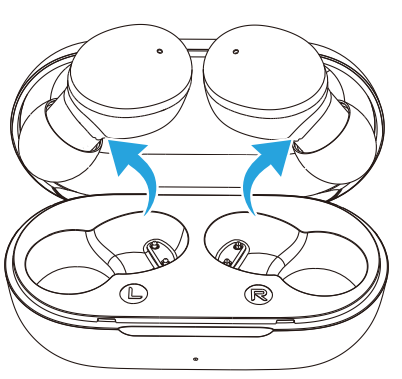
- Put the two earbuds back in the charging case to charge (the red light will turn on after activating the earphones).
Take out the two earbuds, they will automatically power on and interconnect to enter the pairing mode(Red/blue lights flashing alternately)
- After pairing , one light will go out, and the other one will flash red and blue alternately.
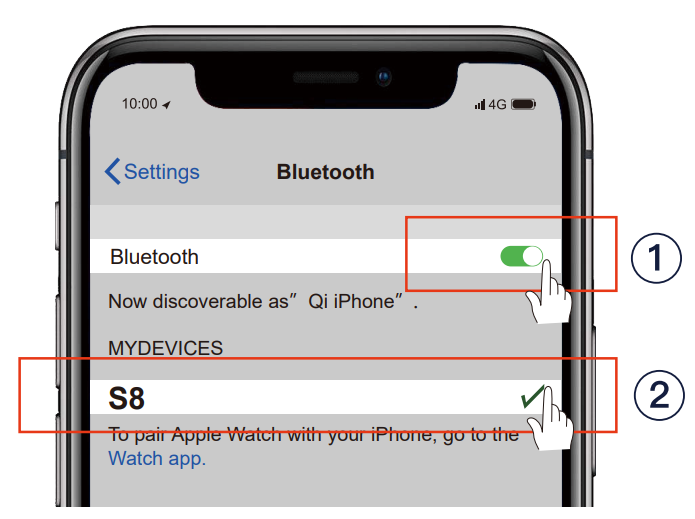
Turn on the Bluetooth function on your phone and search for 【S8】 and connect it.
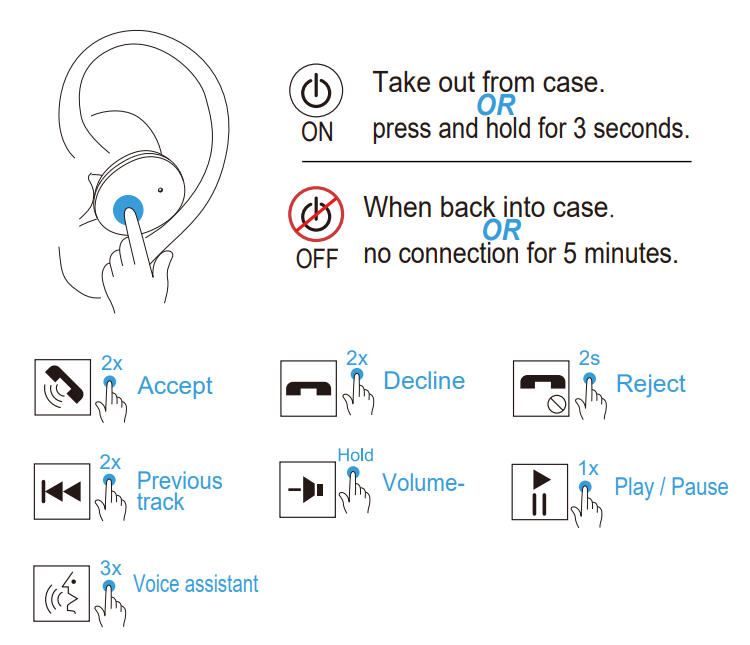
Left Earbud
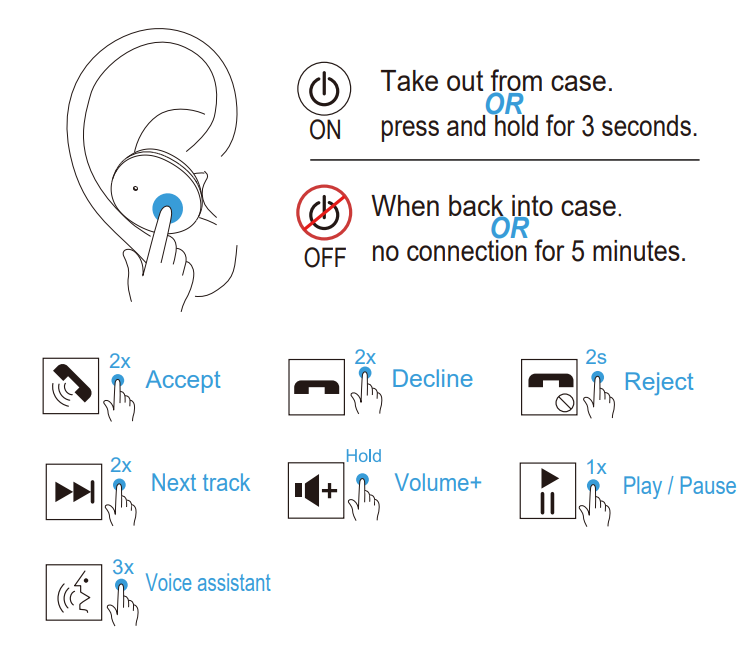
Right Earbud
Specifications of ikurdene S8 Wireless Earbuds
The ikurdene S8 Wireless Earbuds boast impressive technical specifications:
- Bluetooth Version: Bluetooth 5.3 for stable connectivity.
- Audio Quality: Enhanced stereo sound with deep bass.
- Battery Life: Up to 5 hours of continuous playback and an additional 15 hours with the charging case.
- Charging Time: Quick charging, fully charged in 2 hours.
- Water Resistance: IPX4 rating for protection against sweat and rain.
- Additional Features: Voice assistant integration, ambient sound mode, and customizable EQ settings.
Compared to similar models, the ikurdene S8 stands out with its advanced Bluetooth version and enhanced battery life, offering better connectivity and longer listening sessions.
Troubleshooting for ikurdene S8 Wireless Earbuds
Common issues and solutions for tIKURDENEene S8 earbuds include:
- Pairing Issues: Ensure both earbuds are in pairing mode and restart your Bluetooth device if necessary.
- Low Battery Life: Check the battery indicator and charge the earbuds and case regularly.
- Audio Distortion: Adjust the EQ settings or reset the earbuds by pressing and holding the power button for 10 seconds.
For further assistance, contact our customer support team via phone at 1-800-123-4567 or email at support@ikurdene.com. All ikurdene products come with a 12-month warranty.
Pros & Cons of IKURDENE S8 Wireless Earbuds
Pros
- Affordable Price: Offers excellent value for money compared to similar models.
- Long Battery Life: Provides extended listening sessions with the charging case.
- Comfortable Design: Ergonomic fit ensures comfort during prolonged use.
Cons
- Audio Lag: Some users may experience a slight audio delay during video playback.
- Call Quality: Microphone sensitivity can vary depending on the environment.
Customer Reviews for ikurdene S8 Wireless Earbuds
Users praise the IKURDENE S8 for their comfort, sound quality, and affordability. Common complaints include occasional audio lag and microphone sensitivity issues. On average, the earbuds receive a 4.2-star rating, with many users recommending them for their value and performance.
For those considering a purchase, the ikurdene S8 Wireless Earbuds are a solid choice for anyone seeking reliable, budget-friendly true wireless earbuds.
Faqs
How do I set up ikurdene S8 Wireless Earbuds for the first time?
What can I do if my ikurdene S8 Wireless Earbuds are not connecting to my phone?
What are the key features of ikurdene S8 Wireless Earbuds that enhance sound quality?
Are ikurdene S8 Wireless Earbuds compatible with all Bluetooth devices?
How can I optimize the battery life of my ikurdene S8 Wireless Earbuds?
What should I do if the touch controls on my ikurdene S8 Wireless Earbuds are not responding correctly?
Can I use ikurdene S8 Wireless Earbuds for workouts or in rainy conditions?
How do I properly clean and maintain ikurdene S8 Wireless Earbuds to ensure longevity?
Leave a Comment