
Setup & Pairing: Iluv TB100 Wireless Earbuds User Manual
Content
iluv TB100 Wireless Earbuds
Introduction
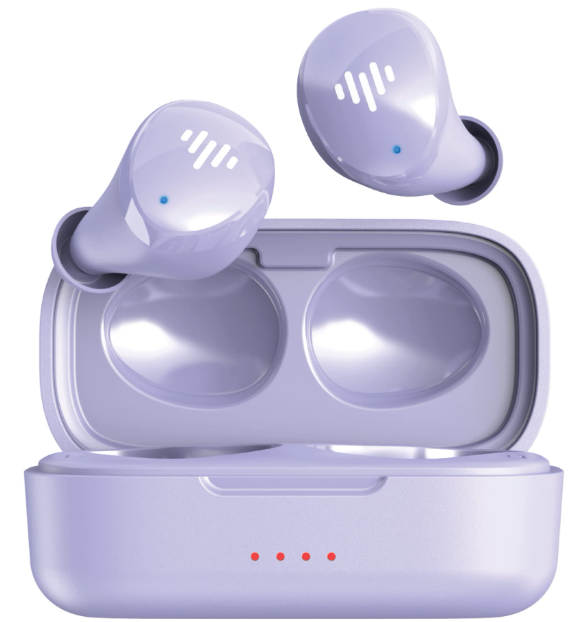
The iluv TB100 Wireless Earbuds offer a premium true wireless audio experience that combines advanced Bluetooth 5.0 technology with ergonomic design for all-day comfort. These earbuds are tailored for users who demand high-quality sound without the hassle of wires, ideal for fitness enthusiasts, commuters, gamers, and everyday music lovers. Their compact, ultra-lightweight form factor ensures a snug, secure fit suitable for workouts, runs, and long listening sessions.
Key benefits include crystal-clear high-fidelity stereo sound with balanced bass and treble, an impressive battery life of up to 20 hours (combining earbuds and charging case), and IPX6 waterproof protection that shields against sweat, rain, and splashes. The earbuds also feature intuitive touch controls for easy music playback and call management, enhancing user convenience.
These earbuds are competitively priced in the mid-range wireless audio market, generally available between $40 and $60, making them accessible without compromising quality. Available through multiple retailers and online platforms, the iluv TB100 wireless earbuds present a reliable choice for those seeking a blend of durability, style, and performance.
Specifications of iluv TB100 Wireless Earbuds
- Bluetooth Version
- 5.3
- Bluetooth Range
- 10 meters (30 feet)
- Battery Composition
- Lithium-ion
- Play Time
- 8 hours*
- Charge Time
- 2 hours
- Quick Charge
- 20 minutes = 2 hours of play time
- Charging Method
- Type-C USB
- Waterproof Protection
- IPX6
- Microphone Type
- MEMS
- Microphone Technology
- Omnidirectional
- Connection Type
- Independent
- Earbud Dimensions
- 27.5 (W) x 18 (D) x 24 (H) mm
- Case Dimensions
- 67.4 (W) x 30.5 (D) x 31 (H) mm
- Earbud Weight
- 4.6 grams
- Case Weight
- 32.7 grams
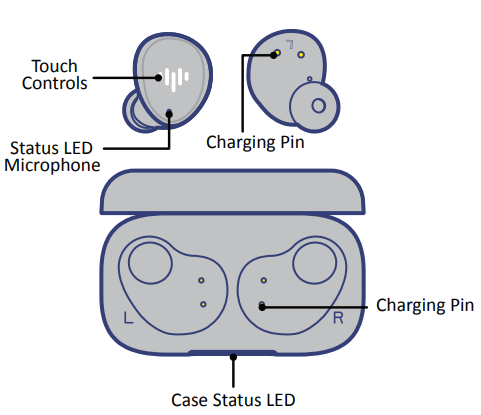
PRODUCT OVERVIEW
HOW TO PAIR
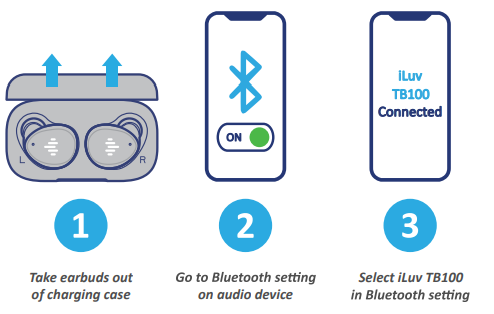
Take both earbuds out of the charging case to pair to your device; the earbuds will automatically power on. With the earbuds powered on, go to your Bluetooth settings on your audio device and select ‘iLuv TB100’. Once paired,,d you’re good to go!
BATTERY PLAYTIME
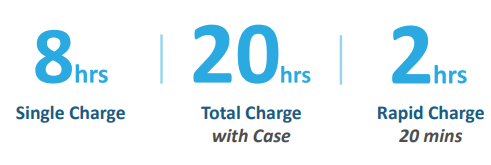
The TB100 earbuds will provide a playtime of 20 hours. Get up to 8 hours on a single charge and an additional 12 hours from the included charging case. For quick charge, place both earbuds back into the charging case for 20 minutes and get 2 hours of listening time. A full charge for the earbud and charging case will take 2 hours.
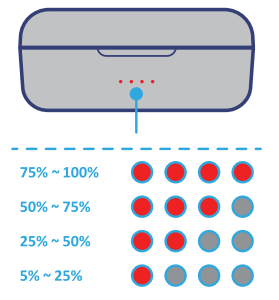
BATTERY STATUS
The charging case is equipped with LED battery life indicators,, which help identify the battery level. The LED will stay lit when charging is at full capacity. Battery level percentages listed below:
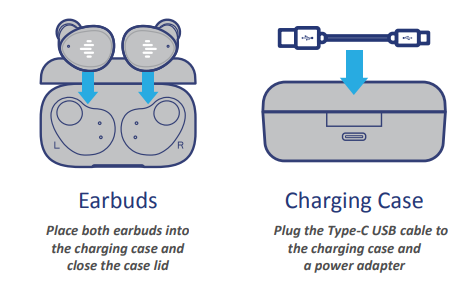
HOW TO CHARGE
Please follow the instructions below to properly charge the earbuds and charging case. The LEDs on the earbud and charging case will signify the status of charge; the earbud LEDs will be off when fully charged, while the charging case LEDs will all be lit.
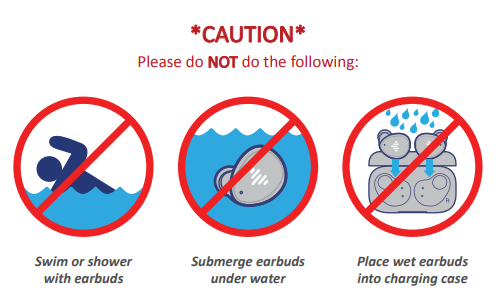
WATER RESISTANCE
The earbuds are rated water-resistant. They are designed to be sweat and weather resistant, but aren’t meant to be submerged under water. The IPX6 is not a permanent condition,n and the resistance may decrease as a result of normal wear.
Troubleshooting iluv TB100 Wireless Earbuds
- No sound or low volume: Ensure earbuds are fully charged; check device Bluetooth volume; reset earbuds by placing them in the charging case and removing them again.
- Earbuds not pairing: Turn off Bluetooth on your device and turn it back on; remove previously paired devices; perform a factory reset by pressing and holding both earbuds for 5 seconds.
- Connection drops or interference: Avoid obstacles or distance over 33 feet; update device Bluetooth drivers if applicable.
- Touch controls unresponsive: Clean the earbud surface gently; reseat reseatthee rt earbuds by powering off and on.
The earbuds do not display error codes but use LED indicators for battery and connectivity status. Preventive measures include keeping the charging case clean and dry, avoiding extreme temperatures, and storing earbuds properly when not in use.
The iluv TB100 comes with a limited warranty covering manufacturing defects. For assistance, contact call 1-866-807-5946 (8:30 AM - 5:30 PM EST).
Pros & Cons of iluv TB100 Wireless Earbuds
Pros
- Excellent battery life: Up to 20 hours total with quick recharge capability.
- High-quality sound: Clear, balanced audio with noise isolation suitable for various music genres.
- Waterproof design: IPX6 rating protects against sweat and rain, ideal for active users.
- User-friendly touch controls: Intuitive and responsive without physical buttons.
- Comfortable fit: Multiple ear tip sizes ensure secure, ergonomic wear during extended use.
Cons
- Bluetooth 5.0: While stable, newer earbuds may offer Bluetooth 5.2 or 5.3 for enhanced performance.
- Limited noise cancellation: Passive noise isolation only; lacks active noise cancellation features.
- Build quality: Some users report the charging case feels lightweight, which might affect durability.
- Mono use limitations: Single earbud use may cause occasional connectivity glitches.
Overall, the iluv TB100 offers strong value for money, especially for users prioritizing battery life and waterproofing over premium features like active noise cancellation.
Customer Reviews and Feedback for iluv TB100 Wireless Earbuds
Customers praise the iluv TB100 Wireless Earbuds for their long battery life and reliable Bluetooth connection, often highlighting the comfort of the fit and clear sound quality. Many reviews rate these earbuds between 4 and 4.5 stars out of 5, noting excellent value for the price.
Common compliments include ease of pairing, responsiveness of touch controls, and effective waterproof protection during workouts. On the downside, some users mention occasional connection drops in environments with heavy wireless interference, and a few note that the bass could be stronger.
Most reviewers recommend the iluv TB100 earbuds for casual listeners, gym users, and commuters seeking affordable, durable wireless earbuds with solid performance and all-day battery life.
Faqs
How do I pair iluv TB100 Wireless Earbuds with my smartphone for the first time?
Why is only one iluv TB100 earbud connecting or producing sound?
How do I control music playback and calls using the touch controls on iluv TB100 Wireless Earbuds?
What is the battery life of iluv TB100 Wireless Earbuds, and how do I check the charging status?
Are iluv TB100 Wireless Earbuds sweatproof and waterproof for workouts?
Can I use iluv TB100 Wireless Earbuds with both Apple iPhone and Android phones?
How do I clean and maintain my iluv TB100 Wireless Earbuds for optimal performance?
What should I do if my iluv TB100 Wireless Earbuds are not charging properly?
Leave a Comment