
Setup: Imilab KW66 Smart Watch User Manual
Content
imilab KW66 Smart Watch
Introduction
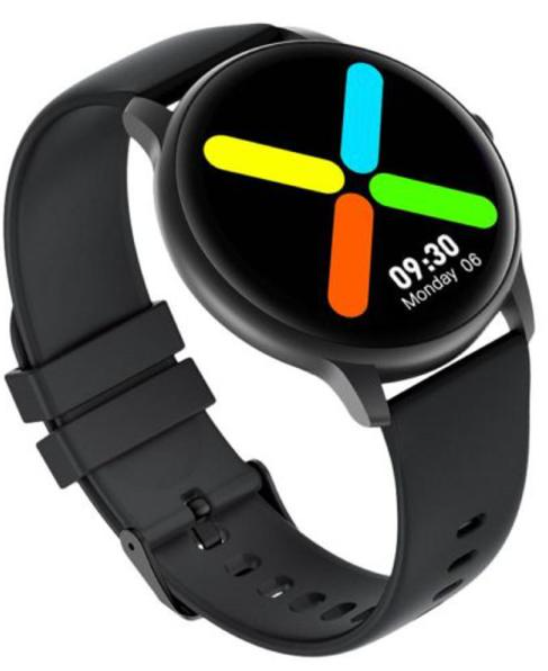
The imilab KW66 Smart Watch offers a sleek, sporty design combined with a host of advanced features tailored for fitness enthusiasts and everyday users alike. Featuring a sharp 1.28-inch 3D curved HD touchscreen display, this smartwatch blends style with functionality, making it an ideal companion for tracking health, sports activities, and staying connected on the go. Its lightweight aluminum and silicone construction ensures comfort for all-day wear.
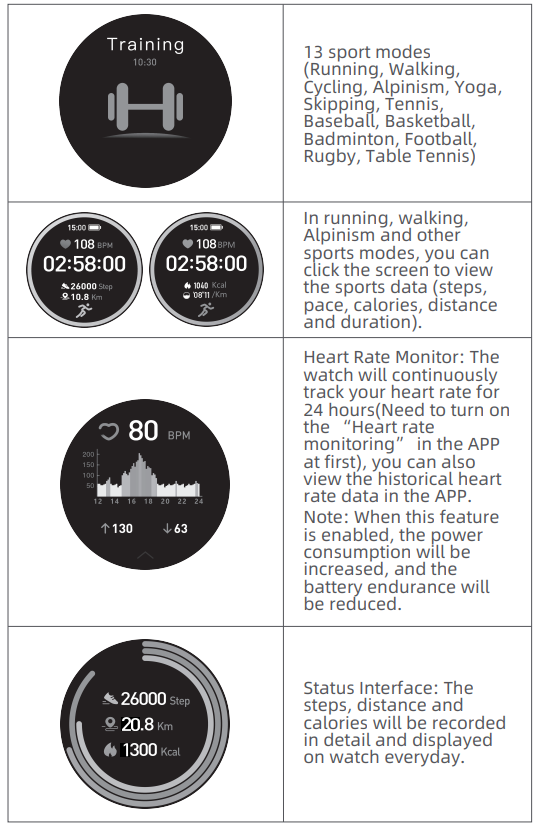
Key benefits include an impressive 30-day battery life on standby, continuous 24-hour heart rate monitoring, and support for 13 different sports modes such as running, cycling, yoga, and basketball. The watch is IP68 rated, providing dust and water resistance suitable for active lifestyles. Additional conveniences like music control, sleep tracking, and smartphone notifications enhance user experience.
Targeted at fitness-conscious individuals and tech-savvy users seeking an affordable yet robust smartwatch, the imilab KW66 is perfect for daily wear and athletic training. It supports both Android (5.1+) and iOS (9.0+) devices through the GloryFit app, ensuring broad compatibility.
Available globally through online retailers, the imilab KW66 Smart Watch typically ranges between $50 to $60, making it an excellent value for its feature set and design quality.
Wearing
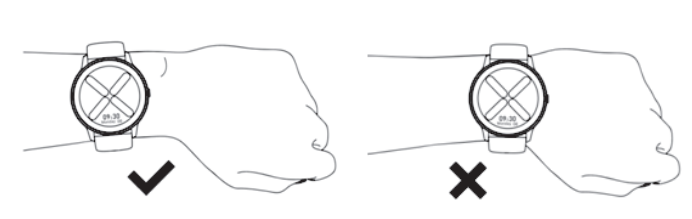
- Wear the wristband about one finger away from the wrist bone and adjust the tightness of the wristband to a comfortable position.
- Tip: If you wear the strap too loosely, the data acquisition of the heart rate sensor may be affected.
Connection and binding
- Scan the QR code on the watch display (Settings-APP Download) with your mobile phone, and then install the APP Runto Sport. You can also scan the QR code below to download and install GloryFit from the mobile APP store.
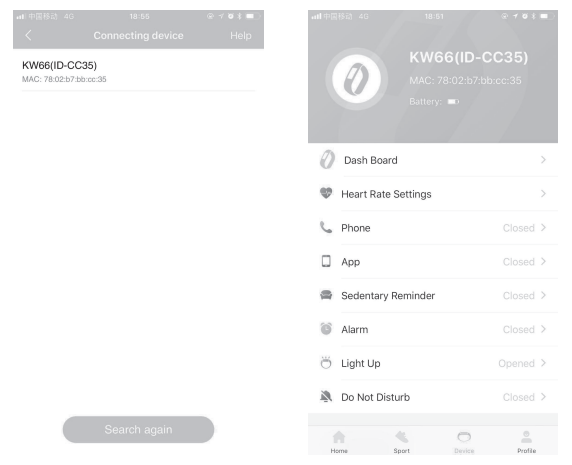
- After installing the APP, open and log in to GloryFit, then select (device KW66 to be added) on the device page to connect it.

Tips:
- In the process of pairing, check if the Bluetooth function onyour mobile phone is enabled, so that the watch can be connected to your mobile phone.
- If the device cannot be found in the pairing process, or the device cannot be connected during use, please cli..ck
- "Settings - Reset" on the watch, then try to start the pairing again.
- If the watch still can not be found, please exit and re-open the APP.
- The connection status of the watch is as shown in the figures below :
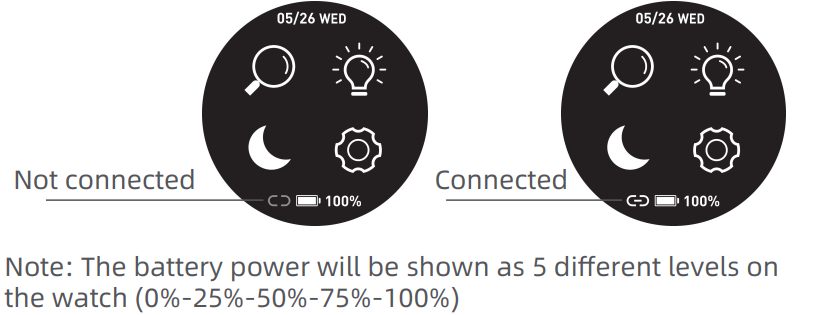
Note: The battery power will be shown as 5 different levels on the watch (0%-25%-50%-75%-100%)
Features
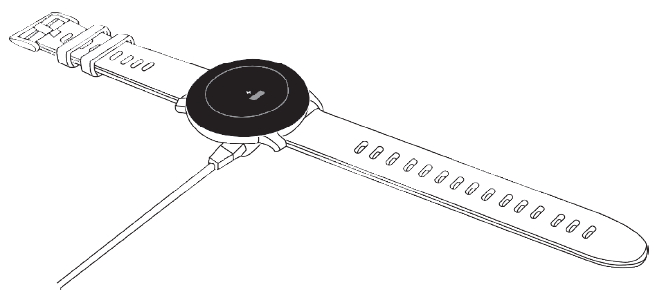
Charging
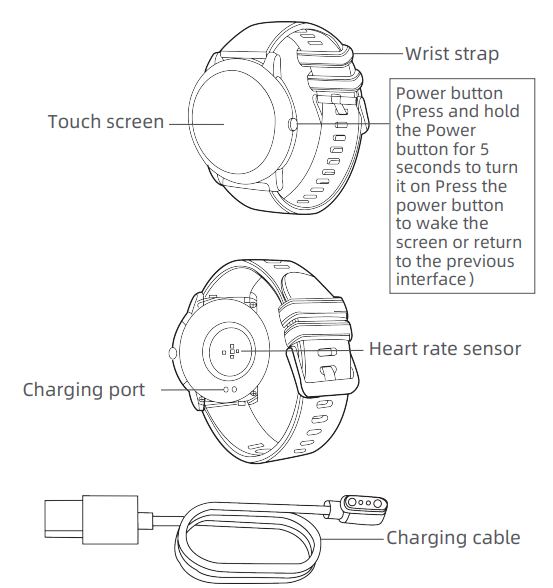
- Place the watch on the magnetic charger. Please make sure the charging contacts on the back of the watch are fully absorbed by by the metal contacts of the charger. It can be fully charged within about 3.5 hours..
- Plug the charging cable into a standard USB charger purchased via official channels. The output voltage is 5V and the output current is 1A.
If the watch cannot be turned on after being out of use for a long time, please wipe the charging contacts of the charging cable when using it again to remove the sweat or moisture residue.
Note: (If you do not use the watch often, please charge it once every month.)
Technical Specifications and Features of the imilab KW66 Smart Watch
- Display: 1.28-inch IPS touchscreen, 240 x 240 pixels, 3D curved HD screen
- Processor & Memory: Realtek RTL8762C CPU; 160KB RAM + 348KB ROM; 128MB flash storage
- Battery: 340mAh lithium polymer; Standby up to 30 days; Usage about 7-15 days; Magnetic charging (approx. 2 hours charging time)
- Connectivity: Bluetooth 5.0 compatible with Android 5.1+ and iOS 9.0+
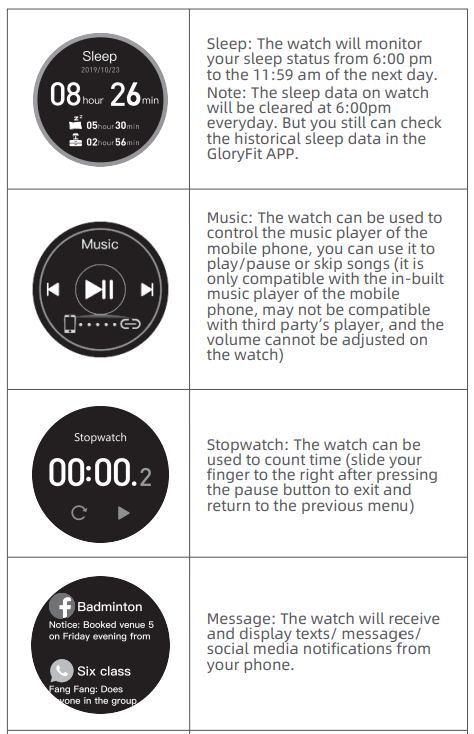
- Sensors: Heart rate sensor (VC31), G-sensor (STK8321) for pedometer, sleep monitoring
- Water Resistance: IP68 rating—waterproof and dustproof for everyday activities
- Sport Modes: 13 modes including running, walking, cycling, mountaineering, yoga, tennis, basketball, and more
- Health Tracking: 24/7 heart rate monitoring, sleep tracking, step counter, calorie tracking
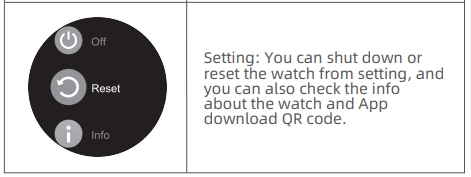
- Additional Features: Music control, stopwatch, notifications for calls, SMS, and social media alerts
- Build: Aluminum alloy case, silicone rubber strap (approx. 262 x 22 mm), weight ~54g with strap
Compared to similar smartwatches in its price range, the imilab KW66 excels with its longer battery life and IP68 water resistance, outperforming many competitors with shorter standby times and less robust protection.
Common Troubleshooting for imilab KW66 Smart Watch
- IsIssuehe e: Watis ch not pairing with the smartphone
Solution: Ensure Bluetooth 5.0 is enabled on your phone, and use the GloryFit app to complete pairing. Restart both devices if needed. - Issue: Heart rate monitor is not updating
Solution: Activate heart rate monitoring in the GloryFit app; ensure the watch fits snugly on your wrist for accurate sensor contact. - Issue: Notifications not showing
Solution: Enable notification permissions for the GloryFit app on your phone; disconnect and reconnect Bluetooth. - Issue: Battery drains faster than expected
Solution: Disable continuous heart rate monitoring if not needed; reduce screen brightness; close unused apps connected to the watch. - Preventive Measures: Regularly update the GloryFit app and watch firmware; avoid exposing the watch to extreme temperatures beyond -20 to 45°C; clean sensors gently to maintain accuracy.
The imilab KW66 comes with a standard warranty covering manufacturing defects. For support, contact the official imilab customer service or authorized sellers where purchased.
Pros & Cons of the imilab KW66 Smart Watch
- Pros:
- Exceptional 30-day standby battery life, reducing frequent charging needs
- Robust IP68 water and dust resistance suitable for active lifestyles
- Wide range of 13 sports modes to cater to diverse fitness activities
- Affordable price point with comprehensive features similar to pricier models
- Comfortable lightweight design and large, vibrant 3D curved touchscreen
- Cons:
- Lacks built-in GPS, relying on a smartphone for location tracking
- Limited third-party music player support; volume control unavailable on the watch
- Screen resolution (240x240) is basic compared to higher-end smartwatches
- Notification previews may truncate long messages, limiting readability
Overall, the imilab KW66 Smart Watch offers strong value for money compared to alternatives, especially for users prioritizing battery life and water resistance over advanced features like GPS.
Customer Reviews and Feedback on imilab KW66 Smart Watch
Users generally praise the imilab KW66 Smart Watch for its durable build, exceptional battery life, and accurate heart rate tracking. Many highlight the convenience of its 13 sport modes and the crisp 3D curved display. Star ratings frequently hover around 4 out of 5 stars.
Common compliments include the ease of setup via the GloryFit app and reliable notification syncing. However, some users report occasional Bluetooth connectivity issues and wish for a built-in GPS. A few mention the screen resolution and limited third-party music controls as minor downsides.
Despite these points, most reviewers recommend the KW66 for budget-conscious buyers seeking a versatile smartwatch for fitness tracking and everyday use.
Faqs
How do I set up my imilab KW66 Smart Watch for the first time?
What should I do if my imilab KW66 Smart Watch is not pairing with my smartphone?
Can I use the imilab KW66 Smart Watch for swimming?
How often should I charge my imilab KW66 Smart Watch?
What are the main features that make the imilab KW66 Smart Watch different?
Is the imilab KW66 Smart Watch compatible with all smartphones?
How do I maintain and clean my imilab KW66 Smart Watch?
Can I customize the watch face on my imilab KW66 Smart Watch?
Tags
Leave a Comment