
Setup: Iq Air Atem Air Purifier User Manual
Content
IqAir Atem Air Purifier
Introduction
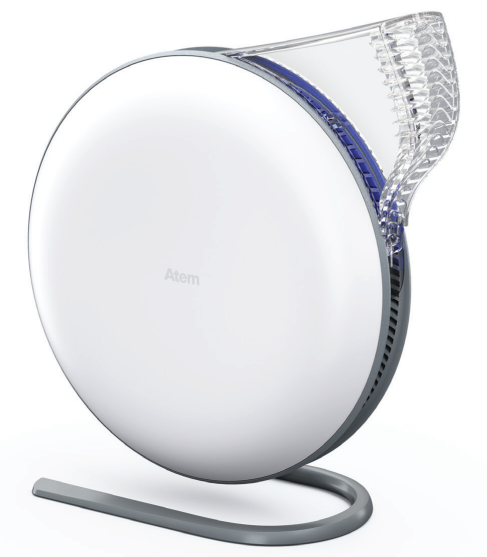
The IQAir Atem Air Purifier is a premium personal air purification solution designed for individuals seeking clean, healthy air in their immediate environment. With its sleek, compact design and advanced HyperHEPA filtration technology, the IQAir Atem Air Purifier delivers exceptional performance in open spaces, offices, and personal workstations. Unlike traditional whole-room purifiers, the Atem creates a purified air zone around the user, making it ideal for those who want targeted air quality improvement.
Key benefits include the removal of viruses, bacteria, allergens, and ultrafine particles as small as 0.003 microns. The device features three fan speeds, Bluetooth app control, and a filter life monitor for convenience. Its quiet operation and elegant design make it suitable for homes, offices, and even cars. The IQAir Atem Air Purifier is perfect for allergy sufferers, remote workers, and anyone concerned about indoor air quality.
Available in various models (Desk, Car, X), the IQAir Atem Air Purifier typically ranges from $600 to $1,400, depending on the version and region. It is widely available through authorized retailers and online stores.
Specifications of the IQAir Atem Air Purifier
- Filtration Technology: HyperHEPA filter, captures 99.97% of particles down to 0.003 microns
- Recommended Coverage: Up to 150 sq ft (personal use), up to 643 sq ft (Atem X model)
- Fan Speeds: 3 speeds (Desk, Car), 8 speeds (Atem X)
- Noise Levels: 20–65 dBA, depending on speed
- Power Consumption: 1.5–3.4 watts (Desk), higher for Atem X
- Dimensions: 12.4 x 5.5 x 11.7 inches (Desk), 27.08 x 25.19 x 10 inches (Atem X)
- Weight: 4.4 lbs (Desk), 6.26 lbs (Atem)
- Filter Life: 12 months (average use)
- Smart Features: Bluetooth app control, filter life monitor, remote on/off
- Warranty: 2-year manufacturer's warranty
The IQAir Atem Air Purifier outperforms many competitors in particle removal speed and quiet operation, making it a top choice for personal air purification.
Read the important safety instructions in the User Guide before using the product.
Congratulations!
You are on your way to taking control of the air you breathe.
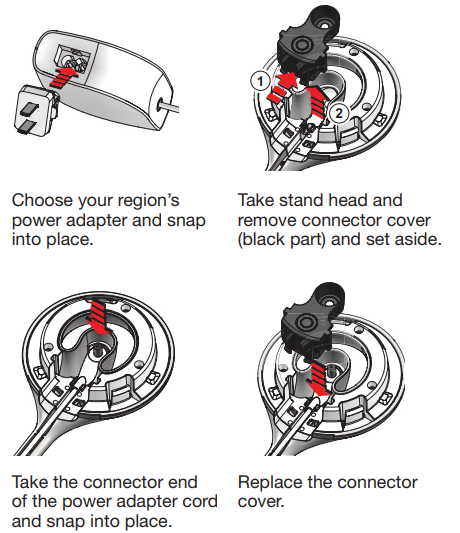
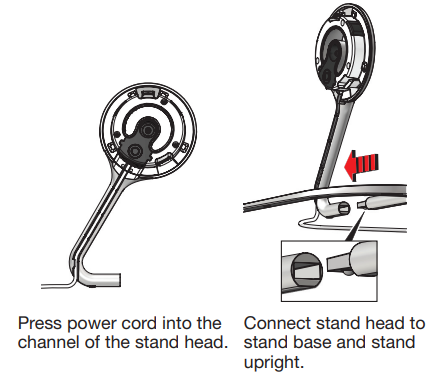
Power Adaptor and Stand Assembly
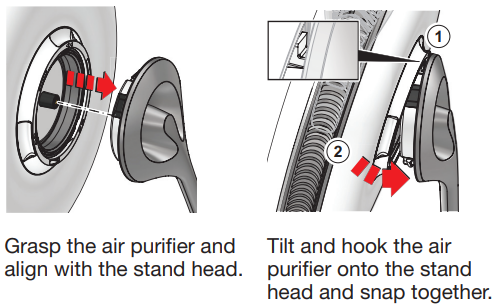
Connect the Air Purifier to the Stand
Turning On and Changing Fan Speed
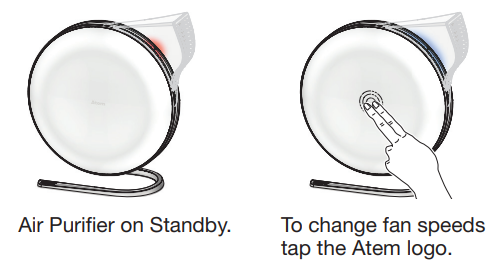
There are three speed settings. Tapping on the Atem logo will change the fan speed in the following order: Standby – Low – Medium – High – Standby.
Setting Up Your Personal Clean Air Zone
Place the Atem personal air purifier near you on a stable surface such as a desk or table. Point the PureJet diffuser toward your breathing zone.
For best results, place the Atem as close to you as possible.

IQAir Atem App
To enhance your user experience and to unlock additional features of the IQAir Atem personal air purifier, download and install the IQAir Atem App for Apple or Android. App features and benefits include:
- Smart on/off
- Fan speed settings
- Filter life notifications
- Light and Sound settings
Bluetooth Pairing
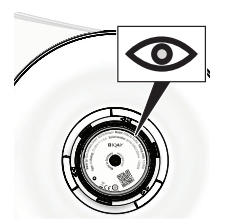
The Atem is automatically in discovery mode and will appear in the Bluetooth section of the App. Tap the Atem name to pair. Enter the Bluetooth code PIN found on the back of the User Guide, the back of the air purifier, and on the packaging label.
Extend your warranty
You may extend your warranty to 3 years by registering on the app or by visiting www.iqair.com/warranty.
Troubleshooting the IQAir Atem Air Purifier
- Device Not Turning On: Check the power connection and ensure the outlet is working. Try a different power adapter if available.
- Filter Life Indicator Flashing: Replace the filter as per the manual. Reset the indicator via the app or control panel.
- Unusual Noises: Ensure the unit is on a flat surface and the filters are properly installed.
- App Not Connecting: Restart the device and ensure Bluetooth is enabled on your phone. Update the app to the latest version.
- Reduced Airflow: Clean or replace the pre-filter and check for blockages.
Preventive measures include regular filter replacement and keeping the unit clean. The IQAir Atem Air Purifier comes with a 2-year warranty. For support, contact IQAir customer service at support@iqair.com or visit their official website.
Pros & Cons of the IQAir Atem Air Purifier
Pros
- Advanced HyperHEPA filtration for ultrafine particles
- Quiet operation, suitable for offices and bedrooms
- Bluetooth app control and smart features
- Compact, stylish design
- Excellent customer support and warranty
Cons
- Higher price point compared to standard air purifiers
- No carbon filter for VOCs in some models
- Not designed for whole-room purification
- Filter replacement can be costly
The IQAir Atem Air Purifier offers excellent value for those prioritizing air quality and advanced features, though it may be overkill for basic needs.
Customer Reviews of the IQAir Atem Air Purifier
Users consistently praise the IQAir Atem Air Purifier for its quiet operation, effective filtration, and sleek design. Many highlight its ability to reduce allergies and improve air quality in personal spaces. The app control and filter life monitor are frequently mentioned as convenient features. Some users note the high price and lack of carbon filtration as drawbacks. Overall, the IQAir Atem Air Purifier receives 4.5-star ratings on major retail sites, with many recommending it for allergy sufferers and those working from home.
Faqs
How do I set up the iq air Atem Air Purifier for the first time?
What should I do if my iq air Atem Air Purifier is not turning on or responding?
What are the main filtration features of the iq air Atem Air Purifier?
Can I control the iq air Atem Air Purifier remotely or via an app?
What room size is suitable for the iq air Atem Air Purifier?
How often should I replace the filter in the iq air Atem Air Purifier for optimal performance?
What can I do to reduce noise levels when using the iq air Atem Air Purifier?
Is the iq air Atem Air Purifier suitable for allergy sufferers and asthma patients?
Leave a Comment