
How to Use: Iron Ether FMeron User Manual
Content
iron ether FMeron Product Manual and Review
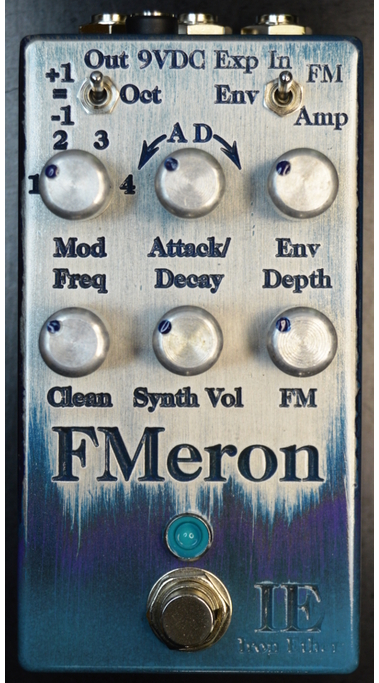
The Iron Ether FMeron is a compact FM synthesizer pedal designed for bass, guitar, and other electric or electronic instruments. It creates rich frequency modulation textures using two tracking sine oscillators, letting players move from subtle harmonic enhancement to dramatic clangs, bell-like tones, and metallic synth voices. For musicians looking for a unique bass synth pedal or a performance-friendly FM effects unit, the iron ether FMeron stands out for its monophonic tracking, expressive dynamics, and expression-pedal control.
This pedal is especially appealing to experimental bassists, ambient players, synth-rock performers, and sound designers who want immediate hands-on control without relying on a keyboard. Core strengths include octave tracking options, an envelope generator for attack or decay shaping, true bypass switching, and a top-mounted jack layout that saves pedalboard space. It is also built with low-noise, low-distortion components for clean audio fidelity and responsive playing feel.
The current listed price is approximately $315, with availability tied to Iron Ether's direct shop and periodic stock updates. Because boutique pedals can sell out quickly, buyers should expect limited runs and occasional restocks rather than constant retail availability. For players seeking a specialized FM synthesis pedal with a distinctive voice, the iron ether FMeron offers a premium, niche solution that is difficult to replicate with standard modulation pedals.
Specifications for the iron ether FMeron FM synthesizer pedal
- Type: FM synthesizer pedal for bass, guitar, and other electric instruments.
- Voice engine: Two pure sine wave oscillators with frequency tracking.
- Operation: Monophonic, optimized for single-note playing.
- Octave switch: Tracks one octave below, at pitch, or one octave above.
- Envelope generator: Switchable Attack/Decay behavior for FM depth or volume shaping.
- Expression control: EXP jack supports real-time FM amount control.
- Bypass: Relay-based true bypass.
- Power: 9V DC, center-negative, 2.1 mm connector.
- Current draw: 85 mA.
- Size: 4.7 in x 2.5 in, approximately 12 cm x 6.3 cm.
- Audio character: Low-noise, low-distortion circuitry for high-fidelity synthesis tones.
- Compared with similar synth pedals, FMeron is more specialized and expressive, while many alternatives focus on simpler monophonic synth voices or less flexible FM behavior.
Setup guide: how to use the iron ether FMeron
Start by connecting your instrument to the input and your amplifier or effects chain to the output. Power the pedal with a regulated 9V DC center-negative supply capable of delivering at least 85 mA. If using an expression pedal, connect it to the EXP jack before powering on to avoid configuration confusion.
Set the octave switch to match the sound you want. Use the carrier and modulator controls to shape the FM relationship, then adjust the FM amount and envelope behavior to control how aggressive or smooth the synth voice feels. For cleaner tracking, play one note at a time and use clean articulation.
For best results, place the pedal early in the signal chain, ideally near the front. If tracking feels unstable, reduce tone or treble on the instrument, favor the neck pickup, and pluck closer to the neck with fingers instead of a pick. Avoid heavy compression, chorus, or dense polyphonic effects before the pedal unless you are intentionally experimenting.
Safety warnings: use only properly regulated power, do not exceed the required voltage, and avoid forcing connectors. If the pedal does not respond, verify the power source, cable orientation, and expression pedal compatibility.
Troubleshooting the iron ether FMeron
If no sound is produced, first check power delivery, cable seating, and bypass routing. If the pedal passes dry signal but no synth voice, confirm that the instrument is sending a clean monophonic note and that the FM and envelope settings are not set too conservatively. If tracking sounds unstable, lower the source tone, use the neck pickup, and play with a lighter touch for more accurate pitch detection.
- Problem: Weak or glitchy tracking. Solution: Play single notes, reduce input brightness, and move earlier in the chain.
- Problem: FM sound too harsh. Solution: Lower the FM depth, adjust the mod frequency ratio, or reduce attack intensity.
- Problem: Expression pedal not working. Solution: Recheck the TRS cable, EXP jack connection, and pedal polarity.
- Problem: Pedal does not power on. Solution: Confirm 9V DC center-negative power and minimum 85 mA capacity.
There are no widely published error codes for this pedal, so troubleshooting is mostly signal-path and power related. Preventive care includes using a clean power supply, keeping patch cables in good condition, and storing the unit away from moisture and impact. For warranty or service support, contact Iron Ether directly through the company website or its official shop contact channels. Owners should keep proof of purchase and serial details if available when requesting help.
Pros and cons of the iron ether FMeron
Pros
- Distinctive FM synthesis voice with bell-like, clangy, and electronic tones.
- Excellent for expressive bass synth textures and experimental guitar sounds.
- Expression pedal support adds real-time performance control.
- True bypass and low-noise components support clean signal integrity.
- Top-mounted jacks save valuable pedalboard space.
Cons
- Monophonic design limits chord use and polyphonic playing.
- Requires disciplined technique for the best tracking results.
- More specialized than general-purpose synth or octave pedals.
- Premium boutique pricing may reduce value for casual users.
For players who want a unique FM synth pedal, the value for money is strong because the sound palette is hard to find elsewhere. Compared with simpler bass synth alternatives, iron ether FMeron offers more depth and a more experimental character, but it is less forgiving and less universal.
Customer reviews and real-world feedback on iron ether FMeron
Overall user sentiment is highly positive, with an average impression around 4.5 out of 5 stars among niche pedal enthusiasts. Many players praise the FMeron for its unusual tones, responsive dynamics, and ability to turn a bass line into a synth-like performance without extra gear.
Common praise includes the pedal's musical FM textures, compact footprint, and expressive control with an expression pedal. Frequent complaints center on its monophonic nature, the learning curve for dialing in stable tracking, and the need for clean playing technique. A typical testimonial would be: “Once I adjusted my technique, the sounds became incredibly playable and unlike anything else on my board.”
Buyers who want a creative FM synthesizer pedal and are comfortable with niche performance behavior are the best match. Players seeking a simple plug-and-play synth effect may prefer a more straightforward alternative.
Faqs
How do I set up iron ether FMeron for the first time?
What should I do if iron ether FMeron is not powering on or responding?
What are the main features of iron ether FMeron and how should they be used?
Is iron ether FMeron compatible with my existing setup?
Why does iron ether FMeron sound noisy, distorted, or weaker than expected?
How can I optimize iron ether FMeron performance for the best results?
How do I maintain and care for iron ether FMeron properly?
What are the most common user mistakes when using iron ether FMeron?
Tags
Leave a Comment