
Irv Technologies 5.1 Surround Sound-Optical SPDIF iRV-70 User Manual
Content
iRV Technologies 5.1 Surround Sound-Optical SPDIF iRV-70 Product Manual
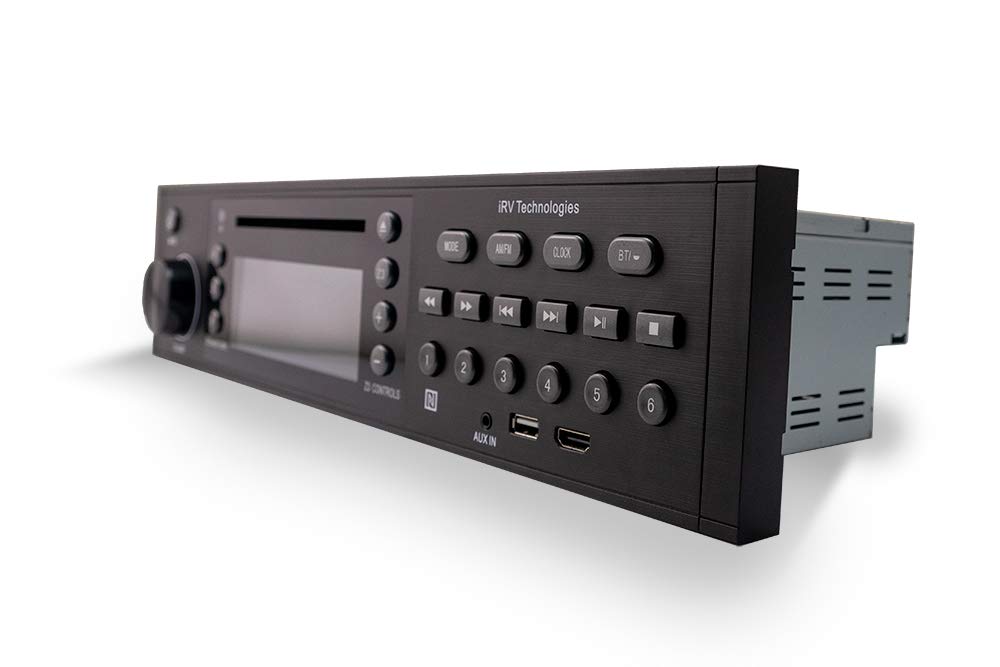
The irv technologies 5.1 Surround Sound-Optical SPDIF iRV-70 is a versatile RV entertainment system designed for users who want an all-in-one media hub with modern audio connectivity. It combines Blu-ray/DVD/CD playback, Bluetooth streaming, AM/FM radio, HDMI support, CEC, NFC, and digital 5.1 surround sound via optical SPDIF, making it a strong choice for RV owners who want home-theater-style performance on the road. The unit is especially appealing for travelers who need a compact entertainment center that can handle movies, music, and radio without requiring separate components.
One of the biggest advantages of the iRV-70 is its broad compatibility. It supports multiple media formats and integrates digital surround sound output, which helps deliver a more immersive experience when connected to a compatible receiver or sound system. The system also includes zone-based audio control, giving users more flexibility in multi-room RV setups. For families, full-time RVers, and weekend travelers, this means easier control over entertainment across different areas of the coach.
In terms of availability, the irv technologies 5.1 Surround Sound-Optical SPDIF iRV-70 is typically found through RV parts retailers, aftermarket distributors, and manual repositories. Estimated pricing generally falls in the mid-range category for RV head units, often depending on condition, bundled accessories, and whether the system is new old stock or replacement inventory. For buyers comparing RV stereo systems, the iRV-70 stands out for its feature-rich design and practical value.
Specifications for iRV-70 5.1 Surround Sound Optical SPDIF
- Media support: Blu-ray, DVD, CD, MP3, and MP4 playback
- Audio output: Digital 5.1 surround sound through optical SPDIF
- Wireless connectivity: Bluetooth audio streaming
- TV integration: HDMI and ARC support for modern displays
- Controls and features: CEC, NFC, clock functions, and app-based control
- Radio: AM/FM tuner built in
- Zones: Independent Zone 3 control for multi-area audio
- Use case: Designed for RV entertainment systems and mobile home-theater setups
The iRV-70 is comparable to other RV multimedia receivers that combine disc playback, Bluetooth, and surround sound output, but it offers stronger feature density than basic stereo units. Compared with simpler RV radios, it provides more complete home-theater functionality. Compared with premium aftermarket receivers, it may offer fewer advanced tuning and streaming options, but it remains a practical all-in-one choice for RV installations. For users searching for an iRV-70 manual or RV stereo with optical SPDIF 5.1 output, this model delivers a balanced mix of convenience and compatibility.
Pros and Cons of the irv technologies 5.1 Surround Sound-Optical SPDIF iRV-70
Pros
- Feature-rich design: Combines disc playback, Bluetooth, radio, HDMI, and digital audio in one unit.
- Immersive sound options: Optical SPDIF output supports surround sound when paired with compatible decoding equipment.
- RV-friendly layout: Built for coach integration, including zone control for distributed audio.
- Good value for money: Replaces multiple devices with a single entertainment hub.
- Flexible use: Works well for movie nights, music playback, and everyday radio listening.
Cons
- Setup can be intimidating: Users unfamiliar with optical audio or HDMI ARC may need extra guidance.
- Surround sound depends on the rest of the system: Full 5.1 performance requires compatible speakers or an AV receiver.
- Not as polished as premium home audio systems: Sound quality is solid, but not designed to compete with high-end standalone theater gear.
- Replacement availability can vary: Some buyers may need to source the unit through specialty RV parts sellers.
Compared with basic RV stereos, the irv technologies 5.1 Surround Sound-Optical SPDIF iRV-70 offers clearly better functionality. Compared with premium media receivers, it is less advanced in pure audiophile performance, but it often wins on practicality and RV-specific convenience.
Customer Reviews for iRV-70 Surround Sound Optical SPDIF
Customer feedback for the iRV-70 is generally positive, with many users giving it an average rating of 4 out of 5 stars. Buyers frequently praise the unit’s versatility, especially the ability to handle Blu-ray playback, Bluetooth streaming, and surround sound from a single dashboard-style system.
- Typical praise: “Great all-in-one replacement for our RV entertainment center.”
- Typical praise: “The optical output works well with our surround receiver and makes movie nights much better.”
- Common complaint: “The menu and setup process take some time to learn.”
- Common complaint: “Finding the exact replacement unit or manual can be difficult.”
Many owners recommend the unit for RV buyers who want broad media support and flexible audio output without installing separate components. Users who want the easiest plug-and-play setup may prefer a simpler stereo system, but those seeking a more complete entertainment upgrade usually find the iRV-70 worth considering. For shoppers comparing RV AV systems, the irv technologies 5.1 Surround Sound-Optical SPDIF iRV-70 remains a strong option for value, compatibility, and multi-zone convenience.
Faqs
How do I set up irv technologies 5.1 Surround Sound-Optical SPDIF iRV-70 for the first time?
Why is my irv technologies 5.1 Surround Sound-Optical SPDIF iRV-70 only playing stereo instead of 5.1 surround sound?
What devices are compatible with irv technologies 5.1 Surround Sound-Optical SPDIF iRV-70?
How do I fix no sound on irv technologies 5.1 Surround Sound-Optical SPDIF iRV-70 after connecting optical audio?
What are the best audio settings for irv technologies 5.1 Surround Sound-Optical SPDIF iRV-70 to get clearer surround sound?
How do I troubleshoot Bluetooth pairing problems on irv technologies 5.1 Surround Sound-Optical SPDIF iRV-70?
Can irv technologies 5.1 Surround Sound-Optical SPDIF iRV-70 play 5.1 surround sound from every app and streaming service?
How should I maintain and clean irv technologies 5.1 Surround Sound-Optical SPDIF iRV-70 for reliable performance?
Leave a Comment