
How to Setup: Ismartgate Mini gate & garage Door Opener User Guide
Content
Introduction to ismartgate Mini Gate & Garage Door Opener
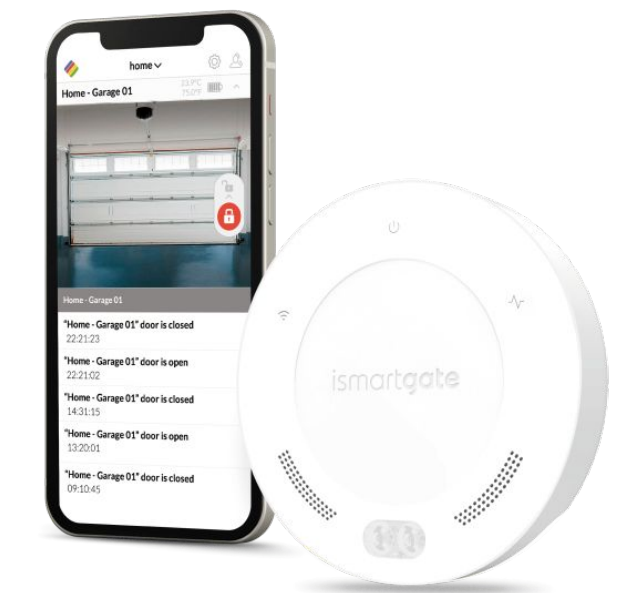
Introduction
The **ismartgate Mini gate & garage Door Opener** is a versatile and affordable smart home solution designed for controlling and monitoring your garage door or gate remotely. This innovative device integrates seamlessly with popular smart home platforms like Amazon Alexa, Google Home, and IFTTT, offering voice control and automated operations. With its intuitive interface and robust features, the ismartgate Mini is perfect for homeowners looking to enhance their smart home setup without breaking the bank.
Targeted at homeowners seeking to modernize their garage or gate operations, this device is particularly suitable for those with busy lifestyles who need remote access and automated control. The estimated price range for the ismartgate Mini is competitive, typically falling between $100 to $200, depending on the kit and retailer. It is widely available through online marketplaces and smart home retailers.
What's In The Box
Garage & Gate Packs


Specifications
The ismartgate Mini features a robust set of technical specifications:
- Wi-Fi Compatibility: 2.4 GHz (802.11 b/g/n)
- Relay Outputs: 1, for controlling one garage door or gate
- Dry Contact Inputs: 1, for connecting a wired sensor
- Power Supply: Universal 110-240V AC (50-60 Hz) to 5V 1A DC
- Compatibility: Amazon Alexa, Google Home, IFTTT, and Samsung SmartThings
Compared to similar products, the ismartgate Mini offers a cost-effective solution with robust smart home integration capabilities.

Consideration For Installation
Set up the environment..
We recommend programming the ismartgate in a room close to the home's main Wi-Fi router, on a clean surface like a desk. It is also recommended to have both a Smartphone and an APaPaPaCinally,, make sure you have a power outlet close by, where to power on the ismartgate device.
- PC (Laptop) :
Use your laptop to follow these manual instructions. - Smartphone :
To program SmartGate from the app. - Router: To make sure there is a strong Wi-Fi (2.4GHz Network) during programming.
- Power Outlet: To power on your ismartgate device.
- Desk: Flat surface to program the ismartgate device.
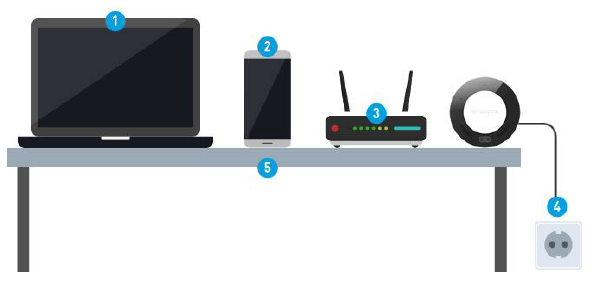
Make sure iiSmartGate is placed in an area with 50% or more signal strength.
Wi-Fi must be 2,4Ghs-802.11 b/g/n (NOT 5Ghz - 802.11 ac)
The device can be placed next to the Garage Door opener or Wall wall-mounted push Button

Installing Ismartgate
GARAGE INSTALLATION
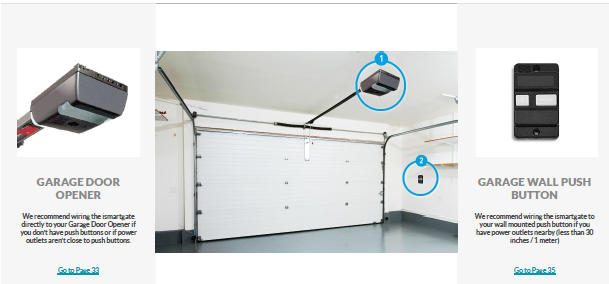
GARAGE MOTOR INSTALLATION
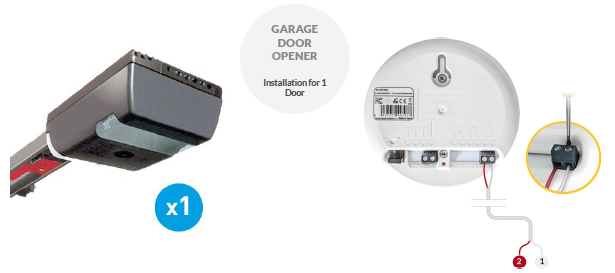
GARAGE MOTOR PLACEMENT AND INSTALLATION

PUSH BUTTON INSTALLATION

GATE MOTOR INSTALLATION
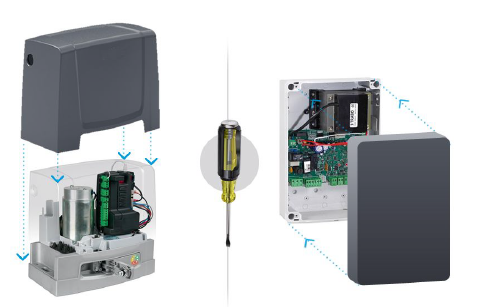
Installing Ismartgate Sensors
COMPATIBLE GARAGE DOORS WITH THE TWS SENSOR

COMPATIBLE GARAGE DOORS WITH THE GWS SENSOR

ISMARTGATE WIRED MAGNETIC SENSOR PLACEMENT ON A ROLLER GARAGE DOOR
A) Installation on a Roller Door
Attach your magnetic wired sensors to your roller door as per the drawing below.

ISMARTGATE WIRED MAGNETIC SENSOR PLACEMENT ON A SECTIONAL GARAGE DOOR
B) Installation on a Sectional Door
Attach your magnetic wired sensors to your Sectional Door as per the drawing below.

C) Installation on a Sliding Gate
Attach your magnetic wired sensors to your sliding gate as per the drawing below.

D) Installation on a Swing Gate
Attach your magnetic wired sensor to your swing gate as per the drawing below.

Troubleshooting
Common issues and solutions:
- Connection Issues: Restart the device or check Wi-Fi connectivity.
- Sensor Malfunction: Check sensor alignment and ensure proper installation.
- IFTTT Discontinuation: Note that IFTTT integration will be discontinued on October 1, 2025.
The ismartgate Mini comes with a 1 to 2-year warranty depending on the region. For further assistance, contact the official support team.
Pros & Cons
Pros
- Cost-Effective: Affordable price point compared to other smart garage door openers.
- Smart Home Integration: Seamless compatibility with major smart home platforms.
- Easy Installation: Simple setup process with minimal tools required.
Cons
- IFTTT Discontinuation: The upcoming discontinuation of oofFTTT integration may limit automation capabilities.
- Single Door Control: Limited to controlling only one garage door or gate.
Overall, the ismartgate Mini offers excellent value for money, especially for those looking to integrate their garage or gate into a smart home ecosystem.
Customer Reviews
Customers appreciate the ismartgate Mini for its ease of use and integration with popular smart home systems. However, some users express concerns about the upcoming IFTTT discontinuation. Ratings typically range from 4 to 5 stars, with users recommending it for its cost-effectiveness and smart features.
For those seeking a straightforward smart garage solution with robust voice control, the ismartgate Mini is a solid choice despite its limitations.
Faqs
How do I set up the ismartgate Mini gate & garage Door Opener for the first time?
What should I do if the ismartgate Mini gate & garage Door Opener is not responding to remote commands?
Can the ismartgate Mini gate & garage Door Opener be used with both garage doors and gates?
How do I integrate the ismartgate Mini gate & garage Door Opener with Amazon Alexa or Google Home?
What automatic features does the ismartgate Mini gate & garage Door Opener offer?
How often should I maintain the ismartgate Mini gate & garage Door Opener and its sensors?
What alerts and notifications does the ismartgate Mini gate & garage Door Opener provide?
Is the ismartgate Mini gate & garage Door Opener compatible with smart home platforms besides Alexa and Google Home?
More ismartgate manuals
Leave a Comment