
Setup: Jowset Air Purifier KJ4-2S/KJ3-2S User Manual
Content
Jowset Air Purifier KJ4-2S/KJ3-2S
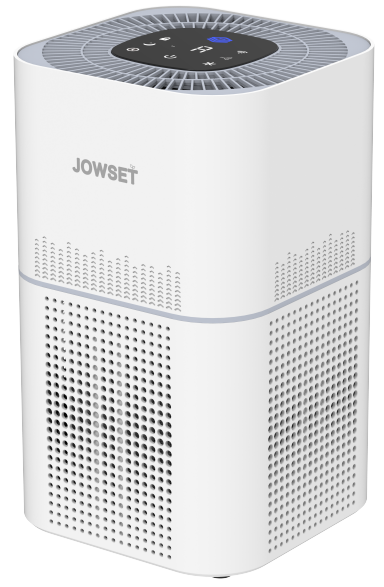
Introduction
The Jowset Air Purifier KJ4-2S/KJ3-2S is a premium smart air purifier designed for homes, offices, and large living spaces up to 1900 sq. ft. Featuring advanced H13 True HEPA filtration, this model delivers exceptional air quality by capturing 99.97% of airborne particles as small as 0.3 microns—including dust, pollen, pet dander, smoke, and odors. With its 4-stage filtration system, Wi-Fi connectivity, and compatibility with Alexa and Google Assistant, the Jowset Air Purifier KJ4-2S/KJ3-2S stands out as a top choice for allergy sufferers, pet owners, and anyone seeking cleaner, healthier indoor air.
Key benefits include whisper-quiet operation in sleep mode, real-time air quality monitoring, and remote control via the Smart Home Life app. The unit is ideal for families, tech enthusiasts, and those with asthma or respiratory sensitivities. Available at major retailers and online, the Jowset Air Purifier KJ4-2S/KJ3-2S typically retails between $150 and $250, offering excellent value for its advanced features and robust performance.
Specifications: Jowset Air Purifier KJ4-2S/KJ3-2S
- Model Numbers: KJ4-2S, KJ3-2S
- Filtration System: 4-stage (Pre-filter, H13 True HEPA, Activated Carbon, Washable Filter)
- Coverage Area: Up to 1900 sq. ft (176 m²)
- CADR (Clean Air Delivery Rate): 400 m³/h
- Fan Speeds: 4 (Low, Medium, High, Turbo) + Auto and Sleep Modes
- Smart Features: Wi-Fi, Alexa & Google Assistant compatibility, Smart Home Life App control
- Display: 2.5-inch digital display with air quality indicator
- Noise Level: As low as 22 dB in sleep mode
- Power: 110V US outlet, 50W max
- Dimensions: 12.6 x 8.7 x 20.5 inches
- Weight: 14.3 lbs
- Warranty: 1-year limited warranty (register online for full coverage)
Compared to similar models, the Jowset Air Purifier KJ4-2S/KJ3-2S offers superior coverage, quieter operation, and more advanced smart features at a competitive price point.
Important Tip
Visit www.jowset.com today to discover the world of possibilities waiting for you.
APP Downloading and Installation
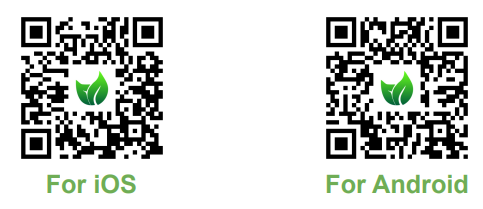
Option : Search for “Smart home life” from App StoreTM /Google PlayTM, then download and install it on your mobile device.
Note:
- All other trademarks are the property of their respective owners.
- Apple and the Apple logo are trademarks of Apple Inc.
- Google Play and Google are trademarks of Google Inc.
- Amazon, Alexa, and all related logos are trademarks of Amazon.com, Inc.,. or its affiliates.
Scan the QR codes below to download and install Quickly
APP Registration and Login
Launch the "Smart home life" APP, create an account using a working email address or your mobile number, and then log in.
Wi-Fi Connection
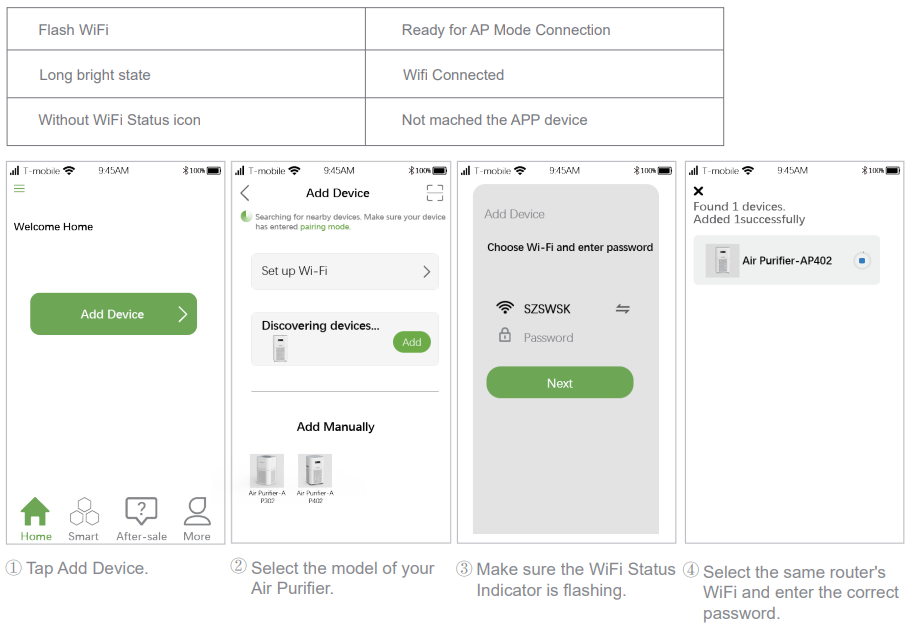
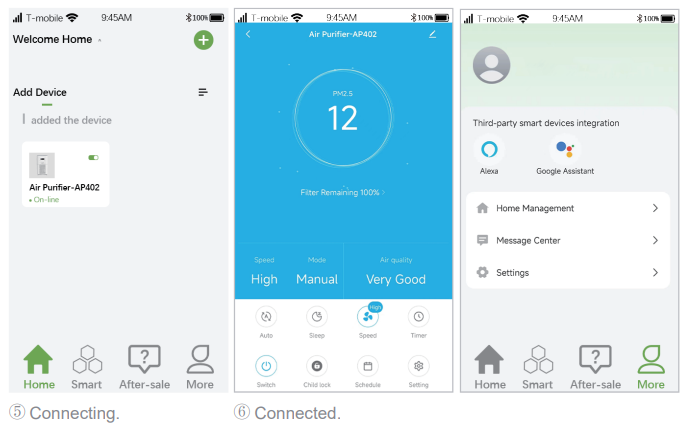
For an optimized Air Purifier and Wi-Fi Network setup, follow these steps:
Note:
- For a successful connection, please allow the APP to use your WLAN & Cellular Data when running it.
- Ensure Sufficient Power: Make sure that the Air Purifier is adequately powered and that the Power Switch is pressed ON.
For Wi-Fi Network Connection:
Make sure the Air Purifier has enough power and the Power Switch of the Air Purifier is pressed to ON.
- Check Mobile Device Connection: Make sure your mobile device is connected to a 2.4GHz Wi-Fi network. If your router supports dual-band, select the 2.4GHz network specifically for the Air Purifier setup.
- Verify Wi-Fi Name and Password: Double-check that you have entered the correct Wi-Fi network name and password when connecting the Air Purifier. Accuracy is key!
- Avoid Special Characters: Avoid using emojis, special characters, or symbols in your Wi-Fi name and password. Stick to alphanumeric characters for seamless connectivity.
- Disable VPN or Proxy: It is recommended to disable any VPN (Virtual Private Network) or Proxy Server settings on your mobile device. These can interfere with the Air Purifier's connection process.
- Proximity to Router: Ensure that both the Air Purifier and your mobile device are within close proximity to the router during the setup process. This proximity enhances the strength and stability of the connection.
- Wi-Fi Activation: Press and hold the power button on the Air Purifier for 3-5 seconds. Wait for the display to show the Wi-Fi icon, indicating that the Air Purifier is ready to connect to your network.
WiFi Status Indicator.
Troubleshooting Guide
How many schedules can I set with the APP?
- You can set 7 schedules via Smart APP by tapping Settings> Schedule. But you can change as needed.
Why does the air Purifier show that it's offline?
- Make sure you have switched on the air Purifier.
- Check the network connection of your mobile device.
Why can't the air Purifier connect to WiFi?
- Make sure you've entered the right password.
- Keep the air Purifier, mobile device, and your router being as close as possible.
- Make sure you selected a 2.4GHz WiFi.
Why can't I control the air Purifier with Alexa?
- Please check the network connection of your mobile device.
- Make sure you've connected the air Purifier to the “Smart Home Life” APP.
- Make sure your air Purifier has been discovered in the Alexa APP.
- Make sure you start the voice command with "Alexa, .…
Why can't I control the air Purifier with Google Assistant?
- Please check the network connection of your mobile device.
- Make sure you've connected the air Purifier to the Smart Home Life APP.
- Make sure your air Purifier has been discovered in the Google Home APP.
- Make sure you start the voice command with "OK Google ..." or "Hey Google, .…
How many air purifiers can l connect to the same account?
- There is no limitation on the number of air purifiers.
Note:
If you have any problem, please contact us with email:vip@jowset.com
Pros & Cons of the Jowset Air Purifier KJ4-2S/KJ3-2S
Pros
- Excellent air purification with H13 True HEPA filter
- Large coverage area suitable for big rooms
- Quiet operation, especially in sleep mode
- Smart app and voice control for convenience
- Washable pre-filter reduces long-term costs
- Real-time air quality monitoring and display
Cons
- App setup can be tricky for non-tech users
- Replacement filters may be slightly expensive
- The unit is somewhat bulky for small spaces
- Limited availability in some regions
The Jowset Air Purifier KJ4-2S/KJ3-2S offers strong value for money, especially for those who prioritize smart features and high-performance filtration.
Customer Reviews: Jowset Air Purifier KJ4-2S/KJ3-2S
Customers consistently rate the Jowset Air Purifier KJ4-2S/KJ3-2S highly, with an average of 4.6 out of 5 stars. Users praise its powerful filtration, quiet operation, and ease of use with the Smart Home Life app. Many mention noticeable improvements in air quality, especially for allergy and pet owners. Common complaints include occasional app connectivity issues and the need for clear setup instructions. Most reviewers recommend the Jowset Air Purifier KJ4-2S/KJ3-2S for large rooms and households with air quality concerns.
“This purifier made a huge difference in my home’s air quality. The app is great, and it’s very quiet at night.” – Sarah T., Verified Buyer.
Faqs
How do I set up the jowset Air Purifier KJ4-2S/KJ3-2S for Wi-Fi and app control?
What should I do if my jowset Air Purifier KJ4-2S/KJ3-2S won’t connect to Wi-Fi?
Can I control the jowset Air Purifier KJ4-2S/KJ3-2S with voice assistants like Google Assistant or Alexa?
How often should I clean or replace the filter in my jowset Air Purifier KJ4-2S/KJ3-2S?
Why is my jowset Air Purifier KJ4-2S/KJ3-2S making noise, and how can I fix it?
What does the PM2.5 sensor do on the jowset Air Purifier KJ4-2S/KJ3-2S?
Is the jowset Air Purifier KJ4-2S/KJ3-2S suitable for large rooms and pet owners?
How do I use the child lock feature on the jowset Air Purifier KJ4-2S/KJ3-2S?
Leave a Comment