
How to Use: K23 True Wireless Sport Headphones User Guide
Content
K23 True Wireless Sport Headphones
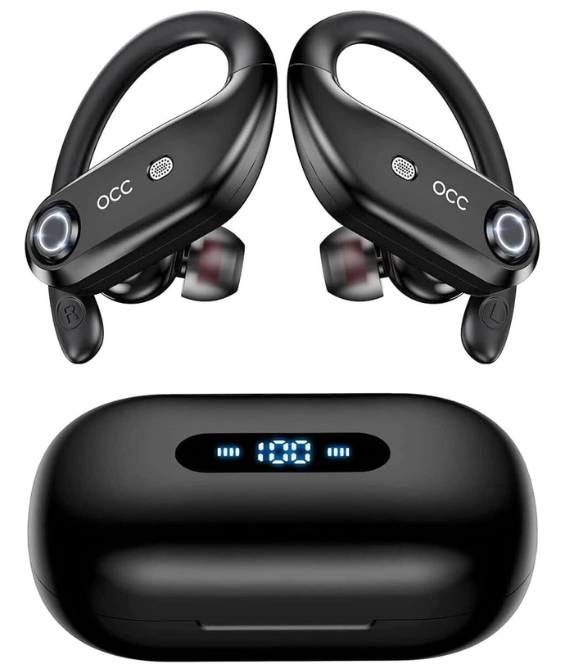
Introduction
The K23 True Wireless Sport Headphones are designed to offer unparalleled convenience and audio quality for athletes and music enthusiasts alike. These true wireless earbuds boast a sleek, ergonomic design, ensuring they fit comfortably in your ears during intense workouts or long music sessions. With Bluetooth 5.3 connectivity, you can enjoy seamless music streaming and voice calls. The K23 earbuds are packed with features like a long-lasting battery life of up to 130 hours with the charging case, and a single charge provides 8 hours of playback. The earbuds are lightweight, with each unit weighing 11.5g. The price range for these earbuds is typically between $30 to $50, making them an affordable option for those looking for reliable wireless headphones.
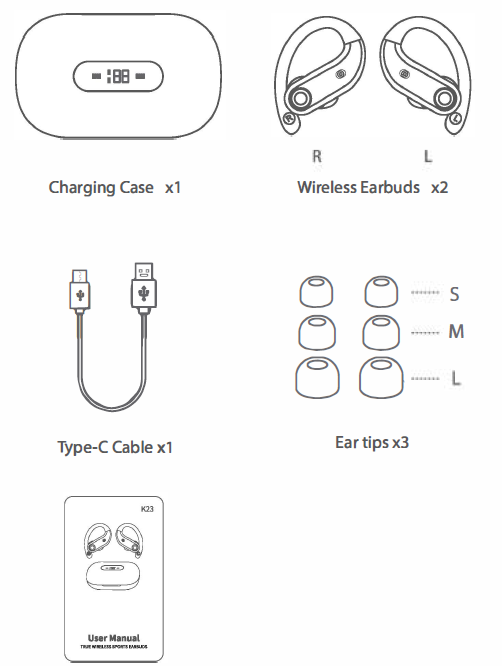
Targeted at fitness enthusiasts and individuals who enjoy listening to music on the go, the K23 True Wireless Sport Headphones are ideal for running, gym workouts, or daily commutes. They come with three sizes of ear tips (small, medium, and large) to ensure a snug fit for any ear size. The earbuds support voice assistance and are easy to pair with devices, making them a versatile choice for both Android and iOS users.
What's in the box?
Product Parameters
- Bluetooth Version: BT5.O+EDR
- Supports: HSP/HFP/A2DP/AVRCP
- Charging Interface: Point-Contact
- Charging Port: Type-C
- Battery Capacity: (Li-ion battery inside)
- Earbud: 75mAh
- Charging case: 2200mAh
- Battery Life: Twin Earbuds will last 8 hours on a single full charge (Actual battery life changes with the song types and volume requirements)
- StandbyTime: Up to 100 hours
- Charging Time: 1-1.5 Hrs for earbuds / 2.5Hrs for charging case
- Transmission Range: 33 feet (with no obstacle)
- Earbud Weight / Size: 10g
- Charging Case Weight / Size: 130g / 10663.540mm
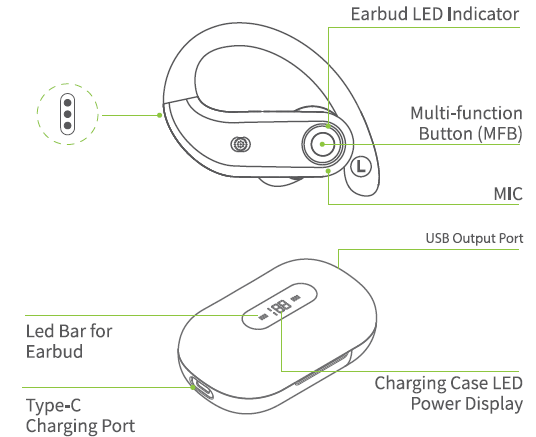
Overview
For The Second Time And Subsequent Using
If your device has already connected with the earbuds, in the second time you use them, when you take out the earbuds from the charging case, they will connect with your device automatically.
Connect with Other Devices
If you want to connect the earbuds with other devices, there are three methods as below:
- Delete"K23" from the Bluetooth list of the previously connected device.
- Before they connect to other devices, please turn off the Bluetooth of the previously connected device.
- Reset the earbuds.
Power on/ off
- Auto Power On
Take out the earbuds from the charging case, and the earbuds will automatically power on and start pairing. - Auto Power Off
Put the earbuds back into the charging case, and the earbuds will automatically power off and enter charging mode. - Manual Power On
If the earbuds are not in the charging case, press and hold each earbud for 3 seconds. - Manual Power Off
If the earbuds are not in the charging case, press and hold each earbud for 5 seconds.
How to wear the earbuds correctly?
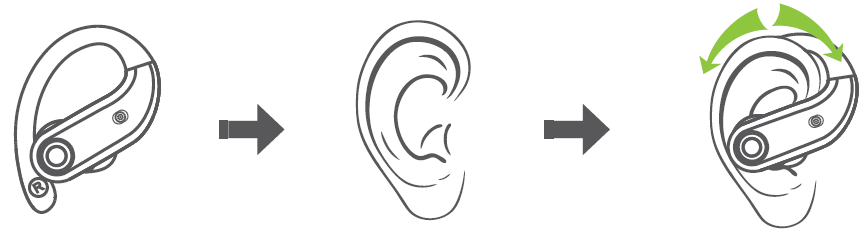
How to place headphones
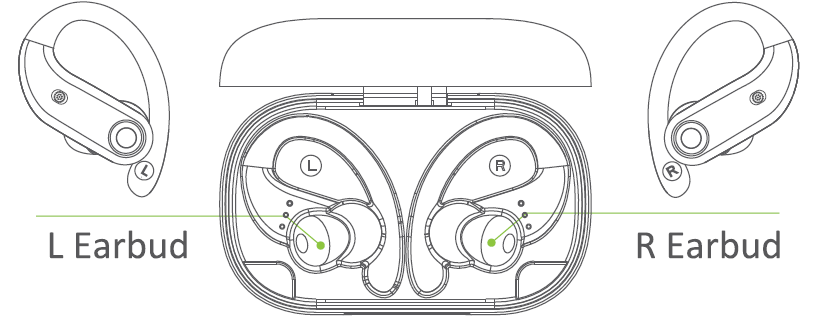
Low Battery Alert
When the battery power is less than 10% (and the voltage is lower than 3.3V, a voice prompt "Low Battery" will be advised. After several instances of low battery alert, the earbuds will shut down as normal.
Earbuds Charging
Put the earbuds into the charging case, and they will power off & be charged. When the earbud LED indicator flashes white light, it means that the earbud is being charged from the charging case. Meanwhile, the LED bar for the earbud on the charging case flashes white light from the 1st grid to the 4th grid repeatedly.
Once fully charged, the earbud LED indicator will turn off, and the LED bar for the earbud on the charging case will be off too.
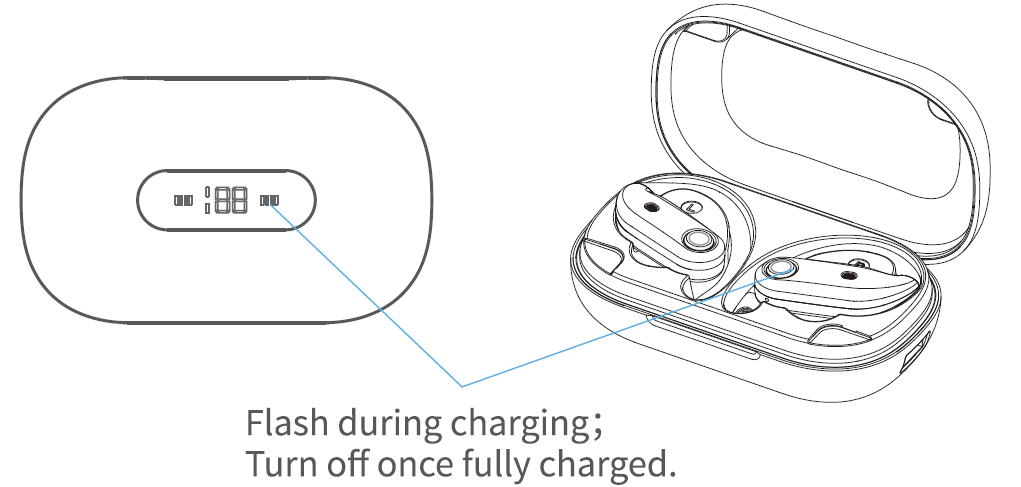
Charging Case Charging
Type-C USB charging
There is a Type-C USB charging cable in the small white box of the package box. Please use the SV/lA adapter with a Type-C charging cable to charge the charging case. During Charging, the charger's LED power display will flash and display the battery in real time. After a full charge, the number is displayed as 100.
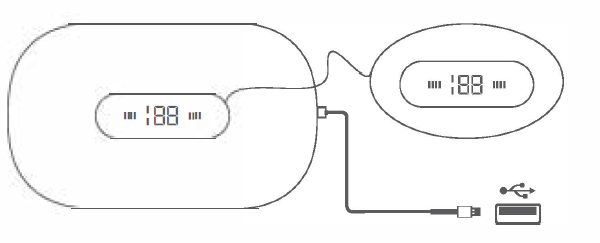
Safety Instruction
- Using earphones at high to moderate volumes for extended periods of time will result in permanent hearing damage. It is advised that you keep volume levels moderate to low at times for your safety.
- Do not use earbuds while driving a car, cycling, operating machinery, or performing other activities that require hearing surrounding sounds.
- Do not use earphones in thunderstorm weather, as the earphones may not work properly in the conditions, and increase the risk of being hit by lightning.
- Earphones may not work properly under high temperature or high humidity conditions. Do not use any corrosive cleaner/oil to clean the earphones.
- If the earphone comes into contact with liquids, quickly wipe them away.
- If submerged in water, do not turn the earphones on until completely dry. (Tips: liquid submersion voids the warranty.)
- Keep the earphones and packaging out of reach of children.
- Please use the original charging cable provided by the earphone manufacturer chargingging,,g choosing a Type-C cable.
Pros & Cons of K23 True Wireless Sport Headphones
Pros:
- Long Battery Life: Up to 130 hours of total playback time with the charging case, making them suitable for extended use without needing to recharge.
- Comfortable Design: Ergonomic design ensures they stay securely in your ears during physical activities.
- Easy Controls: Simple controls for volume, play/pause, and skipping tracks.
- Value for Money: Affordable price compared to similar products on the market.
Cons:
- Bluetooth Version Variation: Some models may have Bluetooth 5.0 instead of 5.3, which could affect connectivity range and stability.
- No Active Noise Cancellation: Lack of active noise cancellation might be a drawback for some users.
Customer Reviews of K23 True Wireless Sport Headphones
Users generally praise the K23 True Wireless Sport Headphones for their comfort and long battery life. Many reviewers appreciate the ease of use and the fact that they come with multiple ear tip sizes. However, some users mention that the sound quality could be improved, especially in noisy environments. Overall, these earbuds are rated around 4 out of 5 stars on various platforms.
Purchase recommendations include checking for the latest Bluetooth 5.3 version for optimal performance and ensuring the earbuds fit well to enhance sound quality. Common complaints include occasional connectivity issues and sound leakage, but these are generally minor and not widespread.
Faqs
How do I set up the k23 True Wireless Sport Headphones for the first time?
What should I do if my k23 True Wireless Sport Headphones are not pairing with my phone?
Can I use the k23 True Wireless Sport Headphones during intense workouts or in the rain?
How long does the battery of k23 True Wireless Sport Headphones last on a single charge?
What are the key features that make k23 True Wireless Sport Headphones suitable for sports enthusiasts?
How do I clean and maintain my k23 True Wireless Sport Headphones for optimal performance?
Are the k23 True Wireless Sport Headphones compatible with all Bluetooth devices?
How can I optimize sound quality and call performance on the k23 True Wireless Sport Headphones?
Leave a Comment