
How to Use: Kef Mu3 Noise Cancelling True Wireless Earphones User Manual
Content
KEF Mu3 Noise Cancelling True Wireless Earphones: Complete Product Manual
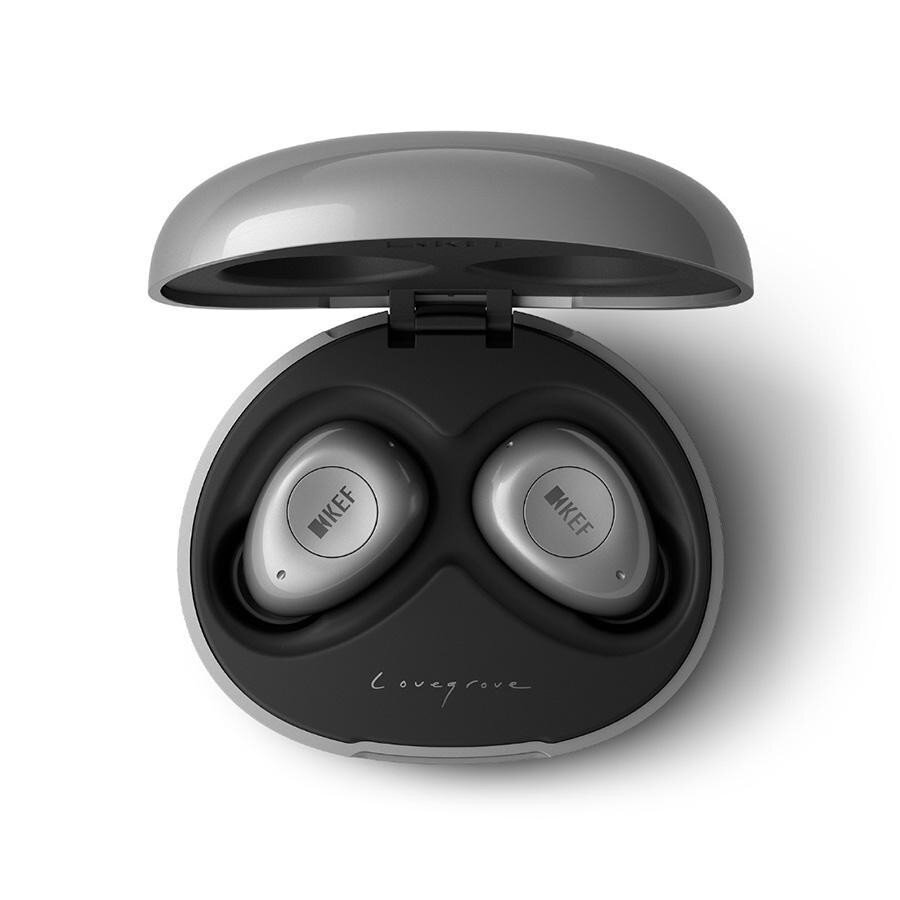
Introduction
The kef Mu3 Noise Cancelling True Wireless Earphones are premium Bluetooth earbuds designed for listeners who want a balanced blend of refined sound, active noise cancellation, and everyday convenience. Built by KEF, a brand known for its audio engineering heritage, the Mu3 delivers a compact true wireless experience with a clean design, comfortable fit, and reliable wireless performance. This makes the earphones a strong choice for commuting, office calls, travel, workouts, and casual listening at home.
One of the main selling points of the kef Mu3 Noise Cancelling True Wireless Earphones is their combination of 8.2 mm dynamic drivers, Bluetooth 5.0 connectivity, and ANC with ambient mode support. The earbuds are tuned for a wide 20 Hz to 20 kHz frequency range and offer up to 9 hours of playback with ANC enabled, plus additional battery life from the charging case. Users also benefit from IPX5 water resistance, AAC and SBC codec support, and a lightweight design that helps reduce listening fatigue during long sessions.
At launch, the Mu3 sat in the premium category, with typical pricing around $229.99 to $249 USD, £199 in the UK, and about AU$299 in Australia. Availability may vary by region and retailer, but the model is still commonly found through select audio retailers and resale marketplaces. For buyers comparing premium ANC earbuds, the Mu3 remains an appealing option for those who value polished sound, a minimalist look, and dependable wireless earphone performance.
Specifications for KEF Mu3 Noise Cancelling True Wireless Earphones
- Driver size: 8.2 mm full-range dynamic driver for detailed wireless audio.
- Frequency response: 20 Hz to 20,000 Hz for a broad listening range.
- Sensitivity: 104 dB/1 mW at 1 kHz for strong output efficiency.
- Impedance: 16 ohms for easy pairing with phones, tablets, and laptops.
- Bluetooth: 5.0 with SBC and AAC codec support.
- Wireless range: Up to 10 meters in typical use.
- Noise cancelling: Active noise cancellation with ambient listening mode.
- Battery life: Up to 9 hours per charge with Bluetooth and ANC enabled.
- Charging case battery: Adds approximately 15 hours, for about 24 hours total use.
- Fast charging: About 5 minutes of charging can provide around 1 hour of playback.
- Water resistance: IPX5-rated for splash and sweat resistance.
- Weight: About 5.8 g per earbud, with a lightweight charging case.
Compared with similar premium ANC earbuds, the Mu3 stands out for its KEF-tuned sound profile and comfortable form factor, while its total battery life is competitive rather than class-leading. It is best viewed as a polished alternative to mainstream models such as the AirPods Pro and Sony WF-1000XM3-era competitors, especially for listeners who prioritize sound quality and design.
Setup Guide: How to Pair and Use KEF Mu3 Earphones
Setting up the kef Mu3 Noise Cancelling True Wireless Earphones is straightforward. First, fully charge the charging case and earbuds before initial use. Open the case, remove both earbuds, and enable Bluetooth on your phone, tablet, or laptop. Select the Mu3 from the available device list to complete pairing. Once connected, the earbuds should reconnect automatically when removed from the case later.
To switch between listening modes, use the earbuds’ onboard controls to activate noise cancelling or ambient mode depending on your environment. ANC is best for airplanes, trains, and noisy streets, while ambient mode is useful when you need to hear traffic or brief conversations without removing the earbuds. For best results, choose ear tips that create a secure seal, since fit directly affects bass response, isolation, and ANC performance.
Troubleshooting tip: if pairing fails, place the earbuds back in the case, close the lid, then retry after restarting Bluetooth on the source device. Keep the earbuds within 10 meters of the audio source and avoid heavy interference from crowded wireless environments. Safety warning: do not use the earbuds at unsafe volume levels for long periods, and avoid exposing the charging case to water or extreme heat.
Troubleshooting KEF Mu3 True Wireless ANC Earphones
Most issues with the kef Mu3 Noise Cancelling True Wireless Earphones are related to charging, pairing, or fit. If one earbud does not play audio, return both earbuds to the case for a reset and confirm that the charging contacts are clean. If Bluetooth audio cuts out, move closer to the device and disconnect unused wireless accessories that may interfere with the signal. If battery life seems shorter than expected, reduce volume, disable ANC when not needed, and make sure the earbuds are fully charged before use.
- Problem: Earbuds will not pair. Solution: Reset by placing them in the case, turning Bluetooth off and on again, then reconnecting.
- Problem: ANC feels weak. Solution: Check the ear tip seal and try a different ear tip size.
- Problem: Audio sounds low or unbalanced. Solution: Clean the mesh and confirm both earbuds are charged.
- Problem: Charging is inconsistent. Solution: Clean the charging contacts and confirm the case has power.
- Problem: Connection drops frequently. Solution: Stay within range and avoid thick walls or busy wireless environments.
KEF offers a two-year warranty for the Mu3 in many regions, which is useful for manufacturing defects and supported service issues. For help, contact the retailer where the product was purchased or visit the official KEF support and warranty channels in your region. If no response is available locally, use KEF’s regional customer care pages for service guidance.
Pros and Cons of KEF Mu3 Noise Cancelling True Wireless Earphones
Pros
- Detailed, balanced sound signature that suits music, podcasts, and calls.
- Lightweight 5.8 g earbuds for comfortable long-term wear.
- Active noise cancellation plus ambient mode for flexible use in different environments.
- IPX5 resistance makes them suitable for commuting and light exercise.
- Quick charging and solid everyday battery performance.
- Premium fit and finish that feels more refined than many midrange earbuds.
Cons
- Battery life is good, but not outstanding compared with newer flagship earbuds.
- Codec support is limited to SBC and AAC, with no aptX option.
- Some users may prefer stronger ANC performance from newer alternatives.
- Price is premium, so value for money depends on sound quality preferences.
- Single-earbud operation is not as flexible as on some competing true wireless models.
Overall, the Mu3 is best for listeners who want better sound and design than basic true wireless earphones, even if newer alternatives may offer more advanced features. For buyers comparing premium noise cancelling earbuds, it remains a respectable choice rather than a bargain pick.
Customer Reviews of KEF Mu3 Noise Cancelling True Wireless Earphones
Customer feedback for the kef Mu3 Noise Cancelling True Wireless Earphones is generally positive, with many users praising the clean audio tuning, premium look, and secure fit. Common ratings cluster around 4 out of 5 stars, especially from buyers who prioritize music quality over app-heavy features. Reviewers often describe the earbuds as “surprisingly musical” and “excellent for vocals and acoustic tracks.”
Frequent complaints mention that the ANC is competent but not class-leading, and some users would like longer battery life. A few reviewers also note that the earbuds are best suited for smaller hands or pockets because the case is compact but not ultra-minimal. Despite these concerns, many customers still recommend the Mu3 for commuting, office use, and everyday listening.
If sound quality, comfort, and a polished design matter most, the Mu3 is a strong purchase recommendation. If maximum ANC power or app features are more important, shoppers may want to compare it with newer premium alternatives first.
Faqs
How do I set up kef Mu3 Noise Cancelling True Wireless Earphones for the first time?
Why are my kef Mu3 Noise Cancelling True Wireless Earphones only connecting to one earbud?
How effective is the noise cancelling on kef Mu3 Noise Cancelling True Wireless Earphones in real-world use?
Can kef Mu3 Noise Cancelling True Wireless Earphones work with iPhone, Android, and laptops?
What should I do if kef Mu3 Noise Cancelling True Wireless Earphones keep disconnecting during playback?
How do I get the best sound quality from kef Mu3 Noise Cancelling True Wireless Earphones?
How should I clean and maintain kef Mu3 Noise Cancelling True Wireless Earphones safely?
Why is the battery life on kef Mu3 Noise Cancelling True Wireless Earphones lower than expected?
More kef manuals
Leave a Comment