
Kenyon Intelliken Touch Signature Grill User Manual
Content
Kenyon IntelliKEN Touch Signature Grill: Complete Product Manual and Buying Guide
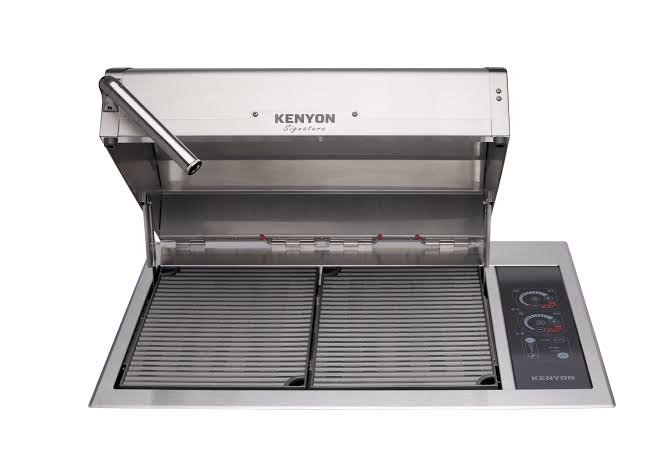
The Kenyon IntelliKEN Touch Signature Grill is a premium built-in electric grill designed for homeowners, marine applications, outdoor kitchens, and luxury condos where open-flame grilling is restricted. It combines a stainless steel build, IntelliKEN Touch controls, and dual independent 1500W heating elements to deliver precise electric grilling performance with low-maintenance operation. The Kenyon IntelliKEN Touch Signature Grill is built for users who want the convenience of indoor-style temperature control with the flavor and versatility of outdoor cooking.
Key benefits include a 310-square-inch cooking area, temperature range from 150°F to 550°F, and a marine-grade stainless steel body that resists corrosion. The grill is available in 208V and 240V configurations, with installation options suited for hardwired or plug-in setups depending on the model. This makes it a strong choice for apartment balconies, yachts, patios, and custom outdoor kitchens. Estimated pricing typically falls in the premium range, often around $1,000 to $5,000 depending on configuration, retailer, lid style, and installation package. Availability is generally through specialty appliance dealers and outdoor cooking retailers.
Key Features and Specifications
- Built-in electric grill with IntelliKEN Touch control
- Two independent 1500W heating elements
- 310 square inches of primary cooking area
- Temperature range: 150°F to 550°F
- Stainless steel exterior with marine-grade durability
- Voltage options: 208V and 240V
- Designed for hardwired or plug-in installation, depending on model
- Compatible with custom lids and outdoor kitchen setups
Troubleshooting the Kenyon IntelliKEN Touch Signature Grill
If the grill will not power on, first check the circuit breaker, power supply, and connection type. A common issue is overheating, which can trigger error code E04. In that case, allow the unit to cool, reduce the cooking temperature, and confirm that suitable cookware or grilling conditions are being used. Error codes E06, E07, E08, and E09 indicate an internal electronic control issue and usually require customer support. Error code E10 means more than two control functions were activated at once for three seconds; the fix is to power the grill back on and use one control input at a time.
To prevent problems, keep the grill clean, avoid overheating, and ensure correct installation with proper electrical load support. If issues continue, Kenyon Customer Care can be reached at 860-664-4906, Monday through Friday, 8AM to 5PM EST, or by email at customercare@cookwithkenyon.com. The product is backed by a 3-year warranty and a lifetime rust-free guarantee on applicable components.
Pros and Cons of the Kenyon IntelliKEN Touch Signature Grill
Pros
- Precise touch controls make temperature management easy for beginners and experienced cooks
- Electric operation is ideal for places where gas or charcoal grills are not allowed
- Dual heating elements help create even heat across the cooking surface
- Stainless steel construction improves durability and corrosion resistance
- Great for condos, boats, patios, and luxury outdoor kitchens
Cons
- Premium pricing makes it more expensive than many standard electric grills
- Requires the right voltage and installation setup, which may add contractor costs
- Electric grilling does not fully replicate the flavor profile of charcoal or gas
- Heavier built-in design limits portability
For value for money, the Kenyon IntelliKEN Touch Signature Grill is best for buyers who prioritize durability, safety, and convenience over low upfront cost. Compared with portable electric grills, it offers a much more refined built-in experience and larger cooking capacity.
Customer Reviews and Owner Feedback
Owners frequently praise the grill’s clean design, easy touch controls, and reliable heat performance. Common ratings trend around 4 to 5 stars for build quality and convenience. Many users highlight how well it fits in upscale outdoor kitchens and how simple it is to operate compared with gas alternatives.
Typical complaints focus on price, installation requirements, and the learning curve for first-time electric grill users. A common testimonial theme is that the grill feels “professional-grade” and “perfect for condo living,” while some buyers recommend checking electrical compatibility before purchase. Overall, the Kenyon IntelliKEN Touch Signature Grill is recommended for users who want a premium built-in electric grill with strong reliability and low-maintenance performance.
Who Should Buy the Kenyon IntelliKEN Touch Signature Grill?
- Homeowners building a luxury outdoor kitchen
- Condo residents with electric-only grilling rules
- Boat and yacht owners needing a marine-ready grill
- Users who want precise temperature control and easy cleanup
Final Verdict
The Kenyon IntelliKEN Touch Signature Grill stands out as a premium built-in electric grill with excellent temperature control, durable construction, and versatile installation options. If you need a high-end solution for restricted spaces or upscale outdoor cooking, this model offers one of the best combinations of performance and convenience in its category.
Faqs
How do I set up the kenyon Intelliken Touch Signature Grill for the first time?
Why is my kenyon Intelliken Touch Signature Grill not heating evenly?
How do the touch controls on the kenyon Intelliken Touch Signature Grill work?
What cookware or accessories are compatible with the kenyon Intelliken Touch Signature Grill?
How can I get the best cooking performance from the kenyon Intelliken Touch Signature Grill?
What should I do if the kenyon Intelliken Touch Signature Grill touch panel is unresponsive?
How do I clean and maintain the kenyon Intelliken Touch Signature Grill safely?
Does the kenyon Intelliken Touch Signature Grill require any special installation or power requirements?
Leave a Comment