
Setup: Keurig K-Elite Single Serve Coffee Maker User Manual
Content
Keurig K-Elite Single Serve Coffee Maker
Introduction
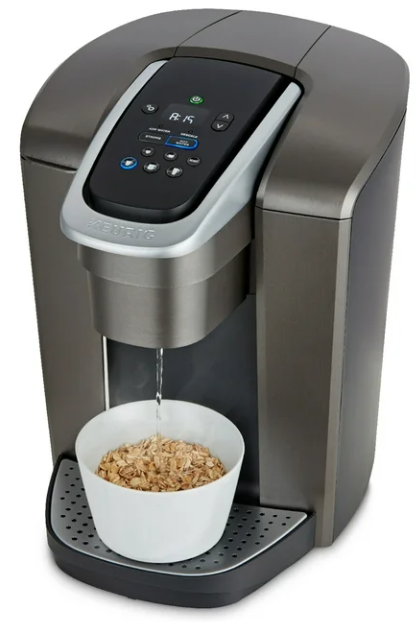
The Keurig K-Elite Single Serve Coffee Maker is a premium addition to the Keurig family, designed to provide users with a seamless and luxurious coffee-making experience. Launched in 2018, this coffee maker is part of Keurig's high-end series, offering advanced features and a sleek design. The estimated price of the Keurig K-Elite ranges from $150 to $200, depending on the retailer and any bundles or promotions available.
This coffee maker is intended for those who value convenience and quality in their daily coffee routine. With its single-serve capability, it is perfect for households where different family members have varying coffee preferences. The K-Elite also features a large water reservoir, allowing for multiple cups to be brewed without the need for frequent refills.
Specifications
- Large 40 oz water reservoir
- Strong Brew feature for a bolder cup of coffee
- Iced coffee setting for hot and iced beverages
- Hot water on demand for tea, soup, or instant noodles
- Temperature control with settings for 187°F and 192°F
- Quiet operation with a silent brew technology
- Programmable favorites for up to 3 users
- High-altitude setting to adjust for higher elevations
- Maintenance alerts for descaling and water filter replacements
Parts
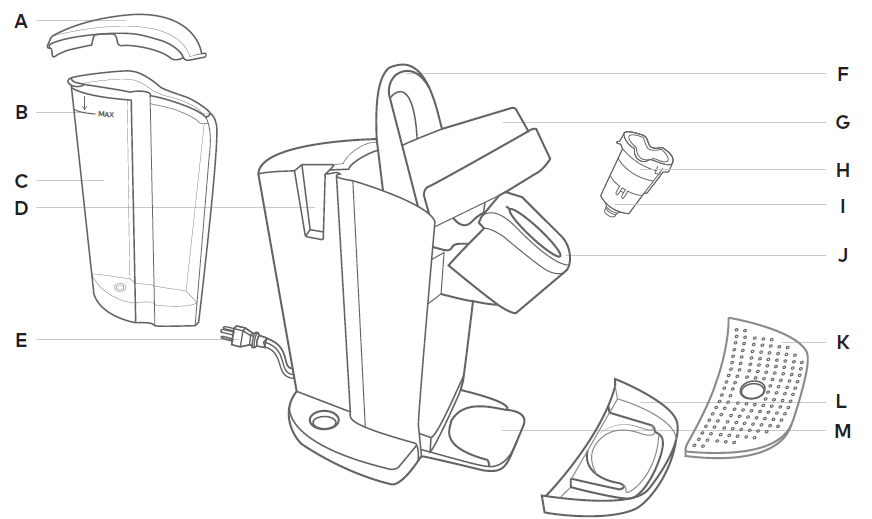
- A. Water Reservoir Lid
- B. MAX Fill Line
- C. Water Reservoir
- D. Water Reservoir Lock Tab Slot
- E. Power Cord
- F. Handle
- G. Lid
- H. K-Cup® Pod Holder (H and I are the K-Cup® Pod Holder Assembly)
- I. Funnel
- J. K-Cup® Pod Assembly Housing
- K. Drip Tray Plate
- L. Drip Tray
- M. Drip Tray Base
Brewer Features
- Strong Brew increases the strength and bold taste of your coffee’s flavor. For bolder coffee, press the STRONG button and select your brew size.
- Iced Coffee: Brew hot over ice and enjoy cold. Makes full-flavored and delicious iced coffee.
- Hot Water on demand for instant soups and oatmeal.
- Smart Start heats then brews in one simple process. No need to wait for the brewer to heat before selecting brew size. Power on your brewer, add coffee, then select your brew size. The brewer will heat, then automatically begin brewing.
- Clock allows you to set an Auto On time.
- Temperature Control allows you to adjust the temperature from 187° – 192°.
- Auto On sets your brewer to turn on at a specific time.
- Auto Off automatically turns your brewer off 2 hours after the last brew for energy savings. You can also program your brewer to shut off in 15-minute increments after your last brew, or remain on all the time.
- High Altitude ensures your brewer works properly at higher altitudes (5,000 feet).
NOTE: In High Altitude mode, the temperature is not adjustable. If you attempt to adjust the temperature, the mountain icon will flash, indicating that you are in high altitude mode.
Programming Brewer Features
To program your K-Elite® brewer, use the settings button  and up and down arrows
 . After the feature is programmed, press the settings button until you return to the home clock screen.
Troubleshooting
If your Keurig K-Elite is not turning on, check that it is properly plugged in and that the power outlet is functioning. If the machine is not brewing, ensure that the water reservoir is filled and properly seated.
Common issues include clogged needles or scale buildup. To resolve these, run a descaling solution through the brewer or clean the needle with a cleaning tool. Always refer to the user manual for specific troubleshooting steps and follow any safety precautions to avoid damage to the machine.
Important warnings include avoiding overfilling the water reservoir and ensuring that the coffee maker is placed on a stable, heat-resistant surface.
- Clock: Press the settings button once and use the up and down arrows to select the correct hour. Press the settings button again and use the up and down arrows to select the correct minutes.
- Temperature Control: Press the settings button 3 times and use the up and down arrows to select your preferred temperature.
- Auto On: Press the settings button until a sun icon
 appears. Then use the up and down arrows to turn the Auto On functionality “on.” Press the settings button again to set your preferred time, using the up and down arrows. Once you return to the home clock screen, a sun icon will be present to let you know that the functionality is on.
 - Auto Off: Press the settings button and use the up and down arrows to set your preferred off time. Off time can be set from 15 minutes to 2 hours in 15-minute increments. A moon icon
 will appear on the screen to indicate your brewer is in Auto Off mode.
 - To disable Auto Off, use the up and down arrows to turn the functionality “off.” The moon icon will no longer appear on the screen.
- To enable Auto Off, use the up and down arrows to turn the functionality “on.” The moon icon will appear on the screen.
- High Altitude: Press the settings button until you see the mountain icon
 displayed on your screen. Use the arrows to turn this setting on or off.
NOTE: In high altitude mode, the temperature is not adjustable. If you attempt to adjust the temperature, the mountain icon will flash, indicating you are in high altitude mode.
NOTE: You must set the clock to enable to Auto On functionality.
Troubleshooting
Grounds in Your Coffee
Grounds may have gathered in the exit or entrance needles and can be cleaned using a straightened paper clip or similar tool.
- Clean the exit needle of the K-Cup® pod holder. Refer to the exit needle care instructions.
- Clean the brewer entrance needle. Refer to the entrance needle care instructions.
Brewer Will Not Brew
- After placing the K-Cup® pod in the K-Cup® pod holder, make sure that the handle is pushed down securely and the brew buttons are flashing.
- If the add water light is illuminated, add water to the water reservoir. Fill to and not beyond the MAX fill line. Make sure the water reservoir is seated properly in its base. If the add water light continues to be illuminated even after refilling, contact Customer Service.
- If 4, 6, 8, 10, 12oz, and ICED button lights are all on simultaneously, lift the handle and remove the K-Cup® pod (if present in the brewer). Close the handle and place a large mug on the drip tray. Press the power button once. The brewer may dispense hot water.
- If 4, 6, 8, 10, 12oz lights all blink simultaneously, contact Customer Service.
Brewing a Partial Cup
- The exit needle may be clogged. Refer to the exit needle care instructions.
- The water reservoir may have been removed during brewing. Replace the water reservoir and perform a rinsing brew without a K-Cup® pod.
- The brewer may need to be descaled. If you have repeated the descale procedure on your brewer two times and it is still only brewing a partial cup, contact Customer Service.
Brewer Does Not Have Power or Shuts Off
- Make sure that the power button has been turned on.
- Plug the brewer into its own grounded outlet. If the electric circuit is overloaded with other appliances, your brewer may not function properly. The brewer should be operated on its own circuit, separate from other appliances.
- For energy savings, your brewer is set to turn off automatically 2 hours after your last brew. You can program your brewer to automatically turn off in 15-minute increments by adjusting the settings.
- If the brewer still doesn’t have power, contact Customer Service.
Adjustable Temperature Not Working
The temperature is not adjustable when set to High Altitude mode. When High Altitude mode is enabled, a mountain icon will be displayed on the screen. If you attempt to adjust the temperature, the mountain icon will flash, indicating you are in high altitude mode.
Helpful Hints
Water quality varies greatly. If you notice an undesirable taste in your beverage (such as chlorine or mineral tastes), we recommend using bottled or filtered water. Do not use distilled water. You can also install a Keurig® Water Filter to help remove water impurities and improve beverage taste.
Service
Beyond these recommended cleaning and maintenance procedures, this brewer is not user serviceable. For service, please refer to the Warranty section of this guide.
Storage
Empty the water reservoir before storing or transporting, and take care to ensure that you store your brewer in a safe and frost-free environment. Please be sure to store your brewer in its upright position to avoid water leakage from the inner tank. If you store the brewer in a cold environment, you run the risk of water freezing inside the brewer and causing damage. When you prepare to use it after storage, we recommend rinsing the water reservoir with fresh water and running three rinsing brews without a K-Cup® pod.
- If you plan to move your brewer to a different location, turn the brewer off, unplug it, and empty the water reservoir.
- If your brewer has been in an environment below freezing, please be sure to let it warm to room temperature for at least 2 hours before using.
Warranty
LIMITED ONE-YEAR WARRANTY
Keurig Green Mountain, Inc. (Keurig) warrants that your brewer will be free of defects in materials or workmanship under normal home use for one year from the date of purchase. It is recommended that you register your brewer on keurig.com/new so that your purchase information will be stored in our system. Keurig will, at its option, repair or replace a defective brewer without charge upon its receipt of proof of the date of purchase. If a replacement brewer is necessary to service this warranty, the replacement brewer may be new or reconditioned. If a replacement brewer is sent, a new limited one-year warranty will be applied to the replacement brewer.
This warranty only applies to brewers operating in the United States and Canada. This warranty gives you specific legal rights, and you may also have other rights that vary from state to state and, in the case of Canada, from province to province.
Only the use of Keurig® K-Cup® brand pods and accessories will guarantee the proper functioning and lifetime of your Keurig® brewer. Any damage to or malfunction of your brewer resulting from the use of non-Keurig® pods and accessories may not be covered by this warranty or may result in a service fee if the damage or malfunction is determined to be caused by such use.
WHAT IS NOT COVERED BY THE LIMITED WARRANTY?
THIS WARRANTY DOES NOT COVER CONSEQUENTIAL OR INCIDENTAL DAMAGE, S SUCH AS PROPERTY DAMAGE, GE AND DOES NOT COVER INCIDENTAL COSTS AND EXPENSES RESULTING FROM ANY BREACH OF THIS WARRANTY, EVEN IF FORESEEABLE. Some states or provinces do not allow the exclusion or limitations of incidental or consequential damages, so the above limitation or exclusion may not apply to you depending on the state or province of purchase.
Nor does this warranty cover damages caused by use of non-Keurig® pods or accessories, services performed by anyone other than Keurig or its authorized service providers, use of parts other than genuine Keurig® parts, or external causes such as abuse, misuse, inappropriate power supply, or acts of God.
OTHER LIMITATIONS
THIS WARRANTY IS EXCLUSIVE AND INSTEAD OF OF ANY OTHER EXPRESS WARRANTY, WHETHER WRITTEN OR ORAL. IN ADDITION, KEURIG HEREBY SPECIFICALLY DISCLAIMS ALL OTHER WARRANTIES WITH RESPECT TO YOUR K-ELITE™ BREWER, INCLUDING ANY IMPLIED WARRANTY OF MERCHANTABILITY OR FITNESS FOR ANY PARTICULAR PURPOSE. Some states or provinces do not allow disclaimers of such implied warranties or limitations on how long an implied warranty lasts, so the above limitation may not apply to you, depending on the state or the province of purchase.
HOW DO YOU OBTAIN WARRANTY SERVICE?
Keurig® brewers are high-quality appliances and, with proper care, are intended to provide years of satisfying performance. However, should the need arise for warranty servicing, simply call Keurig Customer Service at our toll-free phone number 1.866.901.BREW
(2739). Please do not return your brewer for servicing without first speaking to Keurig Customer Service to obtain a Return Materials Authorization (RMA) number. Keurig® brewers returned without an RMA number will be returned to the sender without servicing.
FIND YOUR PERFECT POD
With over 70 brands and hundreds of varieties, find your match at keurig.com/new
Pros & Cons
Pros large water reservoir reduces frequent refills
- Multiple brew settings,s including Strong Brew and iced coffee
- Hot water on demand for various hot beverages
- Quiet operation with silent brew technology
- User-friendly interface with color touchscreen display
- Programmable favorites for multiple users
Cons
- Higher price point compared to other Keurig models
- Requires regular descaling to maintain performance
- Larger footprint due to the large water reservoir
- Some users may find the noise during brewing slightly louder than advertised. ed.
Customer Reviews
Customers generally praise the Keurig K-Elite for its ease of use and the variety of brew options. Many appreciate the quiet operation and the hot water on demand feature. However, some users have noted that the machine can be quite large and that regular descaling is necessary to prevent scale buildup.
Common complaints include the higher price point and occasional issues with the touchscreen display. Despite these, the overall satisfaction with the product remains high due to its robust features and reliable performance.
Faqs
What is the capacity of the water reservoir in the Keurig K-Elite?
Does the Keurig K-Elite support iced coffee brewing?
How do I descale my Keurig K-Elite?
Can I adjust the temperature on the Keurig K-Elite?
Is the Keurig K-Elite quiet during operation?
How do I clean the needle on my Keurig K-Elite?
Can I program my favorite brew settings on the Keurig K-Elite?
What is the high-altitude setting on the Keurig K-Elite?
How often should I replace the water filter in my Keurig K-Elite?
Is the Keurig K-Elite compatible with all K-cup pods?
More keurig manuals
Leave a Comment