
Setup & Pairing: Kinlan Technology BE1030 True Wireless Earbuds User Manual
Content
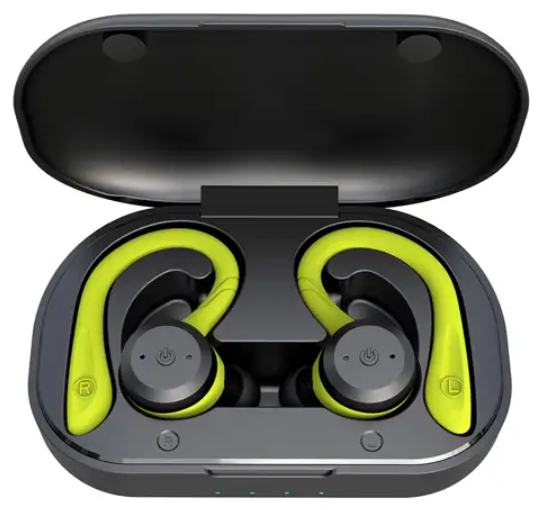
Kinlan Technology BE1030 True Wireless Earbuds
Introduction
The Kinlan Technology BE1030 True Wireless Earbuds deliver a premium audio experience with advanced features tailored for active lifestyles and daily use. Equipped with Bluetooth 5.1 connectivity, these earbuds ensure a stable and seamless wireless connection within a 10-meter range, eliminating the hassle of tangled wires and providing freedom of movement for sports, travel, gaming, and everyday listening.
These earbuds stand out with noise-cancelling capabilities and an IPX7 waterproof rating, making them highly durable and resistant to sweat and rain—ideal for workouts and outdoor activities. Each earbud houses a 50mAh battery offering 4 to 6 hours of continuous playtime, while the compact charging case extends total usage time significantly, requiring only about 1.5 hours to fully recharge both earbuds and case. Their ergonomic design ensures a comfortable and secure fit for prolonged wear.
Targeted at fitness enthusiasts, commuters, and tech-savvy users seeking high-fidelity sound in a wireless format, the Kinlan Technology BE1030 True Wireless Earbuds provide intuitive touch controls for volume adjustment, track navigation, call management, and voice assistant activation (Siri). The earbuds are competitively priced in the mid-range segment, typically available for around $40 to $60, depending on retailer and region, with purchase options through online platforms and select electronic outlets.
SPECIFICATION
Earbuds
- Wireless version: V 5.1 dual mode
- Working distance: 10M (barrier-free)
- Battery: 50mAh
- Working time: 6 hours (50% volume)
- Charging times: 1.5 hours
Charging case
- Battery: Li-battery 700m
- Changing time: 2 hours
- Input: 5V 1A
- Output: 5V 100mA
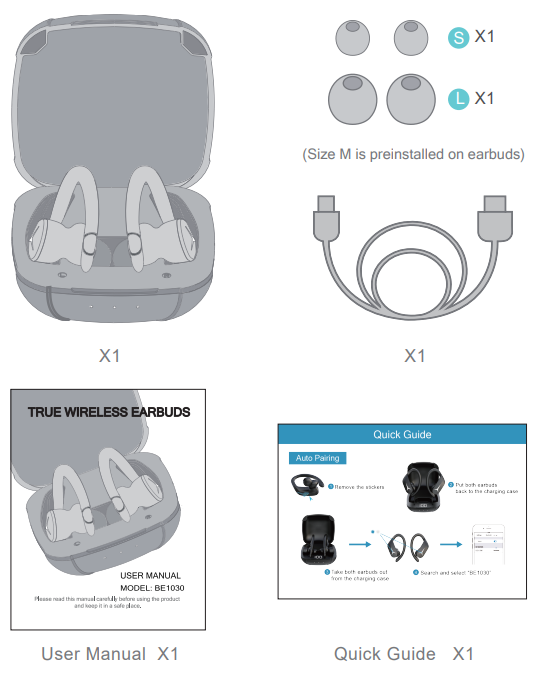
PACKING LIST
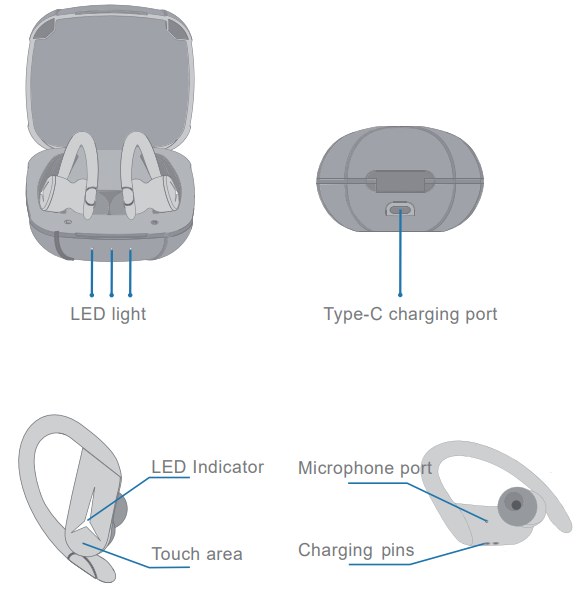
DIAGRAM
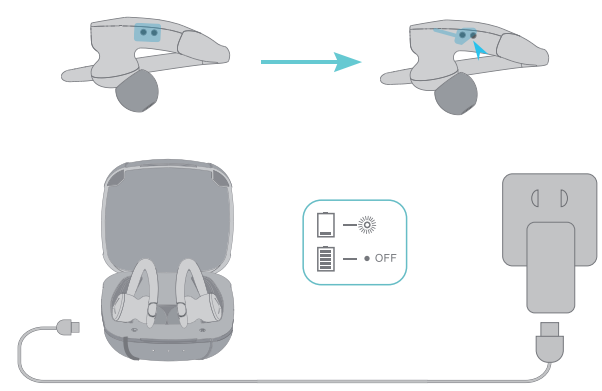
CHARGING
- Remove the protective film from the earbuds when using them for the first time.
- Fully charge both earbuds and the charging case before the first-time use.
- To prevent damage, use the provided USB-C cable.
- Fully dry off the earbuds and the USB port before charging.
PAIRING
Mode 1
Take out both earbuds out of the charging case. They will automatically enter the pairing mode in which the LED lights flash wh ite, and then select "BE1030”.
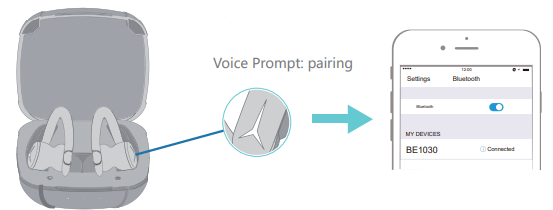
Mode 2
If the earbuds are not in the charging case. Click and hold the MFB of both earbuds for seconds s. They will automatically enter the pairing mode and then select "BE1030” on your phone.
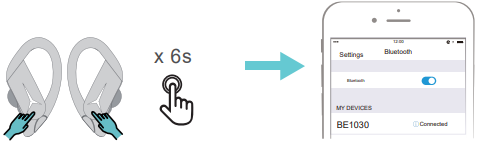
TOUCH CONTROL
- Volume UP/Down
- Volume+: click and hold the MFB button of the Left earbud to turn up the volume increasingly.
- Volume-: click and hold the MFB button of the Right earbud to turn down the volume increasingly.
- Next / Previous Track
- Next Track: double-click the MFB of the Right earbud.
- Previous Track: double-click the MFB of the Left earbud.
- Play / Pause
- Click the MFB of either earbud once.
- Answer / hang up
- Click the MFB of either earbud once.
- Reject
- Double the MFB button when there is an incoming call.
- Activate Siri
- Triple-click the MFB button of either earbud.
RESET
Delete the connection name in the wireless list of your phone.
Put both earbuds back into the charging case to charge, and take both earbuds out of the charging case when the earbuds have been reset successfully.
Troubleshooting Kinlan Technology BE1030 True Wireless Earbuds
Common issues with the Kinlan Technology BE1030 True Wireless Earbuds include pairing difficulties, audio dropouts, and charging problems. If the earbuds fail to pair, ensure both earbuds are removed from the charging case to enter automatic pairing mode, indicated by flashing white LED lights. Alternatively, press and hold the multi-function buttons (MFB) on both earbuds for 6 seconds to manually trigger pairing. If connection issues persist, disconnect previously paired devices and retry.
Volume imbalance or no sound from one earbud can often be resolved by resetting the earbuds: place them back in the charging case, then remove and pair again. For charging issues, verify the charging contacts are clean and the charging case has sufficient power. Avoid exposing the earbuds to extreme temperatures or moisture beyond their IPX7 waterproof rating.
For persistent errors or hardware faults, consult the included warranty terms, which typically cover 12 months from purchase. Kinlan Technology offers customer support via its official website and authorized resellers. Users can contact support by email or phone for assistance with troubleshooting, warranty claims, or replacement parts.
Pros & Cons of Kinlan Technology BE1030 True Wireless Earbuds
Pros
- High-Quality Sound: Clear audio with effective noise cancellation enhances music and calls.
- Waterproof Design: IPX7 rating allows worry-free use during intense workouts and rainy conditions.
- Long Battery Life: Up to 6 hours per charge, plus multiple charges from the portable case.
- Intuitive Touch Controls: Easy management of playback, volume, and calls without reaching for devices.
- Stable Bluetooth 5.1: Reliable connection with low latency suitable for gaming and video.
Cons
- Limited Range: Effective wireless distance is around 10 meters; obstacles can reduce performance.
- Average Driver Size: Some audiophiles might find the 6mm speaker drivers less powerful than premium models.
- Basic Voice Assistant Support: Only supports Siri activation; lacks broader virtual assistant compatibility.
- No Active Noise Cancellation: Passive noise cancelling only, which may not suffice in very noisy environments.
- Charging Case Size: Slightly bulkier compared to some ultra-compact competitor cases.
Overall, the Kinlan Technology BE1030 True Wireless Earbuds offer excellent value for money, especially for users seeking waterproof, reliable earbuds with solid sound quality and battery life. When compared to alternatives like Apple AirPods or Samsung Galaxy Buds, the BE1030s provide a cost-effective solution with competitive features geared towards sports and casual use.
Customer Reviews for Kinlan Technology BE1030 True Wireless Earbuds
Users praise the Kinlan Technology BE1030 True Wireless Earbuds for their comfortable fit, dependable Bluetooth connectivity, and impressive battery longevity. Many reviews highlight the earbuds’ waterproof feature as ideal for gym sessions and outdoor activities, consistently rating the product 4 to 4.5 stars out of 5.
Common compliments include crisp audio clarity and easy touch controls that respond well. However, some customers note occasional pairing delays and minor audio latency during gaming. A few users also mention that while the earbuds are waterproof, they recommend drying them thoroughly after heavy sweating or rain exposure.
Most reviewers recommend the BE1030 for budget-conscious buyers looking for durable wireless earbuds with functional features. Frequent buyers appreciated the quick charging time and compact case design, though some wished for more advanced noise cancellation and multi-device support.
Faqs
How do I set up kinlan technology BE1030 True Wireless Earbuds for the first time?
What should I do if kinlan technology BE1030 True Wireless Earbuds are not connecting to my phone?
Can kinlan technology BE1030 True Wireless Earbuds be used with both Android and iOS devices?
How long is the battery life on kinlan technology BE1030 True Wireless Earbuds, and how do I charge them?
What noise-cancelling features do the kinlan technology BE1030 True Wireless Earbuds have?
How do I maintain and clean my kinlan technology BE1030 True Wireless Earbuds to ensure long-lasting performance?
Why might my kinlan technology BE1030 True Wireless Earbuds experience audio lag during gaming or video playback?
Are kinlan technology BE1030 True Wireless Earbuds waterproof, and can I use them for sports or outdoor activities?
Leave a Comment