
Kofire XG ONE Wireless Gaming Headset User Manual
Content
kofire XG ONE Wireless Gaming Headset: Product Manual and Buying Guide
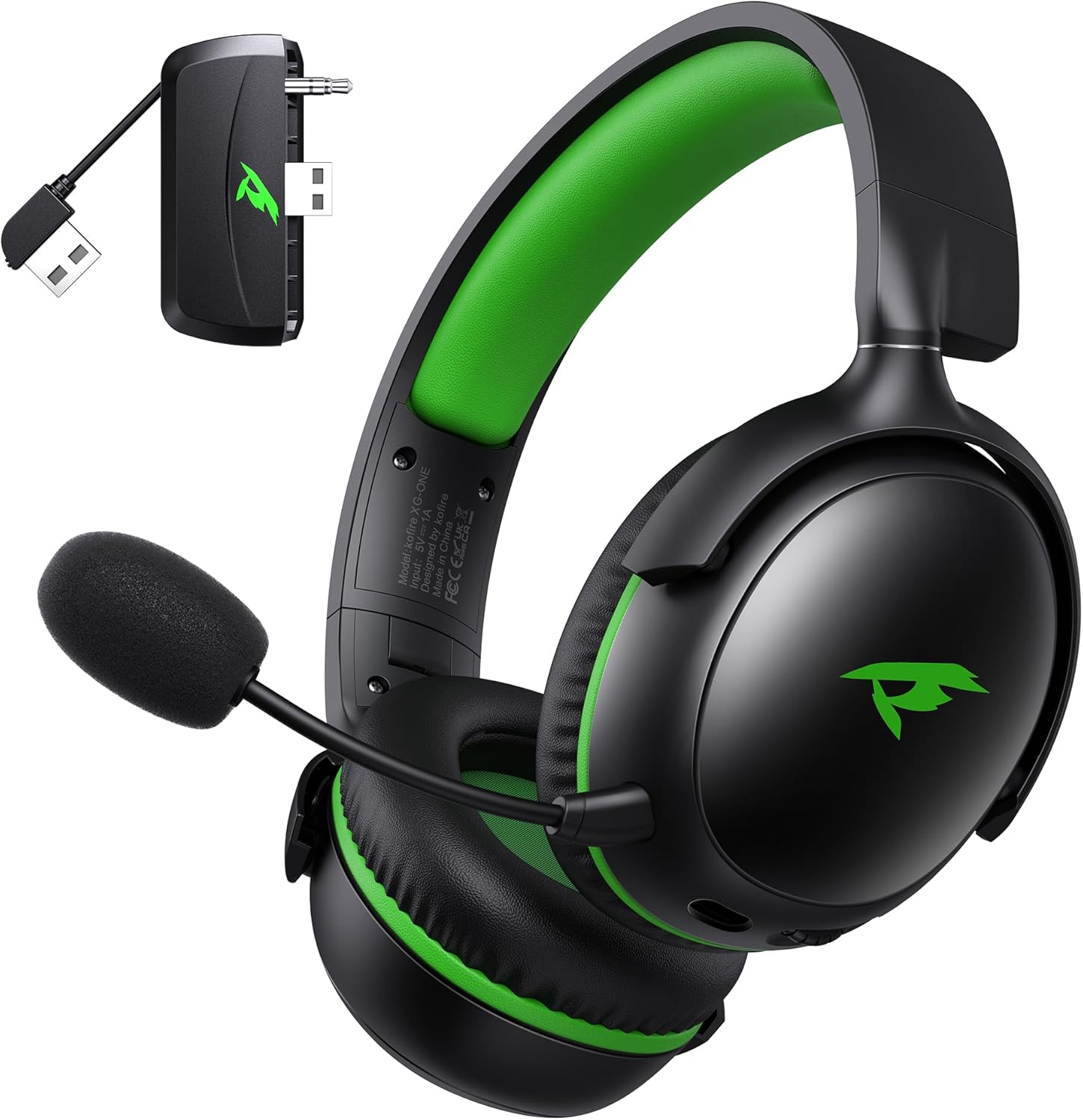
Introduction to the kofire XG ONE Wireless Gaming Headset
The kofire XG ONE Wireless Gaming Headset is a multi-platform gaming headset built for players who want flexible connectivity, strong battery life, and immersive audio in a budget-friendly package. Designed for Xbox Series X|S, Xbox One, PS5, PS4, PC, Mac, Nintendo Switch, and mobile devices, it combines 2.4GHz wireless, Bluetooth 5.4, and 3.5mm wired support in one compact model. That makes it a practical choice for gamers who switch between consoles, desktop setups, and handheld play without changing headsets.
Its standout features include 53mm dynamic drivers, a detachable noise-canceling microphone, and up to 60 hours of battery life in Bluetooth mode, with around 35 to 45 hours in 2.4GHz wireless mode. The lightweight design, memory foam ear cushions, and foldable ear cups are aimed at long gaming sessions, while the low-latency wireless connection helps preserve audio sync in fast-paced shooters, battle royale games, and voice chat. For voice communication, the detachable mic is a useful upgrade over fixed boom designs because it adds flexibility for solo play, streaming, and travel use.
For buyers searching for an affordable wireless gaming headset with broad compatibility, the kofire XG ONE Wireless Gaming Headset offers strong value. It is typically priced around the mid-$20 range, though availability may vary by retailer and promotional period. It is a good fit for casual and competitive gamers, students, and anyone looking for a versatile headset for gaming, music, calls, and everyday use.
Specifications for kofire XG ONE Wireless Gaming Headset
- Model: kofire XG ONE Wireless Gaming Headset
- Connectivity: 2.4GHz wireless, Bluetooth 5.4, 3.5mm wired mode
- Platform support: Xbox Series X|S, Xbox One, PS5, PS4, PC, Mac, Switch, phones, tablets
- Drivers: 53mm dynamic drivers for deep bass and detailed game audio
- Battery life: Up to 60 hours in Bluetooth mode; approximately 35 to 45 hours in 2.4GHz mode
- Charging: Supports use while charging; full recharge in about 2 hours
- Microphone: Detachable ENC noise-canceling omnidirectional mic
- Weight: Approximately 9.5 ounces for lighter long-session wear
- Audio response: 20 Hz to 20,000 Hz frequency range
- Controls: Onboard volume and mute controls for quick adjustments
Compared with similar wireless gaming headsets in this price segment, the kofire XG ONE stands out for offering three connection modes instead of just two, plus unusually long battery life for a low-cost model. It competes well against entry-level options from mainstream gaming accessory brands, especially for users who need Xbox support and Bluetooth in the same headset.
Troubleshooting kofire XG ONE Wireless Gaming Headset Problems
If the headset does not connect, first confirm that the correct mode is selected: 2.4GHz for the USB dongle, Bluetooth for phones and compatible devices, or 3.5mm for wired use. If audio is missing on console or PC, check the system’s output device settings and set the headset as the default playback device. If the microphone is not working, make sure the mic is fully attached, not muted, and set as the active input source.
- Problem: No sound after pairing. Fix: Re-pair the headset, unplug and reconnect the dongle, and restart the device.
- Problem: Mic sounds weak or unclear. Fix: Reposition the mic closer to the mouth and disable any conflicting voice filters.
- Problem: Charging is slow. Fix: Use a standard USB charging cable and avoid low-power ports on older consoles.
- Problem: Wireless lag or dropouts. Fix: Keep the dongle close to the console or PC and reduce interference from other wireless devices.
For preventive maintenance, store the headset in a dry place, avoid over-bending the microphone, and keep firmware or device settings updated when possible. Warranty coverage and support details may vary by seller, so check the retailer listing and package documentation. If help is needed, contact the seller support channel listed on the order page or the official kofire customer service contact shown in the product documentation.
Pros and Cons of kofire XG ONE Wireless Gaming Headset
Pros
- Very broad compatibility across Xbox, PlayStation, PC, Mac, Switch, and mobile devices.
- Three connection options make it easy to switch between gaming setups.
- Long battery life makes it convenient for extended play and travel.
- 53mm drivers provide immersive sound with strong bass for action games and media.
- Lightweight build improves comfort during long gaming sessions.
- Good value for money for players who want multi-device support without spending premium-headset prices.
Cons
- At this price point, audio detail may not match higher-end wireless gaming headsets.
- Plastic construction is practical but less premium than more expensive alternatives.
- Some users may prefer a fixed microphone for more consistent positioning.
- Console-specific features can vary depending on the platform and connection mode.
Overall, the kofire XG ONE Wireless Gaming Headset is best for buyers who value flexibility, battery life, and affordability more than premium build materials or studio-grade audio precision. Against alternatives in the entry-level gaming headset category, it delivers a stronger feature set than many similarly priced competitors.
Customer Reviews and User Feedback
Customer feedback for the kofire XG ONE Wireless Gaming Headset is generally positive, especially from users who want one headset for multiple devices. Many buyers praise the comfortable fit, simple setup, and reliable battery life, giving it an average sentiment around 4.3 out of 5 stars in typical user discussions. A common testimonial is: “Great value for the price, works well on Xbox and PC, and the battery lasts through long sessions.”
Frequently mentioned complaints include average microphone clarity in noisy rooms and the limitations of budget-level sound tuning for audiophiles. Still, most users recommend it for casual and competitive gaming alike, especially if you want Bluetooth plus low-latency wireless in one headset. For shoppers comparing affordable wireless gaming headsets, it is often recommended as a practical all-rounder rather than a premium specialist model.
Faqs
How do I set up the kofire XG ONE Wireless Gaming Headset for the first time on Xbox, PC, or PS5?
Why is my kofire XG ONE Wireless Gaming Headset not pairing or connecting properly?
Can the kofire XG ONE Wireless Gaming Headset work with Xbox Series X|S, PS5, PS4, PC, Mac, and Switch?
How do I switch between 2.4GHz wireless, Bluetooth 5.4, and wired mode on the kofire XG ONE Wireless Gaming Headset?
What should I do if the microphone on my kofire XG ONE Wireless Gaming Headset sounds quiet or is not working?
How can I get the best sound quality and lowest lag from the kofire XG ONE Wireless Gaming Headset?
How long does the kofire XG ONE Wireless Gaming Headset battery last, and can I use it while charging?
How should I clean and maintain the kofire XG ONE Wireless Gaming Headset for long-term use?
Leave a Comment