
Pairing & Setup: Korskr I21 Sport Wireless Earbuds User Manual
Content
Korskr I21 Sport Wireless Earbuds
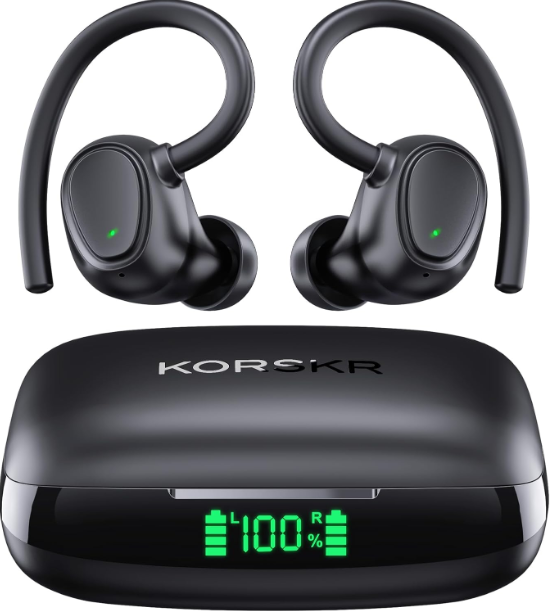
Introduction
The Korskr I21 Sport Wireless Earbuds are a cutting-edge audio solution designed for active lifestyles, combining high-fidelity sound with robust durability and convenience. These earbuds deliver immersive Hi-Fi stereo sound with dynamic bass, making them ideal for music enthusiasts, athletes, and busy professionals seeking wireless freedom without compromising audio quality. They feature an ergonomic sport-fit design with adjustable earhooks, ensuring secure and comfortable wear during workouts, running, and daily commuting.
Equipped with Bluetooth 5.3 technology, the Korskr I21 provides a stable, low-latency connection compatible with both iOS and Android devices. The earbuds boast an impressive battery life of up to 7 hours on a single charge, extendable to 42 hours with the compact charging case, perfect for all-day use without frequent recharging. Their IPX6 waterproof rating protects against sweat and splashes, making them an excellent choice for gym sessions or outdoor activities.
Priced in the affordable range of approximately $30 to $40, the korsKorskr Sport Wireless Earbuds offer premium features at a competitive value, widely available through major online retailers. This blend of sound quality, durability, and long battery life makes them a compelling option for anyone looking to enhance their wireless audio experience in sports and everyday life.
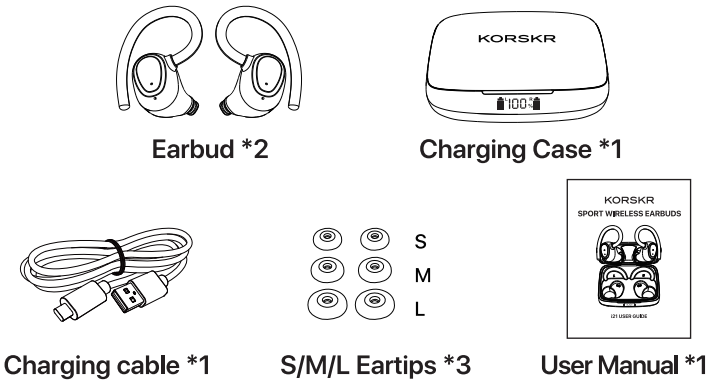
PACKING LIST
Technical Specifications and Features of korskr I21 Sport Wireless Earbuds
- Model: i21
- Chips Version: V5.3
- Battery Type: Lithium-Ion
- Input: DC5V/1A
- Speaker Type: <1>10mm
- Supported Codecs: AAC/SBC
- Bluetooth Profiles Supported: HF P/A2DP/AVR CP
- Operating Frequency: 2.40 GHZ-2.48 GHZ
- RF Sensitivity: -92dBm
- Working Temperature Range: 32° F-104° F / 0-40°C
- Maximum Transmission Range: 49ft/15m (Open Area)
Compared to similar models in the same price bracket, such as other Bluetooth 5.1 earbuds, the Korskr I21 offers superior battery life, faster charging, and enhanced waterproofing, making it a leading choice for fitness-focused users.
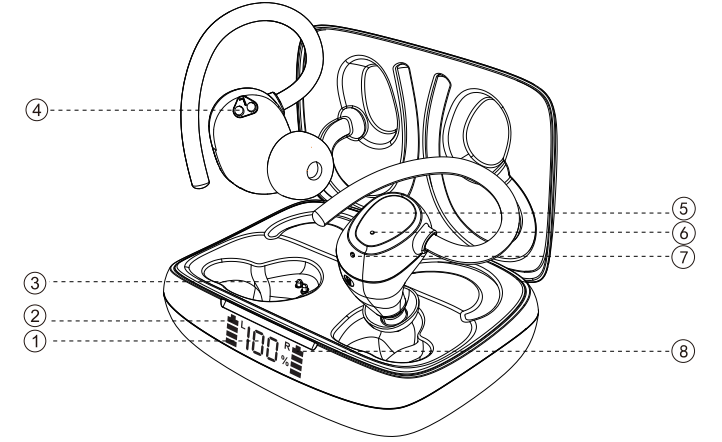
OVERVIEW
- Battery display of the charging case
- Charging pins
- Power status of earbuds
- Charging contacts
- Touch sensor/button
- Earbud indicator
- Microphone
USAGE TIPS
- Before first use, please remove the insulation stickers/tapes from these earbuds.
- For your best audio and wearing experience, it's recommended to wear the left and right earbuds properly and choose the eartips that fit in your ears.
- Please clean the charging contacts after using the earbuds on a regular basis to avoid charging failures.
HOW TO TURN ON/OFF EARBUDS
POWER ON:
Take out the earbuds from the charging case, and they will automatically power on.
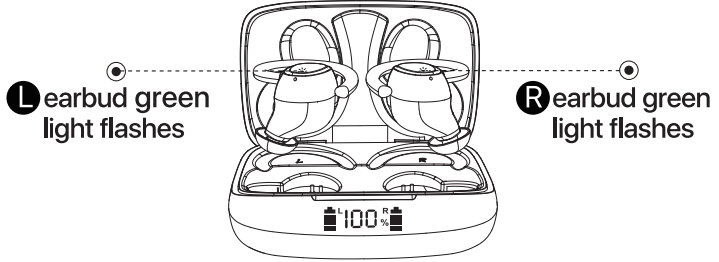
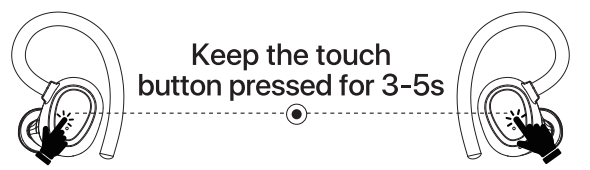
When these earbuds turn off, please press and hold the touch sensor of the earbuds for 3-5 seconds. And then the green lights on the earbuds blink with a voice prompt "power on".
POWER OFF:
- The earbuds will switch off when put into the charging case.
- Keep the touch button pressed for 3-5s, and the LED indicator flashes with a sound prompt "power off".
Notice: If the earbuds disconnect from the device, they will power off automatically after 5 minutes.
HOW TO CONNECT
DUALMODE
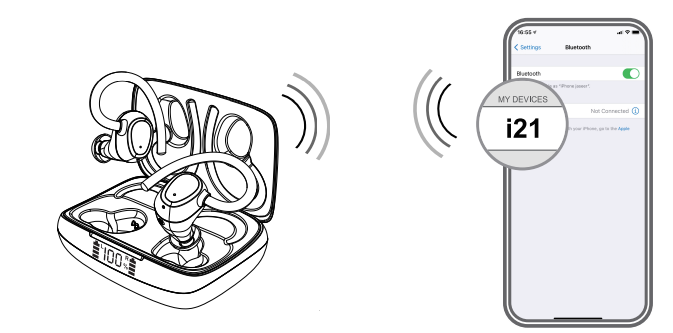
- Taking these earbuds out of the charging case, and then they will automatically power on, and pair with each other after a few seconds.
- When the earbuds are pairing with each other, the green lights blink quickly. If they paired, the green lights blink slowly with a voice prompt "TWS Connected".
- Turn on Bluetooth on your device to search for "i21". Select it to pair, and there will be a sound prompt "Connected". And then the green lights on the earbuds go out.
Notice Prior to first use, both earbuds should be taken out of the case to make sure that they pair with each other before they try to connect to your device.
MONO MODE
- Take an earbud out of the case, and it will automatically power on.
- Turn on Bluetooth in your device settings to search for "i21", and then click it to connect to the device, and there will be a sound prompt "Connected".
HOW TO CHARGE
Charging the earbuds
When the earbuds are not being used, place them in the charging case, and the case will automatically begin charging the earbuds.
Charging status of the charging case
- When the case is charging, the single digit of the LED digital display flashes as the power increases.
- When the case is fully charged, the number on the digital display changes to 100%.
- When the charging cable is unplugged, the digital display goes out in 15 seconds.
The status of the LED digital display
- The number in percentage tells the remaining power of the charging case rather than these earbuds.
- The LED bars on both sides of the number in percentage refer to the power status of the earbuds.
Note: The battery of the earbuds can't be seen directly from the LED digital display.
Low battery reminder
These earbuds have a voice prompt "Battery Low" when in low battery. Please put them back in the case, and then the case will charge for these earbuds automatically.
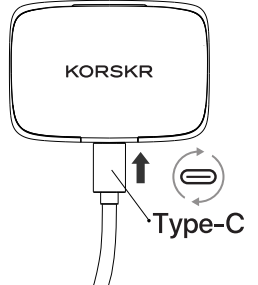
When the number shown in the digital display is close to 0%, please use the USB Type-C cable to charge it.
Troubleshooting Guide for korskr I21 Sport Wireless Earbuds
The earbuds could not connect to the device.
- Make sure your device supports Bluetooth. Delete paired records on all your devices and then try to connect to the device.
- If it still doesn't work, please try connecting to other devices to check if it works normally.
These earbuds didn't work.
- Make sure the earbuds are correctly placed in the case.
- Check the remaining power of the charging case.
- Clean the charging contacts with a cotton swab to check if the green lights on the earbuds blink or not.
- Keep the touch sensor pressed for 5s, then put the earbuds back in the case to check if they blink or not.
The case could not be charged.
Reconnect both ends of the USB-C cable firmly. Tt not, please charge with different cables to check if it works normally. When the charging cable is plugged in, check if the digit on the digital display flashes or not.
The earbuds could not be charged.
Please check if the charging case is undercharged. If yes, please try to clean the charging contacts and charging pins. Not, please make it fully charged for a better experience.
The earbuds have no sound.
- Clean the charging contacts to check if they work fine or not.
- Pairing unsuccessfully between both earbuds. Please reset these earbuds. Both earbuds should be taken out of the case to make sure they pair with each other before they connect to your device.
How to reset these earbuds?
Put them into the charging case and close the lid. Delete paired records on all your devices. Take the earbuds out of the case, and they will pair with each other with a voice prompt "TWS Connected... thennhenyour onn Bluetooth on your device, search for "i21," and select it to connect to your device.
How to connect to another device?
- Operating principle: After the first connection, these earbuds will automatically connect to the last paired device when rebooted.
- If you want to connect to the second device, please make sure you've turned off Bluetooth on the first device. So that the earbuds can connect to another device successfully.
TKorskr I21 earbuds come with a standard manufacturer's warranty and customer support accessible via the official KORSKR website or through the seller platform. Retain your purchase receipt for warranty claims and contact support for technical assistance.
What to do if one side of the earbuds does not pair?
If one earbud is not working, it's probably that both earbuds don't pair with each other successfully. Please put them back into the charging case and take both earbuds out at the same time. There will be a voice prompt "TWS Connected". They will pair automatically. Then turn on the "Bluetooth" switch for connection.
Short communication distance, sound interruption, distortion,, or noise.
Solutions:
- Check if the surrounding radio waves and electromagnetic waves interfere with each other. Please check by turning off the power of wireless devices, microwave ovens, etc.
- Shielding check between the machine and the other party's Bluetooth device (human body, metal, wall, bag, etc.).
- In the case of streaming media such as music distribution services, cloud playback, radio, etc., due to the communication speed you use, there may be sound interruption, distortion,, and noise.
- For smartphones, etc., please also check the following: In the power saving mode, the radio wave may be set to be weak. Please turn off the power saving function to check.
- When other applications are running, when operating data, during communication, when Sound interruptionsdistortionson,, and noise may occur during terrestrial sync.
WARRANTY
If there is any issue with the product, please feel free to contact us by email at support@korskr.com, and you may also reach out to us via Amazon Message. We'll try our best to give you a satisfactory answer.
- Customer Service Team: support@korskr.com
- Website: www.korskr.com
Pros and Cons Korskrskr I21 Sport Wireless Earbuds
- Pros:
- Excellent battery life with up to 42 hours total playtime
- High-fidelity sound with punchy bass and clear treble
- IPX6 waterproof rating is ng ideal for sports and outdoor use
- Fast USB-C charging and an LED battery display on the case
- Stable Bluetooth 5.3 connection with low latency
- Comfortable, secure sport-fit with adjustable earhooks
- Smart touch controls for easy operation
- Cons:
- Occasional touch button sensitivity issues are reported by some users
- No active noise cancellation feature
- Sound isolation may be moderate due to the open sport design
- Warranty period is shorter compared to premium brands
Overall, TK I21 provides exceptional value for money, especially for users prioritizing battery life and waterproofing during physical activities. It competes well against other budget wireless earbuds that lack either durability or long battery performance.
Customer Reviews and Feedback on korskr I21 Sport Wireless Earbuds
With a strong user rating averaging around 4.8 out of 5 stars from over 1,000 reviews, customers praise tKorskrskr I21 Sport Wireless Earbuds for their clear sound quality, comfortable fit, and impressive battery longevity. Many users highlight the earbuds’ secure fit during intense workouts and the convenience of the fast-charging case.
Common positive comments mention the crisp call clarity and responsive touch controls, enhancing hands-free usability. Some users note occasional connectivity drops or touch sensitivity quirks, but these are typically addressed by firmware updates or simple resets.
Most reviewers recommend the earbuds as a budget-friendly alternative for sport-focused wireless audio, emphasizing their durability and value. Prospective buyers are advised to select appropriate ear tip sizes for optimal comfort and sound isolation.
Faqs
How do I set up my korskr I21 Sport Wireless Earbuds for the first time?
What can I do if my korskr I21 Sport Wireless Earbuds are not pairing with my smartphone?
What are the main features of korskr I21 Sport Wireless Earbuds that enhance sports performance?
Are korskr I21 Sport Wireless Earbuds compatible with both iOS and Android devices?
How can I optimize the battery life of my korskr I21 Sport Wireless Earbuds during daily use?
What should I do if the touch controls on my korskr I21 Sport Wireless Earbuds are unresponsive?
How do I properly clean and maintain my korskr I21 Sport Wireless Earbuds to ensure longevity?
Can I use only one earbud of the korskr I21 Sport Wireless Earbuds for calls and music playback?
Leave a Comment