
Specs & Features: Lennox S40 Smart Thermostat User Manual
Content
Lennox S40 Smart Thermostat: Complete Product Manual and Buyer Guide
Introduction
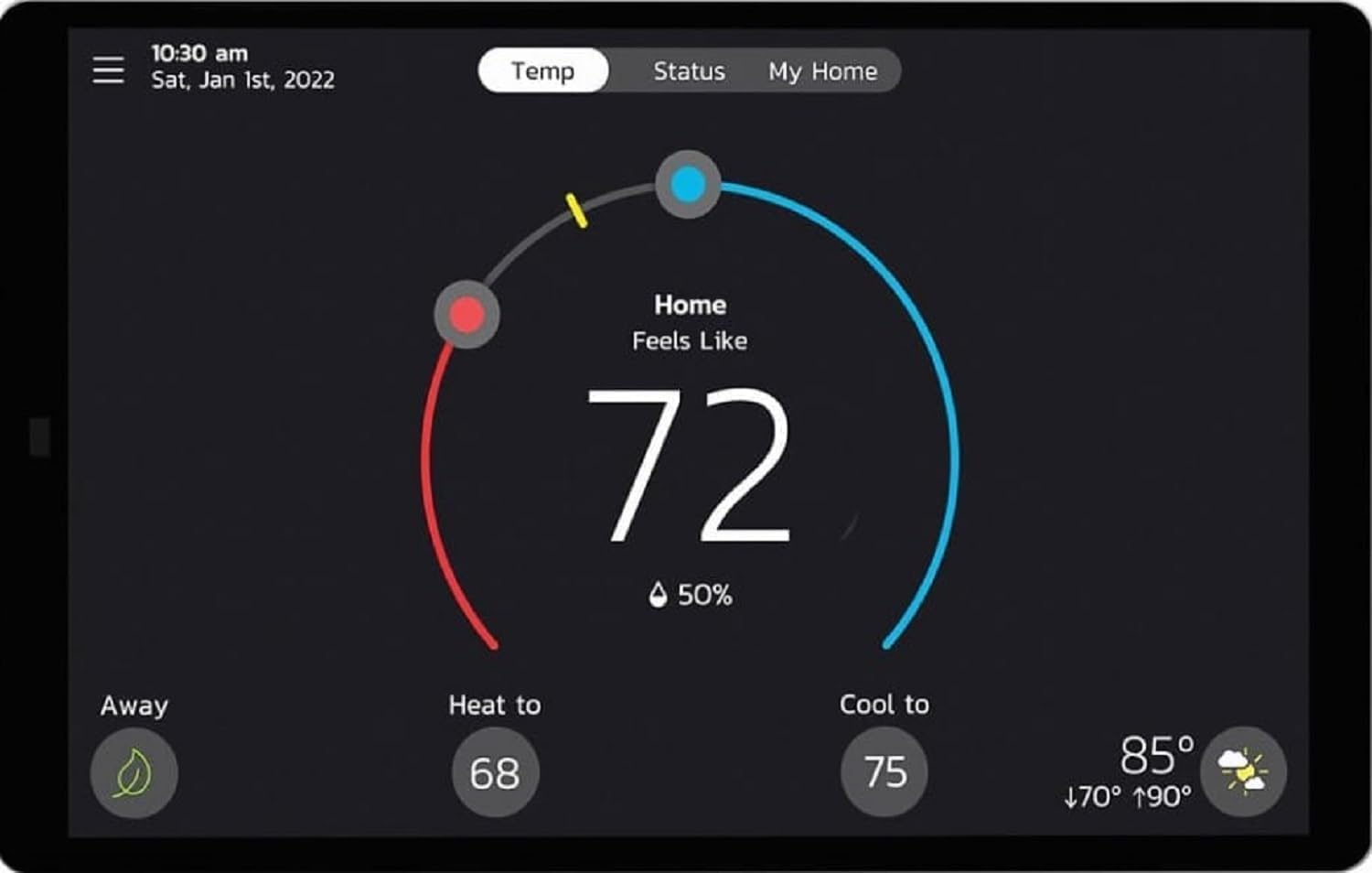
The Lennox S40 Smart Thermostat is a premium touchscreen thermostat designed for homeowners who want advanced climate control, system automation, and a polished smart-home experience. Built to work especially well with Lennox communicating HVAC systems, it helps manage heating, cooling, humidity, airflow, and indoor comfort from one central interface. For users with compatible equipment, the S40 can automatically configure system settings, simplify scheduling, and provide remote access through Wi-Fi-based control. Its large color touchscreen and modern interface make it easier to monitor comfort conditions, adjust settings, and review system alerts at a glance.
This smart thermostat is ideal for households with multi-stage HVAC systems, heat pumps, zoned comfort setups, and homeowners who value detailed diagnostics. The Lennox S40 Smart Thermostat is often chosen for upscale residential installations where performance, efficiency, and integration matter more than basic temperature control. It supports advanced comfort features such as smart scheduling, remote monitoring, and compatibility with add-on system accessories like room sensors and air quality monitors. Estimated pricing typically falls in the premium range, with many retail listings placing it around the several-hundred-dollar mark and some offerings reaching roughly $700 or more depending on package and installer markup. Availability is usually strongest through Lennox dealers, HVAC distributors, and selected online retailers.
For buyers comparing the Lennox S40 Smart Thermostat with mainstream alternatives like Nest or Ecobee, the key differentiator is deeper integration with Lennox equipment and a stronger focus on professional HVAC control. It is best suited for users who want a thermostat that behaves like a full system command center rather than a basic smart home accessory.
Specifications and Key Features
- Touchscreen smart thermostat with built-in Wi-Fi connectivity for remote control and monitoring.
- Designed for Lennox communicating HVAC systems and compatible with many 24VAC furnaces, air conditioners, air handlers, and heat pumps when paired with the proper equipment interface module.
- Supports advanced system configurations, including up to 3 heat and 2 cool stages in many setups.
- Works with smart accessories such as room sensors, wireless extenders, and air quality monitoring devices.
- Large high-resolution color display for easier navigation, scheduling, and alert viewing.
- Provides comfort automation features such as humidity management, weather-aware operation, and adaptive system control.
- Residential warranty coverage is commonly listed as a 10-year limited warranty.
- Physical design is wall-mounted and intended for modern residential HVAC installations.
Compared with budget smart thermostats, the Lennox S40 Smart Thermostat is more specialized and more powerful in Lennox ecosystems. Compared with a Nest or Ecobee, it offers more native equipment coordination for Lennox communicating systems, but it may be less attractive for mixed-brand smart homes. In practical use, it is strongest in homes where precise HVAC integration and advanced system diagnostics are top priorities.
Troubleshooting Guide for Lennox S40 Smart Thermostat
Common issues with the Lennox S40 Smart Thermostat usually involve power, wiring, Wi-Fi, or equipment communication. If the screen is blank, check the furnace or air handler breaker, verify power at the HVAC system, and confirm the thermostat has proper 24VAC supply. If Wi-Fi drops, reconnect the thermostat through the network settings and confirm the router is operating on a supported band and distance is adequate. If the thermostat reports a missing or unknown device, run the HVAC equipment reset and allow the system to rediscover connected components.
- Low voltage or brownout: restore stable line power and inspect the HVAC power supply.
- Reversed power and neutral lines: correct wiring at the equipment connection.
- Missing device alert: reset HVAC equipment and reconfigure connected components.
- Grounding fault: verify earth ground and wiring integrity.
- Rollout switch or blower fault: shut down the system and have a technician inspect the furnace or blower assembly.
Preventive maintenance should include regular filter changes, annual HVAC servicing, and periodic checks of wiring, sensors, and network connectivity. Warranty coverage is commonly advertised as 10 years in residential use, and Lennox residential technical support is available by phone at 1-800-453-6669. For persistent error codes or safety-related furnace alerts, contact a licensed HVAC technician immediately.
Pros & Cons of the Lennox S40 Smart Thermostat
Pros
- Excellent integration with Lennox communicating HVAC systems for smoother automatic setup.
- Large touchscreen interface that is easier to read than many compact thermostats.
- Strong comfort control features, including humidity and advanced scheduling options.
- Remote access and smart alerts help users monitor the system from anywhere.
- Long residential warranty adds value for higher-end installations.
Cons
- Higher price than many mainstream smart thermostats, which can reduce value for simple HVAC systems.
- Best performance depends on compatible Lennox equipment, so it is not ideal for every home.
- Some users report installation complexity and recommend professional setup.
- Feature depth may feel unnecessary for buyers who only want basic temperature control.
For homeowners already invested in Lennox equipment, the Lennox S40 Smart Thermostat offers strong value because it unlocks deeper comfort control and better system coordination. For users comparing it with lower-cost alternatives, the main trade-off is price versus specialization. If the goal is premium HVAC management, it is a strong choice; if the goal is a simple app-controlled thermostat, a less expensive model may be more practical.
Customer Reviews and User Feedback
User feedback for the Lennox S40 Smart Thermostat is generally positive among homeowners with compatible systems, with many ratings falling in the 4-star to 5-star range. Customers often praise the responsive touchscreen, clean interface, and the convenience of remote access. Many reviews also highlight the thermostat’s ability to coordinate with Lennox equipment more intelligently than generic smart thermostats.
Common complaints include the higher upfront cost, occasional touch-screen wake sensitivity, and confusion around compatibility or warranty details when purchased through third parties. A frequent testimonial theme is that the S40 feels premium and feature-rich, but it is best appreciated by users with the right HVAC setup. Recommendation: buy it if you want advanced Lennox system control and are willing to pay for a premium thermostat; choose a simpler smart thermostat if you only need basic scheduling and app control.
Faqs
How do I set up the Lennox S40 Smart Thermostat for the first time?
What HVAC systems work with the Lennox S40 Smart Thermostat?
Why is my Lennox S40 Smart Thermostat not connecting to Wi‑Fi?
How do I restart the Lennox S40 Smart Thermostat if the screen goes black or becomes unresponsive?
What features make the Lennox S40 Smart Thermostat useful for daily comfort control?
How do I improve energy savings with the Lennox S40 Smart Thermostat?
Can I use accessories like room sensors or air quality devices with the Lennox S40 Smart Thermostat?
How should I maintain and clean the Lennox S40 Smart Thermostat?
More lennox manuals
Leave a Comment