
Setup: Letsfit E22 Smart Watch User Manual
Content
Letsfit E22 Smart Watch
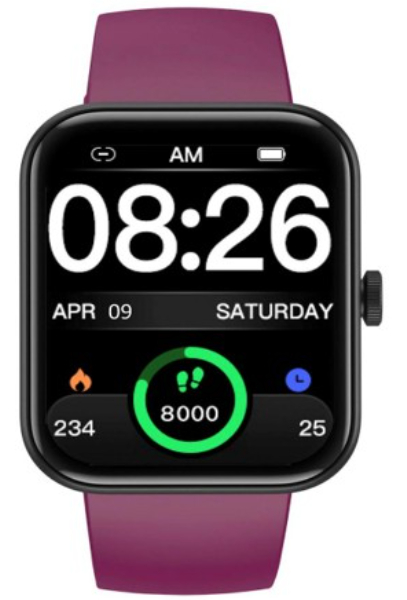
Introduction
The letsfit E22 Smart Watch is a versatile and affordable wearable device designed to enhance your daily health tracking and connectivity. Featuring a bright 1.83-inch TFT LCD touchscreen, the E22 offers seamless Bluetooth 5.3 connectivity to sync with your smartphone for notifications, music control, and call management. With its IP68 waterproof rating and robust 300mAh battery, this smartwatch provides reliable performance for 6 to 8 days on a single charge, making it ideal for active lifestyles and everyday use.
Key benefits of the letsfit E22 include real-time heart rate monitoring, blood oxygen level measurement, sleep tracking, and multiple sport modes to track exercise data accurately. The watch also supports customizable watch faces, weather updates via phone sync, and reminder alerts, making it a comprehensive companion for fitness enthusiasts, busy professionals, and tech-savvy users alike.
Priced in the range of approximately $30 to $40,, depending on the retailer and bundle options, the letsfit E22 Smart Watch is accessible to users looking for a budget-friendly yet feature-rich smartwatch. Its compatibility with both Android and iOS devices ensures broad usability, while its stylish design and extra band options cater to users seeking both function and fashion.
What’s in the Box

Basic Specifications
- Model No.: E22
- Sync: Bluetooth 5.3
- Screen: TFT LCD
- Battery Capacity: 290mAh
- Working Voltage: 5V-500mAh
- Working Temperature: -10℃ to 40℃
- Waterproof Rating: IP68
- Working Time: 6-8 days
Setting up Your Watch
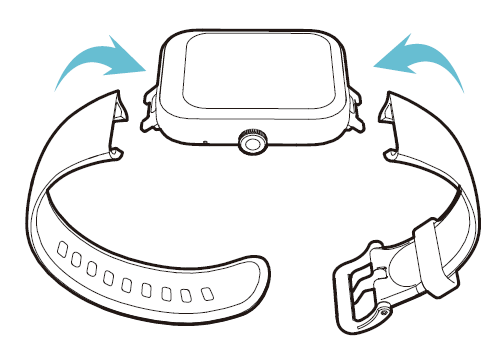
Assembling Your Watch
Push the bands in following the direction of the arrow.
Charging Your Watch
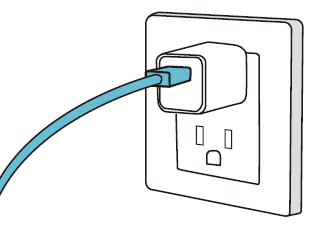
Please fully charge your watch before initial use.
Insert the USB plug of the charging cable into a USB charger.
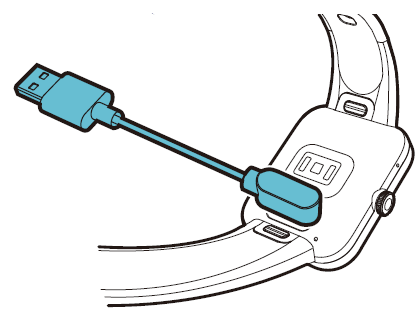
Attach the other end to the charging contacts on the back of the watch. Make sure the pins on the charging cable lock securely with the port. The connection is secure when the battery icon with a percentage charged appears on the screen.
Wearing Your Watch
All-day Wear and Exercise
For all-day wear when you’re not exercising, wear the device on your wrist horizontally, a finger’s width below your wrist bone and lying flat, the same way you would put on a watch.
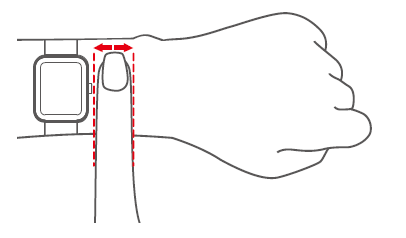
For optimized heart rate tracking, keep these tips in mind:
Experiment with wearing the watch higher on your wrist during exercise. Because the blood flow in your arm increases the farther up you go, moving the watch up a couple of inches can improve the heart rate signal. Also, many exercises, such as bike riding or weight lifting, require you to bend your wrist frequently, which is more likely to interfere with the heart rate signal if the watch is lower on your wrist.
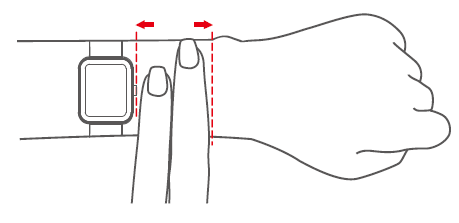
- Do not wear your watch too tightly. A tight band restricts blood flow, potentially affecting the heart rate signal. This being said, the watch should also be slightly tighter (snug but not constricting) during exercise than during all-day wear.
Function Introduction
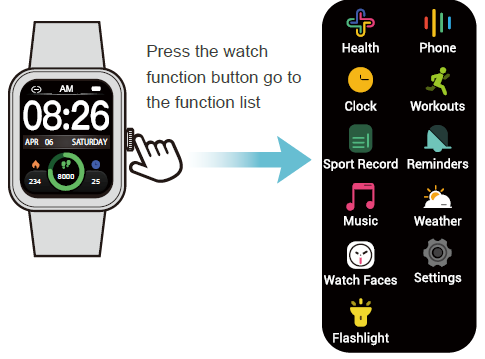
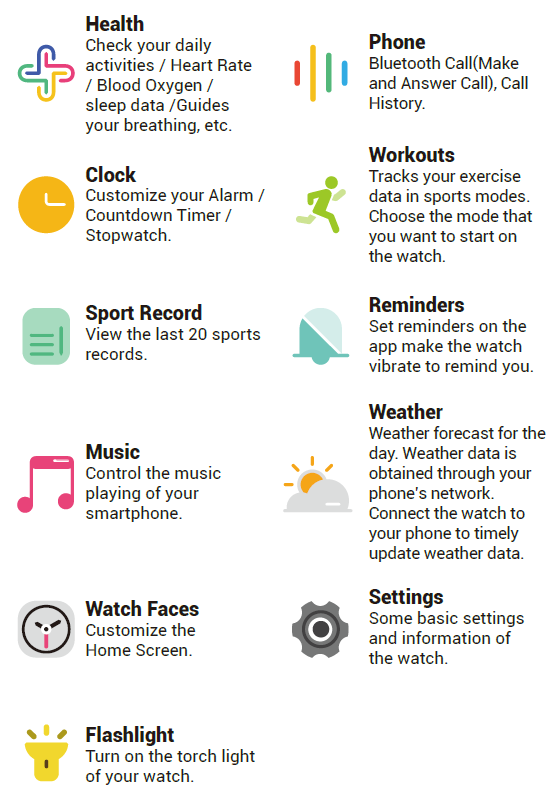
App Interfaces
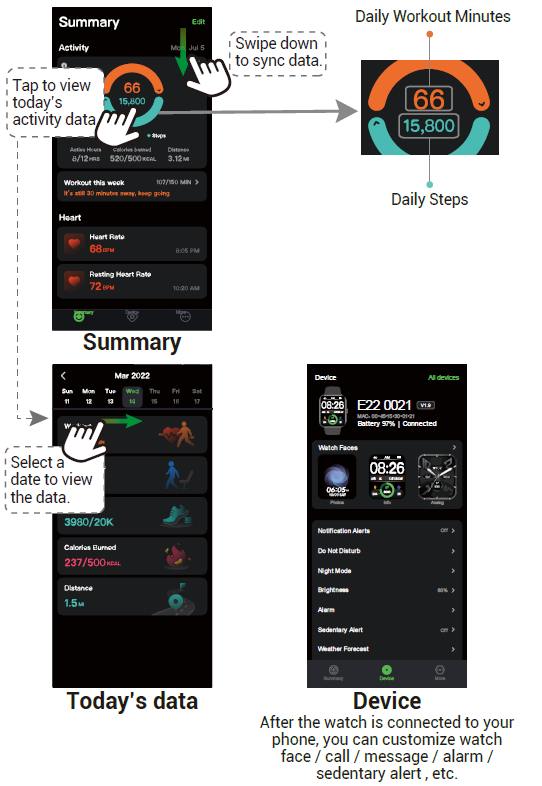
Important Safety Instructions
The device contains electrical equipment that may cause injury if not used properly. For example, prolonged contact may contribute to skin allergies for some users. To reduce irritation, please read the safety guidelines on the following pages to ensure proper use and care.
- Do not expose your device to liquid, moisture, humidity,, or rain while charging; do not charge your device when it is wet, as this may result in electrical shock and injury.
- Keep your device clean and dry. Do not use abrasive cleaners to clean your device.
- Consult your doctor before use if you have any preexisting conditions that might be affected by using this device.
- Do not wear it too tightly. If your device feels hot or warm, or if it causes any skin irritation or other discomfort, please discontinue using your device and consult your doctor.
- Do not expose your watch to extremely high or low temperatures.
- Do not leave your watch near open flames such as cooking stoves, candles, or fireplaces.
- This product is NOT a toy – never allow children or pets to play with this product. Always store the product out of the reach of children. The devices themselves or the many small parts they contain may cause choking if ingested.
- Never try to abuse, crush, open, repair, or disassemble this device. Doing so will void the warranty and can result in a safety hazard.
- If any parts of your product require replacement for any reason, including normal wear and tear or breakage, please contact us.
- Do not use your device in a sauna or steam room.
- Dispose of this device, the device’s battery, and its package in accordance with local regulations.
- Do not check any notifications, GPS, or any information on your device’s display while driving or in other situations where distractions could cause injury or hazard. Always be aware of your surroundings while exercising.
Battery Warnings
A lithium-ion battery is used in this device. If these guidelines are not followed, batteries may experience a shortened life span or may cause fire, chemical burn, electrolyte leakage, and/or injury.
- Do not disassemble, modify, remanufacture, puncture,, or damage the device or batteries.
- Do not remove or attempt to remove the non-user-replaceable battery.
- Do not expose the device or batteries to fire, explosion, or other hazards.
Health Warnings
- If you have a pacemaker or other internal electronic device, consult your physician before using a heart rate monitor.
- The optical wrist heart rate monitor emits green light and flashes occasionally. Consult your physician if you have epilepsy or are sensitive to flashing lights.
- Always consult your physician before beginning or modifying any exercise program.
- The device, accessories, heart rate monitor, blood oxygen level measurement,,t and related data are intended to be used only for general fitness and wellness purposes, not for medical purposes, and are not intended to diagnose, monitor, treat, cure, or prevent any disease or condition.
- The heart rate and blood oxygen level readings are for reference only, and no responsibility is assumed for the consequences of any false readings.
- While the optical wrist heart rate monitor technology typically provides the best estimate of a user's heart rate, there are inherent limitations with the technology that may cause some of the heart rate readings to be inaccurate under certain circumstances, including the user's physical characteristics, fit of the device, and type and intensity of activity.
- The smart watch relies on sensors that track your movements and other metrics. The data and information provided by these devices are intended to be a close estimation of your activity and metrics tracked, but may not be completely accurate, including step, sleep, distance, heart rate, and calorie data and blood oxygen levels.
- If you have eczema, allergies,, or asthma, you may be more likely to experience skin irritation or allergies from a wearable device.
- Whether you have the conditions above or not, if you start to experience any discomfort or skin irritation on your wrist, remove your device. If symptoms persist longer than 2-3 days after not using your device, contact your doctor.
- If you sweat for more than two hours while wearing your watch, be sure to clean and dry your band and your wrist to avoid skin irritation.
- Prolonged rubbing and pressure may irritate the skin, so give your wrist a break by removing the band for an hour after extended wear.
Maintenance
- Regularly clean your wrist and the smart watch, especially after sweating during exercise or being exposed to substances such as soap or detergent, which may adhere to the internal side of the watch.
- Do not wash the watch with household cleanser. Please use soapless detergent, rinse thoroughly,, and wipe with a soft towel or napkin.
- While the watch is water-resistant, wearing a wet band is not good for your skin.
- If your bands get wet—for example, after sweating or showering—clean and dry them thoroughly before putting them back on your wrist.
- Be sure your skin is dry before you put your bands back on.
- Do not bring your device into contact with any sharp objects, as this could cause scratches and other damage.
- For light-colored arm bands, minimize direct contact with dark-colored clothing, as color transfer can occur.
Troubleshooting Common Issues with the letsfit E22 Smart Watch
If you experience common problems such as syncing failures, inaccurate heart rate readings, or battery drain, several solutions can help restore optimal performance. Ensure your watch firmware and the Fit app are updated to the latest versions. For syncing issues, restart both your phone and watch,, and verify Bluetooth is enabled and within range. Wearing the watch slightly higher on the wrist can improve sensor accuracy during exercise.
Error codes are rare, but if the watch fails to respond or displays unusual icons, try a soft reset by holding the power button until the device restarts. For persistent issues, a factory reset via the settings menu can resolve software glitches—remember to back up your data first.
Preventive measures include avoiding exposure to extreme temperatures beyond -10℃ to 40℃, keeping the watch clean and dry despite its IP68 rating, and charging with the supplied cable only. The letsfit E22 comes with a standard manufacturer warranty covering defects; users can contact official support via the letsfit website or email wholesale@letsfit.com for assistance.
Warranty
We strive to build our products with the highest attention to detail and craftsmanship. However, sometimes there are occurrences of a defect, so we are happy to offer a ONE-year hassle-free warranty on all our devices as we continue to make amazing products. Please contact us if you have any questions about our devices.
Pros & Cons of the letsfit E22 Smart Watch
- Pros:
- Affordable price with extensive health tracking,,s including heart rate, SpO2, and sleep monitoring
- IP68 waterproof rating suitable for everyday wear and exercise in various conditions
- Long battery life o6-8 days,s reducing frequent charging interruptions
- Bluetooth 5.3 ensures s a stable connection for notifications, call handling, and music control
- Customizable watch faces and a user-friendly interface enhance personalization
- Cons:
- Display uses TFT LCD, which is less vibrant compared to AMOLED screens in higher-end models.ls
- Plastic build may feel less premium compared to metal or glass-bodied alternatives. ves
- Limited third-party app support—primarily functions through the Fit app.
- Some users report occasional heart rate sensor inaccuracies during vigorous activities.
Customer Reviews and Feedback on the letsfit E22 Smart Watch
Users generally praise the letsfit E22 Smart Watch for its excellent value for money and comprehensive fitness tracking capabilities. Many highlight the convenience of controlling smartphone music and receiving notifications directly from the wrist as major perks. The long battery life and waterproof design are frequently mentioned as practical advantages for active and outdoor users.
However, some common complaints involve occasional syncing delays, less responsive touchscreen sensitivity, and the plastic build feeling less durable. Star ratings hover around 4 out of 5, reflecting overall satisfaction but noting room for improvement,t particularly in sensor precision and display quality. Most reviewers recommend the letsfit E22 for casual fitness tracking and budget-conscious buyers looking for a reliable smartwatch option.
Faqs
How do I set up my letsfit E22 Smart Watch for the first time?
What should I do if my letsfit E22 Smart Watch is not tracking heart rate accurately?
Can I use letsfit E22 Smart Watch with any smartphone?
How often should I maintain my letsfit E22 Smart Watch?
What are the key features that make letsfit E22 Smart Watch different?
How do I control music playback on my phone using letsfit E22 Smart Watch?
Why is my letsfit E22 Smart Watch not connecting to my phone?
How do I optimize the battery life of my letsfit E22 Smart Watch?
Tags
Leave a Comment