
How to Use: Lg ProBeam DLP Projector BF50NST GRF510N BF60PST User Manual
Content
LG ProBeam DLP Projector BF50NST GRF510N BF60PST: Overview, Features, and Buying Guide
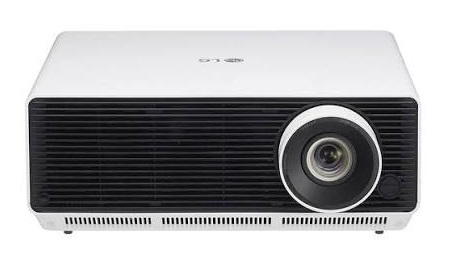
The LG ProBeam DLP Projector BF50NST GRF510N BF60PST is a professional-grade laser projector designed for business presentations, classrooms, conference rooms, and premium home entertainment setups. Built around a WUXGA 1920 x 1200 DLP engine, it delivers sharp detail, flexible installation, and bright, reliable performance for medium to large spaces. The BF50NST/GRF510N model is rated at up to 5,000 ANSI lumens, while the BF60PST pushes brightness to about 6,000 ANSI lumens, making the series well suited for rooms with ambient light.
One of the biggest advantages of the LG ProBeam DLP Projector BF50NST GRF510N BF60PST is its long-life laser light source, which reduces maintenance compared with lamp-based projectors. It also includes image adjustment features such as lens shift, zoom, and multiple aspect ratio modes, giving installers more flexibility when positioning the projector. With support for large screen sizes up to 300 inches, these models are ideal for boardrooms, lecture halls, digital signage, and immersive media displays.
Typical pricing varies by region and seller, but the BF50NST often appears in the mid-range premium projector segment, while the BF60PST generally costs more due to higher brightness and enterprise-focused positioning. Availability is strongest through LG business channels and authorized retailers, with some units also appearing on third-party marketplaces. For buyers comparing bright laser DLP projectors, this model family stands out for image clarity, installation flexibility, and strong value for long-term use.
Key Specifications of the LG ProBeam DLP Projector BF50NST GRF510N BF60PST
- Native resolution: WUXGA 1920 x 1200 for detailed presentations and widescreen content.
- Brightness: approximately 5,000 ANSI lumens for BF50NST/GRF510N and up to 6,000 ANSI lumens for BF60PST.
- Light source: laser phosphor design for longer life and lower maintenance.
- Screen size support: roughly 40 to 300 inches depending on throw distance and setup.
- Aspect ratio options: 16:10 native, with support for multiple display modes for different content types.
- Contrast ratio: rated up to 3,000,000:1 for stronger dark-to-light separation.
- Power consumption: about 380W for BF50NST/GRF510N and 440W for BF60PST.
- Audio: built-in 5W + 5W speakers for basic room sound.
- Connectivity: HDMI, USB, LAN, RS-232, audio out, and HDBaseT on supported configurations.
- Installation flexibility: horizontal and vertical lens shift plus 1.6x zoom on many configurations.
- Comparison note: compared with standard lamp projectors, the BF series offers better longevity and lower upkeep; compared with compact portable projectors, it delivers higher brightness and more robust installation features.
Detailed Product Description and Real-World Performance
The LG ProBeam DLP Projector BF50NST GRF510N BF60PST uses a laser-based light engine and DLP imaging to produce bright, crisp visuals with stable color performance. In everyday use, that combination makes it suitable for business slides, spreadsheets, video conferencing, training materials, and large-screen media playback. The WUXGA resolution is especially useful for text-heavy content, where fine details remain easy to read even at larger screen sizes.
The build is designed for stationary installation, with a solid chassis and a footprint appropriate for conference rooms and classrooms. The housing dimensions are compact for a high-brightness laser projector, and the overall weight supports ceiling mounts or shelf placement. The physical design emphasizes durability rather than portability, which is a good match for fixed-use environments.
Users typically appreciate the projector’s bright output, flexible image alignment, and low-maintenance laser system. In real-world applications, it performs well in meeting rooms with partial lighting, training spaces that need reliable daily use, and large home theater setups where brightness matters more than ultra-compact size. The LG ProBeam DLP Projector BF50NST GRF510N BF60PST is best understood as a professional display tool built for consistent visibility and long service life.
Setup Guide for LG ProBeam DLP Projector BF50NST GRF510N BF60PST
- Place the projector on a stable surface or mount it securely on the ceiling, making sure airflow vents are unobstructed.
- Connect the power cable and allow the projector to remain in a well-ventilated area before first use.
- Attach your video source through HDMI, USB, LAN, or RS-232 depending on your installation needs.
- Use lens shift, zoom, and keystone adjustments to align the image with the screen before finalizing the mount position.
- Select the correct aspect ratio and picture mode for your content, such as presentation mode for slides or cinema-style settings for video.
- Pair wireless or network functions if your configuration supports them, then test playback from a laptop or media device.
- Run a short test projection to confirm focus, brightness, and image geometry.
Safety precautions are important during installation. Avoid looking directly into the lens, do not block ventilation openings, and let the unit cool before moving it. If the projector shows no image, first check input selection, cable seating, and source output settings. For best results, use certified cables and keep the projector away from heat, dust, and moisture.
Troubleshooting Common Issues and Support Tips
- No image on screen: Check the selected input, verify HDMI or other source connections, and confirm the external device is outputting video.
- Blurry image: Recheck focus, throw distance, and lens alignment; make sure the projector is not angled incorrectly.
- Image too dim: Confirm the correct picture mode, reduce ambient light, and ensure the laser brightness setting is not limited.
- Overheating or fan noise: Clean vents, improve ventilation, and remove dust buildup around the projector.
- Audio problems: Verify speaker volume, external audio output selection, and cable connections.
- Network or control issues: Restart the projector, check IP settings, and confirm LAN or RS-232 configuration.
To prevent repeated issues, keep firmware updated, use the projector in a temperature-controlled room, and avoid power interruptions. Warranty coverage and service availability depend on the region and seller, so buyers should keep purchase records and serial details ready. For help, use LG’s official business support channels or an authorized service provider in your market.
Pros and Cons of the LG ProBeam DLP Projector BF50NST GRF510N BF60PST
Pros
- Bright laser output that handles rooms with ambient light well.
- WUXGA resolution gives clear text and detailed visuals.
- Long-life light source reduces maintenance costs over time.
- Flexible installation with lens shift and zoom support.
- Built-in speakers and business connectivity improve practicality.
- Strong value for schools, offices, and fixed installations.
Cons
- Higher cost than entry-level lamp projectors.
- Less portable than compact consumer models.
- Built-in audio is useful for basic use, but not ideal for larger rooms.
- BF60PST is more expensive than BF50NST, which may push budget buyers toward alternatives.
Compared with cheaper lamp-based projectors, this model family offers better longevity and brightness consistency. Compared with smaller portable laser projectors, it is more installation-focused and less travel-friendly. For buyers who need reliable performance and a professional image, the value for money is strong.
Customer Reviews and User Feedback
Overall user sentiment for the LG ProBeam DLP Projector BF50NST GRF510N BF60PST is generally positive, with many reviewers praising brightness, clarity, and easy-read presentation quality. A common star rating pattern is around 4 to 4.5 out of 5 stars, especially from business and education buyers who use the projector daily.
Users frequently highlight the sharp WUXGA image, dependable laser performance, and flexible installation as standout strengths. One common testimonial style comment is: “The projector is bright enough for our meeting room even with the lights on.” Another recurring praise is that text remains crisp during slide presentations and spreadsheets.
Common complaints include the premium price, the size compared with portable projectors, and the desire for stronger built-in audio in larger spaces. Most buyers who need a fixed, bright, professional projector still recommend it, especially when image quality and low maintenance matter more than portability.
Frequently Asked Questions About LG ProBeam DLP Projector BF50NST GRF510N BF60PST
Is the LG ProBeam DLP Projector BF50NST GRF510N BF60PST good for business use?
Yes. It is built for meeting rooms, presentations, training spaces, and other fixed-installation environments.
Does it work well in bright rooms?
Yes. The high brightness output makes it suitable for rooms with moderate ambient light.
Which is better, BF50NST or BF60PST?
BF60PST is the brighter option, while BF50NST usually offers better value for buyers who do not need maximum brightness.
Is it suitable for home theater?
Yes, especially in dedicated rooms, but its strengths are strongest in business and large-screen viewing setups.
Faqs
How do I set up lg ProBeam DLP Projector BF50NST GRF510N BF60PST for the first time?
Why is my lg ProBeam DLP Projector BF50NST GRF510N BF60PST showing a dim or washed-out image?
Can lg ProBeam DLP Projector BF50NST GRF510N BF60PST connect to laptops, streaming devices, and gaming consoles?
What should I do if lg ProBeam DLP Projector BF50NST GRF510N BF60PST will not turn on?
How do I get the sharpest picture from lg ProBeam DLP Projector BF50NST GRF510N BF60PST?
Does lg ProBeam DLP Projector BF50NST GRF510N BF60PST support wireless screen sharing and casting?
How often should I clean and maintain lg ProBeam DLP Projector BF50NST GRF510N BF60PST?
What picture settings are best for presentations on lg ProBeam DLP Projector BF50NST GRF510N BF60PST?
More lg manuals
Leave a Comment