
How to Use: Life360 Tile Bluetooth Tracker User Manual
Content
Life360 Tile Bluetooth Tracker
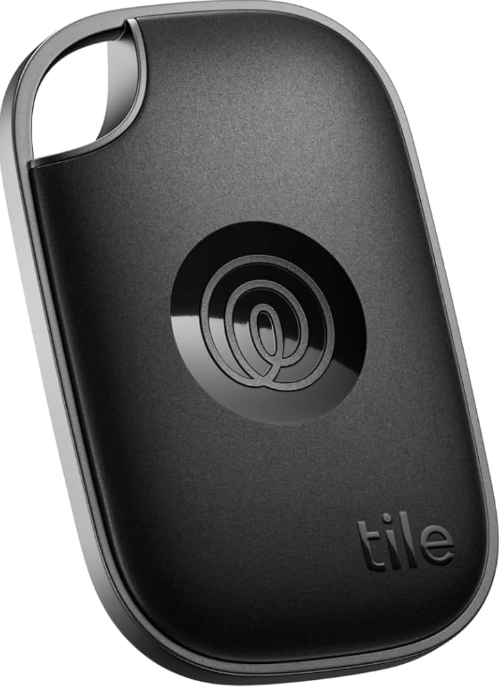
Introduction
Welcome to the world of smart tracking with the Life360 Tile Bluetooth Tracker. Designed for families, frequent travelers, and anyone who wants to keep tabs on their valuables, the Life360 Tile Bluetooth Tracker is a sleek, reliable device that connects seamlessly with both iOS and Android devices. This next-generation Bluetooth tracker, co-developed by Life360 and Tile, brings together the best of both worlds: Tile’s industry-leading Bluetooth tracking technology and Life360’s family-focused location-sharing platform.
The Life360 Tile Bluetooth Tracker stands out with its vibrant, candy-inspired colors and rounded, user-friendly design, making it not just a practical device but also a stylish, giftable accessory for daily life[4]. Key benefits include a loud ringer for easy item recovery, up to 350 feet of Bluetooth range (depending on the model), Community Find network, and the ability to double-press the tracker to ring your phone—even if it’s on silent[1]. You can discreetly activate an SOS alert, sending an immediate notification to your Life360 Circle in case of emergencies.
This tracker is perfect for busy parents, frequent travelers, students, and tech-savvy individuals who want to keep track of wallets, keys, luggage, backpacks, and more. The Life360 Tile Bluetooth Tracker is available in several models—Pro, Mate, Slim, and Sticker—each tailored for different use cases, from wallets to TV remotes. The estimated price range is $25–$35, aligning with other premium Bluetooth trackers, and the device is widely available online and at major electronics retailers.
With robust water resistance, replaceable batteries (on select models), and a community network of millions of users, the Life360 Tile Bluetooth Tracker is engineered for peace of mind in everyday life.
Specifications
- Models Available: Tile Pro, Tile Mate, Tile Slim, Tile Sticker—each optimized for different use cases (e.g., wallets, keys, luggage, remotes).
- Bluetooth Range: Up to 500 feet (Pro), 350 feet (Mate, Slim), 250 feet (Sticker).
- Ringer Volume: Up to 110 dB on the Pro model, ensuring you can hear your tracker even in noisy environments.
- Battery Life: 1-year replaceable (Pro), 3-year non-replaceable (Mate, Slim, Sticker).
- Water Resistance: IP68 rated, making it dustproof and waterproof for everyday use.
- Dimensions & Weight: Slim model: 53.9mm x 85.4mm x 2.5mm, 14g; Pro model: 34mm x 52.1mm x 7.5mm, 12g.
- Community Find: Leverages the Tile network to help locate lost items outside Bluetooth range.
- Phone Finder: Double-press your Tile to make your phone ring, even when silenced.
- SOS Alert: 2024 models can send discreet alerts to your Life360 Circle in emergencies.
- Compatibility: Works with iOS and Android devices via the Life360 app.
Comparison with Competitors: Unlike some competitors, the Life360 Tile Bluetooth Tracker does not use GPS for real-time location tracking—it relies on Bluetooth and the Tile network. This makes it ideal for finding items within your home or nearby, but not for tracking people or pets over long distances. Compared to Apple AirTag, Tile offers broader Android compatibility and a louder ringer, but lacks the ultra-wideband precision of the AirTag. For Android users, Tile’s Community Find network is a strong alternative to Apple’s Find My network.
Download the Tile app for iOS® and Android™

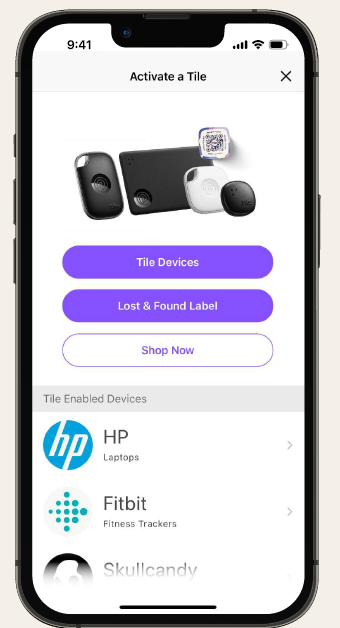
Next, tap "Tile Devices”. Android users may see slightly different screens
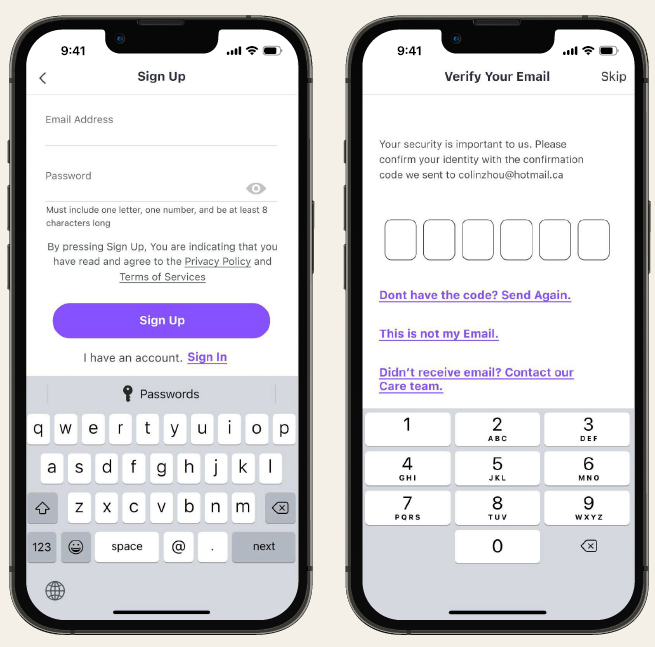
Create your account by filling out all your info, then verify your new account.
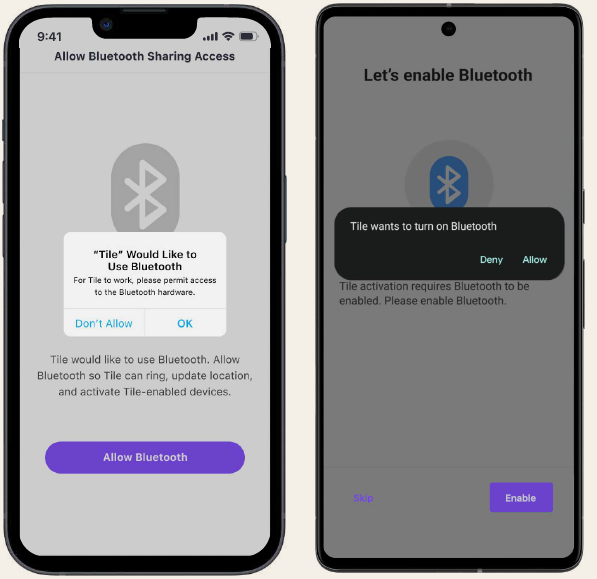
Bluetooth. Enabling your Tile will start the activation process for your Tile tracker, allowing you to ring your Tile when lost, and update its location.
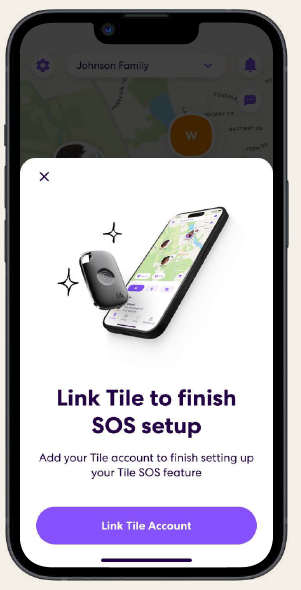
Your Tile is now active! Set up SOS alerts in the Life360 app for iOS® and Android™. Note: You will need to create a Life360 account to proceed with SOS setup.
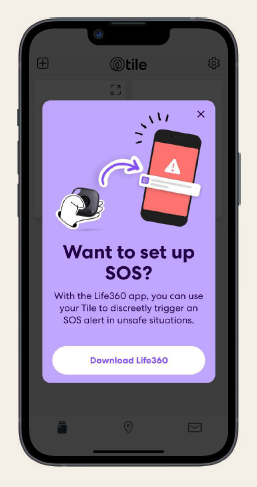
- Link your Tile account to set up SOS alerts.
Troubleshooting
Common Problems and Solutions:
- Device Not Connecting: Ensure Bluetooth is enabled on your phone, the Tile battery is charged, and the Life360 app is updated. Restart both devices if necessary.
- Tile Not Ringing: Check battery level and replace if needed. Confirm the Tile is within Bluetooth range and not obstructed by metal or thick walls.
- Last Location Not Updating: Ensure your phone has internet access and location services are enabled for the Life360 app.
- SOS Alert Not Working: Verify that your Tile model supports SOS (2024 models only) and that your Life360 Circle is properly set up.
Error Codes and Fixes: Most issues can be resolved via the Life360 support portal. If you encounter an error code in the app, refer to the official Life360 help center for model-specific guidance.
Preventive Measures: Regularly check your Tile’s battery status in the app. Keep firmware updated. Avoid exposing your Tile to extreme temperatures or submerging it beyond its IP68 rating.
Warranty and Support: Life360 Tile Bluetooth Trackers come with a standard one-year limited warranty. For support, visit the Life360 website or contact customer service via the app. Replacement options are available for defective units within the warranty period.
Contact Information: For help, use the in-app support feature or visit the official Life360 support website.
Pros & Cons
Advantages
- Loud Ringer: Easily locate misplaced items with a high-decibel alarm—up to 110 dB on the Pro model.
- Wide Compatibility: Works seamlessly with both iOS and Android devices, unlike some competitors, limited to a single ecosystem.
- Community Find Network: Tap into millions of Tile users to help locate lost items outside your immediate Bluetooth range.
- Sleek, Colorful Design: Candy-inspired aesthetics make the tracker a stylish and giftable accessory.
- Easy Setup: Customers praise the simple, quick setup process—just pair via Bluetooth and the Life360 app.
- Replaceable Battery (Pro Model): Save money and reduce waste with a user-replaceable battery.
- SOS Alert (2024 Models): Discreetly notify your Life360 Circle in emergencies.
Limitations
- No GPS Tracking: Relies on Bluetooth and the Tile network, so it’s not suitable for real-time, long-distance tracking of people or pets.
- Battery Life: Non-replaceable batteries in Mate, Slim, and Sticker models mean you’ll need to replace the entire device after 3 years.
- Community Network Size: The Tile network is smaller than Apple’s Find My network, potentially reducing the chances of recovering lost items in some areas.
- No Ultra-Wideband: Lacks the precision tracking offered by Apple AirTag’s UWB technology.
Value for Money
The Life360 Tile Bluetooth Tracker offers strong value for its price, especially for users who want a reliable, cross-platform tracker with a loud ringer and robust water resistance. While not as precise as some high-end competitors, it excels in ease of use, design, and everyday practicality.
Customer Reviews
Users consistently highlight the Life360 Tile Bluetooth Tracker’s easy setup and reliable performance for finding keys, wallets, and luggage. Many appreciate the loud ringer and the ability to ring their phone with a double-press, even when it’s silenced. The colorful, durable design is also frequently mentioned as a positive.
Some customers note that the Bluetooth range—while sufficient for most home and office scenarios—may not cover larger areas, and the tracker is not GPS-enabled, so it’s not ideal for tracking people or pets over long distances. Battery life on non-replaceable models is a minor concern for a few users.
Star ratings are generally high, with most users awarding 4 or 5 stars for ease of use, design, and functionality. For those seeking a simple, effective item tracker compatible with both major mobile platforms, the Life360 Tile Bluetooth Tracker is a top recommendation. If you need long-range, GPS-based tracking, consider alternatives, but for everyday peace of mind, this tracker delivers.
In summary, if you want a stylish, reliable, and user-friendly Bluetooth tracker for your valuables—and especially if you use both Android and iOS devices—the Life360 Tile Bluetooth Tracker is an excellent choice.
Faqs
How do I set up my life360 Tile Bluetooth Tracker for the first time?
What can I do if my life360 Tile Bluetooth Tracker is not connecting to my phone?
Can the life360 Tile Bluetooth Tracker help me locate my phone if it’s on silent mode?
Is the life360 Tile Bluetooth Tracker compatible with both iOS and Android devices?
How can I optimize the performance and range of my life360 Tile Bluetooth Tracker?
What are the main features of the life360 Tile Bluetooth Tracker that enhance personal safety?
How do I maintain and care for my life360 Tile Bluetooth Tracker to ensure long-term use?
What should I do if my life360 Tile Bluetooth Tracker’s battery dies, given it’s non-replaceable?
Tags
Leave a Comment