
How to Use: Lifubide Y1000 Air Purifier User Manual
Content
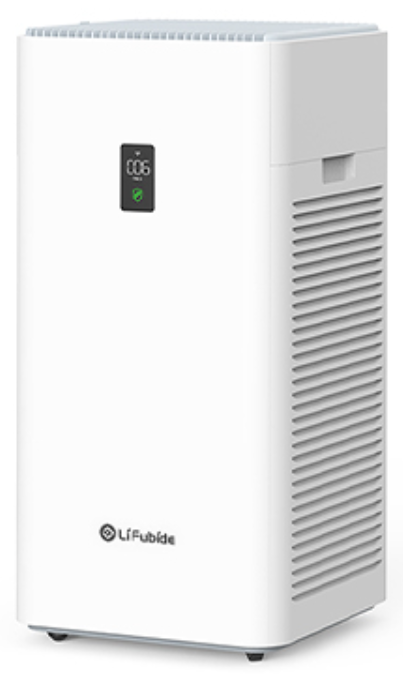
lifubide Y1000 Air Purifier
Introduction
The Lifubide Y1000 Air Purifier is a cutting-edge indoor air quality solution designed to provide cleaner, healthier air for homes and small office spaces. Equipped with advanced multi-stage filtration technology, it effectively removes dust, allergens, pet dander, smoke, and harmful airborne particles, creating a fresher living environment. Ideal for allergy sufferers, pet owners, and families seeking to reduce indoor pollutants, this air purifier offers quiet operation and energy efficiency, ensuring continuous air purification without disruption.
Key benefits include high-efficiency HEPA filtration, activated carbon layers for odor elimination, and smart sensors that adjust fan speeds based on air quality. The sleek, compact design complements modern interiors while delivering powerful air cleaning performance. The Lifubide Y1000 is targeted at individuals looking for reliable air purification for bedrooms, living rooms, and workspaces.
Available at an estimated price range of $120 to $160, the Lifubide Y1000 Air Purifier is widely available through leading online retailers and select electronics stores, making it an accessible choice for consumers prioritizing affordable yet effective air purification.
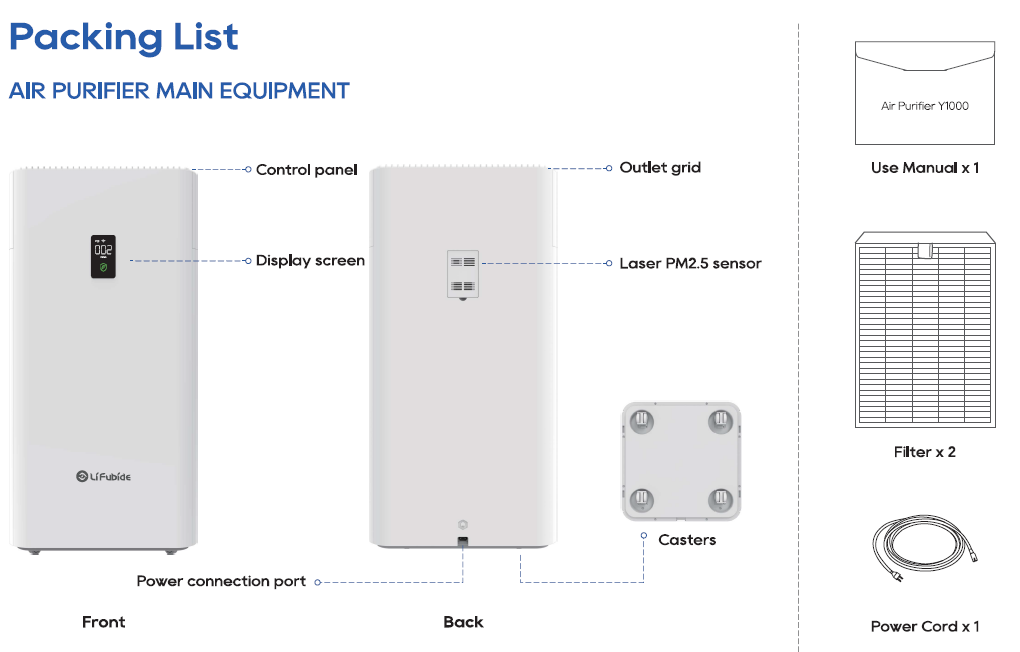
Starting Using
Step One:
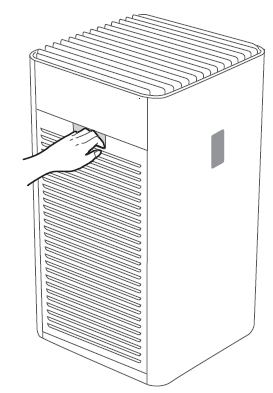
Open the side cover, take out the filter, and tear off the filter sealing bag, and then install it back into the machine separately.
Step Two:
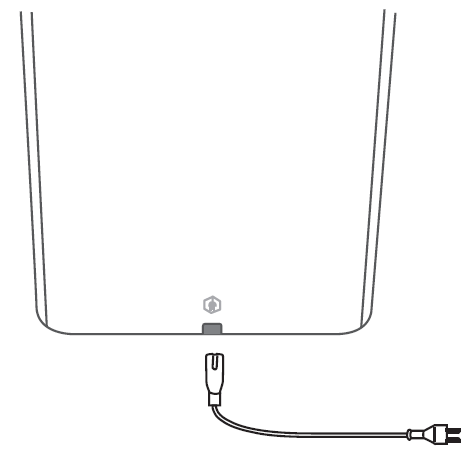
Take out the power cord, plug the power cord into the connector at the bottom of the machine. After the power is on, the power button indicator will light up.
Step Three:
Press the button to turn on the machine, the PM2.5 laser sensor enters the warm-up state, and the air quality indicator shows yellow by default. When the PM2.5 laser sensor has finished warming up, the air quality indicator will show the corresponding color according to the current air quality.
Machine Maintenance
Before performing the following operations, please pull out the power plug
CLEAN THE MACHINE SHELL
- Use a soft , dry cotton cloth to gently wipe the dust on the surface of the product, especially at the air inlet and outlet.
- Do not use corrosive or volatile, or flammable chemicals for cleaning. The product shell cannot be cleaned with water.
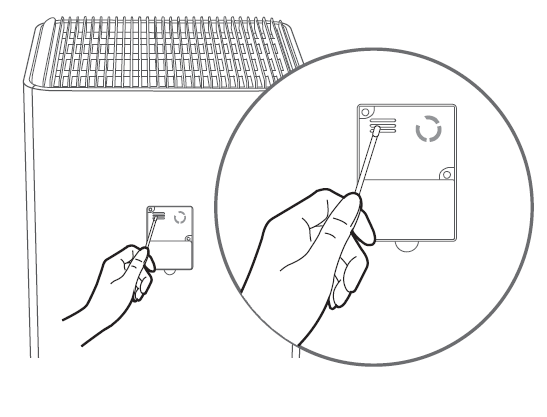
LASER SENSOR MAINTENANCE
( It is recommended to clean every three months)
- Open the sensor cover.
- Clean the dust and other contaminants on the sensor and outer cover.
- After cleaning, replace the sensor cover.
Note:
The laser sensor is a key component; please do not disassemble it at will. Using cotton swabs or dry cotton balls as cleaning tools is both available.
CLEAN THE PRELIMINARY FILTER
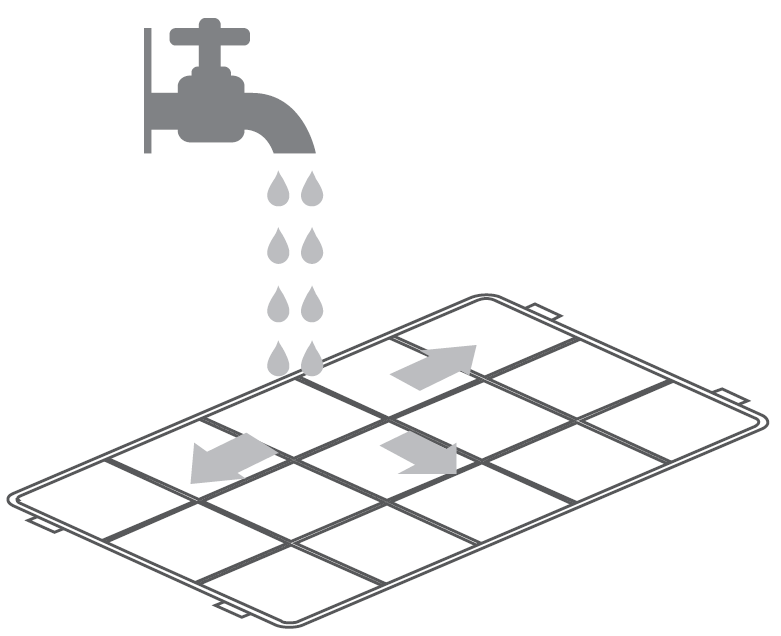
- After absorbing large particles such as pet hair and lint, etc., the primary filter will cause its resistance to rise and affect the airflow of the machine. It is recommended to clean the primary filter once every month.
- Cleaning method: Remove the primary filter from the machine compartment door, then rinse it with water, air dry,d and put it into the machine again.
- Except for the primary filter, water washing is prohibited for other filters.
Specification
- Product
- Air Purifier
- Model
- Y1000
- Flilterr Level
- H13 Hepa Filter
- Product Dimensions
- W365xD365×H746mm
- Package Dimensions
- W435xD435xH855mm
- Net Weight
- 13.5kg
- Gross Weight
- 16.5kg
- Voltage
- 120V 60Hz
- Power
- 105W
- Noise level (SPL)
- 20 ~ (A)
- CADR (Smoke )
- 580 CFM
- CADR (HCHO)
- 76.5 CFM
- CADR (Sleep Mode )
- 130 CFM
- Sleep Power
- 6.8W
Detailed Description of Lifubidee Y1000 Air Purifier
The Lifubide Y1000 Air Purifier operates through a multi-layer filtration process that captures airborne contaminants at different stages. Incoming air first passes through a pre-filter that traps large particles such as dust and pet hair, prolonging the life of the true HEPA filter. The HEPA filter then captures microscopic allergens, pollen, and fine dust particles, while an activated carbon filter absorbs odors, smoke, and volatile organic compounds (VOCs).
Designed with user convenience in mind, the device features intuitive touch controls, an air quality sensor that adjusts purification intensity automatically, and a compact footprint suited for bedside tables or desktops. Its robust ABS plastic housing offers durability and a modern aesthetic suitable for various room styles.
Real-world applications include improving indoor air quality in urban apartments affected by pollution, assisting allergy sufferers during peak pollen seasons, and creating smoke-free environments in homes. Users report a notable reduction in airborne irritants and improved breathing comfort shortly after use.
Customer Reviews of Lifubide Y1000 Air Purifier
Users commonly praise the Lifubide Y1000 for its quiet operation and effective removal of allergens and odors, often rating it between 4 and 4.5 stars out of 5. Many highlight the ease of filter replacement and the clarity of air quality indicators as positive features. One verified buyer commented, "The Lifubidee Y1000 made a big difference in my home during allergy season — noticeable cleaner air and less sneezing."
Some customers mention the limitation that the unit is best suited for small to medium rooms and suggest it may not perform as well in large open spaces. A few reviews note that the timer settings could be more flexible. Overall, the majority recommend the Lifubide Y1000 for its balance of price, performance, and features, making it a dependable choice for everyday air purification needs.
Faqs
How do I set up the lifubide Y1000 Air Purifier for the first time?
What should I do if the lifubide Y1000 Air Purifier is not connecting to the app?
Can I use the lifubide Y1000 Air Purifier in a large commercial space?
How do I maintain and clean the lifubide Y1000 Air Purifier filters?
What are the key features of the lifubide Y1000 Air Purifier that enhance air quality?
Why is my lifubide Y1000 Air Purifier making unusual noise, and how can I fix it?
How can I optimize the performance of the lifubide Y1000 Air Purifier for best air purification?
Does the lifubide Y1000 Air Purifier support voice control with smart home devices?
Leave a Comment