
How to Use: Litetronics LED Smart Light Panel PT-Series User Manual
Content
Litetronics LED Smart Light Panel PT-Series: Complete Product Manual and Buyer Guide
Introduction
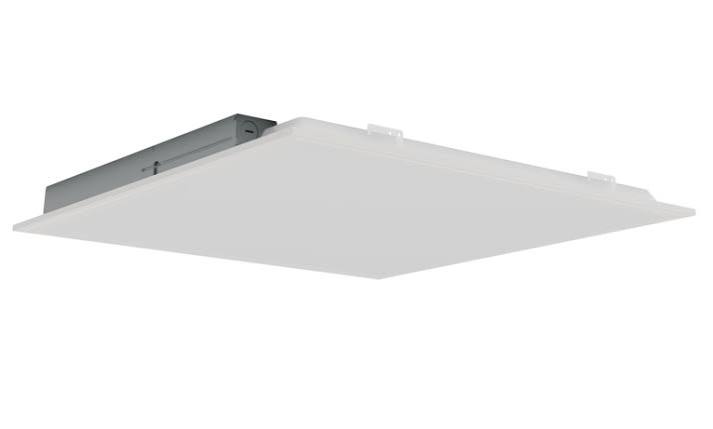
The Litetronics LED Smart Light Panel PT-Series is a versatile commercial-grade flat panel lighting solution designed for offices, schools, healthcare facilities, retail spaces, and other environments that need reliable, efficient, and attractive overhead illumination. Built around selectable CCT and tunable wattage technology, the PT-Series gives installers and building managers the flexibility to match light output and color temperature to the room’s purpose without replacing fixtures. This makes the Litetronics LED Smart Light Panel PT-Series a strong choice for renovation projects, new construction, and energy-saving retrofits.
One of the biggest advantages of the PT-Series is its balance of performance and simplicity. Users can choose from multiple sizes, typically 1x4, 2x2, and 2x4 formats, with selectable color temperatures such as 3500K, 4000K, and 5000K depending on the model. The panel series is also designed for high efficacy, long service life, and smooth dimming compatibility, making it suitable for task lighting, general ambient lighting, and productivity-focused spaces. Common use cases include conference rooms, classrooms, reception areas, and corridors where clean, uniform light is important.
Estimated pricing for the Litetronics LED Smart Light Panel PT-Series generally falls in the mid-range commercial LED category, with typical market pricing varying by size, configuration, and distributor. Buyers can usually expect approximate pricing from $60 to $140 per fixture, with availability through electrical supply houses, lighting distributors, and online commercial lighting retailers. For organizations comparing flat panels, the PT-Series stands out for its smart adjustability, easy installation, and strong value for money.
Specifications and Key Features of the PT-Series LED Smart Light Panel
- Fixture types: 1x4, 2x2, and 2x4 smart LED light panel options
- Selectable color temperature: Common configurations include 3500K, 4000K, and 5000K
- Tunable wattage: Model-dependent output settings for balancing brightness and energy use
- Input voltage: 120-277V, supporting a wide range of commercial installations
- Frequency: 50/60Hz
- Power factor: 0.95 or higher on many models
- Efficacy: Up to about 125 lumens per watt
- CRI: 80 for dependable color rendering in everyday use
- Lumen output: Up to 6,250 lumens on higher-output 2x4 configurations
- Mounting: Designed primarily for T-bar grid and drop ceiling applications
- Typical lifespan: Long-life LED construction for reduced maintenance
- Comparison: Compared with basic fixed-output flat panels, the PT-Series offers more flexibility; compared with premium tunable white panels, it delivers a more budget-friendly commercial lighting solution
In practical terms, this makes the PT-Series an efficient upgrade over older fluorescent troffers and a smart alternative to fixed-color LED panels when project requirements may change later.
Setup Guide: How to Install and Configure the Litetronics LED Smart Light Panel PT-Series
Before installation, turn off power at the breaker and verify that the circuit is de-energized. Confirm that the ceiling opening, grid size, and fixture dimensions match the selected model. Remove the existing troffer or panel if replacing an older light, then inspect the wiring compartment for damage or loose conductors.
To install the fixture, place the panel into the T-bar grid or use the appropriate mounting kit for surface or drywall applications if your model and project require it. Connect the line voltage, neutral, and ground according to the fixture label and local electrical codes. If the model includes selectable wattage or color temperature, set the switches before powering on the fixture for the first time. Choose the desired CCT based on the space: 3500K for warmer hospitality areas, 4000K for neutral office lighting, or 5000K for bright task-oriented rooms.
After installation, restore power and test the light output. If the fixture does not illuminate, recheck wiring polarity, switch settings, and breaker status. Avoid handling the panel with wet hands, and never operate it with damaged insulation or exposed conductors. For best results, use a qualified electrician for commercial installations and confirm compatibility with dimming controls or smart building systems before final commissioning.
Troubleshooting Common PT-Series Light Panel Problems
If the panel does not turn on, the most common causes are incorrect wiring, a tripped breaker, or a misconfigured wattage/CCT switch. Start by confirming incoming voltage, then inspect the connection points and verify the panel is seated correctly in the fixture housing. If the light flickers, check for incompatible dimmers, loose connections, or unstable line voltage.
- Problem: Light will not power on
Solution: Check breaker, wiring, ground, and fixture switch settings - Problem: Flickering or intermittent operation
Solution: Replace incompatible dimmer, tighten wiring, confirm proper voltage - Problem: Wrong brightness level
Solution: Adjust tunable wattage settings before startup - Problem: Color temperature does not match expectation
Solution: Recheck the CCT selector and restart after setting changes - Problem: Uneven light distribution
Solution: Ensure the panel is level and the ceiling grid is properly supported
There are typically no digital error codes on standard PT-Series panels, so troubleshooting is mostly based on visual symptoms and configuration checks. Preventive maintenance includes keeping fixtures clean, avoiding overloading circuits, and verifying that all electrical connections remain secure over time. Warranty coverage and support are generally handled through Litetronics customer service and the original distributor, so keep your purchase documentation, model number, and installation details available when requesting help.
For support, contact the Litetronics customer service department through the company’s published support channels or work with the distributor that supplied the fixture.
Pros and Cons of the Litetronics LED Smart Light Panel PT-Series
Pros
- Flexible lighting control: Selectable wattage and CCT let you customize output for different spaces
- Energy efficient: High efficacy helps reduce operating costs compared with fluorescent fixtures
- Commercial versatility: Works well in offices, schools, retail, and healthcare settings
- Easy retrofit potential: A practical upgrade for older troffer-based ceiling systems
- Good value: Offers strong features without the cost of more advanced premium smart panels
Cons
- Not a full smart-home product: “Smart” refers mainly to adjustable fixture settings, not app-based automation
- Installation still requires electrical knowledge: Best suited for professional or experienced installers
- CRI is functional rather than premium: CRI 80 is adequate for general use but not ideal for color-critical spaces
- Feature set may be basic for advanced users: Competing panels may offer networked controls or higher-end dimming options
Overall, the Litetronics LED Smart Light Panel PT-Series delivers strong performance for the price, especially when compared with standard fixed-output panels. Buyers seeking maximum flexibility without moving into expensive connected lighting systems will find it a practical and cost-effective choice.
Customer Reviews and User Feedback on the PT-Series LED Smart Light Panel
Customer feedback for the Litetronics LED Smart Light Panel PT-Series is generally positive, with many users rating it around 4.5 out of 5 stars for brightness, easy retrofit installation, and dependable output. Office managers often praise the clean appearance and even illumination, while contractors appreciate the selectable wattage and color temperature options that simplify jobsite customization.
Common compliments include lower energy consumption, consistent light quality, and a professional finish in drop-ceiling installations. Common complaints usually focus on the need to confirm switch settings before startup and the fact that installation can be challenging for users without electrical experience. A typical customer comment might be: “The panel installed cleanly, and the 4000K setting was perfect for our conference room.” Another might note: “Great light quality, but make sure you set the wattage selector correctly before mounting.”
For most commercial buyers, the PT-Series is a recommended purchase when the goal is efficient, adjustable, and durable ceiling lighting. It is especially well suited for offices, classrooms, and renovation projects where dependable performance matters more than advanced app-based controls.
Faqs
How do I set up litetronics LED Smart Light Panel PT-Series for the first time?
Why is my litetronics LED Smart Light Panel PT-Series not turning on after installation?
How do I connect litetronics LED Smart Light Panel PT-Series to a smart control system?
What should I do if litetronics LED Smart Light Panel PT-Series is flickering or dimming unevenly?
Is litetronics LED Smart Light Panel PT-Series compatible with standard ceiling grids and retrofit installations?
How can I get the best brightness and energy efficiency from litetronics LED Smart Light Panel PT-Series?
How do I troubleshoot app pairing problems with litetronics LED Smart Light Panel PT-Series?
What maintenance does litetronics LED Smart Light Panel PT-Series need to keep working well?
Leave a Comment