
How to Use: Loddery Smart Sports Watch ID217 User Manual
Content
Loddery Smart Sports Watch ID217
Introduction
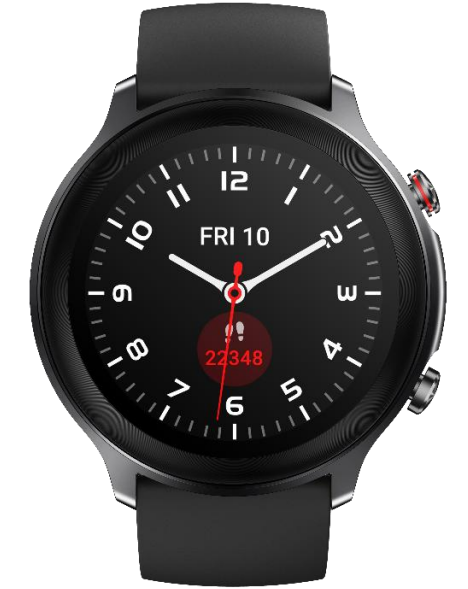
The loddery Smart Sports Watch ID217 is a cutting-edge wearable designed for fitness enthusiasts and everyday users seeking a versatile, stylish, and reliable companion for health monitoring and smart notifications. Combining sleek metal craftsmanship with advanced technology, this smartwatch integrates seamlessly with your smartphone to keep you connected while tracking key health metrics throughout your daily activities.
Its standout features include continuous heart rate and blood oxygen monitoring, 14 dedicated sport modes, and smart gesture controls, making it ideal for runners, cyclists, and gym-goers. The watch’s 1.28-inch full-color touchscreen offers intuitive navigation, and its rugged design includes 3ATM water resistance, allowing wearers to use it safely in the shower conditions or in light water exposure conditions.
Available at an estimated price range of $50 to $80, the ID217 offers excellent value compared to competitors with similar features. It supports notifications from popular apps like WhatsApp, Facebook, and Instagram, ensuring you never miss important messages during workouts or meetings. Perfect for tech-savvy users who want a reliable fitness tracker and smart assistant on the wrist, this smartwatch is widely available through online retailers and select electronics stores.
Specifications of the Loddery Smart Sports Watch ID217
- Display: 1.28-inch full-color touchscreen with tap and tap-and-hold controls
- Connectivity: Bluetooth pairing compatible with iOS and Android devices
- Health Monitoring: Optical heart rate sensor, blood oxygen (SpO2) monitoring, breath training
- Sports Modes: 14 sport modes, including running, cycling, swimming, and more
- Water Resistance: 3ATM waterproof rating (up to 50 meters, safe for showering with controlled temperature)
- Battery: 300mAh capacity, approximately 7 days of battery life, 2-hour charging time
- Material: Metal paint frame, aluminum alloy CNC decorative ring, soft TPU strap
- Notifications: SMS, WhatsApp, Facebook, Instagram, email, calendar alerts via Veryfit app
- Other Features: Smart gesture control, call and message reminders, multi-dial watch faces
Compared to similar smartwatches in the same price bracket, the ID217 stands out with its metal-aluminum alloy construction and comprehensive health tracking sensors, offering a premium feel and reliable performance uncommon in budget models.
Health
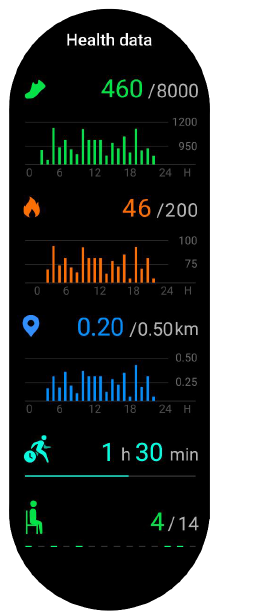
- The watch automatically records activity data if you wear the watch during daily activities.
- The watch allows you to measure heart rate, blood oxygen,, and stress, and to monitor stress, heart rate,, and sleep throughout the day. It also allows you to manually monitor or automatically monitor itself your health continuously.
Start an exercise:
On the watch face screen, press the Down button to enter the Exercise menu. Click on an exercise icon (such as Outdoor run) to start the exercise.
Or, on the watch face screen,, press the Up button to access the application list, then click the Exercise icon to enter the Exercise menu. Click on an exercise icon (such as Outdoor run) to start the exercise.
To add or delete exercise types displayed on the watch or change their order, turn on the veryfit app -> Training -> tap ⋮ the symbol in the upper right -> choose “Edit Sports”.
- Turn on the veryfit app and enable your phone’s Bluetooth and GPS positioning permissions.
- Bring the watch close to your phone and make sure the watch screen is on.
- On the app’s homepage, tap ⋮ the symbol in the upper right -> choose “Add device” -> tap “Watch”, your phone starts searching. From the device list found, choose your smart watch name to pair with.
- When the watch receives the signal, confirm pairing by clicking “Confirm” on the watch.
- On the app, set your personal information and step goal to complete the pairing.
Operation
- Wear the watch correctly: ensure that your watch is at least one finger above your wrist bone and that the sensor on the back touches your skin.
- Screen operation: ID217 supports full-screen touch control. The screen supports “tap” (to select) and “tap and hold” (to enter) operations.
- Button operation: ID217 has two buttons: Up and Down. Short-press the Up button to return; long-press the Up button to end an exercise or pop up the Shutdown/Restart menu. Press the Down button to enter the Exercise menu.
Features
Watch face
Switch between different watch faces in Watch Face Settings on the veryfit app. Download and install more watch faces from the Watch Face Market.
Exercise
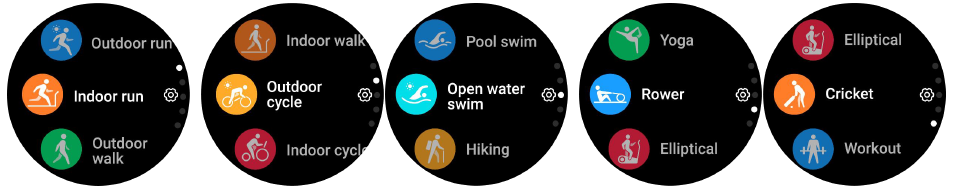
The watch supports 14 exercise modes: Outdoor run, Indoor run, Outdoor walk, Indoor walk, Outdoor cycle, Indoor cycle, Hiking, Cricket, Pool swim, Open water swim, Yoga, Rower, Elliptical, and Workout. You can show or hide the exercise types displayed on the watch via the veryfit app.
- ID217 supports intelligent sports recognition. It can recognize whether the user is running or walking. This feature can be turned on or off on the app.
- ID217’s summary of exercise contains various exercise data, which can be checked on the veryfit app.
Application list
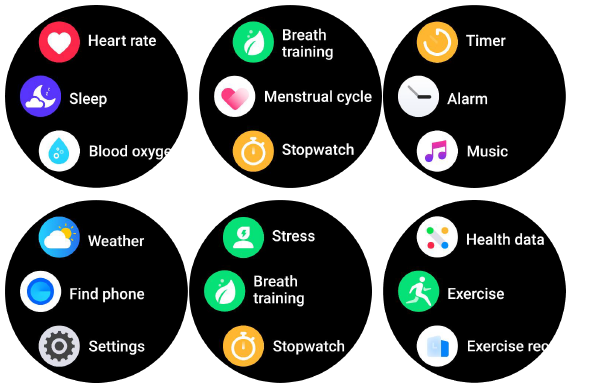
On the watch face screen, press the Up button to access the application list. Applications displayed from top to bottom include Exercise, Exercise record, Heart rate, Sleep, Blood oxygen, Stress, Women's health, Breath training, Stopwatch, Timer, Alarm, Music, Find phone,, and Settings.
Health data
Heart rate
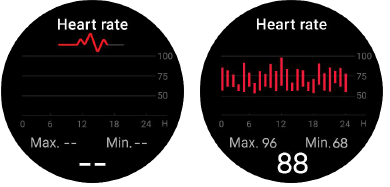
- The watch supports continuous heart rate measurement as well as checking of heart rate data throughout the day. You can turn this feature on or off, and set the measurement frequency in the app’s settings.
- Each time heart rate is measured, keep your arm and wrist still and wait patiently until the measurement finishes.
Stress
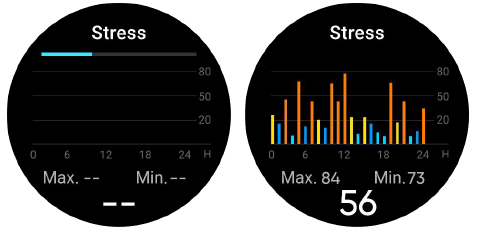
- The watch supports automatic stress measurement as well as checking of stress data throughout the day. You can turn this feature on or off, and set the measurement frequency in the app’s settings.
- Each time stress is measured, keep your arm and wrist still and wait patiently until the measurement finishes.
Blood oxygen
Reminder module
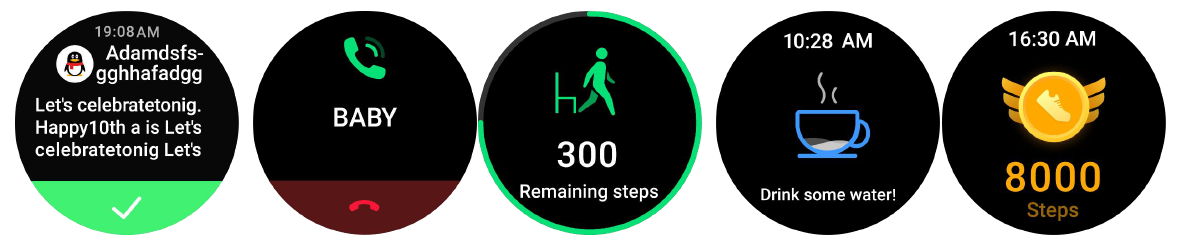
The watch supports multiple reminder modes, including reminders for incoming text messages and calls, step goal achieved, and a reminder to walk around, drink water, etc.
Common Troubleshooting for the Loddery Smart Sports Watch ID217
- Bluetooth Connection Issues: Ensure Bluetooth is enabled and paired via the Veryfit app; for iOS 13+, enable "Share System Notification" in Bluetooth settings.
- Notifications Not Displaying: Confirm notification permissions are enabled both on the watch and phone; the device does not show alerts if Bluetooth disconnects.
- Green Light Heart Rate Sensor Always On: This indicates automatic heart rate monitoring; disable it by switching to manual heart rate mode to save battery.
- Water Damage Precautions: Although water-resistant, avoid exposure to hot water above 40°C and prolonged underwater use.
- Error Codes: No specific error codes reported; resetting the device or reinstalling the app usually resolves most issues.
The ID217 comes with a standard warranty covering manufacturing defects. For support, contact Loddery customer service through their official website or the Veryfit app support section.
Pros & Cons of the Loddery Smart Sports Watch ID217
Pros
- Robust and Premium Design: Metal frame and aluminum alloy ring provide a durable, high-quality look and feel.
- Comprehensive Health Tracking: Includes heart rate, blood oxygen monitoring, and breath training uncommon in this price segment.
- Long Battery Life: Up to 7 days per charge reduces frequent recharging hassles.
- Wide App Notification Support: Integrates with multiple social and messaging platforms for seamless connectivity.
- Water Resistance: Suitable for showering and light water activities, enhancing everyday usability.
Cons
- Limited Advanced Features: Lacks GPS and NFC, which are present in some higher-end smartwatches.
- Notification Delay: Requires a stable Bluetooth connection; notifications are missed if diare disconnected.
- Screen Size: 1.28-inch. The splay may feel small for users accustomed to larger smartwatches.
- App Dependency: Full functionality depends on the Veryfit app, which may have occasional syncing delays.
Overall, the loddery Smart Sports Watch ID217 offers strong value for its price, especially for users prioritizing health tracking and notifications over premium smartwatch features.
Customer Reviews and Feedback on the Loddery Smart Sports Watch ID217
Users consistently praise the ID217 for its accurate heart rate and blood oxygen monitoring and the sturdy, stylish design that suits both sports and casual wear. Many highlight the convenience of receiving WhatsApp and social media notifications directly on the wrist, enhancing productivity and connectivity during workouts.
Common complaints include occasional Bluetooth disconnections, causing missed notifications,s and the relatively small screen size. Some users also note that the Veryfit app may take time to sync data fully.
Average ratings hover around 4 out of 5 stars, with recommendations especially strong for budget-conscious buyers looking for a reliable fitness tracker with smart features. Frequent buyers suggest pairing the watch with compatible smartphones and ensuring notification permissions are correctly set for optimal performance.
Faqs
How do I set up the loddery Smart Sports Watch ID217 for the first time?
What should I do if my loddery Smart Sports Watch ID217 is not syncing with my phone?
Can the loddery Smart Sports Watch ID217 track different types of workouts automatically?
Is the loddery Smart Sports Watch ID217 waterproof, and can I wear it while swimming or showering?
How do I enable and customize notifications on the loddery Smart Sports Watch ID217?
What is the green light on the back of the loddery Smart Sports Watch ID217, and how do I control it?
How long does the battery last on the loddery Smart Sports Watch ID217, and how do I optimize its performance?
What are the best practices for maintaining and caring for my loddery Smart Sports Watch ID217?
Tags
Leave a Comment