
Setup & Usage: Loona Robotic Pet Dog KY004LN01 User Manual
Content
loona Robotic Pet Dog KY004LN01
Introduction
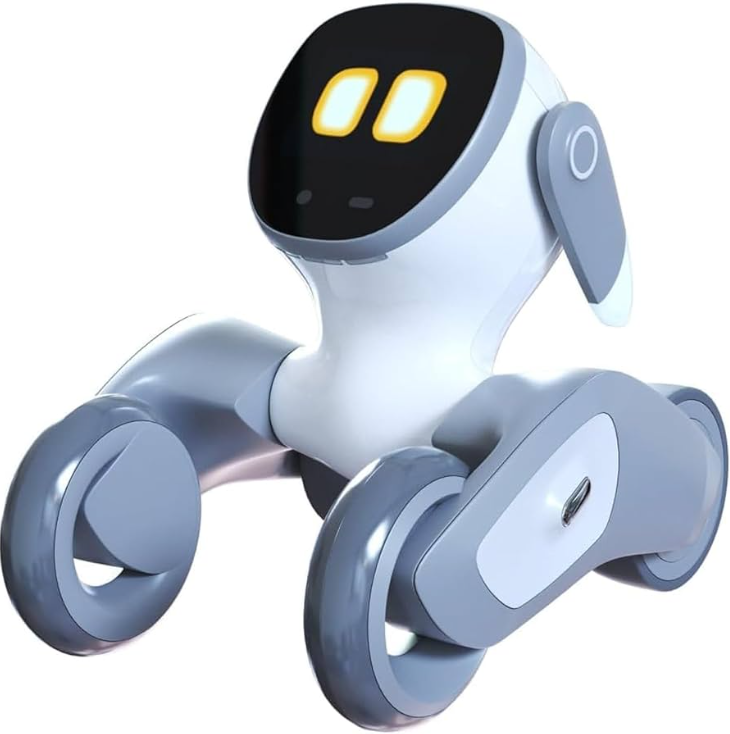
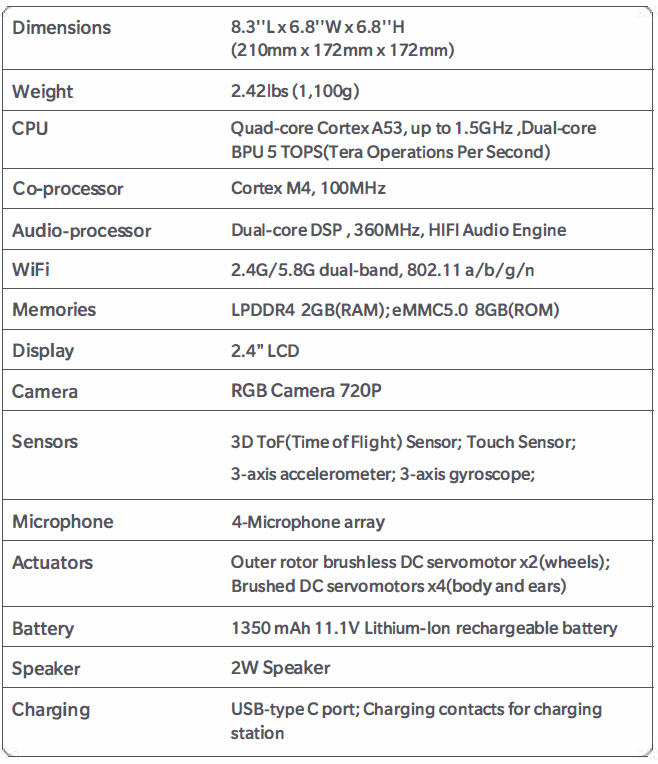
The loona Robotic Pet Dog KY004LN01 is an advanced AI-powered robotic companion designed to bring endless joy, interaction, and security to your home. Combining cutting-edge robotics with conversational AI, this smart petbot offers a lifelike experience through natural voice responsiveness, gesture recognition, and playful activities. Loona’s compact size (8.3" L x 6.8" H), lightweight build (2.42 lbs), and sleek design make it an ideal companion for families, tech enthusiasts, and anyone seeking an engaging, low-maintenance pet alternative.
Powered by a quad-core Cortex A53 CPU and 5 TOPS (Tera Operations Per Second) BPU, Loona delivers fluid motion and intelligent behavior with features such as obstacle avoidance, 720p RGB camera vision, and multi-sensor inputs including 3D time-of-flight and touch sensors. Its interactive personality is enriched by a 2.4" LCD display, 4-microphone array for voice commands, and a set of servo motors controlling wheels, body, and ears, making it both expressive and responsive.
Perfect for households with children, seniors, or anyone who appreciates robotic innovation, Loona offers playful games like fetch and laser chase alongside home security functionalities like remote monitoring. It integrates ChatGPT for conversational AI, allowing meaningful interaction beyond simple commands. The product comes with a rechargeable 1350 mAh battery charged via USB Type-C or docking station, ensuring up to 2 hours of continuous play.
Available at an estimated price range of $600 to $800, depending on the version and accessories, the loona Robotic Pet Dog KY004LN01 is purchasable online through authorized retailers with limited stock. Its unique blend of entertainment, companionship, and smart home assistance makes it a standout choice in the emerging robotic pet category.
Include in the box
Loona
Specification
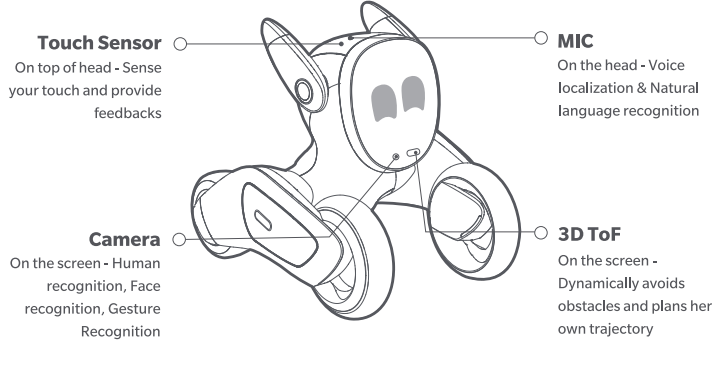
loona has an Al-powered CPU which makes Loona can perform face recognition, body detection, gesture recognition, 3D motion capture, object recognition and more. Equipped with a 4-microphone array and powered by Amazon Lex, loona can localize sound source, understand voice commands and provide feedback while keeping your information secure. Loona has a 30-ToF (time-of-flight) camera that detects environmental obstacles and generates data to help her move swiftly in space and navigate in the environment. She is also integrated with an RGB camera to capture and track moving objects. Loona has six motors, and her rear wheels are driven by two brush less servomotors of which maximum speed is up to 900 rpm(round-per-minute).
Instruction for use
Retain the original package
- Please retain the original package. If needed, it provides secure protection for Loona during transportation.
Turn on and turn off
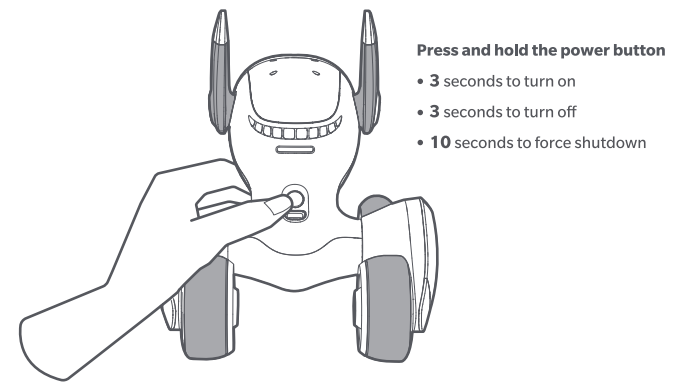
- Press and hold the power button at the back of the neck for 3 seconds to turn Loona on. Press and hold the power button for 3 seconds to turn it off. If this does not work, press and hold the power button for 10 seconds or longer to force shutdown.
WIFI connection
Most of Loona's interactive functions can be used without WiFi. However, some functions require cloud servers, such as voice recognition and remote monitoring based on Amazon Web Service. Loona can get the software updates after connecting to WiFi.
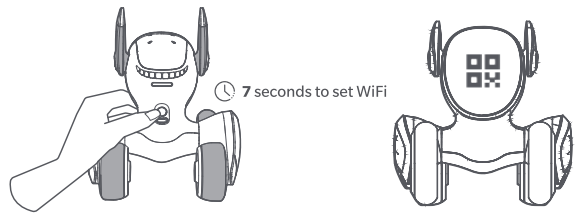
- Press and hold the power button for 7 seconds and release it until the screen of Loona shows a QR code.
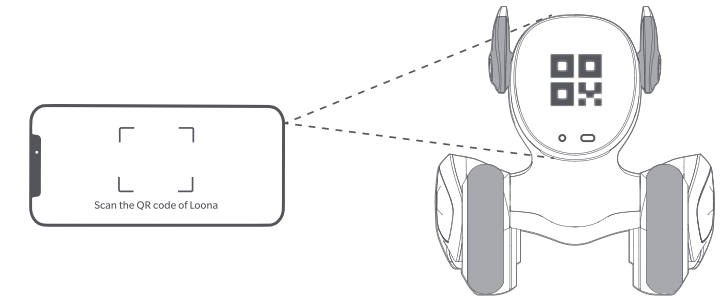
- Scan the QR code and follow the instructions on the Loona App to set up the Wifi connection.
Environment for use
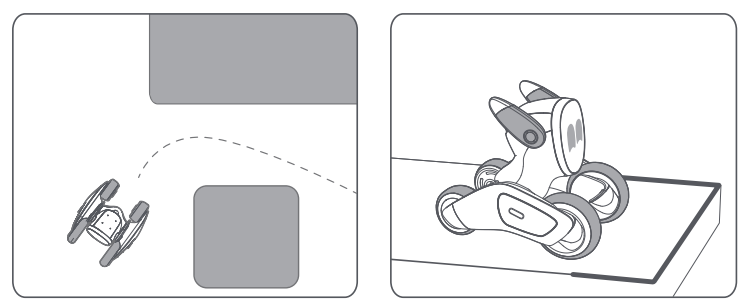
Pathing planning
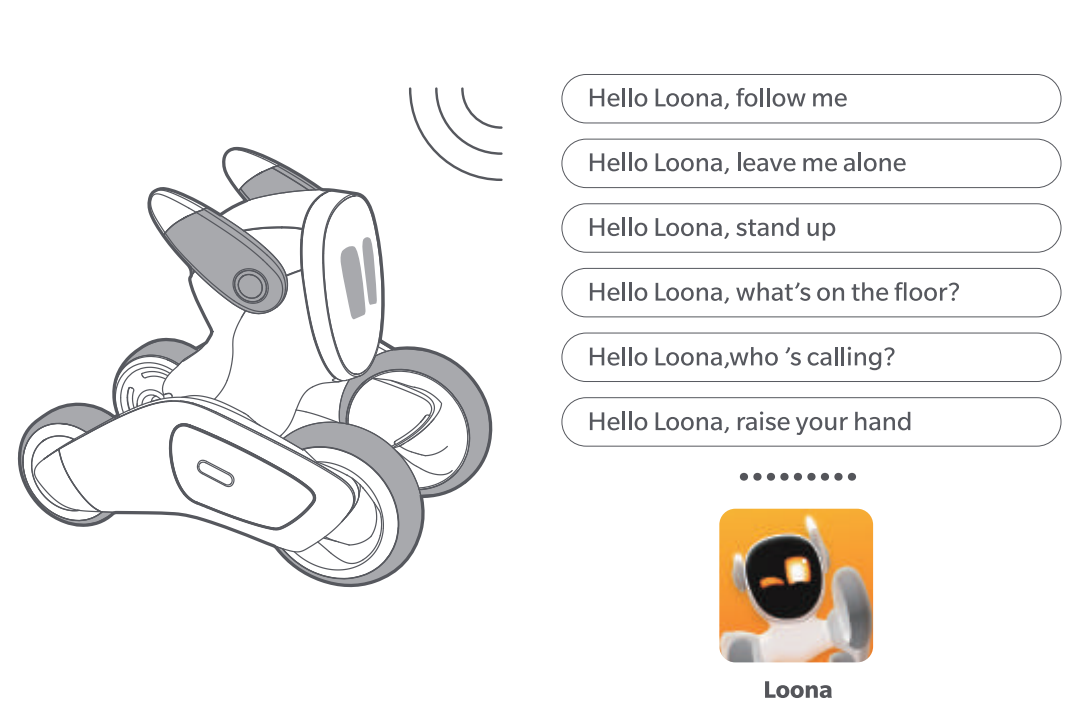
Voice recognition
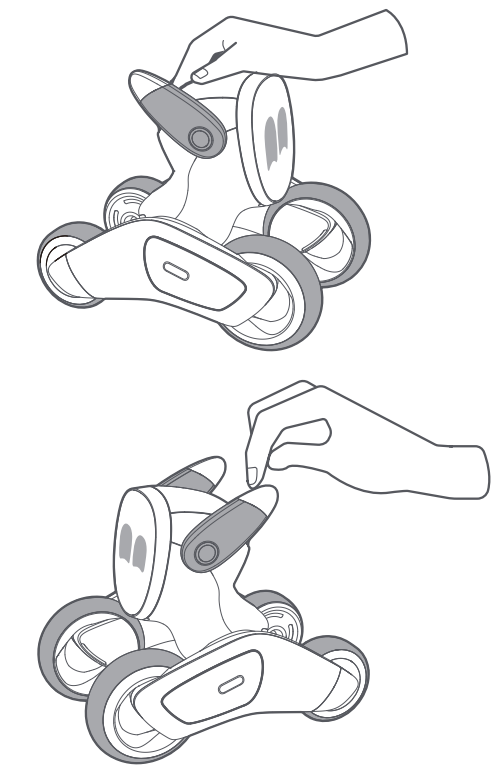
Sense of touch
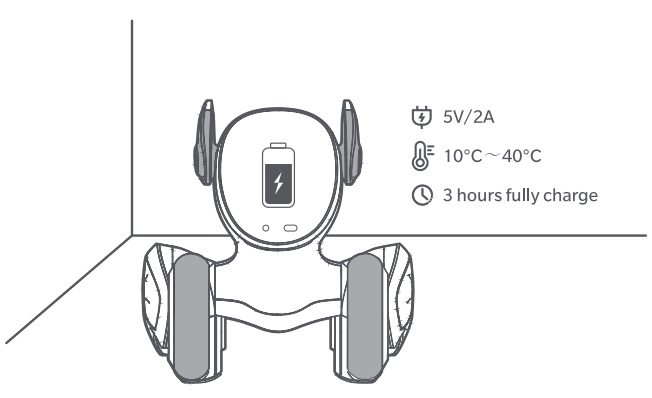
Charge
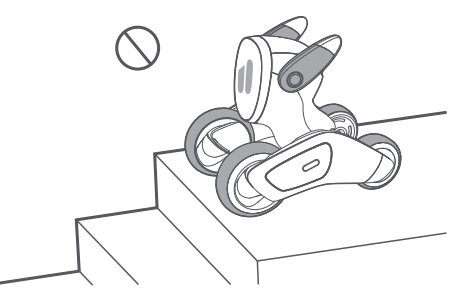
To avoid injury
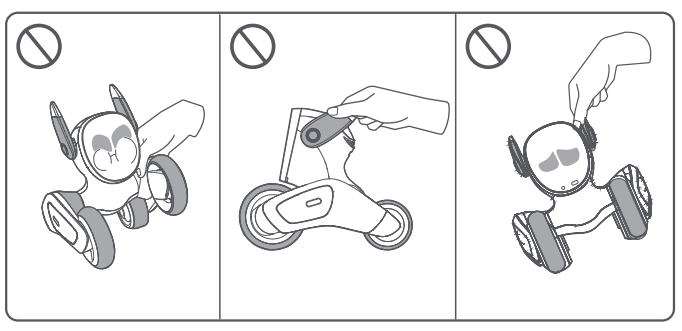
Maintenance
When loona or the chargino station is soled with small oarticles and dust, gentivi wipe them off with a dry, soft cloth. Protect Loona's RGB camera and 3D-Tof camerafrom being scratched of soiled with dust and fingerprints, Scratches or stains onl fingerprints are found on Loona's camoras, blow thom off with a blower and wine them oft with a sott cloth
Troubleshooting Your loona Robotic Pet Dog KY004LN01
While the loona Robotic Pet Dog KY004LN01 is engineered for smooth operation, users may encounter occasional issues. Below are common problems and solutions:
- Robot not responding to voice commands: Ensure the 4-microphone array isn’t obstructed. Check Wi-Fi connectivity (dual-band 2.4G/5.8G) and restart the app controlling Loona.
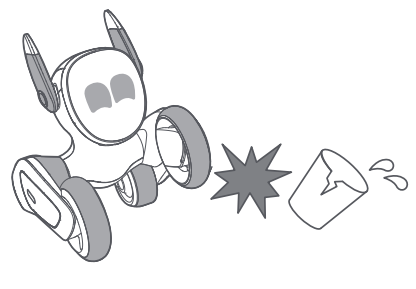
- Loona fails to navigate or avoids obstacles poorly: Clean the sensors, especially the 3D ToF sensor. Restart Loona to reset sensor calibration.
- Battery drains quickly or won’t charge: Use the supplied USB Type-C charger or docking station. Check battery health, and avoid overcharging.
- Error codes: Most errors display on the 2.4" LCD—refer to the user manual for specific code definitions and quick fixes.
To prevent issues, keep firmware updated via the app, avoid exposure to water or extreme temperatures, and charge regularly after use. The product comes with a standard one-year warranty covering manufacturing defects, and customer support is available via the official website and authorized seller contacts.
For technical help, contact support@keyirobot.com or call 1-800-LOONA-01 during business hours.
Pros & Cons of the loona Robotic Pet Dog KY004LN01
Pros
- Advanced AI Interaction: Integrates ChatGPT for real-time conversation and personalized responses, making Loona feel alive and engaging.
- Multi-Sensor Navigation: Equipped with 3D ToF sensor, accelerometer, and gyroscope for smooth, obstacle-avoiding movement.
- Expressive Design: Over 1,000 facial expressions via LCD and servo motors for ears and body, enhancing companionship.
- Versatile Play Modes: Includes voice commands, playful games (fetch, laser chase), and home security monitoring features.
- Strong Build Quality: Compact and lightweight with quality materials and reliable rechargeable battery offering up to 2 hours of playtime.
Cons
- Price Point: At $600-$800, it may be expensive for casual buyers compared to simpler robotic pets.
- Limited Battery Life: Approximately 2 hours per charge may require frequent recharging during extended play sessions.
- Connectivity Sensitive: Requires stable dual-band Wi-Fi for optimal voice command and app control performance.
- Learning Curve: Some users may find the app setup and advanced features complex initially.
Compared to alternatives like simpler robotic toys, the loona Robotic Pet Dog KY004LN01 offers much greater intelligence, interactivity, and home integration—ideal for users seeking a premium, future-ready robotic pet.
Customer Reviews of loona Robotic Pet Dog KY004LN01
Users consistently praise the loona Robotic Pet Dog KY004LN01 for its lifelike movements and engaging AI personality. One five-star reviewer highlighted the “impressive technology in a playful package” and noted the robot’s “natural responsiveness” and smooth setup experience. Many appreciate how Loona blends fun with advanced features like voice recognition and obstacle avoidance.
Common compliments include the robot’s expressive face, interactive games, and ChatGPT-powered chat capabilities that keep both children and adults entertained. However, some users mention occasional Wi-Fi connectivity issues and the relatively short battery life as minor drawbacks. Despite this, most recommend Loona as “an outstanding value for the price” and a “unique gift for tech-savvy families.”
Overall, the loona Robotic Pet Dog KY004LN01 earns an average rating of 4.5 out of 5 stars, with many customers valuing its combination of intelligence, entertainment, and companionship.
Faqs
How do I set up loona Robotic Pet Dog KY004LN01 for the first time?
What should I do if loona Robotic Pet Dog KY004LN01 is not working properly?
Can I use loona Robotic Pet Dog KY004LN01 with my existing smart home devices?
How often should I maintain loona Robotic Pet Dog KY004LN01?
What are the key features that make loona Robotic Pet Dog KY004LN01 different?
Can loona Robotic Pet Dog KY004LN01 be used for home security?
How does loona Robotic Pet Dog KY004LN01 handle obstacles and navigation?
Is loona Robotic Pet Dog KY004LN01 suitable for children?
Leave a Comment