
How to Use: Lutron Connected Bulb Remote Control User Manual
Content
Introduction to the Lutron Connected Bulb Remote Control
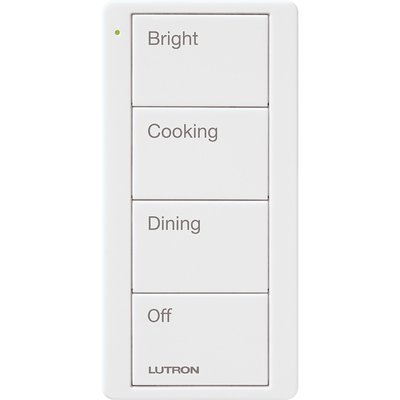
The Lutron Connected Bulb Remote Control is a compact, battery-powered smart lighting remote designed to give users fast, reliable control over compatible connected bulbs without the need for wiring. Built around ZigBee wireless technology, it lets you turn lights on and off, brighten or dim them, and manage multiple bulbs from a single handheld device. For users who want a simple alternative to app-based lighting control, this remote offers a practical, low-maintenance solution that fits well in bedrooms, living rooms, home offices, rentals, and any space where wall rewiring is not ideal.
One of the biggest advantages of the Lutron Connected Bulb Remote Control is its convenience. It works as a standalone controller for compatible ZigBee lighting ecosystems and can manage up to 30 connected bulbs per remote, making it useful for both single-room and whole-space lighting setups. The remote is powered by a CR2032 battery and requires no external power or communication wiring, which keeps installation quick and clean. With a reported battery life of up to 5 years, it is designed for everyday use with minimal maintenance.
Typical pricing has historically fallen in the budget-friendly smart home accessory range, often around the low tens of dollars depending on seller, marketplace, and availability. As of 2026, availability is inconsistent and may vary by retailer, with some listings appearing through home improvement stores, specialty distributors, and legacy smart home marketplaces. This makes it most attractive for users who already rely on compatible ZigBee bulbs and want a straightforward remote control experience rather than a full smart lighting hub.
Specifications and Key Features of the Lutron Connected Bulb Remote Control
- Wireless technology: ZigBee-based communication at 2.4 GHz for smart bulb control.
- Capacity: Controls up to 30 compatible connected bulbs per remote.
- Power source: One CR2032 battery included.
- Battery life: Up to 5 years under typical use.
- Voltage: 3 V operating voltage.
- Installation: Battery-powered, no wiring required.
- Operating environment: Indoor use only, with typical temperature range from 0 °C to 60 °C.
- Humidity tolerance: Up to 90% non-condensing relative humidity.
- Controls: Four-button style with on, off, raise, and lower functions.
- System design: Works within a ZigBee mesh network for compatible bulbs, hubs, and bridges.
Compared with app-only lighting controls, the Lutron Connected Bulb Remote Control delivers faster physical interaction and does not depend on a phone. Compared with larger smart lighting remotes, it stands out for its small footprint and simple function set. Its strength is reliable basic lighting control rather than advanced scenes, voice automation, or multi-room scheduling.
How to Set Up the Lutron Connected Bulb Remote Control
Setup is simple and usually takes only a few minutes. First, insert the included CR2032 battery and confirm that the remote powers on correctly. Next, make sure your bulbs are compatible ZigBee connected bulbs or supported by a compatible hub or bridge. If you are using a bridge, complete the bridge setup first so the lighting network is active before pairing the remote.
Pair the remote by following the button sequence required by your bulb or hub ecosystem. In most cases, the remote must be held close to the bulb or bridge during pairing so the ZigBee connection can be established. Once paired, test the on, off, brighten, and dim functions from different spots in the room to confirm stable communication. If the lights do not respond, replace the battery, restart the bulb, and retry pairing.
Safety precautions: Use only indoors, avoid mounting on metal surfaces, and keep the device away from moisture and extreme heat. If the remote is being added to a smart home bridge, follow the manufacturer’s pairing instructions carefully to avoid conflicts with previously stored network settings.
Troubleshooting Common Problems with the Lutron Connected Bulb Remote Control
- Lights do not respond: Check battery level, confirm the bulb is ZigBee-compatible, and re-pair the remote.
- Intermittent control: Move the remote closer to the bulbs and reduce interference from dense metal objects or nearby wireless congestion.
- Only some bulbs respond: Verify that all bulbs are added to the same compatible network and support group control.
- Remote seems unresponsive: Remove and reinsert the battery, then repeat pairing from scratch.
- Poor range: ZigBee mesh performance depends on network density, so adding compatible powered devices can improve reliability.
The remote does not typically display traditional error codes, so issues are usually diagnosed through connection behavior, battery status, and bulb compatibility. Preventive care includes keeping the battery fresh, avoiding physical damage, and using only supported ZigBee bulbs and bridges. Warranty and support options may vary by seller and region, but Lutron support is available through its official customer service channels, with a published phone contact of +1.610.282.3800 for product assistance.
Pros and Cons of the Lutron Connected Bulb Remote Control
Pros
- Easy to use with simple physical controls for on/off and dimming.
- No wiring required, which makes installation fast and renter-friendly.
- Supports up to 30 compatible bulbs, which is strong for a compact remote.
- Battery life can last up to 5 years, reducing maintenance.
- Works well as a backup to app-based smart lighting.
Cons
- Requires compatible ZigBee lighting hardware, so it is not universal.
- Limited to basic lighting control, with no advanced scene or voice features.
- Availability can be limited compared with newer smart home accessories.
- Best value is for users already invested in ZigBee bulbs or bridges.
For value for money, it is strongest when used in an existing smart lighting setup. Compared with app-only or voice-first alternatives, the tactile control and instant response make it more dependable for everyday lighting. Compared with more advanced remotes, it offers fewer features but a simpler learning curve.
Customer Reviews and Real-World Feedback
User feedback for the Lutron Connected Bulb Remote Control is generally positive, especially among homeowners who want a straightforward way to control multiple smart bulbs. Many reviewers praise the easy setup, compact size, and reliable dimming performance. A common rating pattern is around 4 to 5 stars for convenience and simplicity.
Typical praise includes comments such as, “It works instantly and feels easier than opening an app every time,” and, “One remote controls my bedroom bulbs without any hassle.” Common complaints focus on compatibility limits, occasional pairing confusion, and the need to use supported bulbs only. Buyers who want advanced automation often recommend looking at a more feature-rich smart lighting controller instead.
Overall, this is a strong purchase for users who want a reliable, no-fuss remote for compatible smart bulbs. It is especially recommended for bedrooms, family rooms, and secondary lighting zones where quick manual control matters most.
Faqs
How do I set up lutron Connected Bulb Remote Control for the first time?
Why is my lutron Connected Bulb Remote Control not responding to the bulb?
What devices and bulbs are compatible with lutron Connected Bulb Remote Control?
How do I troubleshoot connection problems with lutron Connected Bulb Remote Control?
What features does lutron Connected Bulb Remote Control offer for everyday use?
How can I improve the performance of my lutron Connected Bulb Remote Control?
How do I reset lutron Connected Bulb Remote Control when it stops working?
How should I clean and maintain lutron Connected Bulb Remote Control for long-term use?
More lutron manuals
Leave a Comment