
M Caster Studio Live Streaming Mixer User Manual
Content
Introduction to the m caster studio Live Streaming Mixer
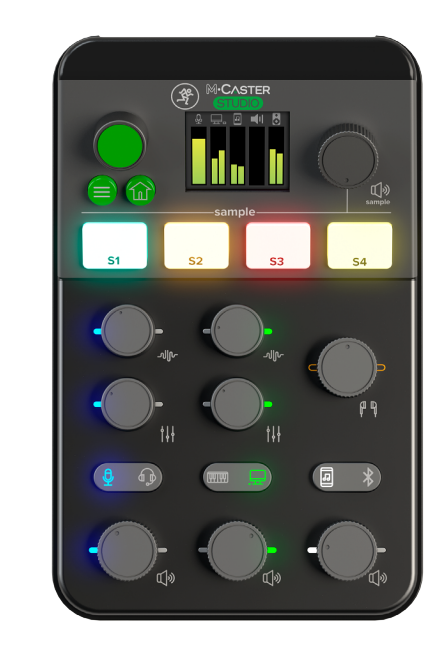
The m caster studio Live Streaming Mixer is a desktop live-streaming audio solution designed for creators who want broadcast-style sound without a complicated studio setup. It combines a USB audio interface, microphone preamp, Bluetooth connectivity, onboard sound shaping, and a built-in sampler in one compact unit, making it ideal for streamers, podcasters, gamers, online educators, and remote presenters.
Its biggest strengths are simplicity, versatility, and creator-focused controls. The mixer supports a wide range of common streaming workflows, including microphone input, headset monitoring, smartphone audio, and computer-based production. A full-color display, selectable RGB lighting, and integrated DSP effects help users monitor and customize their sound in real time. For many buyers, this makes the m caster studio Live Streaming Mixer a strong all-in-one alternative to using a separate audio interface, software effects chain, and external sampler.
The expected price range is typically around $349.99 MSRP, with street prices varying by retailer and promotions. It is generally available through major music and pro-audio retailers as well as online marketplaces. For users looking for a professional streaming mixer with plug-and-play convenience, the m caster studio Live Streaming Mixer offers a compelling balance of features and accessibility.
Specifications and Key Features of the m caster studio Live Streaming Mixer
- Audio resolution: 24-bit / 48 kHz for clean, high-quality streaming and recording.
- Channels: 5-channel desktop layout with flexible routing for voice, media, and auxiliary sources.
- Connectivity: USB, Bluetooth, XLR / 1/4-inch combo input, headset input, and auxiliary connections.
- Microphone support: Includes phantom power for compatible condenser microphones.
- Monitoring: Dedicated headphone output and line out for real-time monitoring.
- Built-in processing: Contour-style voice shaping, StreamFX-style effects, and onboard sampler functionality.
- Display: Full-color screen for quick status checks and setup visibility.
- Lighting: User-selectable RGB accents for visual customization.
- Power: External DC power supply with wide-voltage compatibility.
- Dimensions: Approximately 2.8 x 5.1 x 8.0 inches.
- Weight: About 1.5 lbs, making it easy to place on a streaming desk.
Compared with compact alternatives like entry-level USB mixers, the m caster studio Live Streaming Mixer stands out because it combines onboard effects, Bluetooth input, and a sampler in a single device. Against larger broadcast mixers, it is easier to use and better suited to creators who want fast setup rather than deep multi-track studio routing.
Troubleshooting the m caster studio Live Streaming Mixer
If the mixer does not power on, first confirm that the DC adapter is fully connected and that the outlet is working. If the computer does not recognize the device over USB, disconnect and reconnect the cable, then try a different USB port or cable. Audio dropouts usually point to a loose connection, conflicting software settings, or an overloaded USB bus.
Common issues and fixes include:
- No microphone signal: Check the XLR or combo input, raise the gain, and verify phantom power if using a condenser mic.
- Bluetooth pairing failure: Clear the previous pairing on the phone or computer and re-enter pairing mode on the mixer.
- Distorted sound: Lower input gain and avoid clipping from loud sources or hot microphone signals.
- Headphone monitoring delay: Use direct monitoring settings and close unnecessary audio apps.
- Display or lighting issue: Power cycle the unit and check whether the firmware or preset state needs resetting.
If an error code appears on the display, consult the user guide for the exact code behavior and restart the device after disconnecting all inputs. Preventive care includes using quality cables, keeping firmware current when updates are available, and avoiding power fluctuations with a stable outlet. Warranty coverage and support are typically handled through the manufacturer and authorized retailers, so users should keep proof of purchase and contact the seller or official support channel for service assistance.
Pros and Cons of the m caster studio Live Streaming Mixer
Pros
- All-in-one design reduces the need for separate audio interface, effects processor, and sampler.
- Excellent for live streaming, podcasting, gaming, and virtual meetings.
- Easy to set up, with a user-friendly layout and clear display.
- Bluetooth input adds flexibility for music, calls, and mobile content.
- Onboard effects make voice enhancement simple without extra software.
- Strong value for creators who want a polished desktop production tool.
Cons
- Pricier than basic USB audio interfaces and beginner mixers.
- Not ideal for users needing advanced multitrack studio routing.
- Some creators may prefer software-based effects control for deeper customization.
- The desktop format is less portable than smaller mobile-first streaming gear.
For buyers comparing it with simpler alternatives, the value for money is strongest when the built-in sampler, sound effects, and live-streaming workflow are used regularly. For basic voice recording alone, a lower-cost interface may be enough, but for content creation the feature set justifies the higher price.
Customer Reviews and User Feedback
Users frequently rate the m caster studio Live Streaming Mixer around 4 to 5 stars for its clean sound, simple setup, and creator-friendly features. Many praise the built-in effects and the convenience of managing multiple audio sources from one desktop unit.
Typical positive feedback includes comments such as: “Great for streaming with a single microphone and phone audio,” and “The display and controls make live mixing much easier.” Common complaints mention the price, limited portability, and the learning curve for first-time users who are new to mixer routing.
Purchase is recommended for streamers, podcasters, and gaming creators who want a premium desktop audio hub with easy operation. For budget buyers or users who only need a basic mic interface, a simpler alternative may be a better fit.
Faqs
How do I set up m caster studio Live Streaming Mixer for the first time with OBS or similar streaming software?
Why is my m caster studio Live Streaming Mixer not sending audio to my computer during a live stream?
What are the main features of m caster studio Live Streaming Mixer for podcasting and game streaming?
Is m caster studio Live Streaming Mixer compatible with Windows, Mac, and popular streaming platforms?
How can I reduce background noise and improve voice quality on m caster studio Live Streaming Mixer?
What should I do if m caster studio Live Streaming Mixer audio is crackling, distorted, or dropping out?
How do I monitor my voice in real time with m caster studio Live Streaming Mixer without delay?
How should I clean and maintain m caster studio Live Streaming Mixer for long-term reliability?
Tags
Leave a Comment