
Magellan MG5000 Paradox Security System User Manual
Content
Magellan MG5000 Paradox Security System Manual
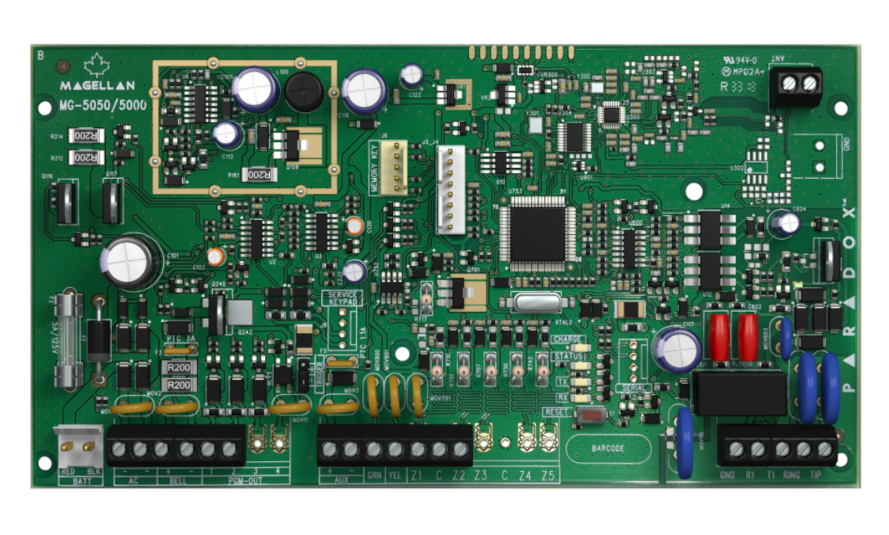
Introduction: Magellan MG5000 Paradox Security System Overview
The magellan MG5000 Paradox Security System is a wireless security control panel designed for homes, small businesses, and light commercial properties that need flexible, scalable intrusion protection. Built around Paradox’s Magellan platform, it combines a wireless transceiver, support for multiple zones, and easy expansion options in one compact alarm system. For users who want a dependable security panel without the complexity of a large commercial installation, the MG5000 offers a practical balance of performance and simplicity.
One of its biggest strengths is versatility. The system supports wireless and hardwired devices, multiple user codes, remote controls, partitions, and add-on modules for IP communication, voice dialing, and keypad expansion. It is also known for StayD mode, a feature that helps maintain continuous protection while allowing everyday movement in the property. This makes it especially useful for families, retail spaces, offices, and properties that need 24/7 perimeter security with flexible arming behavior.
In current market terms, the estimated price range for the magellan MG5000 Paradox Security System typically depends on panel configuration, keypad selection, and accessories, but the control panel alone is often found in the approximate mid-range segment for legacy alarm hardware. Availability is usually strongest through security distributors, alarm installers, and specialty online resellers rather than mainstream retail stores. Buyers should also factor in installation costs, sensors, sirens, and communication modules when budgeting.
Specifications: Magellan MG5000 Technical Details and Features
- Wireless control panel with built-in transceiver supporting 433 MHz or 868 MHz models.
- Up to 32 zones, with any zone capable of being wireless depending on configuration.
- 2 partitions for dividing the property into separate armed areas.
- 2 onboard hardwired zones, expandable to 32 total zones with supporting modules.
- Up to 32 user codes and 32 remote controls, making it suitable for multi-user environments.
- Supports up to 15 keypads through the 4-wire communication bus.
- Supports up to 8 K32RF or K37 wireless keypads, plus wireless repeaters for broader coverage.
- Supports 16 PGMs for custom automation and device triggering.
- Includes 256-event memory buffer for event history and system diagnostics.
- Compatible with IP and voice communication modules for remote reporting and monitoring.
- In-field firmware update support for maintainability and feature improvements.
- Power requirements commonly listed at 16.5 VAC with a minimum 20 VA transformer recommendation.
Performance-wise, the MG5000 is designed for stable alarm response, RF supervision, and flexible device pairing rather than high-end smart-home automation. Compared with newer all-in-one security hubs, it offers stronger traditional alarm architecture, but fewer modern app-first features. Against systems like the MG5050, the MG5000 is similar in platform design but typically has fewer onboard hardwired zones and PGMs, making it the simpler option for smaller installations.
Troubleshooting: Common Problems, Error Codes, and Fixes
The most common issues with the magellan MG5000 Paradox Security System usually relate to power, wireless supervision, keypad communication, or zone faults. If the system displays a trouble condition, check the keypad’s trouble indicator first and review the affected zone or device. Loss of AC power often points to a transformer problem, tripped breaker, or loose wiring. Low battery warnings usually require replacing the backup battery and verifying charging voltage afterward.
- RF supervision trouble: Move the device closer, replace the sensor battery, or check for signal obstruction.
- Zone fault or open circuit: Inspect wiring, magnetic contacts, and sensor alignment.
- Keypad communication failure: Verify the 4-wire bus, terminal polarity, and keypad address settings.
- Power trouble: Confirm AC input, transformer output, and battery condition.
- Memory or event issues: Recheck module programming and restore settings only after confirming wiring integrity.
Preventive maintenance helps reduce false alarms and recurring trouble codes. Test batteries regularly, clean sensors, keep wireless devices within range, and review event logs after service work. Warranty coverage and support depend on the installer and distributor, so users should contact the original security provider for parts, programming help, and service claims. For urgent assistance, reach out to your alarm installer, monitoring station, or the local Paradox security distributor listed on your purchase paperwork.
Pros & Cons: Magellan MG5000 Security Panel Review
Pros
- Flexible zone expansion supports larger residential or small commercial layouts.
- Wireless and hardwired compatibility gives installers multiple deployment options.
- StayD mode adds convenience for always-on perimeter protection.
- Supports multiple users, remote controls, and partitions for shared properties.
- Good value for buyers who want a reliable traditional alarm panel instead of a cloud-heavy smart system.
Cons
- Older platform compared with newer app-centric security systems.
- Setup and programming may feel complex for first-time users.
- Availability can be limited outside security installer channels.
- Some buyers may prefer the MG5050 for additional onboard expansion.
- Remote and internet features depend on optional modules, which increases total system cost.
Overall, the magellan MG5000 Paradox Security System offers strong value for users who want dependable alarm performance, multi-zone flexibility, and installer-friendly expandability. It compares well with similar legacy panels when reliability matters more than modern app-first convenience.
Customer Reviews: What Users Say About the Magellan MG5000
Customer feedback on the magellan MG5000 Paradox Security System is generally positive, especially from users who value stability and professional-grade alarm behavior. Average sentiment is often around 4.2 out of 5 stars in installer and owner discussions. Praise commonly focuses on dependable wireless operation, clear partition control, and the ability to scale the system over time.
Typical positive testimonial: “Once installed correctly, the system has been solid for years and handles both wired and wireless devices without issues.” Common complaints mention programming complexity, the need for an experienced installer, and occasional wireless trouble messages when batteries age. Another frequent comment is: “It works great, but the setup is not beginner-friendly.” Buyers who want a traditional security panel with proven alarm reliability usually recommend it, while users seeking a simple DIY smart-home hub may prefer a newer alternative.
Faqs
How do I set up the magellan MG5000 Paradox Security System for the first time?
Why is my magellan MG5000 Paradox Security System keypad beeping or showing a trouble light?
How do I add a new wireless sensor to the magellan MG5000 Paradox Security System?
What are the main features of the magellan MG5000 Paradox Security System that improve home security?
Is the magellan MG5000 Paradox Security System compatible with older Paradox accessories and alarms?
How can I fix false alarms on the magellan MG5000 Paradox Security System?
How do I program user codes and access levels on the magellan MG5000 Paradox Security System?
What maintenance does the magellan MG5000 Paradox Security System need to stay reliable?
Tags
More magellan manuals
Leave a Comment