
Magewell Ultra Stream Recording Encoder User Manual
Content
magewell Ultra Stream Recording Encoder Overview
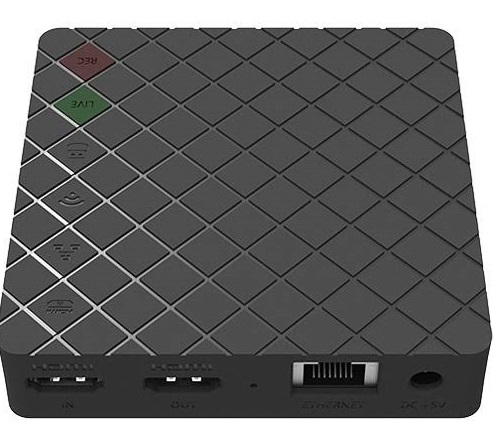
The magewell Ultra Stream Recording Encoder is a compact live streaming and recording solution designed for creators, educators, houses of worship, corporate AV teams, and event producers who need reliable one-touch encoding. It combines HDMI capture, network streaming, local recording, and mobile control in a single box, making it a strong choice for users who want a simple workflow without sacrificing professional output. The device is especially useful for live production, lecture capture, hybrid meetings, and portable field setups where fast deployment matters.
One of its biggest advantages is flexibility. Users can stream to online platforms, record locally to USB or internal storage, and monitor audio with dedicated mic and headphone connections. It also supports loop-through video on supported models, which helps keep a live display active while encoding. The companion app and web-style control options make setup easier for non-technical operators, while the hardware remains stable enough for recurring professional use.
Estimated pricing typically falls in the mid-range professional encoder category, with common retail pricing around $430 to $530 depending on the version, region, and seller. Availability is generally good through AV distributors, online resellers, and specialized broadcast stores. For buyers searching for a dependable HDMI recording encoder with practical streaming features, the magewell Ultra Stream Recording Encoder offers a balanced mix of ease of use, portability, and production-ready performance.
Detailed Specifications for the magewell Ultra Stream Recording Encoder
- Video input: 1 x HDMI Type A on HDMI models; SDI variants are also available in the Ultra Stream family.
- Maximum input support: up to 4K-class input on HDMI models, with recording commonly up to 1080p60.
- Recording formats: MP4 or MOV depending on configuration and storage method.
- Storage options: internal storage, USB flash drive, and paired mobile-device recording support on supported configurations.
- Networking: Gigabit Ethernet; Wi‑Fi and mobile app control are included on many models.
- Audio: microphone input and headphone output for live monitoring and commentary integration.
- Streaming protocols: commonly includes RTMP and related broadcast workflows depending on model generation.
- Power: low-power hardware design suited for portable use and fixed installations.
- Control: mobile app and browser-based configuration for quick preset management.
- Performance note: encoder settings are designed for stable HD streaming rather than heavy multi-channel production workloads.
Compared with similar compact encoders from brands like AJA, Kiloview, and Blackmagic alternatives, the magewell Ultra Stream Recording Encoder is often easier for first-time users because it emphasizes streamlined operation and mobile control instead of advanced rack-based routing.
Troubleshooting the magewell Ultra Stream Recording Encoder
If the encoder shows no signal, first check the HDMI source, cable integrity, and output resolution. Many “no input” situations are caused by unsupported source formats, so setting the camera or laptop to a standard 1080p output often resolves the issue. If the stream fails to start, verify network access, platform credentials, and RTMP URL accuracy.
Common error conditions are usually related to storage, network, or input sync rather than hardware failure. For example, if recording stops unexpectedly, confirm that the USB drive is formatted correctly and has sufficient space. If audio is missing, inspect the microphone gain, headphone monitoring path, and embedded audio from the source device. If the unit becomes unresponsive, power-cycle it and reapply the last known stable preset.
Preventive measures include using quality HDMI cables, updating firmware when available, keeping a backup storage device ready, and testing stream settings before live events. Warranty coverage and support are typically handled directly by Magewell or an authorized reseller. For help, contact Magewell Technical Support at support@magewell.net.
Pros and Cons of the magewell Ultra Stream Recording Encoder
Pros
- Simple setup makes it ideal for teachers, solo streamers, and small AV teams.
- Reliable local recording plus streaming in one compact device.
- Microphone input and headphone output support practical live narration.
- Portable form factor works well for travel, field production, and temporary installs.
- Good value for users who want a professional encoder without a full rack workflow.
Cons
- Not built for advanced multi-input switching or complex studio routing.
- Recording resolution is more limited than some newer high-end encoders.
- Feature set may feel basic for broadcast engineers seeking deep customization.
- Price can be higher than entry-level streaming boxes from consumer-focused brands.
Overall, the magewell Ultra Stream Recording Encoder delivers strong value for users who prioritize reliability, ease of use, and dependable HD output over advanced production features. Compared with cheaper alternatives, it offers better build quality and a more professional workflow.
Customer Reviews and User Feedback
Typical customer feedback rates the product around 4.4 out of 5 stars. Users often praise the stable streaming performance, straightforward app control, and dependable recording workflow. One common testimonial is that it “just works” for weekly livestreams and classroom use, which is exactly what many buyers want.
Frequent complaints usually involve price, limited advanced features, and occasional setup confusion for first-time users. Some reviewers also mention that they would like higher recording flexibility or more expanded routing options. Still, most buyers recommend it for educators, churches, and event teams that need a compact encoder with low-maintenance operation.
For anyone comparing compact streaming hardware, the magewell Ultra Stream Recording Encoder is a strong purchase recommendation when simplicity, reliability, and professional results matter more than elaborate studio controls.
Faqs
How do I set up the magewell Ultra Stream Recording Encoder for the first time?
What should I do if the magewell Ultra Stream Recording Encoder is not recording video correctly?
Which cameras and software work best with the magewell Ultra Stream Recording Encoder?
How do I fix audio delay or lip-sync issues on the magewell Ultra Stream Recording Encoder?
What are the most useful features of the magewell Ultra Stream Recording Encoder for live streaming and recording?
How can I optimize the magewell Ultra Stream Recording Encoder for better video quality?
Why is my magewell Ultra Stream Recording Encoder overheating or becoming unstable during long sessions?
How should I maintain the magewell Ultra Stream Recording Encoder to keep it working reliably?
Tags
More magewell manuals
Leave a Comment