
Matrix Mtx-Router GPRS User Manual
Content
matrix Mtx-Router GPRS Manual and Product Overview
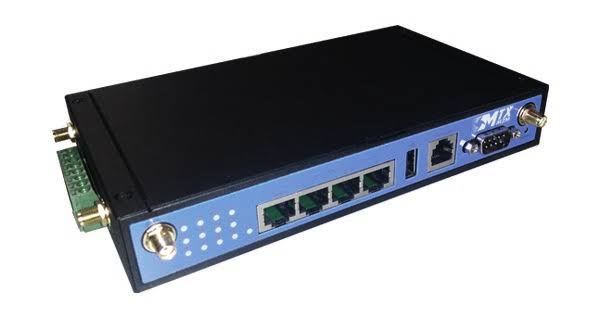
The matrix Mtx-Router GPRS is an industrial cellular router designed for machine-to-machine connectivity, remote monitoring, and reliable data transmission over GPRS networks. It is built for legacy and low-bandwidth deployments that still depend on 2G cellular communications, making it a practical choice for telemetry, point-of-sale backup links, vending systems, alarm panels, utility meters, and industrial automation. With support for transparent GPRS connectivity and Ethernet integration, the matrix Mtx-Router GPRS helps bridge serial or networked devices to mobile data networks in a compact, purpose-built form factor.
One of its key strengths is simplicity. The router is aimed at users who need stable, always-on remote access without the complexity of modern multi-radio gateways. It is especially useful in field installations where wired broadband is unavailable or impractical. Typical buyers include system integrators, industrial engineers, utility providers, and businesses maintaining older M2M infrastructure. The device is also attractive for retrofit projects because it can extend the life of existing equipment by adding cellular connectivity with minimal reconfiguration.
Estimated pricing for the matrix Mtx-Router GPRS typically falls in the budget-to-midrange industrial router category, often depending on region, distributor, and stock status. New units may be harder to source than newer 4G or LTE models, so availability can vary across industrial electronics suppliers and reseller channels. If you need dependable GPRS-only connectivity for a legacy deployment, this router remains a relevant and cost-conscious option.
Troubleshooting Common Issues with matrix Mtx-Router GPRS
If the router does not connect to the mobile network, first confirm that the SIM card is active, inserted correctly, and configured for the correct APN. Weak signal is another frequent cause, so check antenna placement and move the unit away from metal enclosures or interference sources. If the Ethernet link is down, verify the cable, switch port, and IP settings on both the router and the connected device.
Common error conditions usually relate to SIM registration, APN mismatch, or insufficient coverage. For example, an “SIM not detected” or “network registration failed” message often indicates a missing, locked, or damaged SIM. An APN-related connection failure can usually be fixed by entering the correct carrier profile and saving the settings before rebooting the device.
Preventive maintenance includes using a stable power supply, checking antenna connections regularly, and avoiding extreme heat or moisture. If problems persist, reset the device to factory settings and reapply the configuration step by step. Warranty and technical support are typically handled through the manufacturer or authorized distributor, and users should keep the serial number, firmware version, and purchase proof ready when requesting help. Contact your local Matrix electronics distributor or the official support channel listed by the seller for the fastest assistance.
Pros and Cons of matrix Mtx-Router GPRS
Pros
- Reliable GPRS connectivity for legacy M2M and IoT installations.
- Simple deployment for remote telemetry, alarms, meters, and kiosks.
- Industrial-focused design suited for demanding environments.
- Good value for organizations maintaining older cellular infrastructure.
- Useful for serial-to-cellular and Ethernet-based communication scenarios.
Cons
- Limited by GPRS speeds, which are far slower than 4G LTE alternatives.
- Availability may be inconsistent as newer routers dominate the market.
- Less future-proof than multi-band industrial routers with 4G or Wi-Fi.
- Not ideal for high-bandwidth applications such as video, cloud syncing, or large file transfer.
For value for money, the matrix Mtx-Router GPRS makes sense when the goal is to keep existing GPRS-based systems running at low cost. Compared with modern LTE industrial routers, it is more limited but often cheaper and easier to deploy in legacy environments. If your project needs fast data or long-term network longevity, a newer cellular router is the better alternative.
Customer Reviews and Real-World Feedback
Users who work with industrial connectivity often praise the matrix Mtx-Router GPRS for its straightforward setup and dependable performance in basic remote-access tasks. A recurring positive theme is that it “just works” for meter reading, alarm transmission, and simple telemetry applications. Many customers rate it around 4 out of 5 stars for reliability in legacy deployments.
Common complaints focus on slower data transfer and the shrinking availability of GPRS networks in some regions. Some reviewers also mention that the interface feels older than newer industrial routers. Even so, purchase recommendations remain strong for users who specifically need a GPRS router rather than a modern LTE gateway. If your use case depends on low-bandwidth machine communication, the matrix Mtx-Router GPRS is still a practical buy.
Faqs
How do I set up matrix Mtx-Router GPRS for the first time?
What should I check if matrix Mtx-Router GPRS is not connecting to the mobile network?
Which SIM and network settings are required for matrix Mtx-Router GPRS compatibility?
How can I improve the speed and stability of matrix Mtx-Router GPRS?
What features does matrix Mtx-Router GPRS offer for remote monitoring and control?
Why does matrix Mtx-Router GPRS keep dropping the connection, and how do I fix it?
How do I update and maintain matrix Mtx-Router GPRS safely?
Can matrix Mtx-Router GPRS work with older industrial devices or legacy systems?
Tags
More matrix manuals
Leave a Comment