
How to Use: Maxtop T11 Smart Watch User Manual
Content
maxtop T11 Smart Watch
Introduction
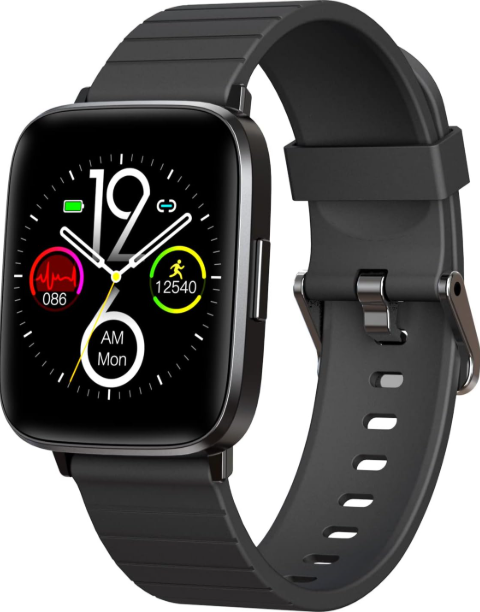
The maxtop T11 Smart Watch is a feature-packed wearable designed for health-conscious individuals and active lifestyles. This sleek, touchscreen device combines the convenience of a traditional wristwatch with the advanced functionality of a modern fitness tracker and smart companion. With its IP68 waterproof rating, the T11 is built to withstand daily activities like hand washing, jogging in the rain, and even short-term submersion, making it a reliable choice for fitness enthusiasts and everyday users alike..
Key benefits of the maxtop T11 Smart Watch include 24/7 heart rate monitoring, blood oxygen (SpO2) tracking, blood pressure measurement, ECG capabilities, sleep analysis, and a built-in pedometer. The device also offers music control, smartphone notifications, remote camera triggering, and customizable watch faces through its companion app. Its long-lasting battery ensures you stay connected and monitored throughout the day without frequent recharging. The intuitive touch interface and easy navigation—swipe up, down, left, or right—make accessing features effortless, even for first-time smartwatch users
Target users include fitness enthusiasts, health-conscious individuals, and anyone seeking a budget-friendly smartwatch that doesn’t compromise on functionality. The maxtop T11 is compatible with both Android and iOS devices, broadening its appeal. With an estimated price range typically under $100, this smartwatch offers significant value for those seeking comprehensive health tracking without the premium price tag of market leaders. The T11 is widely available through online retailers and electronics stores.
In summary, the maxtop T11 Smart Watch is an affordable, versatile, and durable wearable that brings essential health monitoring and smart features to your wrist—ideal for daily use, workouts, or keeping tabs on your wellbeing.
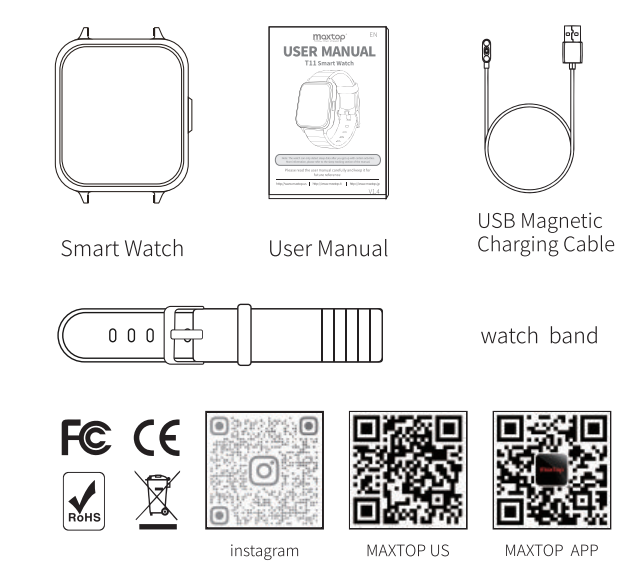
ACCESSARIES
OVERVIEW
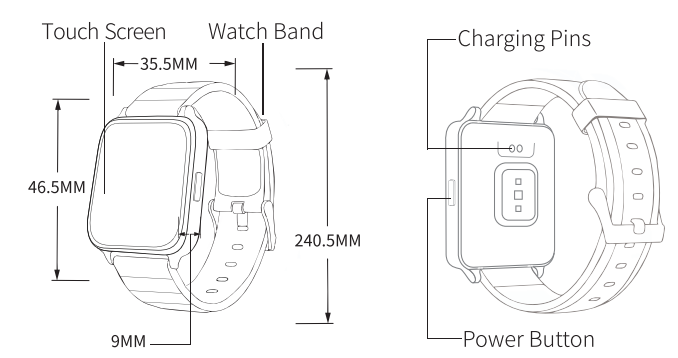
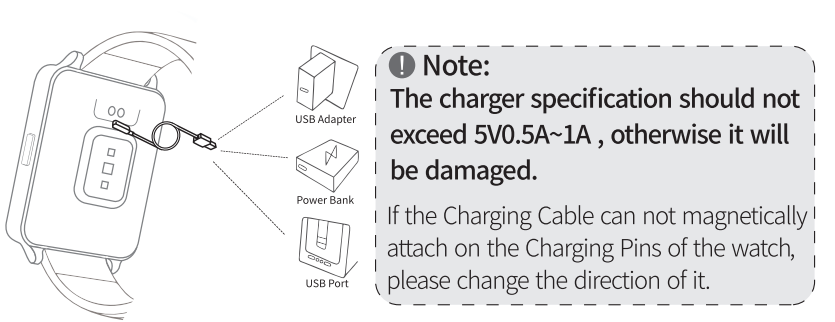
GETTING STARTED Charge Your Watch
- Step 1 : Insert the USB end of the Charging Cable into a USB adapter power bank, or a USB port.
- Step 2 : Hold the other end of the Charging Cable to approach the Charging Pins on the back of the watch until they attach magnetically.
Wear Your Watch
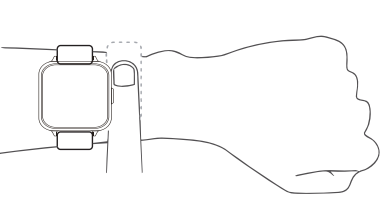
- To make the data tracking more accurate, we recommend that you wear the watch with one finger's width below your wrist bone.
- Please make sure the watch fits snugly against your skin and will not move upward or downward during exercise.
Change the Watch Bands
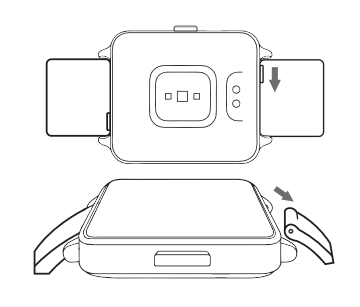
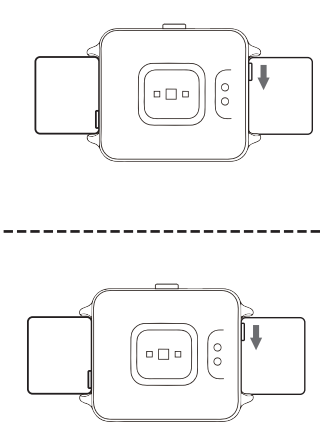
- Step Turn Turn over your watch, then press the quick-release lever inward and gently pull the original watch band away.
- Step 2: Get another band. Slide theinto the notch on the watch, then press the quick-release lever inward and slide the other end of the watch band into place.
- Step 3: Release the quick-release lever when the pins on both ends are securely inserted into the notch.
I P67 WATERPROOF
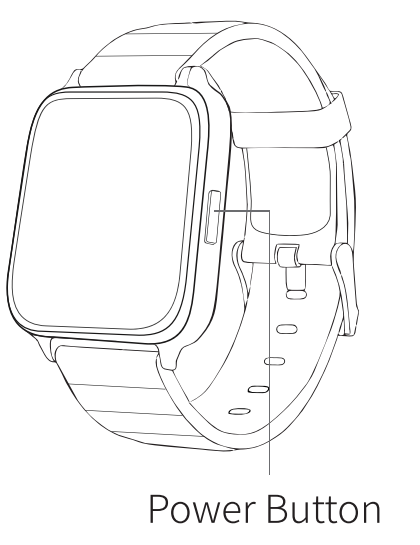
Power Press: Press the power button for 3-4 seconds to
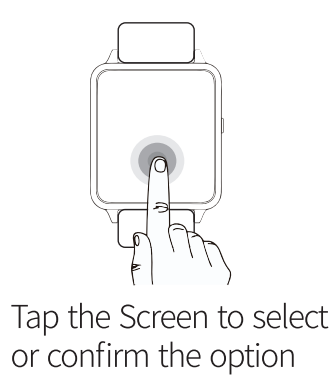
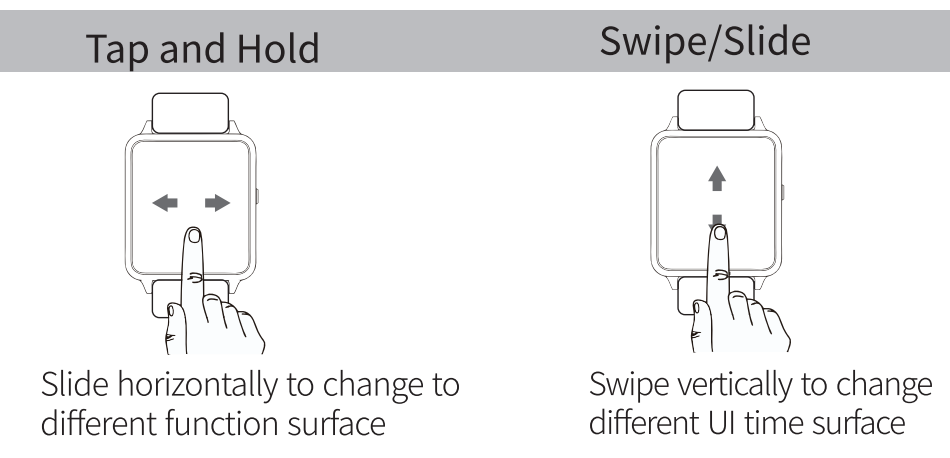
Touch Navigation
- Tap
PRODUCT PARAMETER
- Product Model
- T11
- Battery capacity
- 220mA
- Operating Voltage
- 3.7V
- Battery capacity
- BT4.0
- Main engine weight
- 50g
- Charging Voltage
- 5V
- Charging Current
- 100mA
- Operating Temperature
- -10°C-45°C|
- Waterproofing grade
- IP 68
- Working hours
- 6 days
- Working frequency wave
- 2402-2480
- Maximum transmit power
- 0.44dbm
This device is not a medical device, and the data and information provided are for reference only.
About Waterproofing
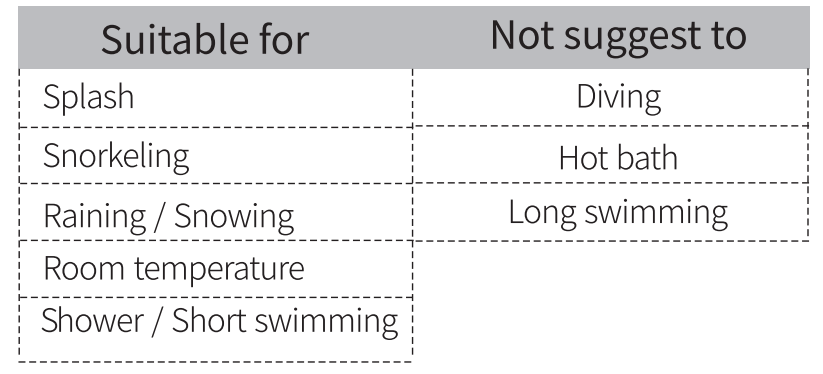
- The waterproof grade of the watch is IP68, which means that dust can be prevented from entering, Prevent short-term soaking. The allowed activity scenes in the activity area are as follows : wearing, washing face and hands on rainy days.
Pros & Cons
Advantages
- Comprehensive Health Tracking: Monitor heart rate, blood oxygen, blood pressure, ECG, sleep quality, and steps—all in one device
- IP68 Waterproof: Suitable for swimming, running in the rain, and hand washing, offering peace of mind for active users
- Long Battery Life: Designed for extended use between charges, minimizing downtime
- Smart Features: Receive notifications, control music, and remotely trigger your smartphone’s camera—enhancing convenience.
- Affordable Price: Delivers premium features at a fraction of the cost of leading brands, making it accessible to a broad audience
- User-Friendly Interface: Intuitive touchscreen and simple app integration make setup and daily use straightforward
- Customizable Watch Faces: Personalize your device with a variety of styles via the companion app
Limitations
- Accuracy Variability: Health metrics like blood pressure and ECG may not match medical-grade devices; best used for general wellness tracking
- Build Quality: While durable, it may not feel as premium as higher-end smartwatches.
- App Dependency: Full functionality requires the companion app, which may have occasional sync issues.
- Limited Third-Party App Support: Lacks the extensive app ecosystem of Apple Watch or Wear OS devices.
- No Built-in GPS: Relies on a connected smartphone for location tracking.
Value for Money: The maxtop T11 Smart Watch stands out for its rich feature set at a competitive price, offering excellent value for budget-conscious buyers. Compared to alternatives like Fitbit or Amazfit, it provides similar core health tracking but at a lower cost, though with fewer advanced smart features and integration..s
Customer Reviews
Users of the maxtop T11 Smart Watch frequently praise its affordability, stylish design, and comprehensive health tracking capabilities. Many highlight the convenience of having heart rate, SpO2, and sleep data readily available, as well as the device’s comfort during all-day wear. The IP68 waterproof rating is a recurring positive, with buyers appreciating the ability to wear the watch during workouts and daily activities without worry.
Common complaints include occasional inaccuracies in health metrics, especially blood pressure and ECG readings, and rare syncing issues with the companion app. Some users note that the user manual could be more detailed, particularly for first-time smartwatch owners. Despite these minor drawbacks, the overall customer satisfaction is high, with many users awarding the T11 4 out of 5 stars for its feature set and value.
Testimonials often mention the T11 as a “great starter smartwatch” and a “budget-friendly alternative to big brands.” Purchase recommendations focus on users seeking essential health tracking without overspending. If you prioritize core fitness features and smart notifications over advanced integrations, the maxtop T11 Smart Watch is a solid choice.
How to Set Up and Use Your maxtop T11 Smart Watch
Initial Setup
- Charge your watch using the included magnetic USB cable.
- Download the MAXTOP app from your device’s app store.
- Enable Bluetooth and pair the watch with your smartphone via the app.
- Enter your personal details (gender, height, weight, skin color) for accurate health tracking.
Daily Use Tips
- Swipe the touchscreen to navigate between time, steps, heart rate, sleep, and other functions.
- Enable automatic heart rate monitoring in the app for continuous tracking.
- Customize watch faces and notification settings in the app’s “My Device” section.
- Use the drop-down quick settings (swipe down from the top) to adjust brightness, alarms, and do-not-disturb mode.e
- For best results, wear the watch snugly during exercise and ensure it’s clean and dry for accurate readings.
Technical Specifications
- Display: Touchscreen with customizable watch faces
- Sensors: Heart rate, blood oxygen (SpO2), blood pressure, ECG, thermometer, pedometer
- Water Resistance: IP68 (suitable for swimming and rain)
- Connectivity: Bluetooth, compatible with Android and iOS
- Battery: Long-lasting, magnetic USB charging
- Additional Features: Music control, notifications, remote camera, timer, stopwatch
Frequently Asked Questions
Is the maxtop T11 Smart Watch accurate for health tracking?
The T11 provides useful wellness insights but is not a substitute for professional medical devices. For best results, ensure proper fit and correct personal data in the app
Can I swim with the maxtop T11?
Yes, the IP68 rating allows for swimming and showering, but avoid deep diving or prolonged submerging..sion
How do I change the watch face?
Connect your watch to the app, go to “My Device” > “Dial Setting,” and select your preferred. style
Conclusion
The maxtop T11 Smart Watch delivers an impressive array of health and smart features at an accessible price point. Its robust build, user-friendly interface, and comprehensive tracking make it a standout choice for budget-conscious consumers seeking a reliable wearable. Whether you’re tracking workouts, monitoring sleep, or staying connected, the T11 is a versatile companion for modern, active lifestyles.
Faqs
How do I set up the maxtop T11 Smart Watch for the first time?
What should I do if my maxtop T11 Smart Watch is not pairing with my phone?
How can I optimize heart rate and sleep monitoring on the maxtop T11 Smart Watch?
Is the maxtop T11 Smart Watch compatible with both Android and iOS devices?
What are the water resistance capabilities of the maxtop T11 Smart Watch?
How do I customize the watch face on the maxtop T11 Smart Watch?
What maintenance tips help prolong the lifespan of my maxtop T11 Smart Watch?
How can I troubleshoot inaccurate health data readings on the maxtop T11 Smart Watch?
Leave a Comment