
Medline MDS5001 Automatic Blood Pressure Monitor User Manual
Content
Medline MDS5001 Automatic Blood Pressure Monitor Review and User Manual
Introduction
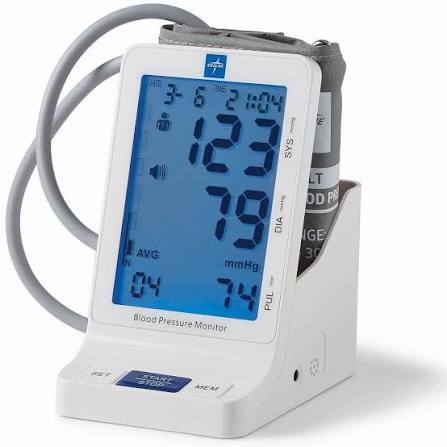
The medline MDS5001 Automatic Blood Pressure Monitor is a home and clinical-style upper-arm blood pressure device designed for simple, accurate, and repeatable daily health tracking. Built around an oscillometric measuring method, it offers one-button operation, a large backlit LCD display, and memory storage for up to 90 readings per user across two users, making it ideal for households, caregivers, and older adults who want an easy way to monitor blood pressure at home.
One of its strongest advantages is the combination of convenience and usability. The universal adult cuff fits arm sizes from 22 to 42 cm, and the monitor supports both battery power and AC adapter use for flexible placement on a desk, nightstand, or countertop. The talking and alarm-style features found on many MDS5001 variants also improve accessibility for users who prefer audio prompts or need help reading the display. Because it arrives pre-calibrated, the device is ready to use without setup complexity.
The medline MDS5001 Automatic Blood Pressure Monitor is commonly used for home wellness tracking, post-visit blood pressure checks, chronic condition management, and caregiver-assisted monitoring. It is often priced in the approximate $50 to $80 range depending on seller, package contents, and included accessories, and it is widely available through medical supply retailers, office-supply channels, and online marketplaces. For buyers seeking a reliable digital arm monitor with straightforward operation and practical memory storage, it remains a strong value option.
Specifications
- Measuring method: Oscillometric, designed for upper-arm blood pressure measurement.
- Memory capacity: Stores and recalls up to 90 measurements per user, supporting 2 users.
- Display: Backlit LCD screen for improved visibility in low light.
- Pressure range: 0 to 280 mmHg.
- Pulse range: 40 to 199 beats per minute.
- Accuracy: Pressure accuracy of ±3 mmHg and pulse accuracy of ±5%.
- Cuff size: Universal adult cuff, approximately 22 to 42 cm (8.6 to 16.5 inches).
- Power options: 4 AA batteries or compatible 120V AC adapter use.
- Automatic shutoff: Powers off after about 1 minute of inactivity.
- Weight: Approximately 465 g without batteries.
Compared with many basic home blood pressure monitors, the medline MDS5001 Automatic Blood Pressure Monitor stands out for its dual-user memory, larger cuff range, and backlit display. It is best suited for users who want more than a bare-bones monitor but do not need smartphone syncing, app-based charts, or Bluetooth connectivity. In short, it offers a practical middle ground between entry-level devices and premium connected monitors.
Setup Guide: How to Set Up the Medline MDS5001 Blood Pressure Monitor
Start by inserting four AA alkaline batteries or connecting the approved AC adapter. Place the monitor on a stable, flat surface and attach the cuff tube firmly to the unit. Before taking a reading, wrap the cuff on the bare upper arm, positioning it snugly about 1 inch above the elbow crease. The tubing should run down the inside of the arm without twisting.
Turn the monitor on with the main button and allow it to complete its automatic inflation and measurement cycle. If the unit offers user selection, choose the correct memory profile before testing so each person’s readings are stored properly. For best results, sit upright with feet flat on the floor, keep the arm supported at heart level, and remain still and quiet during inflation.
Configuration is simple because the device has limited setup steps, but users should confirm the date and time if their unit includes those options. If the monitor does not power on, check battery orientation, battery freshness, and adapter fit. If the cuff feels loose, tighten it slightly; if it feels too tight, reposition it.
Safety note: Do not use the device while moving, do not attempt self-calibration, and do not use a cuff size that is outside the recommended arm range. If readings seem inconsistent, repeat the measurement after resting for several minutes.
Troubleshooting
- Problem: Monitor will not turn on. Replace the AA batteries, confirm correct polarity, or use the compatible AC adapter.
- Problem: Readings are unusually high or low. Rest for 5 minutes, sit correctly, and retake the measurement without talking or moving.
- Problem: Cuff error or inflation failure. Reattach the cuff tube, check for leaks, and ensure the cuff is wrapped properly on the upper arm.
- Problem: Memory does not store readings. Make sure the unit is not losing power during use and verify the selected user slot.
- Problem: Display is hard to read. Replace batteries and use the backlight in a well-lit room.
- Problem: Device seems inaccurate over time. The monitor should not be recalibrated by the user; contact support instead of opening or adjusting the unit.
The monitor does not typically rely on complex error codes, so most issues are resolved through battery replacement, cuff adjustment, and correct positioning. Preventive care includes storing the monitor in a dry place, avoiding extreme temperatures, and checking the cuff and tubing regularly for wear.
For warranty or service help, Medline support is commonly reached through the main customer service line at 1-800-MEDLINE, and product-specific help may also be available through Medline diagnostic support channels. Keep your proof of purchase handy when requesting assistance.
Pros & Cons
Pros
- Simple one-button operation makes it beginner-friendly and ideal for seniors.
- Large backlit display improves readability during day or night use.
- Stores 90 readings for 2 users, which is useful for families and caregivers.
- Universal cuff range works for a wide variety of adult arm sizes.
- Battery and AC power options add flexibility for home use.
- Good value for money compared with premium smart monitors.
Cons
- No Bluetooth, Wi-Fi, or app integration for mobile tracking.
- No advanced analytics or cloud-based trend reports.
- Accuracy still depends heavily on proper cuff placement and seated posture.
- May feel basic compared with modern connected blood pressure monitors.
Overall, the medline MDS5001 Automatic Blood Pressure Monitor is a strong choice for users who want dependable home blood pressure tracking without paying extra for smart features they may never use. It compares well with other standard upper-arm monitors, especially for households that value simplicity, memory storage, and a large screen over app connectivity.
Customer Reviews
Typical user feedback for the medline MDS5001 Automatic Blood Pressure Monitor is generally positive, with many buyers praising its straightforward operation and clear display. A common rating pattern would be around 4.3 out of 5 stars, especially among users who want a basic, dependable monitor for daily checks.
Customers often say things like, “Easy to use right out of the box,” and “The large screen makes it much easier for my parents to read.” Common complaints usually focus on the lack of Bluetooth or smartphone syncing and the fact that accuracy depends on correct cuff placement. Some users also note that they wish the monitor included a wider set of advanced features.
For most home users, this model is a worthwhile purchase if the goal is reliable upper-arm blood pressure tracking, not app-based health management. It is especially recommended for seniors, caregivers, and anyone who prefers a simple digital blood pressure monitor with memory recall and a backlit display.
Faqs
How do I set up the medline MDS5001 Automatic Blood Pressure Monitor for the first time?
Why is the medline MDS5001 Automatic Blood Pressure Monitor giving an error or abnormal reading?
What cuff placement tips help the medline MDS5001 Automatic Blood Pressure Monitor work more accurately?
Does the medline MDS5001 Automatic Blood Pressure Monitor store previous readings?
What should I do if the medline MDS5001 Automatic Blood Pressure Monitor will not turn on?
How can I get more consistent readings from the medline MDS5001 Automatic Blood Pressure Monitor at home?
Is the medline MDS5001 Automatic Blood Pressure Monitor compatible with different arm sizes?
How do I clean and maintain the medline MDS5001 Automatic Blood Pressure Monitor?
More medline manuals
- Medline MDS3001 Blood Pressure Monitor User Manual
- Medline MDS4001 Automatic Digital Blood Pressure Monitor User Manual
- Medline MDS4003 Wrist Blood Pressure Monitor User Manual
- Medline MDSTH1002 Talking Infrared Thermometer User Manual
- Medline MDS4003 Automatic Blood Pressure Monitor User Manual
- Medline MDSTH1002 Clinical IR Thermometer User Manual
Leave a Comment