
Megawell Ultra Stream SDI User Manual
Content
megawell Ultra Stream SDI Product Manual
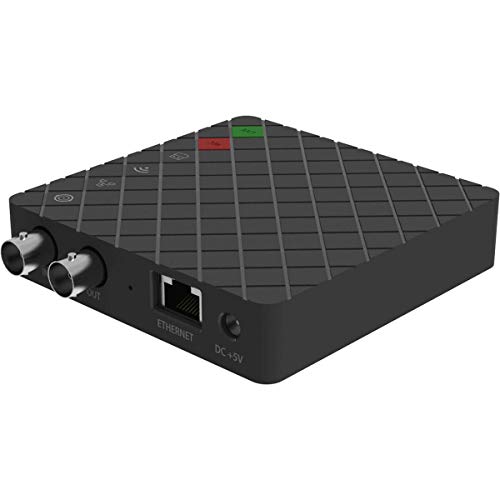
Introduction to the megawell Ultra Stream SDI
The megawell Ultra Stream SDI is a compact SDI streaming encoder designed for live production, event broadcasting, studio workflows, and remote contribution setups. It combines SDI input, loop-through output, encoding, recording, and network streaming in a single box, making it a practical choice for users who need a simple, reliable way to send video to online platforms or internal distribution systems. With support for up to 2048x1080 60fps input and 1080p60 encoding, it is built for professional HD workflows while remaining easy to operate.
One of its biggest strengths is flexibility. The device supports SD, HD, and 3G-SDI standards, embedded audio, network streaming, and local recording. This makes it useful for churches, education, corporate communications, houses of worship, event venues, and independent content creators who need dependable SDI live streaming hardware. The loop-through output is especially valuable when the same source must feed both a switcher and an encoder without signal loss.
The estimated price range typically falls around the mid-range professional encoder category, with current retail listings often landing near the $400 to $500 USD range depending on region, taxes, and availability. Availability may vary by distributor, and the product is usually sold through AV retailers, system integrators, and specialty broadcast suppliers. For buyers searching for a compact SDI encoder with built-in recording and straightforward streaming tools, the megawell Ultra Stream SDI remains a strong option.
Specifications and Key Features of the megawell Ultra Stream SDI
- Video input: 1x SDI BNC input with loop-through output for monitoring or downstream routing.
- Supported formats: SDI standards including SD, HD, 3Ga, 3Gb, 3Gb-DL, and 3Gb-DS.
- Input resolution support: up to 2048x1080 at 60fps, including 1920x1080 and 1280x720 formats.
- Encoding capability: up to 1080p60 streaming with configurable main and sub stream profiles.
- Audio support: embedded SDI audio plus microphone input and headphone monitoring.
- Networking: Gigabit Ethernet for stable wired streaming workflows.
- Recording: internal storage support and USB flash drive recording for backup or standalone capture.
- Streaming protocols: commonly used live streaming options for CDN and RTSP-based workflows.
- Power: 5V DC external power supply with low power draw for portable deployment.
- Compact design: small desktop-friendly enclosure for field use and fixed installations.
In practical performance terms, the unit is best suited for reliable 1080p live streaming rather than ultra-high-bitrate production encoding. Compared with larger rackmount encoders, it is simpler and more portable, though not as advanced as premium multi-channel enterprise models. Against similarly priced compact encoders, it stands out for SDI loop-through, internal recording, and dual-stream flexibility.
Troubleshooting the megawell Ultra Stream SDI
- No video signal: Check the SDI cable, confirm the source format is supported, and verify that the camera or switcher is outputting a valid SDI signal.
- Black screen or unstable image: Match the source frame rate and resolution to a supported mode such as 1080p60, 1080i, or 720p. Replace damaged coaxial cable if needed.
- No audio in stream: Confirm that embedded SDI audio is enabled on the source and that microphone levels are not muted or overdriven.
- Streaming failure: Verify network connectivity, RTMP or RTSP destination settings, and upload bandwidth. A wired Ethernet connection is usually more stable than Wi-Fi.
- Recording not saving: Ensure internal storage has free space or confirm the USB drive is formatted correctly for recording.
- Device overheating or shutdowns: Improve ventilation, avoid stacking equipment, and keep the operating area within recommended ambient temperatures.
If an error code appears, restart the encoder, check the source format, and reapply the network profile before testing again. Preventive maintenance includes using certified SDI cabling, updating firmware when available, and keeping backup power on hand for live events. Warranty coverage and support are typically handled through the original reseller or authorized Magewell channel. For assistance, contact the retailer that supplied the unit or the manufacturer’s official support team through their product support portal.
Pros and Cons of the megawell Ultra Stream SDI
Pros
- Compact and portable design for field production and mobile streaming.
- SDI input with loop-through makes integration into professional video workflows easy.
- 1080p60 support delivers smooth live streaming quality for events and broadcasts.
- Internal and USB recording add backup capture options for safety.
- Suitable for churches, classrooms, small studios, and live event teams.
- Good value for users who need a dedicated SDI live streaming encoder without unnecessary complexity.
Cons
- Single-input design is limiting for multi-camera production.
- Not ideal for users who need very high bitrates or advanced broadcast automation.
- Best results depend on stable network upload speed and proper configuration.
- Recording limits may feel restrictive compared with larger production recorders.
- Alternatives may offer more modern interfaces or stronger remote management features at a higher price.
Overall, the megawell Ultra Stream SDI offers strong value for users who want a dependable SDI encoder with straightforward operation. It competes well against other compact live streaming devices, especially when portability, loop-through, and simple setup matter more than advanced multi-channel capabilities.
Customer Reviews and User Feedback on the megawell Ultra Stream SDI
Customer feedback generally highlights the unit’s ease of use, compact size, and reliable SDI-to-stream workflow. Many users rate it around 4 to 4.5 out of 5 stars for small-scale live production and event streaming. Typical praise includes clean setup, strong video stability, and the convenience of having streaming and recording in one device.
Common complaints focus on the single-input design, limited advanced controls, and the need for a solid network connection during live broadcasts. A frequent recommendation is to test encoding settings before a live event and to use high-quality SDI cabling for best results. Users who need a simple, professional SDI encoder often recommend it, while buyers looking for multi-input production features may prefer a more advanced alternative.
Who Should Buy the megawell Ultra Stream SDI?
This model is a strong fit for streamers, AV technicians, churches, educators, and corporate teams that need dependable SDI live streaming hardware. If the goal is to convert one SDI source into a stable online stream with optional local recording, the megawell Ultra Stream SDI is a practical and cost-effective choice. It is less suited to complex switching environments, but excellent for straightforward single-source workflows.
Faqs
How do I set up megawell Ultra Stream SDI for the first time?
What should I do if megawell Ultra Stream SDI is not showing an SDI signal?
Can I stream from megawell Ultra Stream SDI to YouTube, Twitch, and Facebook Live at the same time?
Which video resolutions does megawell Ultra Stream SDI support for live streaming?
How do I improve stream quality and reduce lag on megawell Ultra Stream SDI?
What audio inputs and monitoring options does megawell Ultra Stream SDI offer?
Can megawell Ultra Stream SDI record while streaming, and where are recordings saved?
How should I maintain and care for megawell Ultra Stream SDI to keep it reliable?
Leave a Comment