
Setup & Usage: Megivez T08 True Wireless Earbuds Instruction Guide
Content
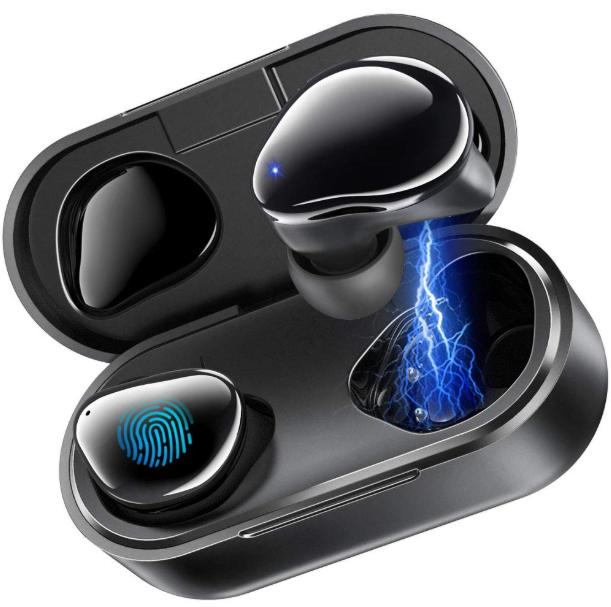
Megivez T08 True Wireless Earbuds
Introduction
The Megivez T08 True Wireless Earbuds are designed to offer an immersive audio experience with their compact and lightweight design. These earbuds are ideal for users seeking a balance between sound quality, comfort, and convenience. With a focus on delivering clear and powerful audio, they are perfect for music lovers and those who value seamless connectivity. The Megivez T08 earbuds feature the latest Bluetooth 5.3 technology, ensuring stable and efficient wireless connectivity. They are suitable for a wide range of users, from casual listeners to athletes, due to their ergonomic fit and long battery life. The estimated price range for these earbuds is typically around $20, making them an affordable option for those entering the true wireless market. Availability is widespread, with options for purchase both online and in-store.
Key Benefits and Unique Selling Points
The Megivez T08 earbuds stand out with their sleek design, easy pairing, and long battery life. They are equipped with a compact charging case that extends their playtime significantly, making them a great choice for users who need reliable earbuds for extended periods. Furthermore, the Megivez T08 True Wireless Earbuds offer a user-friendly interface with intuitive controls, allowing for easy music playback and call management.
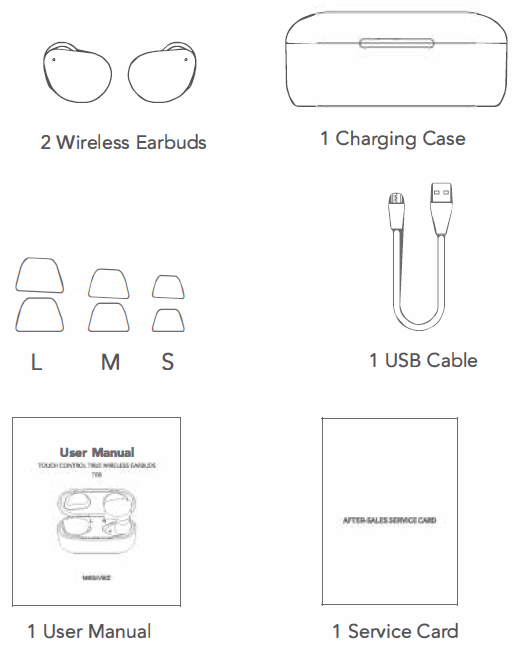
Package Included
Specifications
- Wireless Version: V5.0
- Chipset: Realtek
- Earbud Battery: 50 mAh Li-polymer Battery
- One Earbud Weight: 5.3 g/0.18 oz
- Charging Time for Earbud: About 1.5H
- Music Playing Time: Up 6H (50% volume)
- Talking Time: 5-6H
- Standby Time: 180 H
- Charging Case Battery: 600 mAh Li-polymer Battery
- Charging Time for Case: About 2H
- Charging Earbuds Times: 3-4 Times
- Operation Range: Up to 33 ft/10 m
- Total Weight: 47.4 g/1.67 oz
- Charging Case Size: 2.85"*1.29"*1.25"
- Waterproof Level: IPX 5
- Driver(full range): 8MM
- Protocol: HSP HFP A2DP AVRCP
Product Introduction
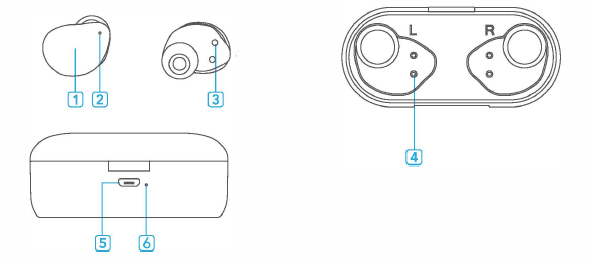
- Multi-function touch pad
- LED Indicator of earbuds
- Charging Pinholes on Earbuds
- Charging Pins on the Case
- Micro USB Charging Port
- LED Indicator of the charging case
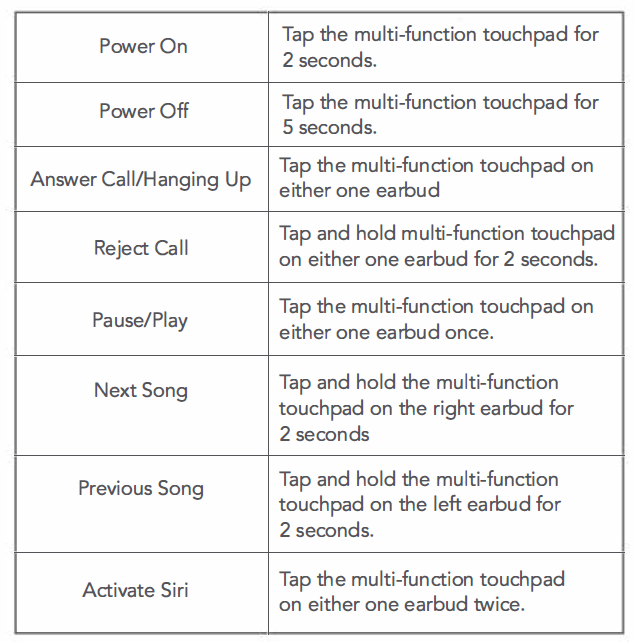
Function Overview
How to Wear
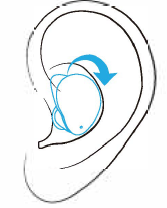
Insert the earbud and rest it into your ear gently. Tilt the earbud back under the ear ridge until a secure fit is achieved.
Safety Information
Read all safety information before using the device to ensure safe and proper use.
- Do not expose the device to physical impact or damage.
- Use manufacturer-approved chargers and accessories.
- Prevent the charger port and battery terminals from contacting conductive elements, such as metal or liquids.
- Do not turn on or use the device when the battery compartment is exposed.
- Do not allow children or animals to chew or tamper with the device.
- The device can be used i locations with an ambient temperature of O '°C to 35 '°C. You can store the device in an ambient temperature of-20 '°CC to 50 ·c. Using or storing the device outside of the recommended temperature ranges may damage the device or reduce the battery's lifespan.
- Do not use your device in a hot environment or near fire.
- Comply with all safety warnings and regulations regarding mobile device usage while operating a vehicle.
Troubleshooting
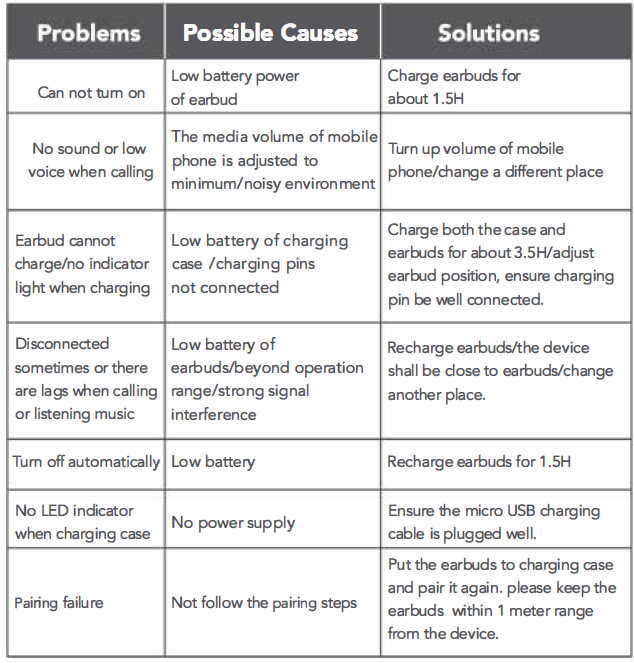
Pros and Cons
Pros
- Compact and Lightweight Design: Ideal for extended wear and comfort during physical activities.
- Latest Bluetooth 5.3 Technology: Offers stable and efficient wireless connectivity with reduced lag.
- Affordable Price Point: Generally priced around $20, making them accessible to a wide audience.
- Easy Pairing and Controls: Simplifies the user experience with straightforward controls for music and calls.
Cons
- Limited Battery Life per Charge: Compared to some competitors, the individual earbud battery life might be shorter.
- No Wireless Charging: Users must rely on wired charging via a USB-C port.
- Touch Controls Sensitivity: Some users may find the touch controls overly sensitive.
Customer Reviews
Users have praised the **Megivez T08 True Wireless Earbuds** for their affordability and ease of use. Many appreciate the lightweight design and stable Bluetooth connectivity. However, some users have noted that the earbuds' battery life could be improved for longer continuous use. Overall, reviews suggest that these earbuds offer good value for money, especially for casual users or those new to true wireless earbuds. Common praises include the clear call quality and straightforward setup process.
Purchase Recommendation
For those looking for a reliable and affordable entry into the true wireless market, the **Megivez T08 True Wireless Earbuds** are a solid choice. They offer a good balance of sound quality, comfort, and price. If you prioritize ease of use and stable connectivity over advanced features like wireless charging or active noise cancellation, these earbuds are worth considering.
Faqs
How do I set up the megivez T08 True Wireless Earbuds for the first time?
What should I do if the megivez T08 True Wireless Earbuds are not connecting to my device?
How can I control music playback and calls using the megivez T08 True Wireless Earbuds?
Are the megivez T08 True Wireless Earbuds compatible with all smartphones and devices?
What is the battery life of the megivez T08 True Wireless Earbuds, and how do I charge them efficiently?
How can I improve sound quality and minimize connectivity issues with the megivez T08 True Wireless Earbuds?
What are the best practices for maintaining and cleaning the megivez T08 True Wireless Earbuds?
Why do my megivez T08 True Wireless Earbuds sometimes have touch control sensitivity issues, and how can I fix them?
Leave a Comment