
How to Use: Metro Mobility M1 Lite Scooter User Manual
Content
Metro Mobility M1 Lite Scooter
Introduction
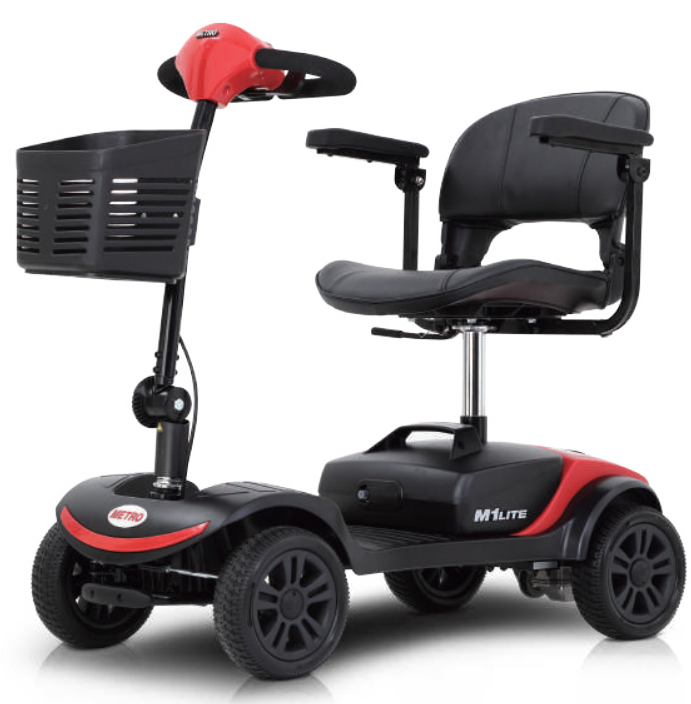
The Metro Mobility M1 Lite Scooter is a versatile, portable, and user-friendly mobility solution designed for individuals seeking independence and ease of movement both indoors and outdoors. Engineered for comfort and convenience, this lightweight travel scooter is ideal for seniors, individuals with limited mobility, and anyone who values a compact, yet powerful, personal transport device.
Key benefits of the Metro Mobility M1 Lite Scooter include its high portability—thanks to a design that quickly disassembles into four manageable pieces—and a maximum weight capacity of 265 lbs, accommodating a wide range of users. The scooter features a 300W motor, smooth 8" or 9" flat-free tires (depending on configuration), and a maximum speed of up to 4.97 mph, ensuring reliable performance on various surfaces, including sidewalks, shopping centers, and parks..
Unique selling points include a sliding, swivel seat with adjustable armrests and backrest, an intuitive control panel with a variable speed dial, battery indicator, and horn, as well as a folding tiller for easy storage and transport. With a driving range of up to 10 miles per charge and a maximum climbing angle of 8 degrees, the M1 Lite is both efficient and capable for everyday use
The Metro Mobility M1 Lite Scooter is especially suited for those who require a compact mobility aid for errands, travel, or daily activities. Its foldable design makes it easy to transport in a car trunk, while the adjustable seat and controls ensure a personalized fit for users between 5'7" and 5'11". Estimated price ranges for this model typically fall in the mid-tier category for mobility scooters, offering strong value for its feature set and build quality. The M1 Lite is widely available through mobility retailers and online stores across the United States.
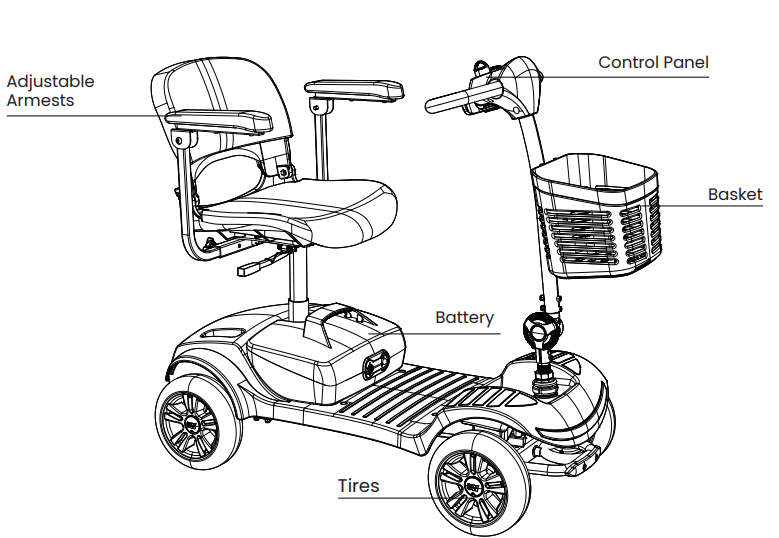
PARTS DESCRIPTION
CONTROL PANEL
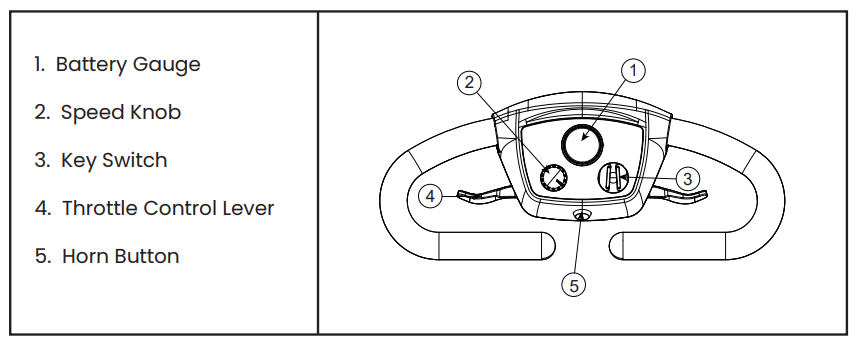
All of the drive controls for the scooter are to be found on the tiller control box.
Operation
Throttle Lever
- The throttle lever controls the speed as well as the forward and reverse motion of the scooter.
- To move the scooter in a FORWARD motion, PULL the lever with the RIGHT hand or PUSH the lever with the LEFT THUMB.
- To move the scooter in a REVERSE motion, PULL the lever with the LEFT HAND or PUSH the lever with the RIGHT THUMB. The lever will return when relea,, sed and the scooter will slow to a stop .
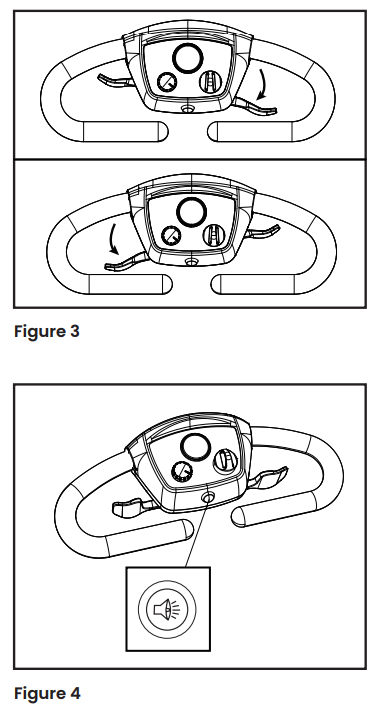
- The more you move the lever, the more your speed will increase (up to its preset maximum). It is possible to operate your scooter using only one side of the throttle lever. To do this , simply PUSH and PULL on the chosen side of the throttle lever(see figure 3).
Horn Button
Pressing the horn button produces an audible warning sound. Use this function to warn pedestrians of your presence when necessary (see figure 4).
Key Switch
- The key switch switches the scooter ON and OFF.
- Please note that the key cannot be removed when it is in the ON position.
- Turning the key to OFF while driving will cause the scooter to stop very abruptly. This is not recommended, except in an emergency, as continual use of this function could result in damage to the scooter.
- Make sure that the switch is in the OFF position before getting on or off the scooter. To ensure that the scooter is OFF, remove the key.
Charging Socket
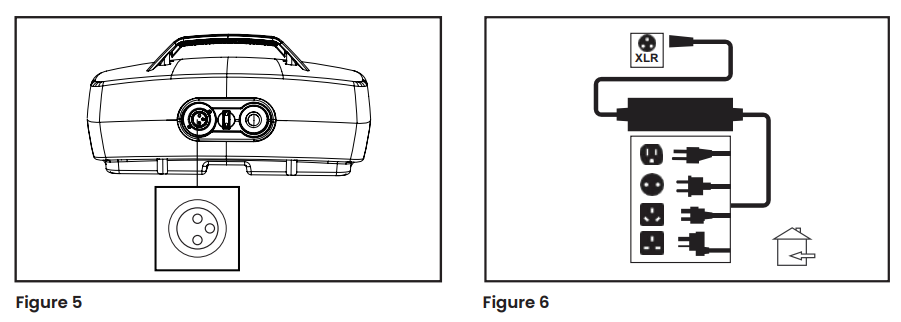
The socket to connect the charger is located on the battery pack (see figures 5 and 6). To use the socket, swivel the plastic cover to the left or right to reveal the socket connections. The charger output plug can now be connected, ready to accept charge current from the battery charger.
After use, ensure that the plastic swivel cover is rotated back into place. This action helps prevent water from entering the socket connections.
Freewheel mechanism
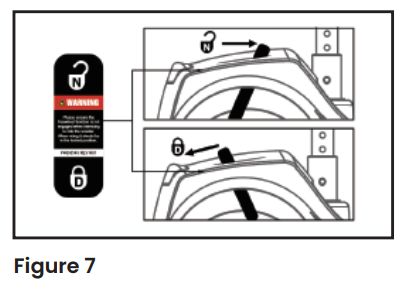
A freewheel device disengages the engine to allow for manual operation only. By pushing the lever babackwardyou will engage the motor to drive again. Please make sure to power off the scooter when moving the lever from the ock to the lock position. This will ensure the scooter registers the change.
The lever is located on the right-hand side of the scooter rear panel(see figure 7).
Routine Maintenance
The following gives an indication as to when routine maintenance checks should be made.
Daily
Look at the battery charge indicator on the tiller, before use, to ensure the batteries are charged.
Weekly
Use a damp soft cloth and mild detergent on panels, battery wells, tiller ,, and seat. Each tire should be free of debris, oil, deep cuts, or distortion.
Please ensure that the batteries are charged for a minimum of 8 hours.
Quarterly
Check the tires to ensure that the tread is visible and continuous.
Annually
- Full service by the dealer
- Inspection of the seat swivel and the seat slide
- Inspection of wiring and connectors for chafing and wear
- Inspection of battery terminals
- Inspection of the parking brake
- Inspection of stabilizer wheels for wear
- Inspection of motor brushes
Storage
When storing your scooter for long periods (in excess of one month), charge the batteries for 8 hours and then disconnect to minimize battery discharge.
Electronic faults
Do not attempt to investigate faults in the control box, the control pod, or the charger, as the design and setup of these electronics is critical for your safety. Spare parts and services are available from authorized dealers
Replacing LED
Caution! Disconnect batteries before changing the ED.
Wheels
Wheels should only be removed and refitted by an authorized dealer.
Guidance for Safe Operation and Use
Basic Driving
It is advisable, for the first few sessions of operating your scooter, that the area around you is clear of obstacles and pedestrians.
Before operating your scooter, ensure the seat height and position have been adjusted to your satisfaction and that the tiller angle has been set for optimal safety and comfort.
- To start, be properly seated on the scooter and check that the speed control knob is fully to the left. Then turn the key switch to the “ON” position .
- On the tiller, use the throttle levers as described earlier. You will gently accelerate. Release, and you will gently stop. Practice these two basic functions until you get used to them.
- Steering the scooter is easy and logical. Remember to allow enough clearance when turning corners so that the rear wheels will clear any obstacles.
- Short-cutting a pavement corner can cause problems for the back wheels if the corner is very rough. Avoid this at all times by steering an exaggerated curve around the obstacle.
- When steering in a tight spot, such as entering a doorway or when turning around, stop the scooter, turn the handlebars to where you want to go, then apply power gently. This will make the scooter turn very sharply. It is also recommended that the preset speed be set to a slower setting so that there is more control over the scooter.
- Reversing requires caution - especially exercise caution when reversing down slopes. When reversing, always turn the handlebars in the opposite direction to the way you want to go. The more you operate the throttle lever, the faster you will go.
- Reverse speed is 50% slower than forward speed. If the scooter does not move in reverse, carefully turn the speed control knob clockwise until the scooter moves gently backwards.
Important
To preserve battery power, there is a “sleep timer” feature built into the controller. Should the scooter be left ON, but not operated for 15 minutes,,s the scooter will go into “sleep mode”. To reset this, switch the scooter OFF and then back ON again.
Note: The user’s visual standards must be higher than 0.5.
Hill Climbing
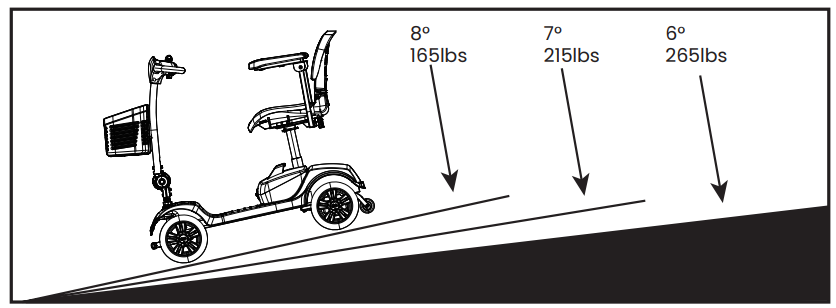
- This scooter has been tested to climb an incline of no more than 8° with a maximum user weight of up to 120kg (265 lbs) (see figure 18). Do not attempt to climb inclines greater than this.
- Always reduce your speed when reversing on slopes. Do not attempt to reverse down hills in excess of 8°.
- Do not attempt to drive with the wheels at different levels, e.,,g. along the footpath and road simultaneously.
Hill climbing capability and the distance travelled between battery charges will be adversely affected by things such as:
- The weight of the user.
- The use and weight of accessories
- The terrain (e.g,,. grass or gravel).
- The steepness of hills.
- The level of charge and the age of the batteries.
- Extremes in temperature.
Note: Do not traverse across the face of a slope that is greater than 8°.
Braking
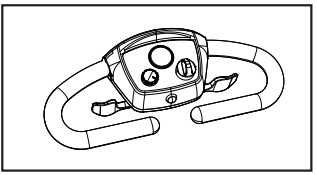
To bring the scooter to a stop, simply let go of the throttle control lever (see figure 19). Remember to keep both of your hands on the handlebars when the scooter is braking. Release of the control lever will stop your scooter in seconds.
Note: Automatic braking is not instantaneous. It will engage within the rotation of half of a tire upon stopping.
Emergency Braking
In an emergency or the unlikely event of an unwanted movement of the scooter, switching off the key switch will bring the scooter to a stop. Though very effective, emergency braking is extremely abrupt and must never be used under normal circumstances. Letting go of the throttle lever will slow the scooter to a controlled stop. Routine use of emergency braking will cause damage to your scooter.
Switching off and Storage
The scooter must be switched off by the key switch. When the scooter is stowed or not in use for a long period of time, always charge the batteries for 12 hours and then disconnect the battery pack before storing at or near room temperature.
Use on the Footpaths
When using your scooter on a footpath, always be aware of pedestrians and situations that might require extra care. For example, those with young children and pets. Remember,r especially when driving in public places, to drive with caution and regard for others at all times. When maneuvering in confined areas, including shops, ensure the minimum speed is selected . If you leave your scooter outside a shop, ensure that it does not obstruct the footpath or vehicular access.
Always switch off and take your key with you.
Crossing roads
Your scooter is not capable of mounting and dismounting curbs and other obstacles in excess of 45mm.
Remember, before crossing the road,d to drive forwards and position the scooter at 90° to the road, stopping about 30 - 60cm (1 - 2 feet) away from the edge of the footpath . Check that it is clear to cross. Select a medium to high speed setting and,, when safe to do so, drive across without stopping. Note that heavier users will require higher speed settings.
Turning corners
Always reduce your speed when turning corners. Disregard of this advice could lead to your scooter tipping over. The anti-tip devices fitted to the scooter must not be removed. A lower speed setting is also recommended when travelling downhill or in reverse.
Use of mobile phones
Mobile telephones or two-way radio devices must not be used while operating the vehicle. Use of mobile phones or two-way radios can cause excessively strong electromagnetic fields that may interfere with the vehicle’s electronic systems.
If mobile phones or mobile radios are required to be used, bring the vehicle to a stop and turn off the scooter’s engine before such devices are used.
Tires
Your scooter has solid tires , but it is good to inspect the tires for damage or wear regularly.
Battery and Charging Information
General information
Batteries are the power source for almost all of the modern mobility products available today. The design of batteries used in mobility products is significantly different from other batteries. Car batteries, for example,, are designed to release a large amount of power over a short period of time, while mobility batteries (commonly called deep cycle batteries) release their power evenly over a long period of time. Due to the lower production volumes and increased technological requirements, mobility batteries cost more. Commonly, two 12-volt batteries are used together in a mobility product to give it a total voltage of 24 volts. The size of the battery (e.g.,, its available power) is expressed in amps per hour. The higher the number, the bigger the battery size and weight, allowing for a greater amount of distance you can travel (see figure 20).
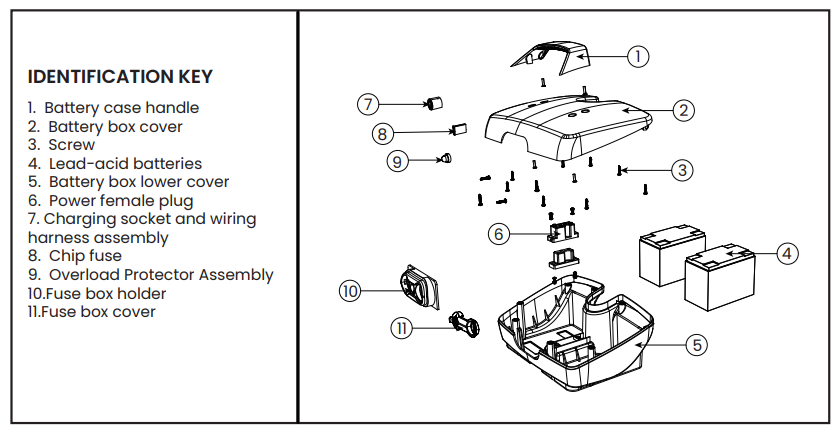
Batteries
- Your scooter is fitted with batteries that require no maintenance, other than regular charging.
- If a battery is physically damaged, please use extreme caution when handling it.
- Battery fluids are corrosive,, and care should be taken at all times to avoid contact with them. If it comes into contact with the skin or clothing, wash immediately with soap and water. If it comes into contact with the eye, immediately flood the eye with running cold water for at least 10 minutes and seek medical attention.
- In such an event, call your local dealer for assistance.
- Please do not dispose of batteries in normal waste; always recycle in accordance with local laws.
Maintenance free
- This type of battery uses GEL electrolytes,, which are totally sealed within the battery’s outer case. As the battery case is sealed, you can safely transport this type of battery without fear of acid spilling. Furthermore, they are approved for transportation on aircraft, boats,, ts, and trains.
- It is recommended that the batter be always transported and stored upright.
- Only use batteries supplied by an authorized dealer.
Charging Battery Care
- Do not expose any part of the battery to direct heat, , and when charging,, always place it on a hard surface in a room with good ventilation. You should not charge the batteries in outdoor conditions. Do not smoke when in the vicinity of charging batteries. Clear all naked flames from the area. Do not allow the batteries to freeze . Remove all conductive jewelry before checking the battery terminals to ensure that they do not short-circuit.
Battery Pack Care
We have set out a plan for maintenance-free batteries. If these directions are not followed, this may result in lower than expected performance from your mobility vehicle.
- Only use the approved battery charger that is compatible with the vehicle.
- Charge your batteries for 8-10 hours before first-time use,.
- Do not interrupt the charging cycle.
- Please recharge the scooter when the battery indicator shows low. Please do not charge the battery every day if not needed.
Range of Vehicle
- Most manufacturers of mobility products state the range of their vehicles either in the sales information or within the Owner’s Manual.
- The range stated sometimes differs from manufacturer to manufacturer,,r even though the battery size is the same. We measure the range of our vehicles consistently and uniformly, but variation may still occur due to motor efficiencies and overall product load weight.
The range figures stated should be seen as a theoretical maximum and could be reduced if any single, or combination, of the following circumstances occur:
- User weighs more than 120kg (265lbs).
- Batteries whose age and condition are less than perfect.
- The terrain is difficult or unsuitable (e.g.,, very hilly, sloping, muddy ground, gravel, grass, snow, ow or ice).
- Thick carpets within the home can affect range, as well.
- The ambient temperature is very hot or very cold.
- Damage occurs to one or more tires.
- Lots of starts and stops when driving.
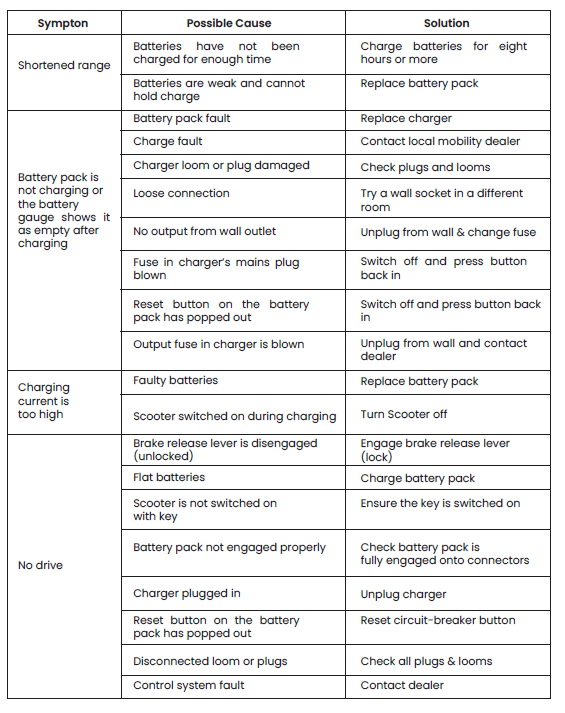
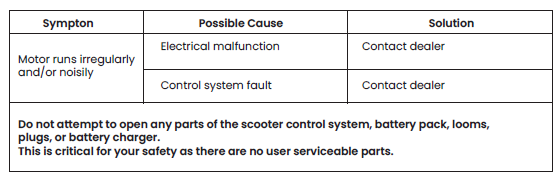
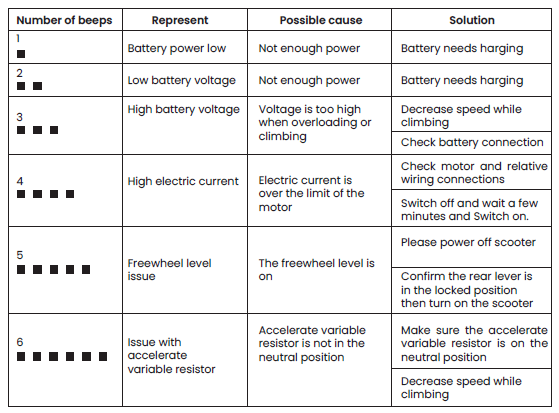
Troubleshooting Guide
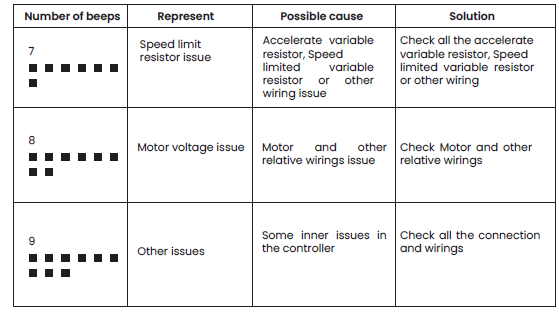
Warranty
One-year limited warranty
Drivetrain parts (transaxle, motor,, and brake), all electrical parts, including controllers and battery charge, rs are covered for one year under warranty.
Any attempt to open or dismantle these parts will lead to this warranty being voided.
Half year limited warranty
Batteries are covered by a six-month warranty from the original manufacturer.
Not covered under warranty
The following are classed as wear items, which may, under normal wear and tear, require replacement. The items that are not covered under warranty include tires, seat belts, bulbs, upholstery, plastic shrouds, motor brushes, and fuses.
Warranty will also be refused if damage is deemed to have been caused through misuse or an accident for which Metro Mobility cannot be deemed responsible.
Pros & Cons: Metro Mobility M1 Lite Scooter
Advantages
- Portability: The M1 Lite is designed for easy disassembly into four pieces, with the heaviest part weighing just 63 lbs. It can be stored in most car trunks, making it ideal for travel and outings.
- Comfort & Adjustability: Features a padded, swiveling seat, adjustable armrests, and an adjustable tiller for personalized comfort and easy entry/exit.
- Performance: Delivers a smooth ride with a 300W motor, 8"–9" flat-free tires, and a maximum speed of up to 4.97 mph. Handles indoor and light outdoor terrain with ease.
- User-Friendly Controls: Intuitive panel with speed dial, battery indicator, horn, and headlight, suitable for users with limited hand dexterity.
- Value for Money: Offers a robust feature set at a competitive price point compared to similar travel scooters in its class.
Limitations
- Limited Range: With a maximum range of 10 miles per charge, it may not be suitable for users needing extended travel without frequent recharging.
- Weight Capacity: While the 265 lbs limit covers most users, heavier individuals may need to consider alternative models with higher capacity.
- Terrain Limitations: Best suited for paved surfaces and mild inclines; not designed for rough or steep outdoor terrain.
- Assembly Required: Some users may find the disassembly/reassembly process slightly challenging, though it is generally straightforward.
When compared to alternatives, the Metro Mobility M1 Lite Scooter stands out for its blend of portability, comfort, and ease of use, making it a strong choice for those prioritizing transportability and everyday convenience over extended range or heavy-duty performance.
Customer Reviews: Metro Mobility M1 Lite Scooter
User feedback for the Metro Mobility M1 Lite Scooter highlights its reliability, comfort, and portability. Many customers praise the adjustable, swiveling seat and intuitive controls, noting how easy it is to get on and off the scooter and to operate it with limited hand strength[6]. The foldable design is frequently mentioned as a major advantage for travel and storage.
Common praises include the smooth ride, even on slightly uneven surfaces, and the scooter's sturdy build quality. Users also appreciate the responsive customer service and availability of replacement parts. Star ratings typically range from 4 to 5 stars, with particular appreciation for the scooter's value and ease of assembly.
Some complaints mention the limited battery life for longer outings and the need for occasional adjustments to the seat or controls for optimal comfort. A few users with mobility challenges found the disassembly process slightly cumbersome, though most agree it is manageable with practice[6].
Overall, the Metro Mobility M1 Lite Scooter is recommended for those seeking a reliable, portable mobility aid for daily activities and travel. It is especially suitable for users who value ease of transport and adjustable comfort features.
Technical Specifications: Metro Mobility M1 Lite Scooter
| Feature | Specification |
|---|---|
| Motor | 300W |
| Max Speed | 4–4.97 mph |
| Max Range | 10 miles |
| Weight Capacity | 265 lbs |
| Battery | 12Ah (24V) |
| Tires | 8"–9" flat-free, non-marking |
| Ground Clearance | 4.7 inches |
| Max Climbing Angle | 8 degrees |
| Heaviest Part (when disassembled) | 63 lbs |
| Folded Dimensions | 44"L x 20"W x 17"H |
| Seat | Sliding, swivel, adjustable height/width |
| Controls | Variable speed dial, battery indicator, horn, headlight |
Conclusion
The Metro Mobility M1 Lite Scooter is a standout choice for anyone seeking a reliable, portable, and user-friendly mobility solution. Its combination of adjustable comfort, intuitive controls, and easy transport makes it a practical option for daily use and travel. While it may not suit those needing extended range or higher weight capacity, most users will find it to be an excellent value, delivering independence and convenience where it matters most.
Faqs
How portable is the Metro Mobility M1 Lite Scooter?
What is the maximum range on a single charge?
Is the seat adjustable?
Can the Metro Mobility M1 Lite Scooter be used outdoors?
How does it compare to other travel scooters?
Leave a Comment