
How to Setup: Micro-Air EasyStart Home AC Wiring User Manual
Content
Introduction to micro-air EasyStart Home AC Wiring
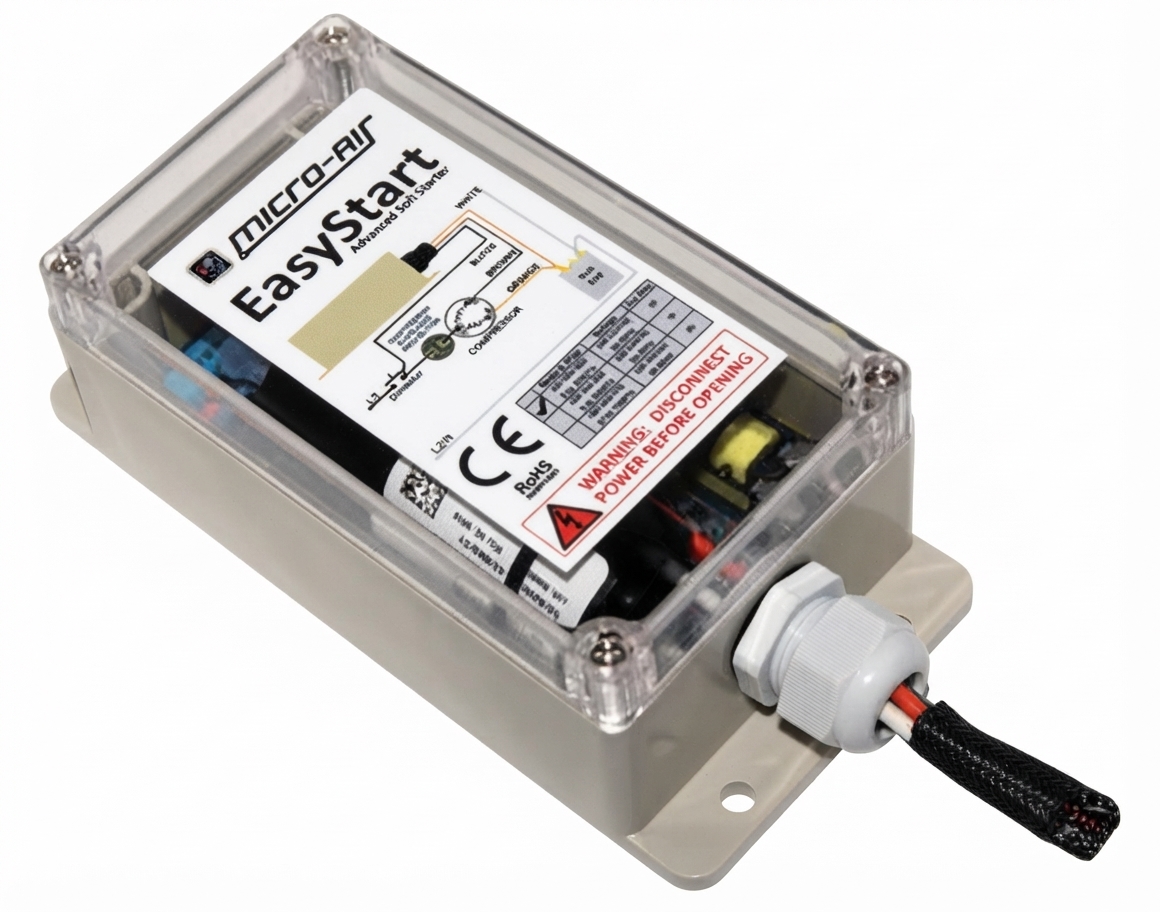
The micro-air EasyStart Home AC Wiring solution is designed to make residential air conditioner installation cleaner, safer, and more reliable by helping the soft starter learn compressor behavior and reduce startup stress. For homeowners, HVAC technicians, and DIY installers, this system is especially useful when an AC unit struggles with high inrush current, dimming lights, nuisance breaker trips, or noisy compressor starts. It is built to support a wide range of home cooling setups and is commonly used on residential split systems and other AC applications that benefit from a soft-start device.
One of the biggest advantages of micro-air EasyStart Home AC Wiring is its straightforward wire identification and learning-based startup process. Once installed correctly, the device can improve compressor starts by reducing the initial electrical surge, which may help extend equipment life and improve generator compatibility in some setups. It also supports brand-specific wiring diagrams and a general wiring guide, making it easier to match the unit to different HVAC configurations. The product is typically positioned as a premium soft starter, with an estimated price range that often falls in the mid-hundreds depending on model and retailer availability. It is widely available through HVAC suppliers, specialty retailers, and the manufacturer’s support resources. For users searching for a dependable soft starter with detailed documentation, micro-air EasyStart Home AC Wiring remains a strong option.
Specifications for Home AC Soft Starter Installation
- Operating voltage: 100 to 250 VAC
- Frequency: 50 to 60 Hz
- Wire harness length: Approximately 40 in. (1 m)
- Typical use: Residential air conditioners and compressor soft-start applications
- Control method: Automatic learning of compressor start characteristics over initial cycles
- Installation support: General wiring guide plus brand-specific residential wiring diagrams
- Primary function: Reduce startup surge and improve smoother compressor engagement
- Compatibility focus: Home AC systems that use standard compressor C, S, and R wiring
Compared with basic hard-start kits, micro-air EasyStart Home AC Wiring offers a more refined soft-start approach that is intended to reduce mechanical and electrical stress during compressor startup. Compared with many generic soft starters, it stands out for its documented wiring support, learning behavior, and residential-focused installation resources. This makes it a practical choice for users who want a more guided installation experience and a more polished performance profile.
Setup Guide: How to Wire micro-air EasyStart Home AC Wiring
Before starting, disconnect all AC power at the breaker and verify that the system is fully de-energized. Access the electrical compartment and identify the compressor wires marked C, S, and R. The EasyStart orange wire connects to the compressor S circuit, usually at the HERM terminal on the run capacitor. The black wire connects to the compressor C circuit with no electrical hardware in between. The brown wire connects to the compressor R wire, and the white wire reconnects to the point where the original compressor R wire was removed.
After wiring, secure all connections neatly, restore power, and let the unit cycle normally on mains power so the starter can learn compressor characteristics. Configuration options may vary by unit type, so always use the correct brand-specific diagram when available. If the compressor fails to start, recheck wire placement, terminal labels, and any start-assist components that may need removal. Safety is critical: never work on live HVAC equipment, and if you are uncertain about wiring identification, use a qualified technician.
Troubleshooting micro-air EasyStart Home AC Wiring Problems
Common issues usually come from incorrect wire placement, leftover start components, loose terminals, or a wiring diagram mismatch. If the compressor hums but does not start, confirm that orange is on S/HERM, black is on C, brown is on the compressor R lead, and white is on the original R source. If the unit still has a start capacitor, start relay, or PTCR in the circuit, remove it only if the installation instructions require that step for your model.
There are no user-facing error codes in the usual consumer sense, so troubleshooting is typically based on symptoms, wiring checks, and restart behavior. Preventive measures include labeling wires before disconnecting them, taking photos during installation, and checking terminal tightness after the first test cycle. The product is covered by a two-year limited warranty from the date of delivery to the original purchaser, and support is available through the manufacturer’s knowledge base, installation guides, and customer service channels. For assistance, contact Micro-Air support through the official support section on the manufacturer’s website or the retailer that supplied the unit.
Pros and Cons of micro-air EasyStart Home AC Wiring
Pros
- Reduces compressor startup strain and can help soften the initial electrical surge.
- Helpful for homes that experience dimming lights or nuisance breaker trips during AC startup.
- Clear wiring guides and brand-specific diagrams improve installation confidence.
- Works with a broad range of residential AC configurations.
- Strong value for users who want a premium soft starter rather than a basic hard-start kit.
Cons
- Installation is still technical and may be challenging for first-time DIY users.
- Incorrect wiring can prevent startup or cause learning issues.
- Price is usually higher than simple start-assist alternatives.
- Some systems may require careful removal of existing start components.
Overall, micro-air EasyStart Home AC Wiring offers excellent value for homeowners who want smoother starts, better documentation, and a more professional installation experience. Compared with generic soft starters, it is often the more user-friendly choice for residential HVAC projects.
Customer Reviews: What Users Say About micro-air EasyStart Home AC Wiring
Typical customer feedback is strongly positive, with many users praising the quieter startup, reduced light flicker, and improved generator-friendly performance. A common star rating theme is around 4.5 out of 5, especially from homeowners who successfully install the unit on the first attempt. One frequent testimonial style comment is: “My AC starts much smoother now, and the whole house no longer dims when the compressor kicks on.”
Common complaints usually center on the wiring complexity and the need to follow the instructions carefully. Users also mention that checking the compressor terminals and any existing start components can take time. For best results, buyers who are comfortable with HVAC wiring or who have access to a technician are the most likely to recommend the product. Overall, the feedback suggests that micro-air EasyStart Home AC Wiring is a solid purchase for users who want reliable soft-start performance and can handle a detailed installation process.
Faqs
How do I set up micro-air EasyStart Home AC Wiring for the first time?
What wiring problems can cause micro-air EasyStart Home AC Wiring to fail during startup?
Is micro-air EasyStart Home AC Wiring compatible with my central air conditioner or heat pump?
Why does my micro-air EasyStart Home AC Wiring reduce startup current on the AC unit?
How can I troubleshoot micro-air EasyStart Home AC Wiring if the compressor still hard-starts?
What are the best installation requirements for micro-air EasyStart Home AC Wiring to work reliably?
How do I maintain micro-air EasyStart Home AC Wiring after installation?
Can micro-air EasyStart Home AC Wiring help when running my AC on a generator or inverter?
Tags
More micro-air manuals
Leave a Comment