
Midea MV12UltraSGBK Robot Vacuum Cleaner User Manual
Content
midea MV12UltraSGBK Robot Vacuum Cleaner Review and Product Manual
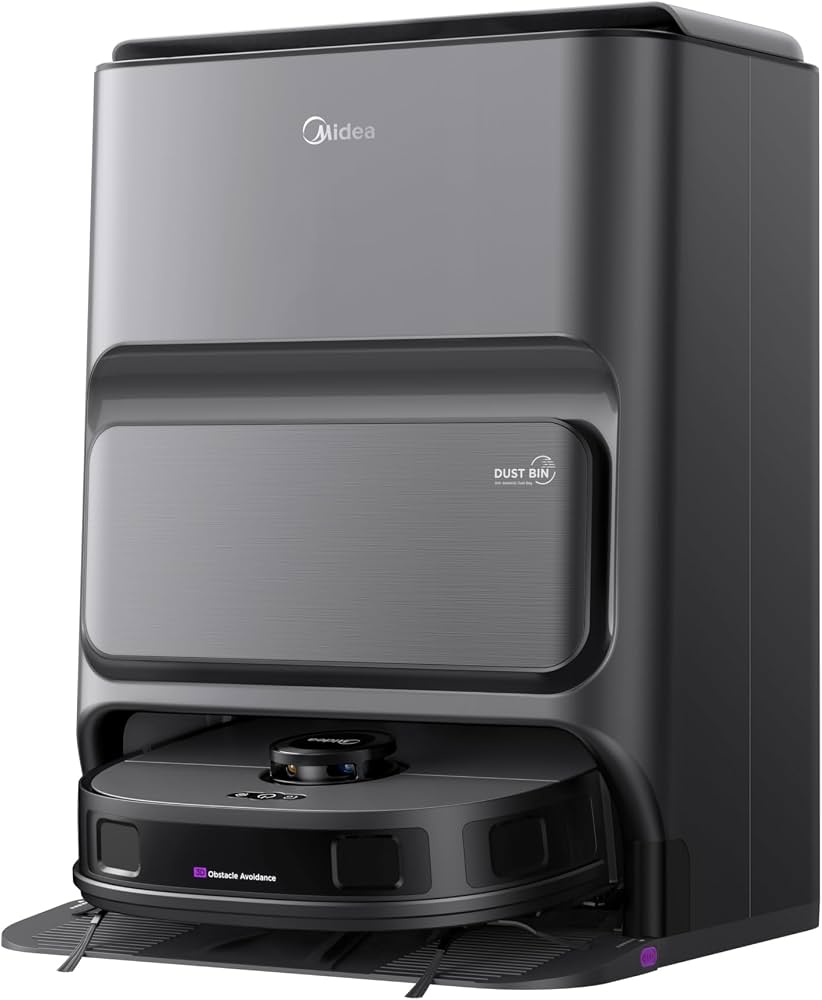
The midea MV12UltraSGBK Robot Vacuum Cleaner is a premium robot vacuum and mop system designed for hands-free floor cleaning in modern homes. It combines 5,000Pa suction, LiDAR navigation, dual line laser mapping, self-emptying, and auto mop washing to deliver a more automated cleaning experience than standard robot vacuums. With a 3L self-empty base, disposable dust bag support for up to 75 days, and hot air drying, it is built for users who want less maintenance and more convenience.
This model is especially appealing for busy households, pet owners, and apartment or condo residents who need reliable daily cleaning on hard floors and mixed surfaces. The midea MV12UltraSGBK Robot Vacuum Cleaner is also a strong fit for users searching for smart vacuum cleaner performance with mapping precision, scheduled cleaning, and mop support in one device. Its 100-minute runtime, 5,200mAh battery, and 4.7L water tank capacity make it practical for medium-sized homes and regular maintenance cleaning.
In Singapore, the estimated price range is commonly seen from about S$699 to S$854, with some listings showing higher regular prices around S$1,199 depending on promotions and stock availability. The midea MV12UltraSGBK Robot Vacuum Cleaner is available through selected appliance retailers and online marketplaces, though pricing and availability can vary significantly by seller and season. If you are comparing it with alternatives, it sits in the upper-midrange segment and competes with other self-emptying robot vacuum and mop cleaners that offer smart mapping and stronger automation.
Pros and Cons of the midea MV12UltraSGBK Robot Vacuum Cleaner
Pros
- Strong 5,000Pa suction: Handles dust, crumbs, hair, and everyday debris well, making it effective for routine cleaning on hard floors and low-pile surfaces.
- Self-emptying and auto mop washing: Reduces manual upkeep and is ideal for users who want a more automated robot vacuum cleaner.
- LiDAR and dual line laser navigation: Helps the robot map rooms more accurately and clean in organized routes instead of random patterns.
- Useful for pet hair and busy homes: The auto-empty base and scheduled cleaning features make it practical for households that need frequent maintenance.
- Good value during promotions: When discounted, it offers a solid feature set for the price compared with many self-cleaning robot vacuum and mop competitors.
Cons
- Premium price outside promotions: At full retail pricing, it can be expensive compared with simpler robot vacuums that do not include self-emptying or mop washing.
- Large dock footprint: The self-empty base takes up more space, which may be inconvenient in smaller homes.
- Best for maintenance cleaning: Like most robot vacuums, it is not a full replacement for deep cleaning on stubborn dirt or heavily textured carpets.
- Noise and size considerations: The base system and stronger suction can be more noticeable than compact entry-level alternatives.
Overall, the midea MV12UltraSGBK Robot Vacuum Cleaner offers strong value if you want automation features that are usually found in more expensive models. If your priority is low-cost basic vacuuming, a simpler robot vacuum may be enough. If you want a smarter all-in-one mop and vacuum with less daily maintenance, this model is more compelling than many budget alternatives.
Customer Reviews for midea MV12UltraSGBK Robot Vacuum Cleaner
Customer feedback is generally positive, with many buyers rating it around 4.3 to 4.6 out of 5 stars for its convenience, suction power, and smart mapping. Users often praise the self-emptying base, mop washing function, and the way it reduces daily cleaning effort. One common testimonial theme is that it is “a major time saver for busy families” and “much easier to live with than a standard robot vacuum.”
Frequent complaints usually focus on the premium price, the space needed for the dock, and occasional setup complexity for first-time robot vacuum users. Some customers also mention that mop performance is best for light to moderate floor maintenance rather than deep scrubbing. If you are considering the midea MV12UltraSGBK Robot Vacuum Cleaner, it is a strong buy for users who value convenience, but less ideal if you only need basic floor cleaning. For the best purchase experience, look for bundled promotions, warranty coverage, and seller support before ordering.
Key Specifications at a Glance
- Suction power: Up to 5,000Pa
- Battery capacity: 5,200mAh
- Runtime: About 100 minutes
- Charging time: Less than 6 hours
- Noise level: 68.5 dB
- Water tank capacity: 4.7L
- Robot size: 350 x 342.5 x 107.5 mm
- Color: Black
- Main features: Self-empty base, auto mop washing, hot air drying, LiDAR navigation, dual line laser mapping
Buying Advice for the midea MV12UltraSGBK Robot Vacuum Cleaner
If you want a robot vacuum cleaner with self-emptying convenience, smart mapping, and mop support, this model is a strong match. It is best suited to homes with daily dust, pet hair, and mixed floor types where regular automated cleaning matters more than occasional deep cleaning. The midea MV12UltraSGBK Robot Vacuum Cleaner is most attractive when found at a discounted price, since its feature set becomes much more competitive in that range.
For voice-search style guidance: this is a good choice if you want “the best robot vacuum cleaner with self-emptying and mop washing for everyday home use.” If your home is very large, heavily carpeted, or needs intensive scrubbing, a higher-end premium model may be a better fit. For most modern households, however, this Midea robot vacuum offers a balanced mix of smart features, cleaning performance, and convenience.
Faqs
How do I set up the midea MV12UltraSGBK Robot Vacuum Cleaner for the first time?
Why is my midea MV12UltraSGBK Robot Vacuum Cleaner not connecting to Wi-Fi or the app?
What should I do if the midea MV12UltraSGBK Robot Vacuum Cleaner gets stuck or stops mid-clean?
How does the midea MV12UltraSGBK Robot Vacuum Cleaner handle pet hair and everyday debris?
Can the midea MV12UltraSGBK Robot Vacuum Cleaner work on carpet, tile, and hardwood floors?
How often should I empty and maintain the midea MV12UltraSGBK Robot Vacuum Cleaner?
How can I improve the cleaning performance of the midea MV12UltraSGBK Robot Vacuum Cleaner?
What features should I know about before buying the midea MV12UltraSGBK Robot Vacuum Cleaner?
More midea manuals
Leave a Comment