
Midea OSK102 Wi-Fi Smart Kit User Manual
Content
midea OSK102 Wi-Fi Smart Kit Manual and Product Guide
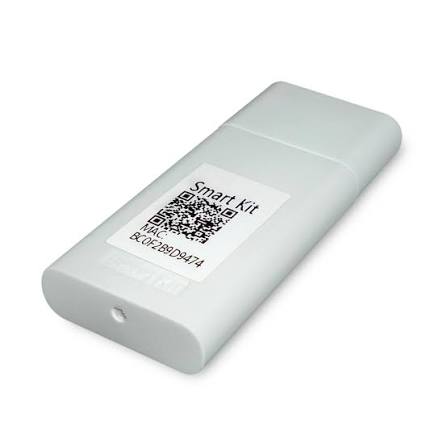
The midea OSK102 Wi-Fi Smart Kit is a compact wireless module that adds smart control to compatible Midea air conditioners. It connects through a reserved USB-style interface on the indoor unit and enables app-based management through a smartphone, making it a practical upgrade for homeowners, renters, and small businesses that want remote climate control without replacing the entire system. With 2.4 GHz Wi-Fi support, IEEE 802.11 b/g/n compatibility, and low-power DC 5V / 300mA operation, it is designed for simple integration and everyday convenience.
Key benefits include remote on/off control, temperature adjustment, mode selection, fan speed control, and room temperature monitoring through the Midea smart home app ecosystem. This makes the midea OSK102 Wi-Fi Smart Kit especially useful for users who want to pre-cool rooms before arriving home, manage comfort in vacation properties, or reduce energy waste by scheduling HVAC use more efficiently. It is also a strong fit for users who prefer voice-assisted or app-based smart home workflows, depending on their connected platform and app support.
The estimated price range is typically around $25 to $85 USD depending on the seller, region, and compatibility package, with availability varying by market and distributor. For best results, buyers should verify that their air conditioner model supports the kit before ordering. In search terms, this product is often listed as a Midea Wi-Fi smart adapter, smart kit module, or AC Wi-Fi USB module, so those related keywords can help with product discovery and compatibility checks.
How to Install and Set Up the midea OSK102 Wi-Fi Smart Kit
Quick installation overview
- Turn off the air conditioner before installation.
- Remove the protective cap from the smart kit module.
- Open the front panel and insert the module into the reserved interface.
- Attach the QR code sticker to the side of the indoor unit or store the QR code in your phone.
- Download the compatible mobile app and complete pairing over a 2.4 GHz Wi-Fi network.
The setup process is generally straightforward, but the module must be matched to a supported Midea indoor unit series. If the app cannot detect the device, confirm that the router is broadcasting 2.4 GHz Wi-Fi, since 5 GHz networks are typically not supported by this class of smart kit.
Troubleshooting the midea OSK102 Wi-Fi Smart Kit
If the midea OSK102 Wi-Fi Smart Kit does not connect, start by checking power, insertion depth, and router band settings. A common issue is pairing failure caused by using a 5 GHz-only network or an unstable signal. Reboot the router, restart the air conditioner, and try pairing again from close range. If the app reports a connection timeout or device offline status, delete the device from the app and repeat the setup process with the QR code. Some units may also show generic wireless setup failures rather than a detailed error code, so the fix is usually to reinitialize the pairing process.
Common problems and solutions include:
- No Wi-Fi connection: Confirm 2.4 GHz network support and verify the module is fully seated.
- App cannot find device: Reset pairing, rescan the QR code, and keep the phone near the unit.
- Intermittent disconnection: Improve router signal strength and reduce interference from walls or appliances.
- Smart kit not responding: Power cycle the AC indoor unit and check for firmware or app updates.
Prevent issues by using the correct compatible model, keeping the app updated, and placing the router within reliable range. Warranty and support options usually depend on the seller, distributor, or AC manufacturer, so retain proof of purchase and installation details. For help, contact the retailer, the Midea service channel in your region, or the installer who supplied the unit. If a fault persists after reinstalling the module, professional service is recommended.
Pros and Cons of the midea OSK102 Wi-Fi Smart Kit
Pros
- Convenient app control: Lets users manage cooling remotely from a smartphone.
- Energy-saving potential: Scheduling and pre-cooling can reduce unnecessary runtime.
- Compact design: The module is small and designed for internal installation.
- Good smart-home upgrade: Adds modern connectivity without replacing the AC system.
- Value for money: Often cheaper than replacing a working air conditioner with a smart model.
Cons
- Compatibility limits: Not all Midea units support the OSK102 module.
- 2.4 GHz only: Homes using only 5 GHz Wi-Fi may face setup issues.
- Basic feature set: It improves control, but does not turn every unit into a premium smart HVAC system.
- App dependence: Many functions require a mobile app and network connection.
- Alternatives may differ: Some newer Wi-Fi smart kits include broader app ecosystems or updated hardware revisions.
Overall, the midea OSK102 Wi-Fi Smart Kit offers strong value for users who want affordable AC automation. Compared with newer smart modules or fully integrated smart HVAC units, it is less advanced, but it remains a practical upgrade for compatible systems.
Customer Reviews of the midea OSK102 Wi-Fi Smart Kit
Customer feedback is generally positive, with many users rating it around 4 out of 5 stars for convenience and easy remote control. Praise often focuses on quick temperature adjustments, simple scheduling, and the ability to start cooling before arriving home. One typical review says, “It made my older Midea AC feel much more modern.”
Common complaints include pairing difficulty, weak Wi-Fi performance in larger homes, and confusion about compatibility. Another frequent comment is, “The app works well once connected, but setup took a few tries.” Buyers who want a straightforward smart upgrade usually recommend it, especially if they already own a supported Midea unit. Users looking for advanced automation, detailed energy analytics, or multi-platform integration may prefer a newer smart AC ecosystem instead.
Final Buying Recommendation for the Midea Wi-Fi Smart Kit
If you want a reliable and affordable way to add smart controls to a compatible Midea air conditioner, the midea OSK102 Wi-Fi Smart Kit is a solid purchase. It is best for homeowners, apartment users, and small offices that need remote access, simple scheduling, and app-based comfort control without a major equipment upgrade.
Faqs
How do I set up midea OSK102 Wi-Fi Smart Kit for the first time?
Why is my midea OSK102 Wi-Fi Smart Kit not connecting to the app?
What appliances are compatible with midea OSK102 Wi-Fi Smart Kit?
What features does midea OSK102 Wi-Fi Smart Kit add to my Midea appliance?
How can I improve the Wi-Fi performance of midea OSK102 Wi-Fi Smart Kit?
What should I do if midea OSK102 Wi-Fi Smart Kit keeps disconnecting?
How do I maintain and clean midea OSK102 Wi-Fi Smart Kit safely?
Can I reset midea OSK102 Wi-Fi Smart Kit without losing my appliance settings?
More midea manuals
- Midea MCD1-24HRDN1 Cassette-Type Air Conditioner User Manual
- Midea 12000BTU Window Air Conditioner MAW12V1DWT User Manual
- Midea MCA3U-09HRFN1-M Mono-DC Air Conditioner User Manual
- Midea MRU21F2AWW Upright Freezer User Manual
- Midea YL1635T Water Dispenser User Manual
- Midea MLV45N1B Top-Load Washer User Manual
Leave a Comment