
Setup & Installation: Midea Robot Vacuum Cleaner M7 Pro User Manual
Content
Midea Robot Vacuum Cleaner M7 Pro: Complete Product Manual and Buying Guide
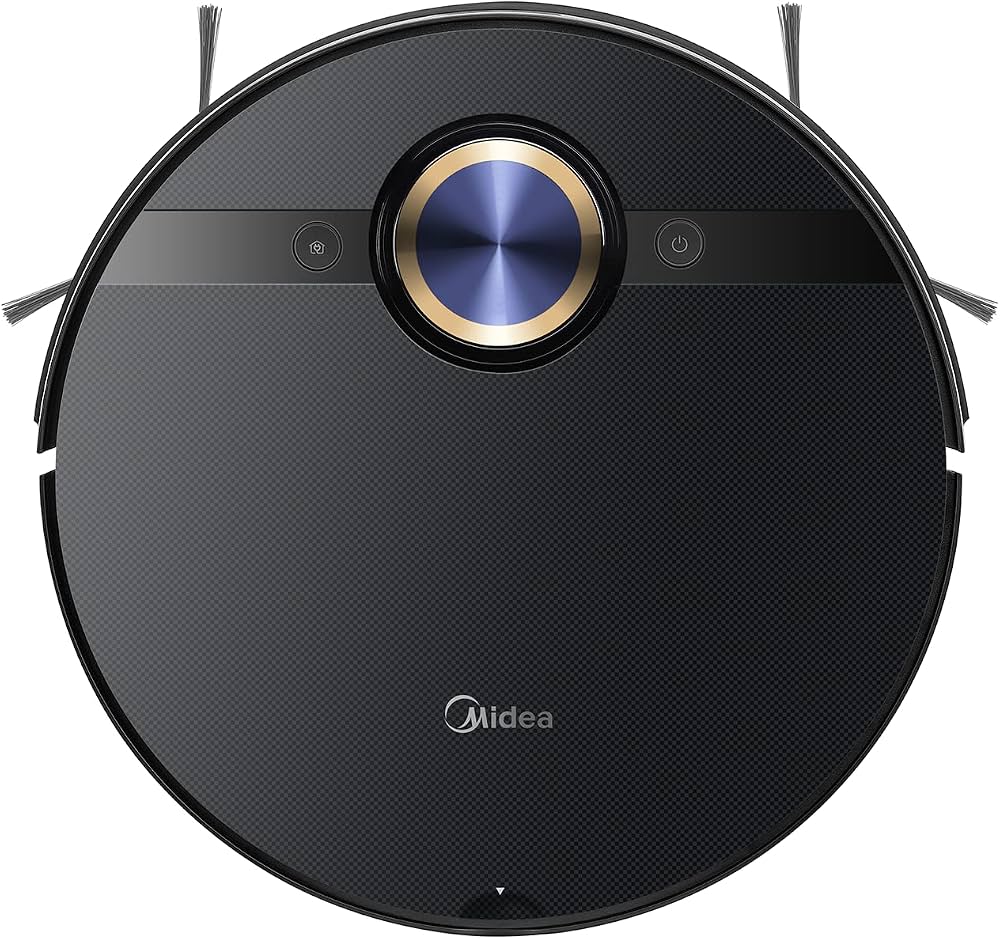
The Midea Robot Vacuum Cleaner M7 Pro is a smart robot vacuum and mop designed for homes that need powerful everyday cleaning with minimal effort. It combines strong suction, laser navigation, app control, and wet mopping in a compact body that fits under most furniture. With features such as 4000Pa suction power, LDS mapping, a 5200mAh battery, and a large dustbin, it targets users who want a practical all-in-one floor care solution for dust, pet hair, crumbs, and light stains.
This model is especially useful for busy households, pet owners, apartment dwellers, and anyone who prefers scheduled cleaning over manual vacuuming. Its mapping system helps it move efficiently through rooms, while the mop function adds extra convenience for hard floors. The Midea Robot Vacuum Cleaner M7 Pro is also a strong fit for mixed-floor homes with carpet and tile, thanks to carpet detection, obstacle sensing, anti-fall protection, and automatic recharging. In real-world use, it is best for regular maintenance cleaning rather than deep carpet extraction.
As of 2026, the estimated price range is typically around $300 to $500 depending on region, retailer, and bundle configuration. Availability is generally good in online marketplaces and Midea’s regional stores, though stock can vary by country. For shoppers comparing robot vacuum cleaners, the M7 Pro sits in the mid-range segment and offers solid value for users who want advanced navigation and mopping without paying premium flagship prices.
Technical Specifications and Key Features of the Midea Robot Vacuum Cleaner M7 Pro
- Suction power: 4000Pa for daily dust, dirt, and pet hair pickup
- Navigation system: LDS laser mapping for intelligent room planning and route efficiency
- Battery capacity: 5200mAh lithium-ion battery for long cleaning sessions
- Runtime: Up to 180 minutes, depending on mode and floor type
- Dustbin capacity: 430ml to 450ml, depending on regional configuration
- Water tank capacity: 180ml to 230ml, depending on the model version
- Dimensions: 350 x 350 x 97 mm for low-profile cleaning under furniture
- Noise level: About 65 to 70 dB in typical use
- Climbing ability: Around 20mm to 22mm thresholds
- Controls: App control, schedule cleaning, virtual walls, and multi-mode cleaning
- Cleaning types: Vacuuming and wet mopping with vibration-assisted water delivery
- Safety features: Anti-collision, anti-fall sensors, and carpet detection
Compared with similarly priced robot vacuums, the Midea M7 Pro stands out for its 4000Pa suction and LDS navigation, which are often found in more expensive competitors. It competes well against mid-range models from brands like Roborock, Xiaomi, and Dreame in terms of mapping and runtime, while offering straightforward app-based control and dependable daily cleaning performance.
Setup Guide: How to Install and Configure the Midea Robot Vacuum Cleaner M7 Pro
1. Unbox the robot, charging dock, power adapter, side brushes, mop components, and user materials.
2. Place the charging base against a wall on a flat surface with open space around it for docking.
3. Attach the side brushes, install the dustbin, and fill the water tank if you plan to mop.
4. Fully charge the vacuum before the first cleaning cycle to calibrate the battery properly.
5. Download the compatible mobile app, connect the robot to 2.4GHz Wi-Fi, and follow the pairing prompts.
6. Run an initial mapping cycle so the robot can scan rooms and create an accurate floor plan.
7. Set no-go zones, virtual walls, cleaning schedules, suction levels, and mop intensity through the app.
8. Test the robot in one room first to confirm docking, navigation, and obstacle detection are working correctly.
When configuring the robot, keep cables, socks, small toys, and loose rugs out of the cleaning area. Avoid using the mop function on delicate carpets or moisture-sensitive flooring. If pairing fails, reset the Wi-Fi connection, confirm the router is on 2.4GHz, and move the robot closer to the router during setup. For safety, never place the dock near stairs, water sources, or direct heat.
Troubleshooting the Midea Robot Vacuum Cleaner M7 Pro
- Robot will not charge: Clean the charging contacts, check the adapter connection, and make sure the dock is powered on.
- Weak suction: Empty the dustbin, clean the filter, inspect the brush for hair tangles, and confirm suction mode is not set too low.
- Robot gets stuck: Remove cables, thick mats, and obstacles; then verify that threshold height is within supported range.
- Poor mopping performance: Refill the tank, check the mop pad, and make sure the water outlet is not blocked.
- Wi-Fi pairing fails: Use a 2.4GHz network, reboot the router, and restart the robot before pairing again.
- Navigation looks inaccurate: Clean the sensors and allow the robot to complete a full mapping run in good lighting.
Common error codes can vary by region and app version, but most are related to brush jams, wheel blockage, cliff sensor issues, or charging problems. Preventive care includes cleaning the filter weekly, wiping sensors regularly, and clearing the floor before each run. If problems continue, check the warranty card or contact the seller or regional Midea support team through the official customer service channel listed in your local product documentation. Keep the purchase receipt and serial number ready when requesting help.
Pros and Cons of the Midea Robot Vacuum Cleaner M7 Pro
Pros
- Strong 4000Pa suction for dust, crumbs, and pet hair
- LDS navigation improves route planning and room coverage
- Long battery life makes it suitable for larger apartments and homes
- Vacuum and mop combination adds value for hard floors
- Compact height helps it clean under sofas, beds, and cabinets
- Good value for money in the mid-range robot vacuum category
Cons
- Mopping is best for light maintenance, not heavy scrubbing
- Noise can be noticeable at higher suction levels
- App features may vary slightly by region
- Dustbin and tank sizes are practical, but not among the largest in class
- Premium features like automatic self-emptying are not typically included
For value-conscious buyers, the Midea Robot Vacuum Cleaner M7 Pro offers a balanced mix of smart navigation, strong suction, and mopping support without moving into premium pricing. It is a better fit than basic entry-level robot vacuums, but users who want advanced station automation or deep carpet cleaning may prefer higher-end alternatives.
Customer Reviews and Real-World Feedback on the Midea Robot Vacuum Cleaner M7 Pro
Customer feedback is generally positive, with many users rating it around 4 out of 5 stars for everyday cleaning performance. Buyers often praise the mapping accuracy, easy app control, and reliable suction on hard floors and low-pile carpets. One common comment is that it performs well for routine cleaning and reduces the need for manual vacuuming during the week.
Frequent complaints include occasional navigation errors in cluttered rooms, moderate noise at maximum power, and mopping that works better for dust than dried-on stains. Several users also recommend cleaning the sensors and brush roll regularly to keep performance consistent. Overall, the Midea Robot Vacuum Cleaner M7 Pro is a smart purchase for households that want dependable automation, especially if the main goal is daily floor maintenance rather than intensive deep cleaning.
Faqs
How do I set up the midea Robot Vacuum Cleaner M7 Pro for the first time?
Why is my midea Robot Vacuum Cleaner M7 Pro missing spots during cleaning?
How do I fix midea Robot Vacuum Cleaner M7 Pro navigation problems or getting stuck?
Does the midea Robot Vacuum Cleaner M7 Pro work with smart home apps and voice assistants?
What floor types can the midea Robot Vacuum Cleaner M7 Pro clean effectively?
How can I improve suction and cleaning performance on the midea Robot Vacuum Cleaner M7 Pro?
How often should I maintain the midea Robot Vacuum Cleaner M7 Pro to prevent problems?
What should I do if the midea Robot Vacuum Cleaner M7 Pro will not charge or return to the dock?
More midea manuals
- Features & Specs: Midea 20L Digital Microwave MP7010002-00 User Manual
- Setup & Features: Midea Portable Air Conditioner User Manual
- Midea Portable Dehumidifier User Manual
- How to Use: Midea Robot Vacuum Cleaner User Manual
- Setup: Midea MD200H80W Series Tumble Dryer User Manual
- Setup & Features: Midea Top Load Washing Machine User Manual
Leave a Comment