
Midea S8+ Robot Vacuum Cleaner User Manual
Content
midea S8+ Robot Vacuum Cleaner: Full Product Manual and Buyer Guide
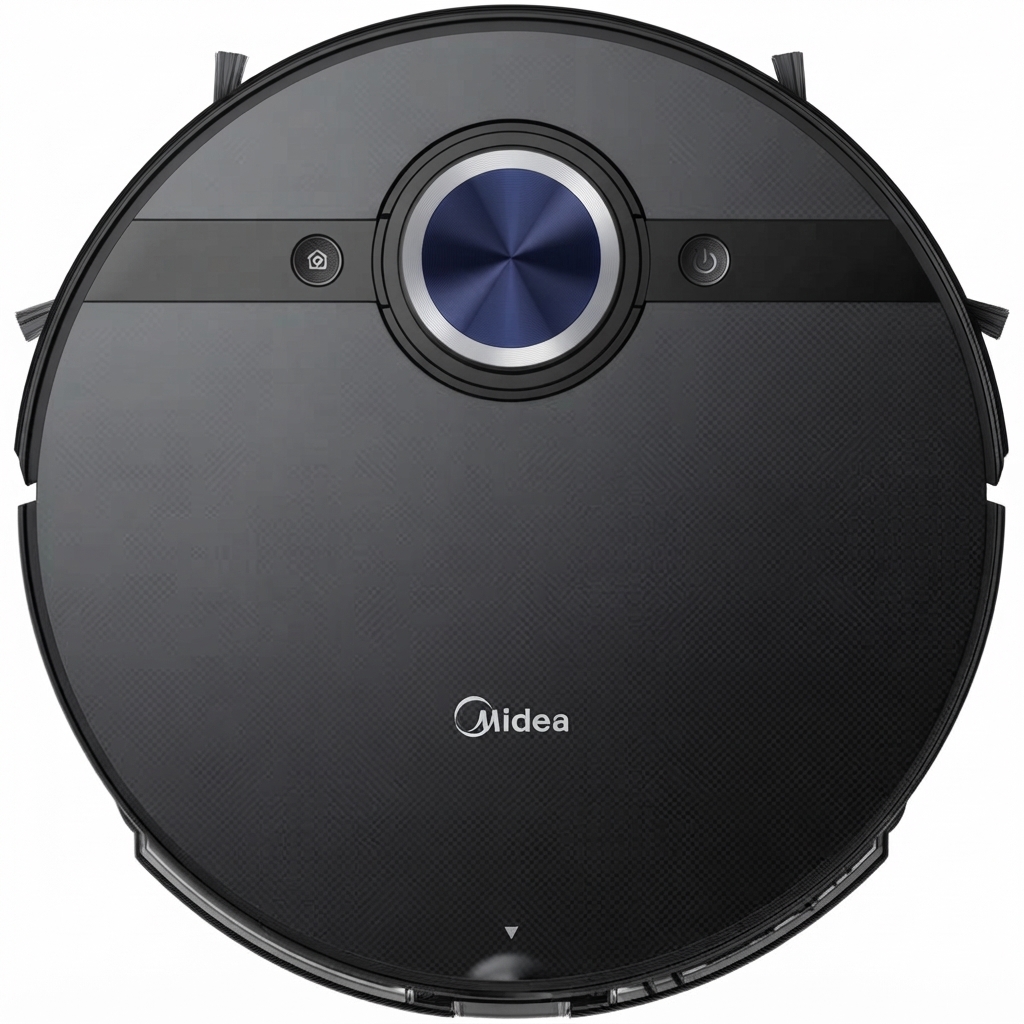
The midea S8+ Robot Vacuum Cleaner is a premium 2-in-1 smart cleaning solution designed for homes that need powerful vacuuming, effective mopping, and low-maintenance automation. It combines 4000Pa suction, LiDAR-based laser navigation, and an auto-empty dust station to reduce everyday cleaning work while improving floor coverage and consistency. With a 5200mAh battery and up to 180 minutes of runtime, it is well suited for medium to large apartments and family homes, especially those with mixed flooring, pets, and frequent dust buildup.
One of its biggest strengths is the self-emptying station, which can store dust for weeks before needing attention. That makes the midea S8+ Robot Vacuum Cleaner appealing to busy households, pet owners, and users who want a more hands-off robot vacuum cleaner experience. Its vibrating mop system adds value for hard floors, helping remove fine dirt and light stains better than basic drag-mop designs. The LDS navigation system also supports efficient room mapping, zone cleaning, and scheduled cleaning through app control.
Estimated price typically falls in the mid-range premium category, often around $450 to $600 depending on the market, promotions, and included accessories. Availability varies by region, but the model is commonly sold through official Midea channels and major online retailers in Europe, the Middle East, and select Asia-Pacific markets. For shoppers comparing robot vacuums with self-emptying bases, the midea S8+ Robot Vacuum Cleaner offers a strong balance of cleaning power, smart features, and convenience.
Pros and Cons of the midea S8+ Robot Vacuum Cleaner
Pros
- Strong suction power: The 4000Pa motor handles dust, crumbs, pet hair, and debris on hard floors and low-pile carpets with confidence.
- Self-emptying station: The dock reduces frequent bin emptying, making it ideal for daily use in busy homes.
- LiDAR navigation: Laser mapping improves route planning, room coverage, and obstacle-aware cleaning patterns.
- Long runtime: Up to 180 minutes of operation helps it clean larger spaces in one session.
- Useful mopping system: The vibrating mop adds better floor refreshment than basic passive mopping robots.
- Good value for money: Compared with premium alternatives from Roborock, Ecovacs, or Dreame, it often costs less while still offering auto-emptying and laser navigation.
Cons
- Not the quietest option: The vacuum and station can become noticeable during stronger cleaning or dust emptying cycles.
- Mopping is not a substitute for manual deep cleaning: It works best for maintenance, not heavy spills or dried stains.
- Base station size: The auto-empty dock requires more floor space than compact robot vacuum models.
- Alternative brands may offer more advanced app ecosystems: Some competing robot vacuums provide richer mapping controls, better object recognition, or smarter multi-floor management.
- Best performance is on hard floors and low carpets: High-pile rugs may reduce cleaning efficiency compared with higher-end flagship models.
Overall, the midea S8+ Robot Vacuum Cleaner is a practical choice for users who want a self-emptying robot vacuum without paying flagship pricing. It competes well against mid-range models, especially for homes that prioritize automation, suction power, and reliable everyday cleaning.
Customer Reviews of the midea S8+ Robot Vacuum Cleaner
Customer feedback is generally positive, with many users praising the strong suction, accurate mapping, and convenience of the auto-empty station. Typical ratings hover around 3.8 to 4.7 out of 5 stars across major marketplaces, depending on the region and seller. One common compliment is how well it handles pet hair and daily dust with minimal effort.
Frequent complaints focus on the mop performance being more suitable for light maintenance than deep scrubbing, while some users mention that the station takes up noticeable space. A few buyers also note that app setup and mapping can require patience during the first run. A representative user impression would be: “Great for daily cleaning and pet hair, but I still use a mop for tougher spots.”
Recommendation: buy the midea S8+ Robot Vacuum Cleaner if you want strong suction, automated dust disposal, and smart navigation in a value-focused package. If your priority is advanced obstacle avoidance or premium mopping performance, a higher-end Roborock or Ecovacs model may be a better fit.
Key Specifications at a Glance
- Cleaning type: vacuuming and mopping
- Suction power: 4000Pa
- Battery capacity: 5200mAh
- Runtime: up to 180 minutes
- Navigation: LDS laser navigation
- Dust bin capacity: 450ml
- Auto-empty station capacity: 2.5L
- Water tank capacity: around 200ml to 210ml
- Obstacles clearance: up to 20mm
- Smart features: app control, Wi‑Fi, scheduling, room cleaning, zone cleaning, and voice assistant support in supported regions
Who Should Buy the midea S8+ Robot Vacuum Cleaner?
This robot vacuum is ideal for homeowners who want a dependable daily cleaner for hard floors, pet hair, and light carpet maintenance. It is especially useful for people who travel often, work long hours, or prefer a low-maintenance cleaning routine. The self-emptying base and long battery life make it a strong fit for medium to large homes.
For users looking for a balanced robot vacuum cleaner with mapping, mopping, and automatic dust disposal, the midea S8+ Robot Vacuum Cleaner is a smart and practical investment.
Faqs
How do I set up the midea S8+ Robot Vacuum Cleaner for the first time?
Why is my midea S8+ Robot Vacuum Cleaner not connecting to Wi-Fi?
How does the midea S8+ Robot Vacuum Cleaner map rooms and avoid obstacles?
What should I do if the midea S8+ Robot Vacuum Cleaner keeps getting stuck?
How do I improve suction and cleaning performance on the midea S8+ Robot Vacuum Cleaner?
Is the midea S8+ Robot Vacuum Cleaner suitable for pet hair and mixed flooring?
How often should I maintain the midea S8+ Robot Vacuum Cleaner?
What app settings should I use to get the best results from the midea S8+ Robot Vacuum Cleaner?
More midea manuals
Leave a Comment