
Miele Scout RX3 Series Robot Vacuum Cleaner HS18 User Manual
Content
Miele Scout RX3 Series Robot Vacuum Cleaner HS18: Comprehensive Product Manual and Guide
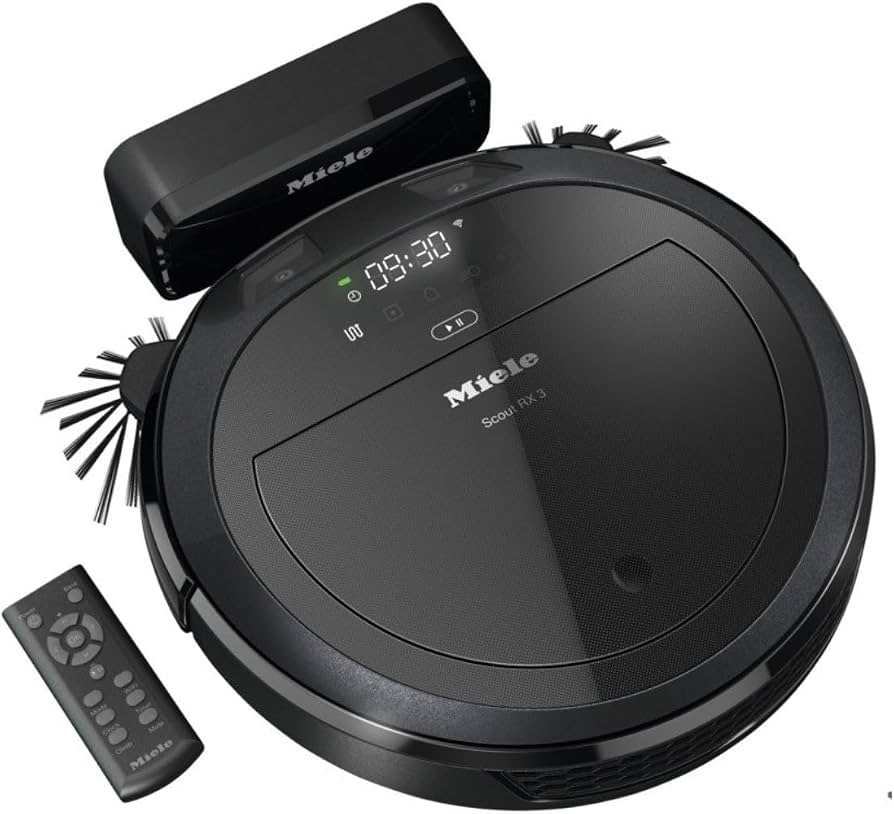
The Miele Scout RX3 Series Robot Vacuum Cleaner HS18 is a premium smart robot vacuum designed for users who want reliable automated cleaning with Miele’s signature build quality. It combines strong suction performance, intelligent navigation, and app-connected convenience in a compact body that fits under most furniture. With features such as Quattro Cleaning Power, multiple cleaning programs, and smart control through the Miele@home ecosystem, it is built for everyday home maintenance rather than occasional touch-ups.
This model is especially suitable for apartment owners, busy households, pet owners, and anyone looking for a low-effort way to keep floors tidy. It works well on hard floors and low- to medium-pile carpets, and its slim 85 mm profile helps it clean in hard-to-reach areas. The 0.4-liter dustbox and up to 70 m² cleaning coverage make it practical for smaller to medium-sized homes, while the rechargeable Li-ion battery supports routine automated cleaning. Depending on the version and market, the estimated price range is typically in the premium segment, often around the mid-to-high hundreds in local currency, with availability through Miele stores, authorized retailers, and select online shops.
For buyers searching for a dependable Miele robot vacuum cleaner, the Miele Scout RX3 Series Robot Vacuum Cleaner HS18 stands out for its balanced mix of design, smart features, and brand trust. It is a strong option for users who value quiet operation, structured cleaning patterns, and easy integration into a connected home environment.
Specifications of Miele Scout RX3 Series Robot Vacuum Cleaner HS18
- Cleaning area: up to 70 m² per charge
- Operating time: up to 85 minutes on the standard Scout RX3 model
- Recharge time: about 180 minutes
- Battery type: Li-ion
- Battery capacity: 2600 mAh
- Dustbox volume: 0.4 L
- Noise level: 71 dB
- Dimensions: 354 mm wide, 85 mm high, 354 mm deep
- Weight: 3.2 kg
- Cleaning system: Quattro Cleaning Power
- Cleaning programs: 4
- Connectivity: Miele@home support on connected versions
- Obstacle handling: designed for indoor floor transitions and small thresholds
- Comparison note: compared with many entry-level robot vacuums, it offers more refined build quality and stronger integration with smart-home controls, though some competing models may offer longer runtime or larger dust bins
Compared with similar robot vacuums in the same class, the Scout RX3 emphasizes premium engineering and controlled navigation over ultra-long runtime or maximum bin capacity. It is best viewed as a high-quality robotic floor cleaner for regular maintenance rather than deep-cleaning large homes in a single cycle.
Troubleshooting Miele Scout RX3 Series Robot Vacuum Cleaner HS18 Common Problems
If the robot vacuum does not start, first check that the main power switch is on, the battery is charged, and the robot is seated correctly on the charging base. If the unit stops automatically after powering on, the battery may not have enough charge, so reconnect it to the charging station and allow a full charge cycle.
Common fault indications include dustbox-related errors such as F3, which usually means the dustbox is missing, not seated properly, or needs to be removed and reinserted until it clicks into place. Cleaning performance problems are often caused by a full dustbox or a dirty or worn roller brush. Empty the dustbox regularly, clean the brush, and inspect side brushes for tangled hair or debris.
If the robot is unresponsive, verify the remote batteries, make sure the IR path is clear, and restart the device. Preventive care includes weekly brush cleaning, frequent filter and dustbox checks, and keeping cables, rugs, and loose items off the floor before cleaning. Warranty coverage is typically 2 years in many markets, and support is available through Miele’s customer service and authorized service partners. For help, contact the official Miele support center in your region or the retailer from which the product was purchased.
Pros and Cons of Miele Scout RX3 Series Robot Vacuum Cleaner HS18
Pros
- Premium Miele build quality with a solid, durable feel
- Compact 85 mm height helps it clean under furniture
- Quattro Cleaning Power delivers dependable daily floor maintenance
- Smart home integration is useful for scheduled cleaning and remote control
- Good fit for apartments, smaller homes, and routine upkeep
- Strong brand reputation and service support
Cons
- Battery runtime is shorter than some competing robot vacuums
- Dustbox capacity is modest at 0.4 L
- Noise level is not the quietest in the segment
- Better suited to maintenance cleaning than heavy debris pickup
- Premium pricing may be difficult to justify against simpler alternatives
For value for money, this model makes the most sense for users who prioritize reliability, brand trust, and connected features over budget pricing. Compared with cheaper alternatives, it feels more refined; compared with longer-running rivals, it may require more frequent charging.
Customer Reviews for Miele Scout RX3 Series Robot Vacuum Cleaner HS18
Customer feedback for the Miele Scout RX3 Series Robot Vacuum Cleaner HS18 is generally positive, with many users praising its compact size, solid cleaning consistency, and premium finish. Typical ratings cluster around 4 out of 5 stars, especially from owners who use it for daily maintenance in apartments or homes with mixed flooring.
Common praise includes easy scheduling, effective dust pickup on hard floors, and smooth integration with smart-home control. Common complaints mention the limited dustbox size, average battery runtime, and the need for regular brush maintenance. One frequent user comment is that it works best when floors are kept relatively clear and the device is used regularly rather than sporadically.
For buyers who want a trustworthy robot vacuum cleaner from a premium brand, it is a recommended purchase, especially if the goal is routine cleaning and convenience rather than maximum runtime.
Frequently Asked Questions About the Miele Scout RX3 HS18
What is the Miele Scout RX3 Series Robot Vacuum Cleaner HS18 best for?
It is best for daily floor maintenance in apartments and smaller homes, especially on hard floors and low-pile carpets.
How long does the battery last?
The standard Scout RX3 model can run for up to 85 minutes, depending on floor type and cleaning mode.
Does it support smart control?
Yes, connected versions support app-based control through Miele@home and can be used with scheduling features.
How often should I clean it?
Empty the dustbox regularly, clean the brush weekly, and check the sensors and wheels for debris to maintain performance.
Faqs
How do I set up the Miele Scout RX3 Series Robot Vacuum Cleaner HS18 for the first time?
Why is my Miele Scout RX3 Series Robot Vacuum Cleaner HS18 not connecting to Wi-Fi or the app?
How does 3D Smart Navigation work on the Miele Scout RX3 Series Robot Vacuum Cleaner HS18?
Can the Miele Scout RX3 Series Robot Vacuum Cleaner HS18 clean under low furniture and around obstacles?
What should I do if the Miele Scout RX3 Series Robot Vacuum Cleaner HS18 gets stuck or stops frequently?
How can I improve cleaning performance on the Miele Scout RX3 Series Robot Vacuum Cleaner HS18?
Which maintenance tasks are most important for the Miele Scout RX3 Series Robot Vacuum Cleaner HS18?
How long does the Miele Scout RX3 Series Robot Vacuum Cleaner HS18 run, and when should I recharge it?
More miele manuals
Leave a Comment