
How to Use: Mijia Air Purifier Pro User Manual
Content
Mijia Air Purifier Pro
Introduction
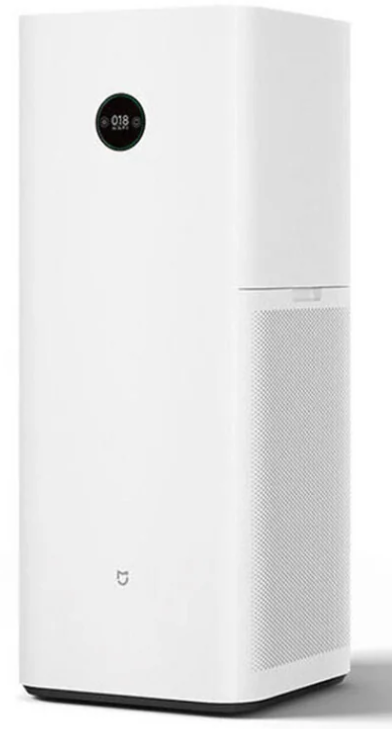
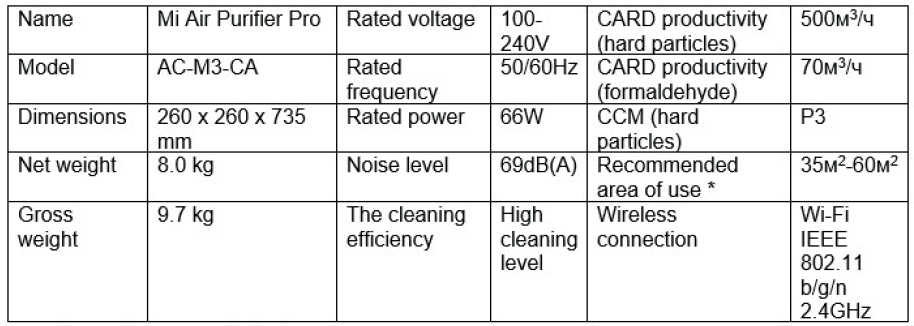
The Mijia Air Purifier Pro is a high-performance air purification system designed to provide clean air in homes and offices. With its advanced 360° circulation technology, it effectively captures dust, PM2.5, formaldehyde, and other pollutants, ensuring a healthier indoor environment. The device features a robust CADR of 500m³/h, making it suitable for rooms between 35m² and 60m². Key benefits include a triple-layer filtration system, Wi-Fi connectivity for remote control via smartphones, and a sleek, compact design. Targeted at health-conscious consumers seeking efficient air purification, this product is ideal for families and individuals with allergies or respiratory issues. The Mijia Air Purifier Pro is generally priced between $150 and $250, depending on the retailer and availability.
Main parameters
Overview
Usage
Correct position of the air filter
For optimal air cleaning,, set the device at a certain distance from walls and other objects to ensure a good air flow to the cleaner.
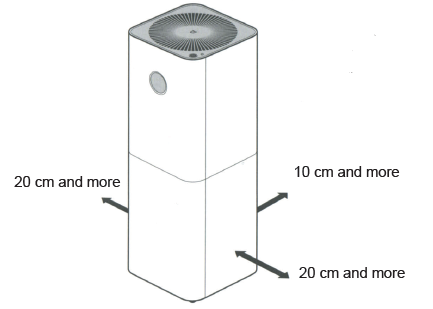
Note: for optimal air purification,, it`s recommended to close windows and doors.
Connecting to the power supply
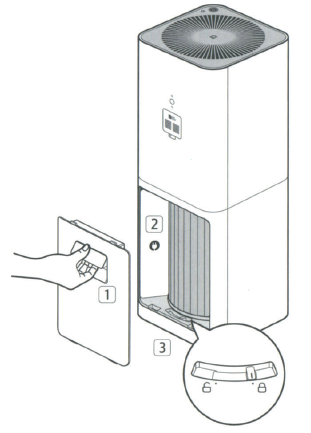
- Open a protective cover plate for the filter.
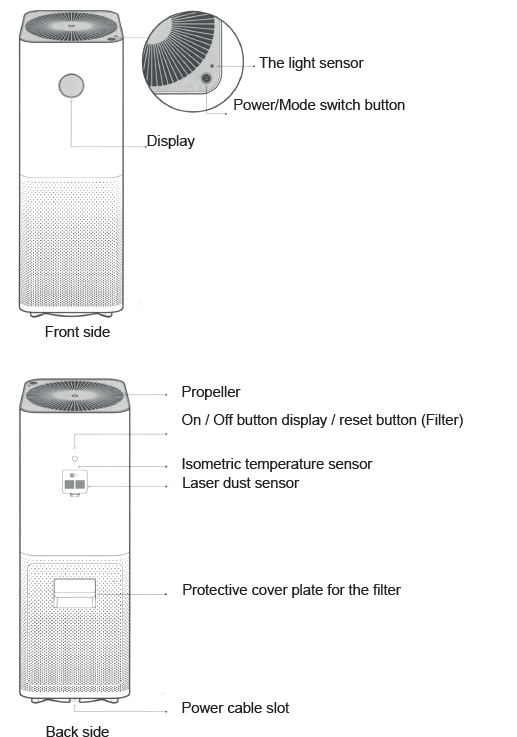
Slightly lift a handle to open a cover plate for the filter. Make sure that the filter is in the locked position. Unplug the power cord, and close the access panel.
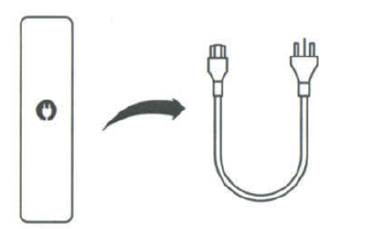
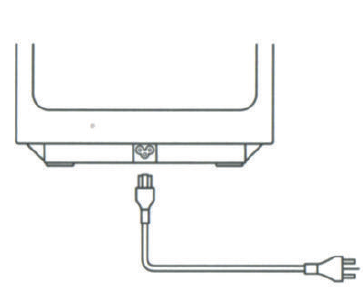
Connect the cable to the air filter supply, which is at the bottom of the device. Then connect the device to a power supply.
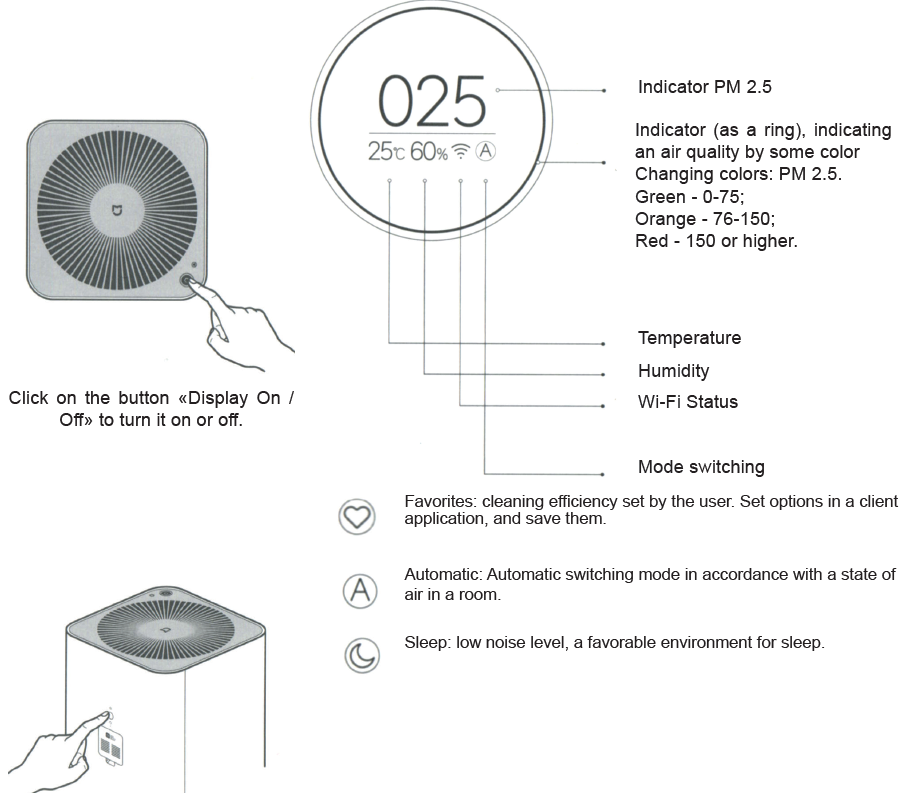
Display
The power button/switch modes
Press the power button to turn the device on. Subsequent presses of a button,, you can switch between the cleaner work. Press and hold the power button for 2 seconds to turn off the device.
Maintenance
Before performing the steps, listed below, make sure you turn off the device and unplug it from a power supply.
Replacing a filter
- Replace a filter every 3-6 months. If the useful life of a filter ends, a percentage appears on the display, indicating the time of its use.
- A time, during which the filter can still be used - 10%.
- Before replacing a filter, carefully check the sticker «Replacing the filter», which is on the back side of a protective panel.
- Before performing filter replacement, the air cleaner must be switched off and disconnected from the power supply.
- After replacing a filter, switch on the air purifier. Press and hold the reset button until you hear a beep. Resetting a filter usage time is successful. Air cleaner starts a new ccount ofthe life of a filter.
- Warning: if you have an RFID tag, you do not need to perform a factory reset.
- Warning: when a filter is filled with noxious gases or substances, you can detect the presence of a specific uncharacteristic odor. It is necessary to leave a filter in a bright and well-ventilated place to resolve this issue.
Protective cover cleaning
- For optimum air purification necessary to clean the air vents and all side walls. It is also possible to lightly wipe a compartment for a filter, using a soft cloth.
Dust sensor cleaning
Using a non-acute thing, open a dust sensor panel. Using a hair dryer or other similar device, clean the filter screen and the dust sensor.
Warning: Do not use hot air.
Special notices
Transportation: When transporting the unit, switch off and disconnect it from a power.
Setting:
- Before turning on the device, make sure that an impeller and / or rear panel of the air cleaner installed.
- Openings for air inlet into the device must be within 20 cm or more from walls or surrounding objects.
Power:
- Do not twist, bend a power cable, because cable wires can remain bare or completely broken.
- When you turn off / turn on a power, do not pull a power cord.
- Please do not connect a power cord to an unsuitable socket
- Please do not connect a power cables of other devices in a same outlet with the air cleaner.
Power cable:
The following information will help you to prevent fire, electrical shock or other damage.
- It is necessary to connect to an appropriate outlet additional power cable.
- Use only Mi power cable, it is not necessary to use a power cables of other brands.
- Before you go beyond the technical care of the air cleaner before moving it or disconnect the device from a power supply.
Limitations:
The following information will help you to prevent a risk of fire, electric shock, or other damage.
- Do not turn to the device, do not install the device on an unstable surface.
- Do not install the unit in rooms with high temperature and high humidity.
While using:
- In case of untypical sound, peculiar smell, heat, or when failure is detected in impeller should immediately turn off the device;
- Do not insert fingers or other things into the openings for entry and exit of air.
- Place the air purifier out of hair, tissue, etc., to prevent them from falling into a hole for air inlet and outlet.
- Do not sit down, do not put your weight and do not install the unit tilted.
- When using the device, together with other (flue) heating device, ensure good air ventilation to avoid the likelihood of carbon monoxide poisoning.
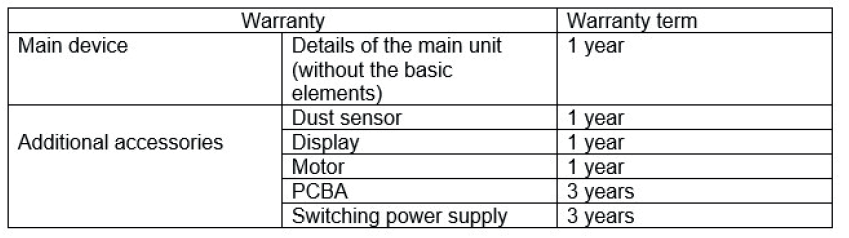
Warranty
Warranty service is carried out in accordance with the law on «the rights of consumers of China» and «the quality of Chinese products.» Warranty service includes:
- Within 7 days from the date of purchase, in case of a problem from the «List of faults», Xiaomi service center determines the cause of the problem, then you can choose a free replacement product or a refund.
- Within 8-15 days of purchase, in case of a problem of «fault list» Xiaomi service center defines the problem, then you choose a free replacement or repair of the goods.
- Within 12 months from the date of purchase, in case of a problem from the «List of faults», Xiaomi service center defines the problem, then you are given a free repair.
Terms, that are not included in the warranty service
- Completion of service, falling, neglect, abuse, liquid ingress, accident, damage to labels and labeling of devices;
- The warranty period has expired;
- Damage caused by force majeure;
- Failures, which do not correspond to the «List of faults» of Xiaomi center service;
- The failure of the device or its components from the «Fault list», which arose in connection with the human factor, and which interfere with normal operation. Failures that result from the use of air purifier with outsiders adapters with wrong rated voltage in an inappropriate setting.
- Recommendation: use the packaging for safe transport of the device. We recommend keeping the original packaging within 30 days after receipt of the goods
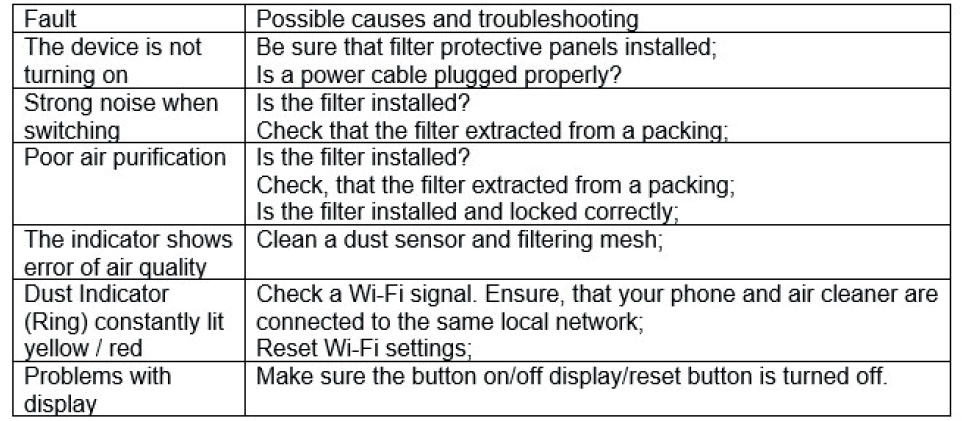
List of faults
Warranty terms
Pros and Cons of the Mijia Air Purifier Pro
Here's a balanced assessment of the Mijia Air Purifier Pro's advantages and disadvantages:
Pros
- Efficient Air Purification: Offers a high CADR of 500m³/h, effectively purifying air in large rooms.
- Triple-Layer Filtration: Combines primary filter, high-efficiency filtration materials, and activated carbon for comprehensive pollutant removal.
- Wi-Fi Connectivity: Allows for remote control and scheduling through smartphone apps.
- Compact Design: Its tower shape and 360° air intake maximize space efficiency.
Cons
- Noise Level: Can reach up to 69 dB(A), which may be too loud for some users.
- Filter Replacement Cost: While effective, the filters may need frequent replacement, adding to the overall cost.
- Power Consumption: Consumes 66W, which is relatively high compared to some alternatives.
Overall, the Mijia Air Purifier Pro offers excellent value for money, especially when considering its robust purification capabilities and smart features.
Customer Reviews and Feedback
Users of the Mijia Air Purifier Pro generally praise its effectiveness in improving indoor air quality and its user-friendly interface. Common complaints include the relatively high noise level and the cost of replacement filters. Many users appreciate the device's ability to integrate with smart home systems, making it a convenient choice for those already invested in IoT technology.
Rated 4.5 out of 5 stars, this product is recommended for those seeking a reliable air purifier with advanced features. However, users sensitive to noise may want to consider alternatives.
For those interested in purchasing the Mijia Air Purifier Pro, it is advisable to check for any ongoing promotions or discounts that might reduce the cost.
Faqs
How do I set up my mijia Air Purifier Pro for the first time?
What should I do if my mijia Air Purifier Pro is not responding or won’t turn on?
How can I connect mijia Air Purifier Pro to Wi-Fi and control it via the Mi Home app?
What are the key features of mijia Air Purifier Pro that improve indoor air quality?
What maintenance is required to keep my mijia Air Purifier Pro working efficiently?
Can mijia Air Purifier Pro be used in rooms larger than its recommended coverage area?
How do I troubleshoot connectivity problems with mijia Air Purifier Pro’s Wi-Fi?
What is the best placement for mijia Air Purifier Pro to maximize its air cleaning efficiency?
Tags
Leave a Comment