
Setup: Minix Prime smartwatch User Guide
Content
Minix Prime Smartwatch
Introduction
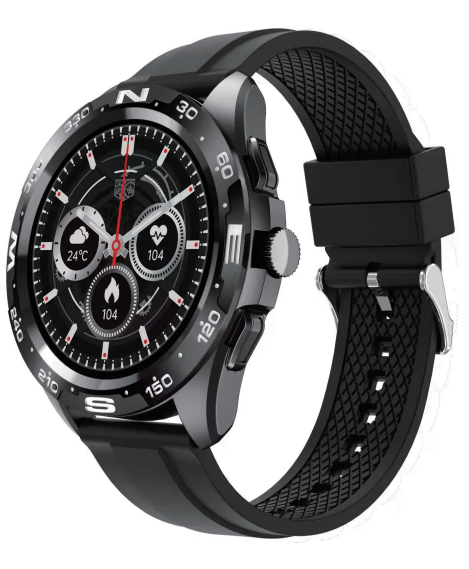
The Minix Prime smartwatch is a feature-rich wearable device designed for tech-savvy fitness enthusiasts and professionals seeking seamless connectivity and health monitoring on their wrist. Equipped with a vibrant 1.32-inch semi-AMOLED touchscreen display, this smartwatch delivers crisp visuals and intuitive navigation. Its sturdy metal body paired with a stylish steel strap ensures both durability and elegance, making it ideal for daily wear and formal occasions.
Key benefits include Bluetooth calling support, allowing users to take calls directly from the watch without needing their phone, and comprehensive health tracking features such as a heart rate monitor, sleep monitor, SpO2 sensor for blood oxygen levels, and sedentary reminders. The watch also offers smart notifications for texts, emails, and social media, plus useful alerts like calendar events and low battery warnings.
Targeted towards men and women who value both fitness and productivity, the Minix Prime is perfect for fitness and outdoor activities, as well as everyday health management. Its IP67 water resistance rating ensures protection against sweat and splashes, while a long-lasting battery provides up to 10 days of use on a single charge.
The Minix Prime smartwatch is competitively priced around ₹3,999 to ₹4,899, available through online marketplaces and select retail stores, offering excellent value for a Bluetooth calling smartwatch with advanced health features and a stylish design.
Product Overview
APP Functions and Settings
- Main interface/dial
Switch the customized dial through the APP (As shown in the picture on the left) - Discovermore dials through the app
APP device page dial selection find more dials click on your favorite dial picture click to download nowPlease do not leave the download page during download.
Personal Profile
- Set personal information when you log in.
- My date-personal date. Gender - height - weight- age .
Call reminder
Keep connected, if the call alert function is enabled, the wristband will vibrate and display the name or number of the caller when the call..l
Notifications
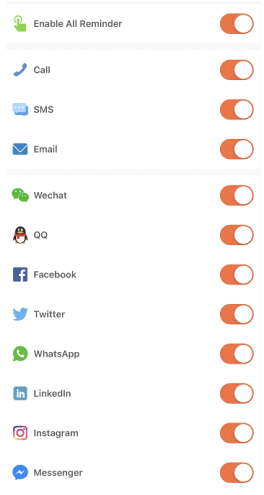
Keep connected, if this function is enabled, the bracelet will vibrate when there are messages such as WeChat, Facebook, Twitter,, and so on. (Give the APP access to system permission).
- Alarms: set the alarms.
- Shutter: this function will control your mobile phone to take photos from the watch.
- Favorite Contacts: You can add your mobile phone contacts to your watch.
- Others: you can set Find a bracelet, Timeform , Sedentary reminder, Raise your wrist to brighten the screen, and drink water reminder.
- Upgrade: Upgrade the watch software when necessary.
- Note:
- When using GPS under sports mode, please turn on location services for the phone and device. The watch does not have a GPS function; you can open the GPS function in the app.
- The data step, sleeping, heart rate, blood pressure, and blood oxygen saturation of the watch will be synchronized to the app. The relevant data can be synchronized by pulling down the corresponding page. More detailed information analysis and data recording can be viewed from the APP.
- Each time you open the App, the watch will automatically connect to the phone. After right-sliding of the main interface of the watch to enter the MAC address interface, the Bluetooth icon will apindicatinghattingthat Bluetooth is connected. If there is no Bluetooth icon, Bluetooth nis ot connected.
Watch function interface
- Watch face: long-press the watch face button; it can be changed to 4 different watch faces. ShowedDates Time,, etc.
More default watch faces: go to APP “FitCloudPro”---Watch faces--Discover more dials---Choose dial--Download immediately-----Done. Then you can see the dial will be shown ininour watch. - From the watch face page, put your finger and slide to the left and right pages.
- Sports: show the step counts.
- Sleep: show sleep status, like sleep time, deep sleep time ,, etc.
- Measure HR: measure your heart rate
- Exercise information: record various exercise information and data.
- Phone: you can check phone call records, contacts, and the Dial pad.
- Measure BP: measure your blood pressure.
- Blood oxygen measures blood oxygen.
- Weather: show weather status.
- Shutter: this function will control your mobile phone to take photos from the watch.
- Player: Music control, play or pause, last music or next music.
- Others: In this page, you can set the dial switch, brightness,, ss, etc.
- On the watch face page, you can go to the following page by touching the finger from top to bottom.
- Do not disturb: you can turn on or off do not do-not-disturb function.
- Brightness: You can adjust the brightness.
Settings
You can set a stopwatch, an alarm clock, a timer, brightness, phone switch, call settings, vibration, theater mode, factory reset, shutdown, about, APP download,, Vibration setting/Brightness adjustment/Bracelet.. The down-downslide screen will display the interface (As in the first pictureThehe ness adjustment, you can adjust the screen brightness you need according to the usage.
- If you need to use the watch with another phone, you need to reset the watch. Click Restore factory settings, the watch will be restored to the initial state and restart automatically; at this time,, all data on the wristband is cleared 。
- Click the "SYSTEM" icon, you can check the version information, Bluetooth MAC address, battery percentage display,, ay and Bluetooth connection status.
Why can’t the watch receive the message notification?
Since Android mobile phone background will automatically clean up the appssthath not commonly used, it will cause the watch connection to drop and no longer push the message.
- Make sure to turn on message push in the FitCloudPro settings.
- Make sure the message can be displayed in most mobile phones' notification bars. The message notification is pushed by reading the phone notification bar ..eee watch can’t get the notification if the message push is closed in the mobile phone settings.
- Note: Find notification settings in phone settings, turn on WhatsApp, Facebook, Twitter, Phone, SMSand .
Getting to know your Device
- It is forbidden to throw this product into the fire to avoid an explosion. The battery life varies according to the environment and usage mode.
- Warning: This product is not a medical device. The Watches and their applications should not be used for diagnosis, treatment, or prevention of diseases and illnesses. PPleaPlease cconsultconsultalified medical doctor first if you want to change your habits,, such as exercises and sleep,, to avoid causing serious casualties.
- Our company reserves the right to modify and improve the functions which described in this manual without prior notice. At the same time, we are also reserve the right to continuously update the product . All contents are subject to the actual product.
Why is the blood pressure data is different from the Sphygmomanometer?
The difference between the smartwatch data and the sphygmomanometer is determined by a variety of factors. The measurement site of the sphygmomanometer is in the radial artery, and the measurement site of the watch is the two main branches of the arteriole. Normally, the difference value between aortic blood pressure measurement and micro arterial measurement is 3~40 . Because of the blood flow in the artery in the direction of the centrifuge, if you use the smart watch and sphygmomanometer to measure at the same time, the sphygmomanometer band puts pressure on your elbow under pressure. The blood pressure cannot flow smoothly to the lower branch of the artery-and increased vascular tension, which will make the difference larger.
Why can't you wear a smart watch to take a bath&hot springs&sauna?
The bath water temperature is relatively higwhichch will produce a lot of water vapor, and the water vapor is gas phase. Its molecular radius is small, it is easy to infiltrate from the shell gap of the watch, and when the temperature drops, it will recondense into a liquid phase. Water droplets can easily cause a short circuit inside the watch, damage the circuit board,, and damage the watch itself.
Special attention: For other issues of the watch’s usage, you can get detailed answers in the app suggestion feedback.
Basic parameters
Troubleshooting the Minix Prime Smartwatch: Common Issues & Solutions
Many users of the Minix Prime smartwatch may encounter typical issues that can be easily resolved:
- Bluetooth connection failure: Ensure Bluetooth is enabled on both devices, restart the watch and phone, and re-pair through the companion app.
- Touchscreen unresponsive: Clean the screen, check for screen protector interference, and perform a soft reset by turning the watch off and on.
- Battery drains quickly: Reduce screen brightness, disable unused notifications, and avoid continuous sensor monitoring if not needed.
- Error codes related to syncing: Clear the app cache, update the watch firmware,, are and companion app to the latest versions.
Preventive tips include regular charging with the provided magnetic charger, avoiding exposure to extreme temperatures, and keeping the watch’s software up to date to enhance performance.
The Minix Prime comes with a 1-year warranty. For support, users can contact Minix customer service via the official website or the retailer’s support channels, ensuring quick resolution of hardware or software issues.
Pros & Cons of the Minix Prime Smartwatch
Pros
- High-quality semi-AMOLED display: Sharp visuals with excellent color reproduction.
- Bluetooth calling: Enables hands-free calls directly from the watch, enhancing convenience.
- Robust health tracking sensors: Includes heart rate, SpO2, and sleep monitoring for comprehensive wellness insights.
- Long battery life: Up to 10 days of standby time ensures reliable use without frequent charging.
- Durable metal body and stylish steel strap: Combines aesthetic appeal with durability.
Cons
- Smaller screen size compared to some competitors. The 1.32-inch display may feel compact for some users.
- Limited app ecosystem: Lacks third-party app support common in more expensive smartwatches.
- Touch responsiveness can vaIt occasionally require firm taps to register input.
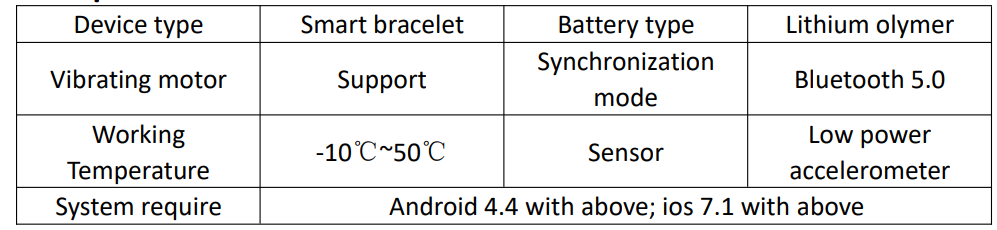
- Bluetooth version: Uses Bluetooth 55.0,, which is standard,, but some competitors offer newer connectivity options.
Overall, the Minix Prime smartwatch offers strong value for money with robust features that compete well against alternatives like the Fire-Boltt Legacy, especially for users prioritizing call functionality and health monitoring in a stylish form factor.
Customer Reviews and Feedback on the Minix Prime Smartwatch
Users of the Minix Prime smartwatch often praise its bright AMOLED display and smooth Bluetooth calling experience, highlighting the convenience of answering calls without their phone. The health tracking features, es such as heart rate and SpO2 monitoring,, receive positive notes for accuracy and ease of use.
Common complaints include occasional touchscreen lag and the strap’s metal buckle feeling a bit stiff initially. Some users also mention a learning curve with the watch interface, though the dynamic UI is appreciated once familiar.
Star ratings generally hover around 4 out of 5, with many recommending the watch for daily fitness and casual use. Buyers looking for an affordable smartwatch with calling capability and essential health features find the Minix Prime a compelling choice.
Overall, customers recommend the Minix Prime smartwatch for its blend of style, functionality, and value.
Faqs
How do I set up my Minix Prime smartwatch for the first time?
Why is my Minix Prime smartwatch not connecting to my smartphone via Bluetooth?
What health monitoring features does the Minix Prime smartwatch include?
Is the Minix Prime smartwatch compatible with both Android and iOS devices?
How can I optimize battery life on my Minix Prime smartwatch?
What should I do if the touchscreen on my Minix Prime smartwatch becomes unresponsive?
How do I maintain and clean my Minix Prime smartwatch to ensure durability?
Does the Minix Prime smartwatch support Bluetooth calling and how do I use it?
Tags
Leave a Comment