
Mobilemix 8-Channel USB-Powerable Mixer User Manual
Content
MobileMix 8-Channel USB-Powerable Mixer Review and Manual
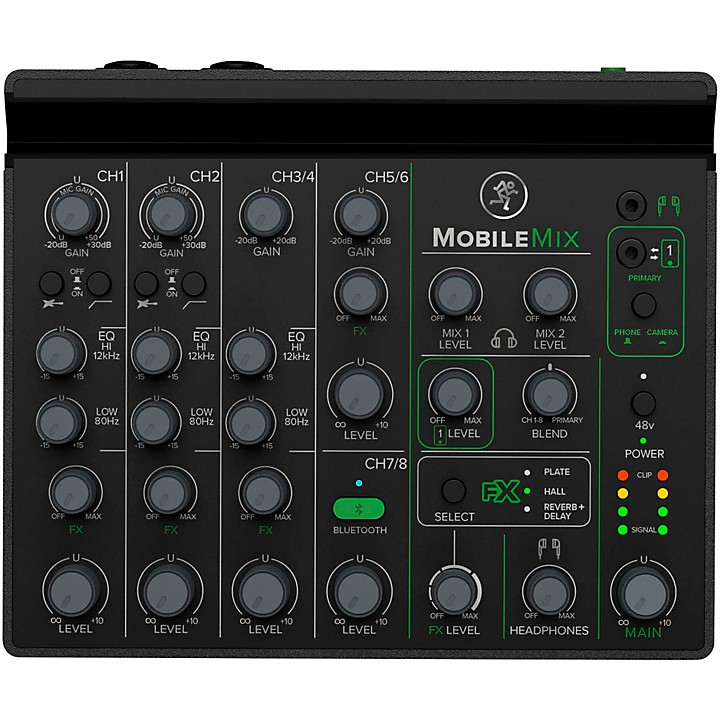
The MobileMix 8-Channel USB-Powerable Mixer is a compact, portable analog mixer designed for creators who need flexible audio control without carrying a full-size console. Built for live streaming, mobile recording, podcasting, small events, and on-the-go content production, it combines eight channels with practical connectivity for microphones, instruments, smartphones, cameras, and Bluetooth audio. Its standout advantage is USB power support, which makes it especially useful for mobile setups where wall power is limited.
At the core of the MobileMix 8-Channel USB-Powerable Mixer are two XLR/1/4-inch combo inputs with mic preamps, Hi-Z switching, and 48V phantom power, plus additional stereo line inputs and dedicated TRRS connections for smart devices and cameras. That makes it a strong fit for solo creators, worship teams, travel videographers, educators, and small bands needing a lightweight mixer for quick setup and reliable routing. It also offers built-in reverb options, low-cut filtering on the mic channels, and separate mix outputs for monitoring or PA use.
Current market pricing typically falls in the mid-range for compact mixers, usually around the low- to mid-$200 range, though bundled listings and regional pricing can move it higher. Availability is generally good through major music retailers and online marketplaces, often with accessory bundles such as a protective bag. For buyers comparing it with simpler 4-channel mini mixers or larger desktop mixers, the MobileMix 8-Channel USB-Powerable Mixer stands out as a balanced choice for portability, channel count, and mobile power flexibility.
Pros and Cons of the MobileMix 8-Channel USB-Powerable Mixer
Pros
- USB-powerable design supports rechargeable battery packs, making it ideal for outdoor recording, field interviews, and mobile livestreams.
- Two combo mic/instrument inputs with phantom power add real versatility for microphones, acoustic guitars, and direct boxes.
- Dedicated smartphone and camera connections simplify streaming, video production, and hybrid podcast workflows.
- Built-in reverb and low-cut controls help improve vocal clarity and reduce rumble without extra gear.
- Compact size and lightweight construction make it easy to carry in a backpack or equipment bag.
- Good value for creators who need more than a basic mini mixer but do not want a full studio console.
Cons
- Only two channels offer mic preamps, so it is not the best fit for multi-mic band recording.
- Analog workflow is straightforward, but users wanting deep digital effects, USB multitrack recording, or app control may prefer a digital mixer.
- Battery or power pack is not included, which adds to the total setup cost for portable use.
- Smaller form factor can mean more limited hands-on control compared with larger alternatives.
- For users who only need a simple stereo input, a cheaper compact mixer may offer better value.
Compared with entry-level portable mixers, the MobileMix 8-Channel USB-Powerable Mixer offers stronger connectivity and more practical mobile features. Compared with higher-end digital mixers, it is easier to use but less advanced, making it a smart middle-ground option for creators who value speed and portability over complex routing.
Customer Reviews and User Feedback for MobileMix 8-Channel USB-Powerable Mixer
User feedback is generally positive, with many buyers praising the mixer’s portability, clean layout, and flexible input options. A common theme is convenience: creators like being able to run the mixer from USB power during remote shoots or livestreams. Typical star ratings in retail listings cluster around the 4-star range, especially from users who value quick setup and dependable analog controls.
Common praise includes strong sound quality for vocals, useful phantom power, and the practical TRRS smartphone/camera integration. Common complaints focus on the lack of an included battery pack, the limited number of true microphone channels, and the wish for more advanced digital features. One typical customer comment would be: “Perfect for travel podcasting and camera audio—small, light, and easy to use.” Another frequent sentiment is: “Great for two mics and a phone, but not enough if you need a bigger live band setup.”
For most buyers, this mixer is recommended if the goal is portable streaming, field recording, or small hybrid productions. If the setup requires more than two mic inputs or advanced effects, a larger digital mixer may be a better purchase.
Key Specifications of the MobileMix 8-Channel USB-Powerable Mixer
- 8-channel analog mixer layout
- 2 XLR/1/4-inch combo mic and instrument inputs
- Hi-Z support for instruments
- 48V phantom power on the primary mic channels
- Stereo line input for keyboards and playback devices
- Dedicated TRRS connection for smartphones and cameras
- USB power compatibility for portable operation
- Built-in reverb effects
- Compact desktop form factor
- Lightweight design for travel and mobile production
Who Should Buy the MobileMix 8-Channel USB-Powerable Mixer?
This mixer is a strong match for content creators, podcasters, vloggers, teachers, mobile DJs, and small teams that need an easy way to mix microphones, instruments, and mobile devices. It is especially useful for anyone searching for a portable USB-powered mixer for live streaming or a compact analog mixer for smartphone and camera audio.
If you need a simple, durable, and travel-friendly audio hub with enough flexibility for modern content creation, the MobileMix 8-Channel USB-Powerable Mixer is a practical choice. If your work requires many microphone channels, multitrack USB recording, or advanced onboard processing, a more advanced digital mixer will be the better long-term solution.
Faqs
How do I set up the mobilemix 8-Channel USB-Powerable Mixer for the first time?
What devices are compatible with the mobilemix 8-Channel USB-Powerable Mixer?
Why is the mobilemix 8-Channel USB-Powerable Mixer not passing audio through some channels?
How can I reduce noise and hum when using the mobilemix 8-Channel USB-Powerable Mixer?
Can the mobilemix 8-Channel USB-Powerable Mixer be used for live streaming or podcast recording?
What are the best settings to get clear sound from the mobilemix 8-Channel USB-Powerable Mixer?
How do I maintain and clean the mobilemix 8-Channel USB-Powerable Mixer safely?
What should I check if the mobilemix 8-Channel USB-Powerable Mixer sounds distorted or overloaded?
Tags
Leave a Comment