
Setup: Monoprice BT-600ANC Bluetooth Headphones User Manual
Content
Monoprice BT-600ANC Bluetooth Headphones
Inroduction
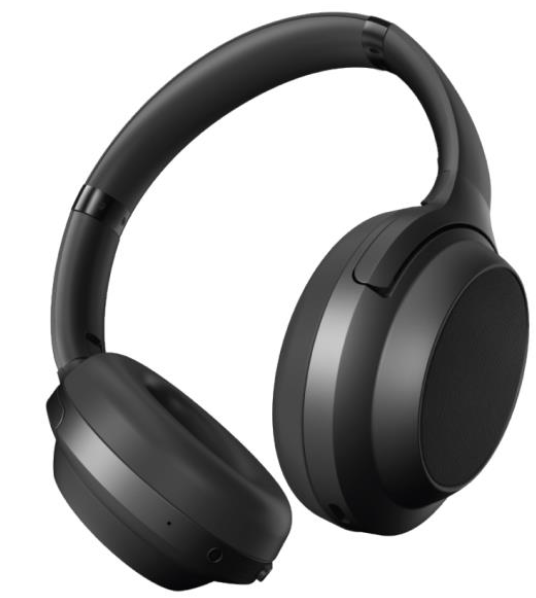
The Monoprice BT-600ANC Bluetooth Headphones deliver premium audio performance with advanced features at an affordable price, making them an excellent choice for audiophiles and casual listeners alike. These over-ear headphones combine Hybrid Active Noise Cancellation (ANC) technology with Qualcomm aptX HD audio for crystal-clear, CD-quality sound, perfectly suited for commuters, remote workers, and travelers who demand immersive sound without distractions.
Designed with comfort and functionality in mind, the BT-600ANC offers up to 40 hours of battery life, allowing all-day use without frequent recharging. Its foldable design, touch controls, and multi-device Bluetooth 5.0 pairing enhance convenience, making it easy to switch between phones, tablets, and laptops seamlessly. Ideal for those seeking noise cancellation and wireless freedom under $100, these headphones are widely available through major retailers and online stores, typically priced around $80-$100.
Package Contents
Please take an inventory of the package contents to ensure you have all the items listed below. If anything is missing or damaged, please contact Monoprice Customer Service for a replacement.
- 1x BT-600ANC Bluetooth® headphones
- Carrying case
- 1x 3.5mm audio cable
- 1x USB Type-A to Type-C® charging cable
- 1x User's manual
Overview
Specifications
- Driver Size: 40mm dynamic drivers delivering rich, balanced sound
- Frequency Response: 20Hz – 20kHz, covering full audible spectrum
- Sensitivity: 100 ± 3dB for clear and loud playback
- Bluetooth Version: 5.0 with support for aptX HD, AAC, and SBC codecs
- Noise Cancellation: Hybrid active noise cancellation reduces up to 35dB of ambient sound
- Battery Life: Up to 40 hours of wireless playback on a single charge
- Weight: Lightweight 283g (10 oz) for comfortable extended wear
- Connectivity: Wireless Bluetooth and wired 3.5mm jack option included
- Controls: Intuitive touch controls for volume, track navigation, and calls
- Design: Foldable earcups with leather ear cushions for portability and comfort
Compared to similarly priced competitors, the BT-600ANC stands out with superior noise cancellation rivaling some high-end models, combined with versatile codec support and impressive battery life.
Safety Warnings And Guidelines
Please read this entire manual before using this device, paying extra attention to these safety warnings and guidelines. Please keep this manual in a safe place for future reference.
- These headphones are intended for indoor use only.
- Do not use these headphones while operating a motor vehicle, heavy equipment, walking in traffic, or in any other situation in which situational awareness is a key to safety.
- Charge the battery before first use and at least once every three months to keep it fresh and capable of holding a full charge.
- Lean using a soft, dry cloth only. Do not use chemical cleaners, solvents, or detergents. For stubborn deposits, moisten the cloth with warm water.
- These headphones have no user-serviceable parts. Do not attempt to open, service, or modify the headphones.
Led Indicators
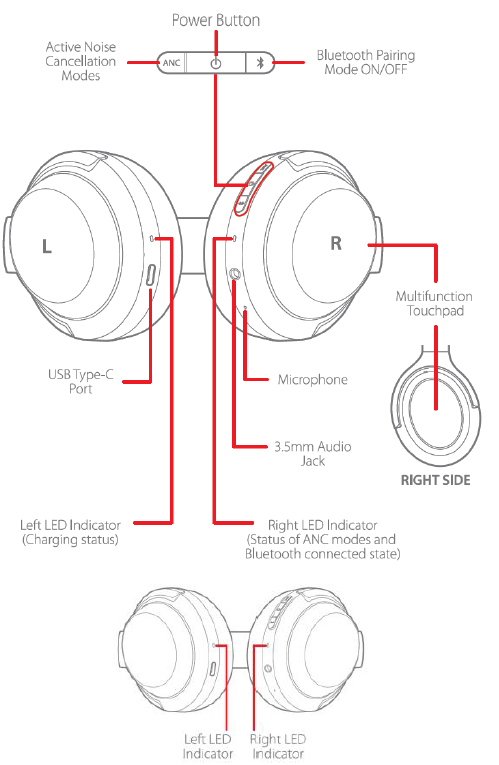
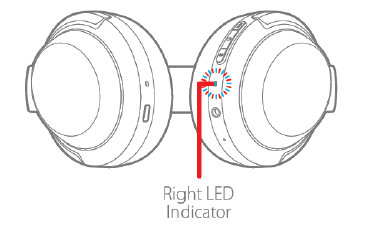
The headphones feature two LED indicators. The LED on the left earcup shows the charging status, while the one on the right earcup shows the Bluetooth®, ANC, and low battery status.
Left LED
- Solid Red: Battery is charging.
- Solid Green: Battery is fully charged.
Right LED
- Flashes Red and Blue: The headphones are in Bluetooth® pairing mode.
- Flashes Blue Once Every 5 Seconds: Bluetooth is connected.
- Flashes Blue Once per Second: Bluetooth is not connected.
- Solid Green: Noise Cancelling is on.
- Solid White: Ambient Sound is on.
- Off: Noise Cancelling and Ambient Sound are both off.
- Flashes Red Twice Every 5 Seconds: The battery is low and should be charged.
Charging
When the battery is low, the Right LED will flash red twice every 5 seconds,, and a voice prompt saying Battery Low can be heard. Note that the battery should be fully charged before first use and at least once every three months to keep it fresh and capable of holding a full charge.
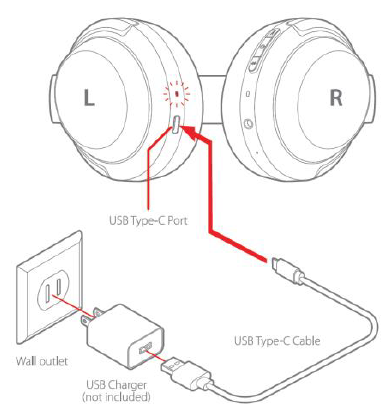
Using the included USB Type-C®, plug one end into the USB-C® port on the left earcup, then plug the other end into a USB power source, such as a wall charger (not included). The Left LED will illuminate solid red while charging is in progress and will illuminate solid green when charging is complete. Note that the headphones cannot be powered on or used while charging is in progress.
Power
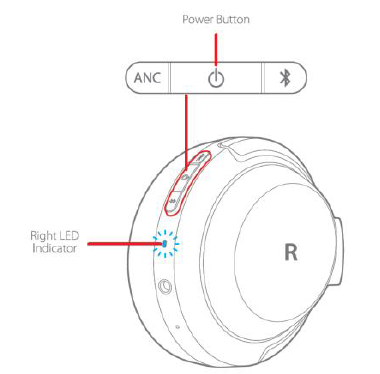
Press and hold the Power Button until the Right LED either flashes blue once every 5 seconds and a voice prompt saying Connected can be heard, rd or flashes red and blue and a voice prompt saying Bluetooth Pairing On can be heard, depending on the Bluetooth® connection status.
To turn power off, press and hold the Power Button until the Right LED turns off and a voice saying Power Off can be heard.
Note that if Bluetooth is not connected, the headphones will automatically power off after 5 minutes.
Bluetooth Pairing
Perform the following steps to pair the headphones with your mobile device.
- Power the headphones on, then press and hold the Bluetooth Button until the Right LED flashes red and blue. A voice prompt saying Bluetooth Pairing On can be heard.
Note: Momentarily press the Bluetooth Button to exit Bluetooth® pairing mode. - Open the Bluetooth settings on your mobile device, then scan for nearby Bluetooth devices. Locate and select the BT-600ANC entry.
- Once paired, the Right LED will flash blue once every 5 seconds,,nds and a voice prompt saying Connected can be heard.
Note that the headphones support the A2DP v1.3, AVRCP v1.6, HFP v1.7, and HSP v1.2 Bluetooth® profiles.
DISCONNECTING
If you want to connect the headphones to a different mobile device, you will need to disconnect the currently paired device.
To disconnect the headphones from a paired device, press and hold the Bluetooth Button until the Right LED flashes red and blue. A voice prompt saying Bluetooth Pairing On can be heard.
The headphones are now ready to be paired to a different device.
Anc Modes
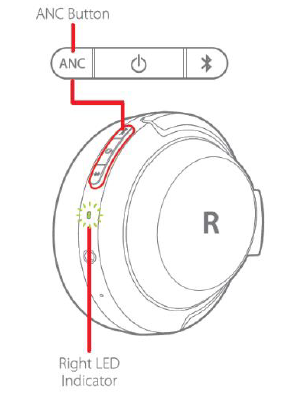
The BT-600ANC headphones offer three different listening experiences. Momentarily press the ANC Button to cycle through the three modes.
- Noise Cancelling (NC) Mode: This mode isolates your listening experience to sounds coming through the headphones and helps block unwanted outside noise. NC Mode is automatically selected when the headphones are powered on. When NC Mode is selected, the Right LED illuminates solid green,, and a voice prompt saying Noise Cancelling can be heard.
- Ambient Sound Mode: This mode allows you to listen to the sounds around you using the built-in microphones. When Ambient Sound Mode is selected, the Right LED illuminates solid white,, and a voice prompt saying Ambient Sound can be heard.
- NC and Ambient Sound NC Modes Off: The third selection disables both NC and Ambient Sound Modes, allowing the headphones to operate like ordinary headphones. When this mode is selected, the Right LED turns off , and a voice prompt saying Ambient Sound and Noise Cancelling Off can be heard.
USING THE AUDIO CABLE
If you want to use a wired connection, plug one end of the included 3.5mm audio cable into the 3.5mm jack on the right earcup, then plug the other end into the headphone output of your mobile device. If powered on, the headphones will automatically power off when using a wired audio connection.
TECHNICAL SUPPORT
Monoprice is pleased to provide free, live, online technical support to assist you with any questions you may have about installation, setup, troubleshooting, or product recommendations. If you ever need assistance with your new product, please come online to talk to one of our friendly and knowledgeable Tech Support Associates. Technical support is available through the online chat button on our website www.monoprice.com or through email by sending a message to tech@monoprice.com. Check the website for support times and links.
REGULATORY COMPLIANCE
Notice for FCC
This device complies with Part 15 of the FCC rules. Operation is subject to the following two conditions: (1) this device may not cause harmful interference, and (2) this device must accept any interference received, including interference that may cause undesired operation.
Modifying the equipment without Monoprice's authorization may result in the equipment no longer complying with FCC requirements for Class B digital devices. In that event, your right to use the equipment may be limited by FCC regulations, and you may be required to correct any interference to radio or television communications at your own expense.
This equipment has been tested and found to comply with the limits for a Class B digital device, pursuant to Part 15 of the FCC Rules. These limits are designed to provide reasonable protection against harmful interference in a residential installation. This equipment generates, uses, and can radiate radio frequency energy and, if not installed and used in accordance with the instructions, may cause harmful interference to radio communications. However, there is no guarantee that interference will not occur in a particular installation.
If this equipment does cause harmful interference to radio or television reception, which can be determined by turning the equipment off and on, the user is encouraged to try to correct the interference by one or more of the following measures:
- Reorient or relocate the receiving antenna.
- Increase the separation between the equipment and receiver.
- Connect the equipment into an outlet on a circuit different from that to which the receiver is connected.
- Consult the dealer or an experienced radio/TV technician for help.
Troubleshooting Common Issues
- Connectivity Problems: If pairing fails, ensure Bluetooth is enabled on your device and the headphones are in pairing mode. Restart both devices and reattempt pairing.
- Sound Distortion or Dropouts: Move closer to the source device to reduce interference. Check for firmware updates or reset the headphones.
- Noise Cancellation Not Working Properly: Confirm ANC mode is activated via the touch controls. Clean microphones gently to avoid blockage.
- Battery Drains Quickly: Fully charge before use and avoid continuous ANC if battery longevity is a priority.
- Error Codes: No specific error codes reported; general device resets can resolve most anomalies.
Preventive measures include regular charging, gentle handling, and keeping firmware updated. The product comes with a 1-year limited warranty. For support, customers can contact Monoprice customer service or reach out to Target Guest Services at 1-800-591-3869.
Pros & Cons of Monoprice BT-600ANC Bluetooth Headphones
Pros
- Exceptional Noise Cancellation: Competes with premium brands by effectively reducing ambient noise, enhancing focus and immersion.
- Excellent Battery Life: Up to 40 hours of continuous playback, ideal for long trips or workdays.
- High-Quality Audio: Supports aptX HD and AAC codecs for superior wireless sound clarity.
- Comfortable Design: Lightweight with leather ear cushions and a foldable frame for easy portability.
- Multi-Device Pairing: Bluetooth 5.0 supports seamless switching between multiple connected devices.
Cons
- No Water Resistance: Not suitable for use during heavy rain or intense workouts involving sweat.
- Touch Controls Sensitivity: Some users report accidental touches causing unintended actions.
- Lack of Custom EQ: No built-in equalizer for personalized sound tuning.
- Moderate Build Quality: While sturdy, materials are not premium-grade compared to flagship models.
Overall, the Monoprice BT-600ANC Bluetooth Headphones deliver outstanding value for money, especially for users desiring effective noise cancellation and long battery life without premium pricing.
Customer Reviews and Feedback on Monoprice BT-600ANC Bluetooth Headphones
Users generally praise the Monoprice BT-600ANC Bluetooth Headphones for their impressive noise cancellation and sound quality at a budget-friendly price point. Many highlight the comfort during extended use and commend the long battery life as a major advantage. Typical star ratings hover around 4 out of 5, reflecting strong satisfaction.
Common complaints include occasional touch control sensitivity issues and the lack of water resistance. Some users note minor connectivity hitches with certain devices but find them rare and easily resolved. Overall, purchasers recommend these headphones for casual listening, travel, and office use due to their balanced performance and affordability.
Faqs
How do I set up my monoprice BT-600ANC Bluetooth Headphones for the first time?
What should I do if my monoprice BT-600ANC Bluetooth Headphones are not connecting to my device properly?
Can I use monoprice BT-600ANC Bluetooth Headphones with a smartphone and a computer simultaneously?
How do I maintain and clean my monoprice BT-600ANC Bluetooth Headphones?
What are the key features that make monoprice BT-600ANC Bluetooth Headphones different?
How do I troubleshoot audio quality issues with my monoprice BT-600ANC Bluetooth Headphones?
Can I use monoprice BT-600ANC Bluetooth Headphones with my television?
How do I optimize the battery life of my monoprice BT-600ANC Bluetooth Headphones?
Tags
More monoprice manuals
Leave a Comment