
Setup & Pairing: Morento Air Purifier Wifi HY4866-WF User Manual
Content
Morento Air Purifier Wifi HY4866-WF
Introduction
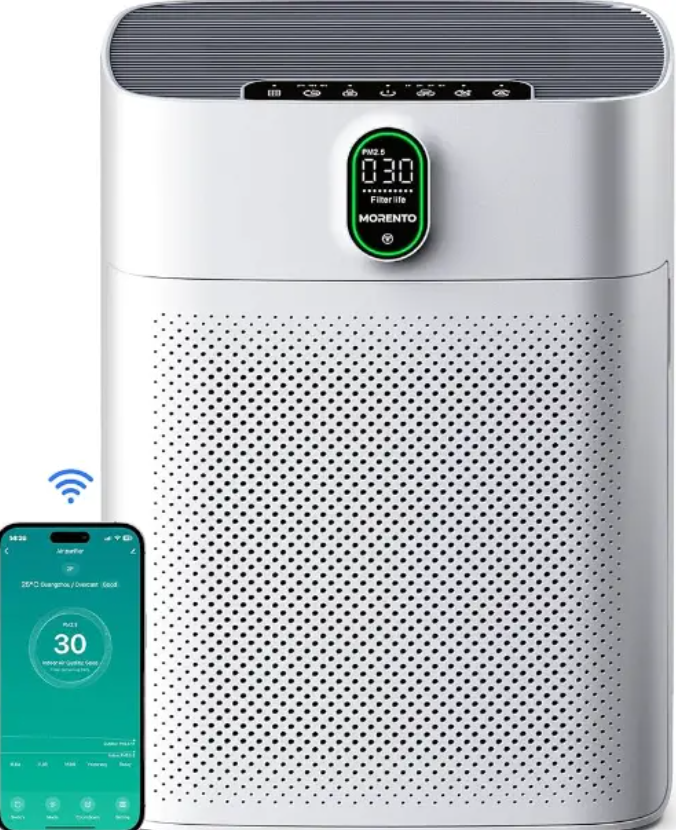
The morento Air Purifier Wifi HY4866-WF is a state-of-the-art air purification device designed to improve indoor air quality by filtering out airborne pollutants, allergens, pet dander, and odors. With a robust Clean Air Delivery Rate (CADR) of up to 300 m³/h, this model efficiently refreshes the air in spaces up to 1,076 square feet (100 m²), making it ideal for large rooms, living spaces, and offices.
Equipped with dual true HEPA filters and activated carbon layers on both front and back sides, the purifier captures particles as small as 0.3 microns, including PM2.5 dust, pollen, cigarette smoke, and odors. Unique to this model is its WiFi connectivity, enabling remote control via the Havaworks app and compatibility with Alexa voice commands, offering smart home convenience.
This air purifier targets users who prioritize clean, healthy air in homes or work environments and seek user-friendly smart features for seamless operation. It is well-suited for allergy sufferers, pet owners, and those living in urban or polluted areas.
Priced competitively in the mid-range segment, typically around $200-$300, the morento Air Purifier Wifi HY4866-WF is widely available through online retailers and specialty home appliance stores. Its combination of effective filtration, smart controls, and affordability makes it a compelling choice for anyone looking to enhance their indoor air quality.
SPECIFICATIONS
- Model
- HY4866-WF
- Power Supply
- 24V/2.5A
- Power
- 3-48W
- CADR(CFM)
- 176 CFM/300 m3/h (MAX)
- Area Coverage
- <1076Ft2 /100m2
- Note: Effective for larger rooms, but purification will take longer.
Operating Conditions
- Temperature:
- 14104°F /-10 -40 C
- Humidity:
- ≤ 80% Rr
- Noise Level
- 23-55dB
- Main material
- ABS
- Product Dimensions
- 13.18x 7.63 x 17.51 in /33.5 x 19.4 x 44.5 cm
- Weight
- 7.96 lb / 3.62 kg
- Power Adapter
- nput: 100-240V 50/60Hz
- Output:
- 24V/2.5A
Various Wind Power
- Sleep mode
- 3.2W
- 1 speed
- 7.5W
- 2 speed
- 14.5W
- 3 speed
- 27W
- 4 speed
- 48W
AIR PURIFIERS AND ACCESSORIES
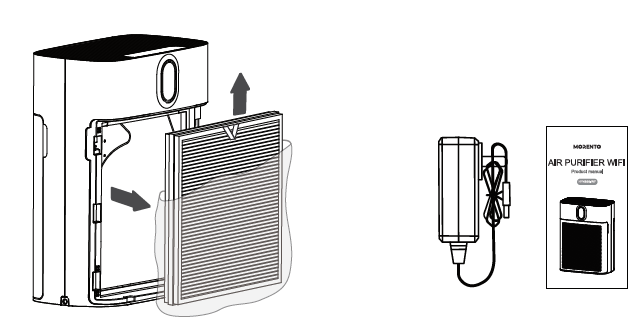
- Packing list:
- Air Purifier
- HEPA Filter
- '2- Power Adapter
- User Manual
USE YOUR AIR PURIFIER
Note: The power adapter is at the bottom of the air purifier. Make sure to remove the protective bag before first use. The Air purifier adopts double-sided air intakes. Appropriate clearance should be maintained when placed against a wall.
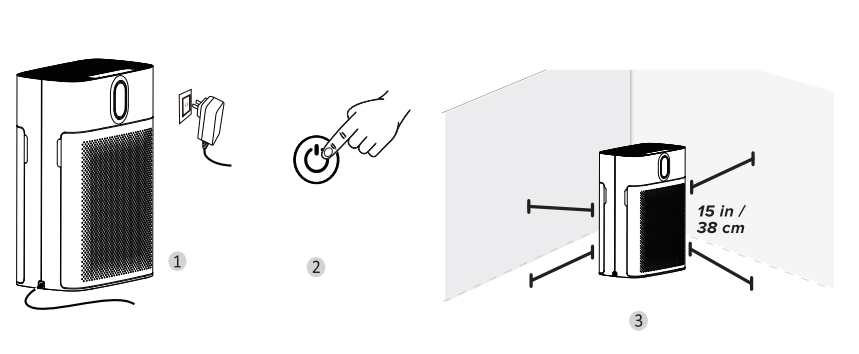
Note: The power inlet is located at the lower left of the product.
- Connect the power adapter to the side port of the air purifier and connect the socket. When the air purifier beeps and the power button flashes, the air purifier is ready
- Tap
 to turn on the purifier.
 - When using the air purifier, allow at least 15 inches / 38 cm of clearance from the front of the air purifier. Keep away from anything that would block air flow, such as curtains.
HOW TO DOWNLOAD THE APP AND CONNECT THE AIR PURIFIER
Havaworks App Setup
Note: The "Havaworks" App is continually being improved and may change over time. If there are any differences, follow the in-app instructions.
To download the "Havaworks" App, scan the QR code or search "Havaworks" in the Apple App Store or Google Play Store .
Note: For Android™ users, choose "Allow" to use "Havaworks" .
- Open the "Havaworks" App. Log in or sign up.
Note: You must create your own "Havaworks" account to use third-party services and products. These will not work with a guest account. With a
"Havaworks" account, you can also allow your family and friends to control your smart air purifier. - Follow the in-app instructions to set up your smart air purifier.
Note: Your phone must have Location turned on while your phone is connecting to your smart air purifier. This is required to establish the Bluetooth® connection. You can turn Location off after your smart air purifier is finished connecting to the "Havaworks" App.
Wifi Connection
- To disconnect Wi-Fi, press and hold the power button for about 5seconds, until the device makes a "beep beep beep" sound. This will restore the smart air purifier's default settings and disconnect it from the "Havaworks" App.
- To reconnect, please follow the instructions in the "Havaworks" App for adding a device.
- Or scan the QR code to add a device

Havaworks App Troubleshooting
My smart air purifier isn't connecting to the "Havaworks" App.
- Make sure your phone has Bluetooth® turned on and is not currently connected to another Bluetooth device.
- During the setup process, you must be on a secure 2.4GHz Wi-Fi® network. Confirm that the network is working correctly.
- Make sure the Wi-Fi password you entered is correct.
- There should be no spaces at the beginning or end of the password.
- Test the password by connecting a different electronic device to the router.
- If you're manually typing in the SSID and password, double-check that both are entered correctly.
- Try moving your air purifier closer to the router. Your phone should be as close as possible to your air purifier.
- Your router may need to be at a higher location, away from obstructions.
- Make sure your air purifier and router are away from appliances (such as microwave ovens, refrigerators, electronic devices, etc.) to avoid signal interference.
- If you're using a VPN, make sure it's turned off while setting up your air purifier.
- Disable portal authentication for your Wi-Fi network. If portal authentication is enabled, the air purifier will not be able to access your Wi-Fi network, and setup will fail.
TROUBLESHOOTING
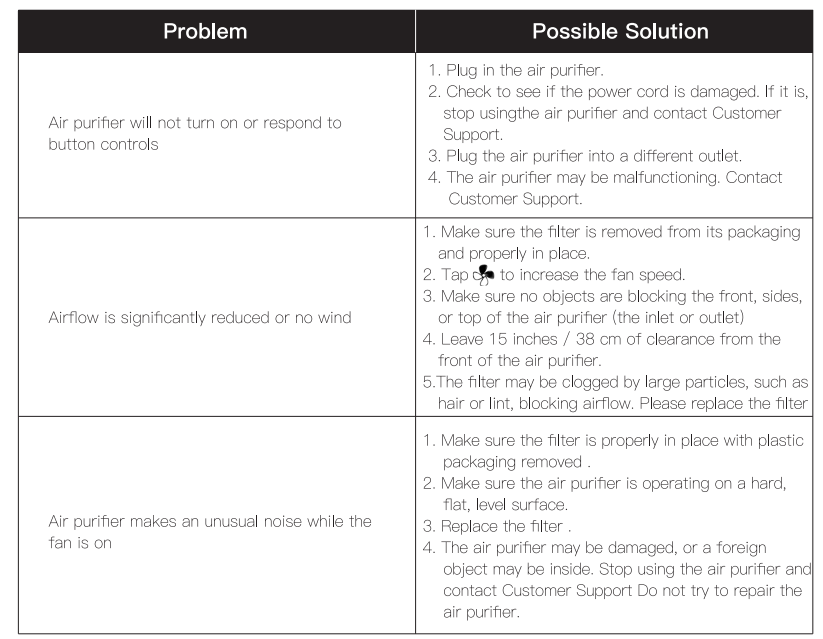
When an abnormal condition happens, please check the following before sending the air purifier for repair.
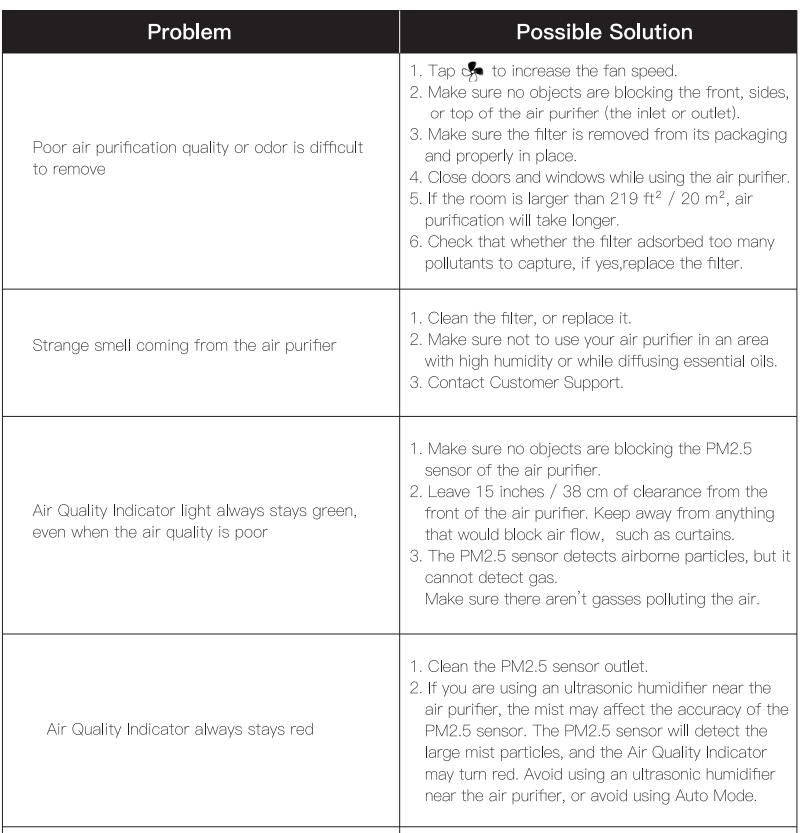
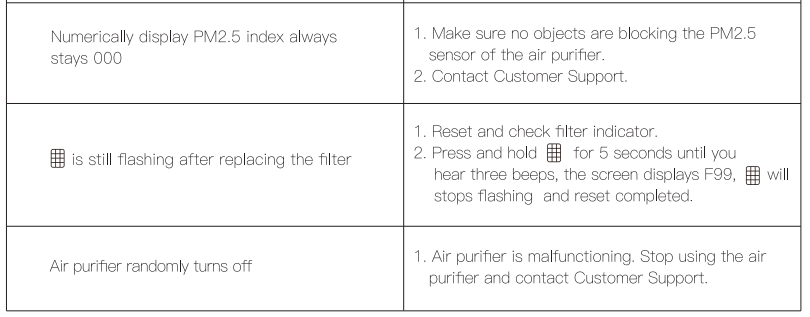
MAINTENANCE
The unit needs regular maintenance to ensure that the air purifier is at optimal performance. Regularly wipe the air inlet and outlet with a soft, damp cloth. Allow the nit to dry completely before turning it back on.
Instructions for cleaning the filter:
- Turn off the unit and unplug the power cord.
- Open the filter cover and remove the filter.
- Use a soft brush or vacuum cleaner to clean the filter.
- Tip: You can place the filter in direct sunlight for 1-3 hours. Do not allow the filter to get wet.
Note: The Above actions only help to maintain the filters' performance.
Reset Filter Indicator:
When the filter needs to be replaced, the filter indicator light will flash to remind you.
- Turn off the device and unplug the power cord from the left side of the device.
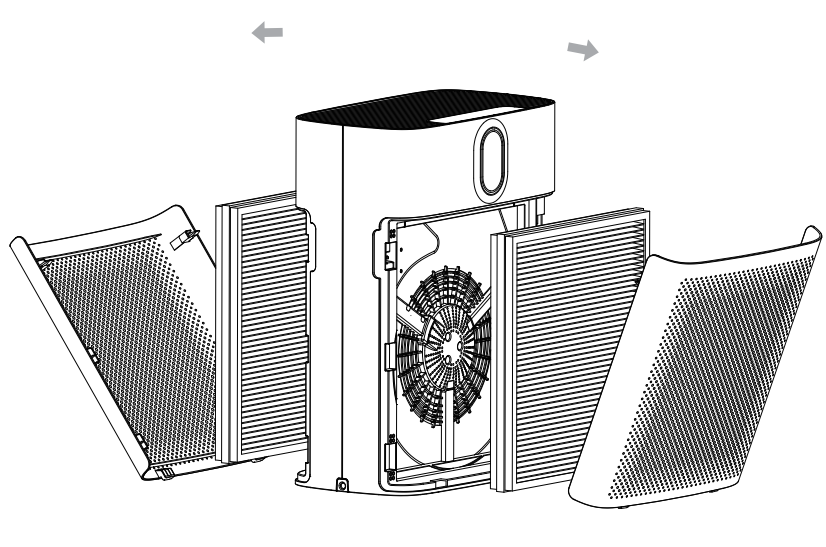
- Open the purifier cover from the notches on both sides and remove the filter.
- Install the new filter (remove the protective plastic bag) and reset the cover.
- Press and hold the filter button for 5 seconds until you hear 3 beeps to complete the reset of the filter indicator
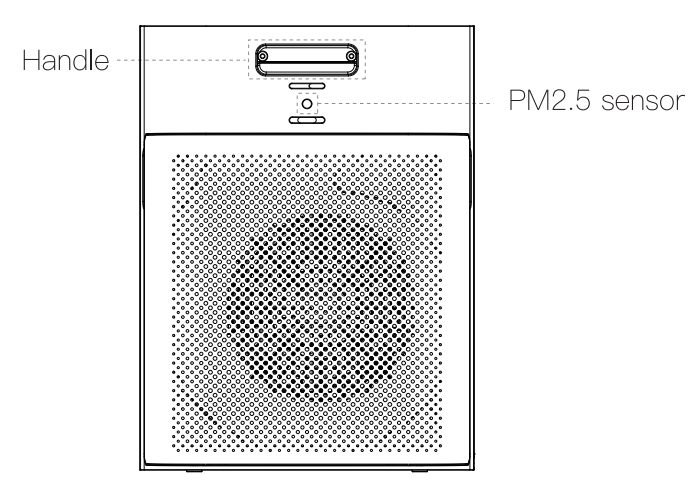
Tip: PM2.5 sensor (don't block the sensor)
Pros and Cons of morento Air Purifier Wifi HY4866-WF
Pros
- Effective Filtration: Dual true HEPA filters with activated carbon on both sides provide excellent removal of fine particles and odors.
- Smart Connectivity: WiFi-enabled with app and Alexa voice control for convenient remote operation and air quality monitoring.
- Quiet Operation: Low noise levels, maxing at 44 dB, suitable for bedrooms and offices without disruption.
- Multiple Fan Speeds and Modes: Includes four fan speeds, auto mode, sleep mode, and timer, offering flexible air purification settings.
- Large Coverage Area: Covers up to 1,076 sq ft, ideal for spacious rooms and open-plan layouts.
Cons
- WiFi Connectivity Issues: Users report intermittent disconnection from WiFi and the pp, requiring repeated setup.
- Temperature Display: Currently displays temperature only in Celsius, which may not be convenient for all users.
- Design: Basic, minimalistic design that some may find less stylish compared to premium alternatives.
- Non-Energy Star Certified: May consume more power compared to some energy-efficient models.
- Customer Service Concerns: Some users experienced device malfunctions with limited support responsiveness.
Compared to similar mid-tier purifiers like the Coway Airmega 150, the morento HY4866-WF offers a competitive price with smart features, although some long-term reliability issues may influence value for money.
Customer Reviews and Feedback on morento Air Purifier Wifi HY4866-WF
Customers generally praise the morento Air Purifier Wifi HY4866-WF for its effective air cleaning capabilities and quiet operation. Many highlight the smart WiFi connectivity and Alexa integration as convenient features that enhance user experience. For example, one user reported significant odor elimination near a litter box, indicating strong odor control performance.
However, common complaints include the purifier frequently going offline on WiFi, making app controls unreliable. Several customers have noted difficulty reconnecting it remotely and requested improvements to temperature display options. Some users have also reported early device failures or unresponsive controls, leading to dissatisfaction with customer support.
Star ratings average around 4 out of 5, reflecting overall satisfaction tempered by connectivity and durability concerns. Purchase recommendations are positive for those prioritizing air quality and smart features, but cautious for users seeking flawless tech integration or long-term robustness.
Faqs
How do I set up the morento Air Purifier Wifi HY4866-WF for the first time?
What should I do if the morento Air Purifier Wifi HY4866-WF keeps disconnecting from Wi-Fi?
How do the smart features of morento Air Purifier Wifi HY4866-WF enhance user experience?
Can I use the morento Air Purifier Wifi HY4866-WF in rooms larger than 1076 square feet?
What maintenance is required to keep the morento Air Purifier Wifi HY4866-WF performing optimally?
How can I troubleshoot if the morento Air Purifier Wifi HY4866-WF does not respond to app commands?
What are the fan speed and timer options available on the morento Air Purifier Wifi HY4866-WF?
Is the morento Air Purifier Wifi HY4866-WF compatible with voice assistants like Alexa and Google Assistant?
Tags
More morento manuals
Leave a Comment