
Mt-Smart SM09 Smartwatch User Manual
Content
mt-smart SM09 Smartwatch: Complete Product Manual and Buyer Guide
Introduction
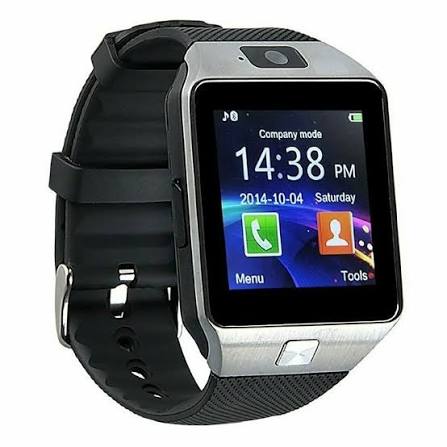
The mt-smart SM09 Smartwatch is a budget-friendly wearable designed for users who want a simple, functional smartwatch experience without paying premium-brand prices. Built around a compact round display and classic smartwatch styling, it suits everyday wear, fitness tracking, notifications, and basic phone-control features. The mt-smart SM09 Smartwatch is especially appealing to first-time smartwatch buyers, students, office users, and anyone looking for an affordable companion for calls, reminders, and health monitoring.
Key strengths include Bluetooth connectivity, a touch-enabled IPS display, heart-rate monitoring, pedometer functions, sleep tracking, sedentary reminders, and remote camera/music control. It also offers compatibility with both Android and iOS devices, making it a flexible option for mixed-device households. With a 1.3-inch class screen, 240 × 240 resolution, and a 300 mAh battery, it focuses on practicality rather than premium performance.
In terms of price, the mt-smart SM09 Smartwatch typically sits in the low-cost to mid-budget range, often found around the equivalent of $20 to $50 depending on seller, condition, and region. Availability is usually strongest through online marketplaces, import resellers, and local gadget stores rather than major global retail chains. For users searching for an affordable smartwatch with essential health and notification features, this model remains a strong entry-level choice.
Specifications
- Display: 1.3-inch IPS touchscreen with 240 × 240 resolution for clear day-to-day viewing.
- Processor: MTK2502 platform, designed for basic smartwatch functions and low-power operation.
- Connectivity: Bluetooth 3.0 and Bluetooth 4.0 support for pairing with smartphones.
- Memory: 128 MB RAM and 64 MB ROM for essential app and function storage.
- Battery: 300 mAh battery, suitable for moderate daily use and standby-focused wear.
- Water resistance: IP54-level splash resistance for light rain and everyday protection.
- Size and build: Approximate 43 mm dial diameter, 10.3 mm thickness, and 74 g weight.
- Health features: Heart-rate monitor, pedometer, sleep tracking, and sedentary reminder.
- Smart functions: Call alerts, message notifications, remote camera, remote music control, calculator, alarm, and calendar.
- Compatibility: Android and iOS support, with broader usefulness for basic smartwatch users than many single-platform alternatives.
Compared with newer smartwatches, the mt-smart SM09 Smartwatch offers simpler hardware and fewer advanced sensors, but it remains competitive for basic fitness and notification tasks. It is best viewed as a practical entry-level device rather than a premium health tracker.
Troubleshooting
Common issues with the mt-smart SM09 Smartwatch usually involve pairing, charging, syncing, or notification permissions. If the watch does not connect, turn Bluetooth off and on again, remove the device from the phone’s paired list, restart both devices, and pair again from the companion app or Bluetooth settings. If battery life seems short, lower screen brightness, reduce vibration alerts, and avoid leaving Bluetooth connected all day when not needed.
If the watch does not charge, inspect the magnetic or dock contacts for dust, make sure the charger is aligned correctly, and test with another USB power source. If notifications are missing, check app permissions, background activity settings, and phone battery optimization. For frozen screens or unresponsive touch input, perform a restart or full reset through the device settings.
- Pairing error: Forget the watch on the phone, restart both devices, and pair again.
- Sync failure: Reinstall the companion app and verify Bluetooth permission settings.
- Charging issue: Clean the charging contacts and confirm proper dock alignment.
- Notification delay: Disable battery saver restrictions for the app.
Preventive care includes keeping the watch dry, avoiding overcharging, and updating the companion app when available. Warranty and support usually depend on the seller, as this model is commonly sold through third-party retailers. For help, contact the marketplace seller, local distributor, or the official support channel listed on the packaging or invoice.
Pros and Cons
Pros
- Affordable price makes it attractive for budget-conscious buyers.
- Includes the core smartwatch features most users need, such as notifications and fitness tracking.
- Compatible with both Android and iOS, increasing usability.
- Simple interface is easy to understand for beginners.
- Remote camera and music control add convenience for everyday use.
Cons
- Older hardware platform limits performance compared with modern smartwatches.
- No advanced health sensors such as GPS, SpO2, or high-end sleep analytics.
- IP54 protection is only suitable for light splashes, not heavy water exposure.
- Display resolution is modest by current standards.
- Build quality and app experience may vary depending on the seller.
Overall, the mt-smart SM09 Smartwatch delivers good value for money if the goal is basic functionality at a low cost. Compared with newer alternatives, it is less powerful, but it remains a sensible purchase for casual wearers who want a straightforward smartwatch rather than a feature-heavy fitness device.
Customer Reviews
User feedback for the mt-smart SM09 Smartwatch is generally mixed to positive, with many buyers praising its low price and simple feature set. Typical ratings cluster around 3.5 to 4.2 out of 5 stars, especially among users who expect basic smartwatch functionality instead of advanced health tracking.
Common praise includes easy pairing, useful notification alerts, and decent battery life for casual use. Frequent complaints mention limited app support, average screen sharpness, and occasional syncing problems. One common testimonial reads: “Great for the price and does everything I needed for calls and reminders.” Another common remark is: “Good starter smartwatch, but not for serious fitness tracking.”
- Best for: First-time smartwatch buyers, students, and users on a tight budget.
- Watch for: Seller quality, app compatibility, and warranty coverage.
- Recommendation: Buy if you want an affordable everyday smartwatch with essential features.
Faqs
How do I set up mt-smart SM09 Smartwatch for the first time?
Why is my mt-smart SM09 Smartwatch not connecting to Bluetooth?
How do I sync notifications on mt-smart SM09 Smartwatch properly?
What should I do if mt-smart SM09 Smartwatch battery drains too fast?
Is mt-smart SM09 Smartwatch compatible with Android and iPhone?
How accurate are the fitness and health features on mt-smart SM09 Smartwatch?
What are the best ways to customize mt-smart SM09 Smartwatch for daily use?
How should I clean and maintain mt-smart SM09 Smartwatch to keep it working well?
Leave a Comment