
My Charge Adventure Jump Start User Manual
Content
myCharge Adventure Jump Start Product Manual
Introduction
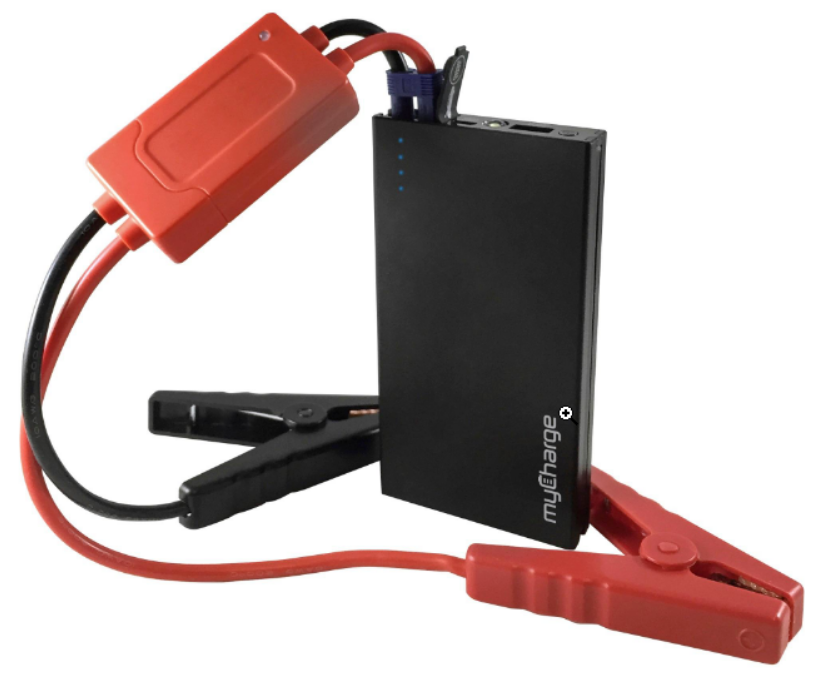
myCharge Adventure Jump Start is a compact portable jump starter and power bank designed for drivers, boaters, ATV owners, and outdoor users who need reliable emergency power on the go. Built around a 6,600mAh lithium-ion battery, it combines vehicle jump-starting capability with everyday USB charging in a size that is easy to store in a glove box, center console, or gear bag. The unit is best known for its ability to start cars, boats, and similar 12V engines while also charging smartphones, tablets, and other USB-powered devices.
One of its biggest advantages is versatility. Instead of carrying a separate battery pack and a dedicated jump starter, users get both in one device. The Adventure Jump Start is especially useful for commuters, weekend travelers, marine users, and anyone who wants a lightweight emergency backup. It is also a practical choice for people who spend time in remote areas where roadside assistance may not be immediately available. The rugged portable design makes it suitable for everyday carry, travel, and outdoor use.
In terms of availability, the product has historically sold in the budget-to-midrange category, with an estimated price range of about $70 to $120 depending on seller, condition, and bundle contents. It is commonly found through online retailers, electronics resellers, and support listings tied to the Adventure Series. For users searching for a portable jump starter, battery booster, or USB power bank, myCharge Adventure Jump Start remains a recognizable option with strong value for money.
Specifications
The myCharge Adventure Jump Start is built for emergency vehicle starts and portable device charging. Its core specifications make it a practical all-in-one roadside companion.
- Battery capacity: 6,600mAh lithium-ion
- Jump start current: 200A sustained
- Peak jump start current: 400A
- Supported devices: Cars, boats, ATVs, and other 12V systems
- USB charging: Supports phones, tablets, and other USB accessories
- Portability: Compact, smartphone-sized form factor with approximate weight around 1.2 lb
- Recharge methods: Wall outlet, car charger, or computer USB connection
- Indicator system: LED charge status lights for battery monitoring
Performance is strong for a device in this class, especially for standard gasoline vehicles and small engines. Compared with larger high-capacity jump starters, the Adventure Jump Start favors portability over extreme cranking power. Against similar mini jump packs, its 400A peak output and built-in power bank function make it competitive for daily carry and emergency use. For users who want a compact jump starter with USB backup charging, the balance of power and size is one of its main strengths.
Troubleshooting
If the unit does not start a vehicle, first confirm that the battery is charged and the clamps are attached correctly to the battery terminals. A fully charged unit should show four solid, non-blinking LED indicators. If the LEDs are low or blinking, recharge the device before attempting another jump start. If the vehicle still does not crank, make sure the battery clamps are making firm contact and the vehicle battery is not severely damaged.
Common problems include slow charging, no output to USB devices, and reduced jump-start performance in cold weather. These issues are often caused by low battery charge, poor cable connection, or using the unit outside its recommended operating range. Preventive care includes recharging the unit every few months, storing it in a dry location, and avoiding complete discharge for long periods. If your unit appears unresponsive, disconnect all cables, let it rest for a few minutes, then recharge it fully.
Some manuals and support materials may reference LED fault states instead of formal error codes. If you see unusual blinking patterns, treat them as a warning that the unit needs charging or that the clamps may be connected incorrectly. Warranty coverage and support are handled through myCharge customer support and product service channels. For help, use the official myCharge support site or the contact form provided by the manufacturer.
Pros & Cons
Pros
- Compact and easy to store in a vehicle, boat, or travel bag
- Combines jump starter and portable charger in one device
- Useful 400A peak current for many small and mid-size 12V applications
- Good value for users who want emergency power without bulk
- Convenient USB charging for phones and tablets
- Practical for roadside emergencies, camping, boating, and ATV trips
Cons
- Not designed for large-displacement engines or heavy-duty commercial use
- Battery capacity is lower than newer high-capacity jump starters
- Older design compared with modern USB-C and fast-charge models
- Best suited for occasional emergency use rather than frequent professional use
- May not match the ruggedness or advanced features of premium alternatives
For most everyday drivers, myCharge Adventure Jump Start offers solid value for money because it performs two jobs in one compact device. Compared with larger jump packs, it is easier to carry, but it gives up some raw power and battery capacity. Buyers who prioritize portability will likely appreciate it more than users who need maximum jump-start performance.
Customer Reviews
Customer feedback for myCharge Adventure Jump Start is generally positive, with many users praising its size, portability, and convenience. Typical ratings range around 4 out of 5 stars in consumer discussions, especially among users who want an emergency backup rather than a heavy-duty jump starter. Reviewers often mention that it works well for cars, boats, and everyday charging needs.
Common praise includes reliable performance for small engines, easy storage, and the ability to charge phones in the same unit. Common complaints focus on battery age in older units, limited power compared with larger jump packs, and the need to keep it charged regularly. A typical user comment is: “Small enough to keep in the car, powerful enough to save a dead battery, and handy for charging my phone too.” Another frequent sentiment is that it is best for convenience-focused buyers rather than demanding professional users.
For shoppers comparing jump starters, this model is a smart buy if portability and basic emergency coverage matter most. Users who need longer runtime, faster charging, or stronger output may want to compare it with newer high-capacity portable jump starters.
Faqs
How do I set up my charge Adventure Jump Start for the first time?
Why is my charge Adventure Jump Start not turning on, and what should I check first?
What devices or vehicles are compatible with my charge Adventure Jump Start?
How long does my charge Adventure Jump Start need to charge before use?
Why does my charge Adventure Jump Start lose power quickly during use?
How do I safely use my charge Adventure Jump Start on a vehicle battery?
What should I do if my charge Adventure Jump Start shows an error light or warning?
How should I maintain and store my charge Adventure Jump Start for long-term reliability?
Tags
Leave a Comment