
Navimow I-Series EFLS-2.0 Robotic Lawnmower User Manual
Content
navimow I-Series EFLS-2.0 Robotic Lawnmower: Smart, Wire-Free Lawn Care for Modern Homes
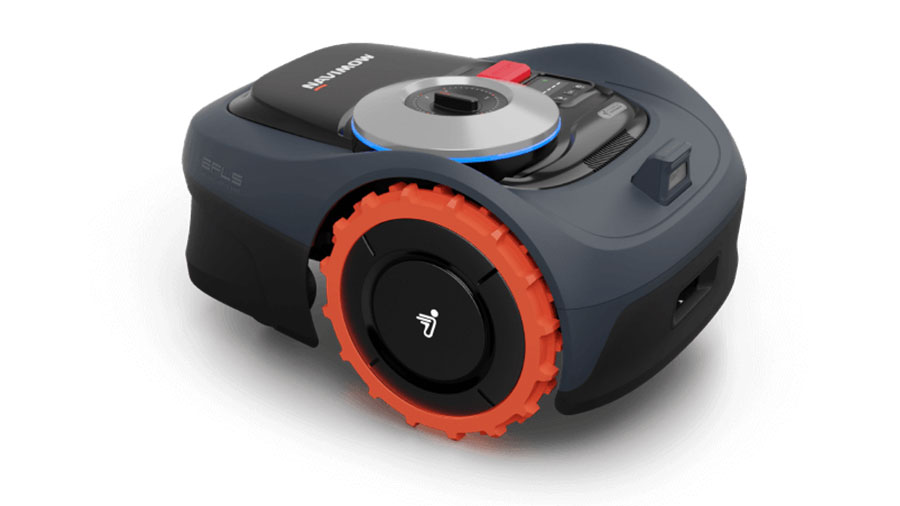
The navimow I-Series EFLS-2.0 Robotic Lawnmower is a wire-free robotic mower designed for homeowners who want precise, low-maintenance lawn care without the hassle of perimeter wires. Its standout feature is EFLS 2.0, a positioning system that combines advanced GPS-based navigation with visual mapping support to help the mower stay accurate even in areas with weaker satellite reception. This makes it especially appealing for lawns with trees, narrow corridors, mixed layouts, or complex garden designs.
Built for convenience, the navimow I-Series EFLS-2.0 Robotic Lawnmower offers app-based control, virtual boundary setup, multi-zone mowing, and smart scheduling. It is a strong fit for busy households, tech-savvy users, and anyone looking to automate regular mowing while maintaining a neat, even cut. The mower is also well suited to medium-sized suburban lawns where quiet operation and reliable obstacle handling matter.
In terms of price, the I-Series typically sits in the mid-range premium robotic mower segment, with estimated market pricing generally starting around $669 and rising depending on model, region, and availability. It is commonly available through official brand stores and selected lawn equipment retailers. For buyers comparing a robot lawnmower under a traditional wired system, the navimow I-Series EFLS-2.0 Robotic Lawnmower offers a modern, easier-to-install alternative with strong value for the features provided.
Specifications for Navimow I-Series EFLS-2.0 Robotic Lawn Mower
- Navigation system: EFLS 2.0 with centimeter-level positioning support and visual mapping assistance
- Recommended mowing area: up to 500 m² on the smaller model and up to 960 m² on the larger model, depending on version
- Battery capacity: 2.55 Ah on the smaller unit and 5.1 Ah on the larger unit
- Runtime per charge: approximately 60 minutes on the smaller model and up to 120 minutes on the larger model
- Charging time: around 90 minutes or 180 minutes, depending on model
- Cutting width: 7.1 inches / 18 cm
- Cutting height: 20–60 mm, or about 2–3.6 inches
- Maximum slope: up to 30% or about 17° in supported areas
- Noise level: 58 dB(A), making it quieter than many gas mowers and many older robot mowers
- Water protection: IP66 for improved outdoor durability
- Weight: about 24 lb / 10.9 kg
- Dimensions: approximately 21.4 x 15.1 x 11.2 inches
Compared with similar wire-free robot mowers, the navimow I-Series EFLS-2.0 Robotic Lawnmower stands out for its balance of smart navigation, quiet operation, and app-driven setup. It is less complex to install than boundary-wire models and more affordable than many high-end premium robot mowers with wider-area or advanced obstacle-camera systems.
Pros and Cons of the Navimow I-Series EFLS-2.0 Robotic Lawnmower
Pros
- Wire-free installation: No boundary wire is required, which saves setup time and avoids buried cable repairs.
- Strong navigation accuracy: EFLS 2.0 helps the mower stay on track in open lawns and challenging layouts.
- Quiet performance: At 58 dB(A), it is a practical option for early morning or evening mowing.
- Smart app control: Users can create zones, schedules, and no-go areas with minimal effort.
- Good value for money: It delivers premium convenience without reaching the price of top-tier large-area models.
Cons
- Best for small to medium lawns: It is not designed for very large properties or highly demanding commercial use.
- Cutting width is moderate: The 7.1-inch deck is efficient for regular maintenance but slower on bigger lawns.
- Obstacle handling depends on layout: Dense clutter, toys, or frequent garden changes can reduce mowing efficiency.
- Premium features add cost: It is cheaper than flagship robot mowers, but still more expensive than basic wired alternatives.
For most homeowners, the navimow I-Series EFLS-2.0 Robotic Lawnmower is a smart middle-ground choice: easier than wired mowers, more advanced than budget models, and competitive in value against similarly priced alternatives.
Customer Reviews of Navimow I-Series EFLS-2.0 Robotic Lawn Mower
Customer feedback is generally positive, with many users praising the easy setup, quiet operation, and reliable mowing patterns. Typical ratings often fall around 4.3 to 4.7 out of 5 stars, especially among buyers who wanted a cleaner-looking lawn without manual weekend mowing.
One common testimonial theme is: “The setup was faster than expected, and the app makes daily mowing almost effortless.” Another frequent comment is: “It handles my lawn better than I thought, especially after I removed the boundary-wire headaches.”
Frequently mentioned complaints include occasional navigation issues in shaded or heavily obstructed areas, as well as the learning curve during initial mapping. Some users also note that the mower performs best when the lawn is kept tidy and edging is managed separately. Overall, it is recommended for buyers who want a dependable smart robot mower and are comfortable paying more for wire-free convenience and app-based control.
Is the Navimow I-Series EFLS-2.0 Robotic Lawnmower Worth Buying?
If you want a modern robot lawnmower that reduces setup hassle, improves mowing automation, and delivers strong everyday performance, the navimow I-Series EFLS-2.0 Robotic Lawnmower is an excellent option. It is especially appealing for homeowners who value wire-free installation, quiet operation, and smart lawn management features.
For small to medium lawns, it offers a compelling blend of convenience and capability. For larger properties or users who need maximum cutting speed and advanced obstacle detection, a higher-end alternative may be a better fit.
Faqs
How do I set up the navimow I-Series EFLS-2.0 Robotic Lawnmower for the first time?
Why is my navimow I-Series EFLS-2.0 Robotic Lawnmower having trouble finding a signal or staying on route?
What mowing area and lawn conditions work best with the navimow I-Series EFLS-2.0 Robotic Lawnmower?
How do I fix boundary, mapping, or no-go zone problems on the navimow I-Series EFLS-2.0 Robotic Lawnmower?
Can the navimow I-Series EFLS-2.0 Robotic Lawnmower handle narrow passages and complex garden layouts?
What should I do if the navimow I-Series EFLS-2.0 Robotic Lawnmower stops unexpectedly or returns to the dock too early?
How often should I clean and maintain the navimow I-Series EFLS-2.0 Robotic Lawnmower?
What app features are most useful on the navimow I-Series EFLS-2.0 Robotic Lawnmower for daily use?
Tags
Leave a Comment