
How to Use: Netgar N300 WiFi Range Extender EX2700 User Manual
Content
netgar N300 WiFi Range Extender EX2700: Complete Product Manual and Buyer Guide
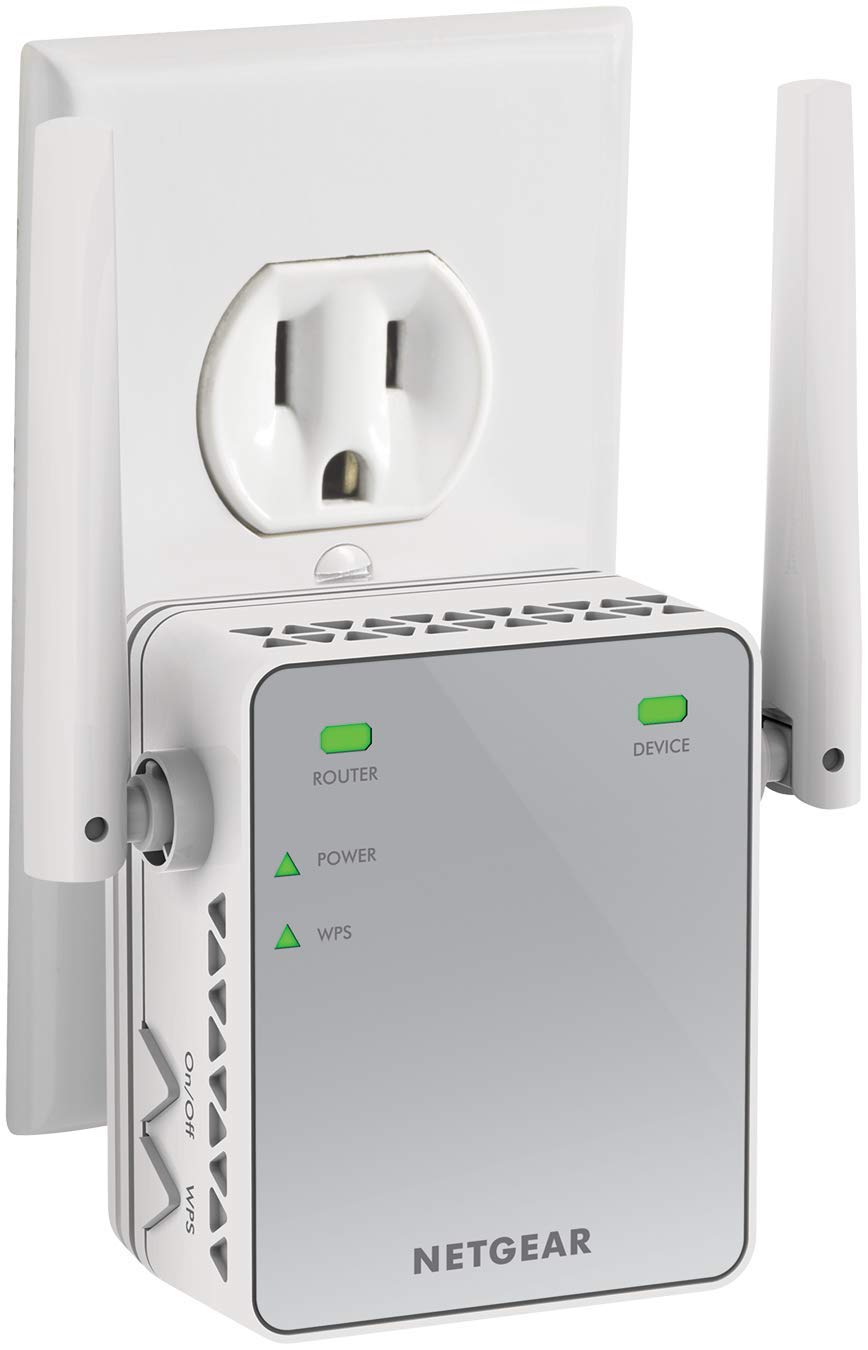
Introduction to the netgar N300 WiFi Range Extender EX2700
The netgar N300 WiFi Range Extender EX2700 is a compact plug-in wireless repeater designed to improve coverage in homes and small offices where the router signal does not reach every room. It uses 2.4 GHz 802.11n WiFi with N300 speeds up to 300 Mbps, making it a practical choice for browsing, email, HD streaming on moderate connections, and extending basic smart home connectivity. Its wall-plug design keeps installation simple, while the built-in Fast Ethernet port adds flexibility for wired devices such as printers, smart TVs, or game consoles.
This model is a strong fit for users who want an affordable way to reduce dead zones without replacing their router. It is especially useful in apartments, multi-room houses, and office spaces with thick walls or long hallway layouts. The netgar N300 WiFi Range Extender EX2700 supports common security standards including WPA/WPA2-PSK and WEP, and it works with most 2.4 GHz and dual-band routers. Typical pricing for this class of extender usually falls in the low-budget range, often around $20 to $40 depending on retailer and availability. Stock may vary by region, but the EX2700 remains widely listed through major electronics stores and online marketplaces.
For shoppers comparing WiFi range extenders, this model stands out for its compact size, easy setup, and reliable entry-level performance. It is best suited for users who need simple, affordable coverage expansion rather than advanced mesh networking features.
Technical Specifications and Key Features of the netgar N300 WiFi Range Extender EX2700
- WiFi standard: IEEE 802.11b/g/n, 2.4 GHz band only
- Wireless speed: N300, up to 300 Mbps
- Ports: 1 Fast Ethernet port for wired devices
- Security: WPA/WPA2-PSK and WEP support
- Dimensions: 67 x 55 x 34 mm
- Weight: 98 g
- Power: Wall-plug powered, no external adapter required
- Antennas: 2 internal antennas
- Indicators: Power and WPS LEDs for status and pairing
- System compatibility: Works with 2.4 GHz and many dual-band routers
In real-world use, the EX2700 is built for stable range extension rather than maximum throughput. It is comparable to other budget N300 extenders, but it is more compact than many desktop-style alternatives. If you need dual-band support, higher throughput, or mesh roaming, a newer AC or AX extender may be a better fit. For basic signal extension at low cost, however, this product remains competitive and easy to deploy.
How to Set Up the netgar N300 WiFi Range Extender EX2700
Start by plugging the extender into a wall outlet halfway between your router and the weak-signal area. Wait for the power light to become solid, then press the WPS button on your router and the WPS button on the extender to pair automatically. If your router does not support WPS, use the manual setup process from a connected phone, tablet, or laptop by joining the extender’s temporary network and following the on-screen wizard.
After pairing, move the extender to its final location only if the connection indicator shows a strong or acceptable signal. For best results, avoid placing it behind televisions, inside cabinets, or near microwave ovens and other sources of interference. The Fast Ethernet port can be used to connect a single wired device once the extender is configured.
Safety precautions are simple but important: use only indoor outlets, keep the device away from moisture, and never cover it with fabric or place it in cramped spaces where heat can build up. If setup fails, restart the router and extender, then repeat pairing from scratch. A factory reset may help when the unit has been previously configured for another network.
Troubleshooting the netgar N300 WiFi Range Extender EX2700
- No power light: Try a different outlet and confirm the wall socket is working.
- WPS pairing fails: Reboot the router, press the buttons again within the pairing window, or use manual setup instead.
- Weak signal after installation: Move the extender closer to the router and avoid thick walls or metal objects.
- Devices disconnect often: Update router firmware, reconnect the extender, and check for interference from other 2.4 GHz devices.
- Ethernet device not working: Confirm the cable is secure and the connected device supports standard Fast Ethernet.
There are no commonly used consumer-facing error codes for this model, so most issues are solved through LED status checks, reset procedures, and placement adjustments. Preventive maintenance is easy: keep firmware current on the main router, use a stable outlet, and avoid overloading the extender with too many devices. The product is typically covered by a one-year limited warranty, with support available through the manufacturer’s product support channels and regional customer service resources. If the device is still under warranty, have the serial number ready before contacting support.
Pros and Cons of the netgar N300 WiFi Range Extender EX2700
Pros
- Very compact wall-plug design that saves space
- Simple setup for beginners using WPS or manual configuration
- Affordable value for money compared with newer mesh systems
- Useful Fast Ethernet port for one wired device
- Good entry-level choice for reducing dead zones in small homes
Cons
- 2.4 GHz only, so it cannot deliver modern dual-band flexibility
- 300 Mbps is suitable for basic use but limited for heavy streaming or gaming
- Performance depends heavily on placement and router quality
- Not ideal for large homes or high-density smart device environments
- Newer AC or AX extenders may offer better speed and roaming
Overall, the netgar N300 WiFi Range Extender EX2700 is a budget-friendly solution for users who want simple coverage improvement without advanced features. Compared with newer alternatives, it is less powerful, but it is often easier to justify for low-cost signal extension in secondary rooms, garages, or small offices.
Customer Reviews of the netgar N300 WiFi Range Extender EX2700
User feedback is generally positive, with many customers praising the small size, straightforward setup, and noticeable improvement in WiFi coverage. Common review themes include a solid 4 out of 5 star experience for households needing a basic extender. One frequent comment is that it works well for bedrooms, hallways, and home offices where the router signal is weak but still present.
Typical complaints focus on 2.4 GHz limitations, occasional reconnection issues, and slower speeds when placed too far from the main router. Buyers often recommend it for light-to-moderate use rather than demanding tasks. For best results, customers usually suggest placing it carefully and pairing it with a reliable router. If you need a low-cost range booster with easy installation, this model remains a practical purchase.
Faqs
How do I set up the netgar N300 WiFi Range Extender EX2700 for the first time?
Why is my netgar N300 WiFi Range Extender EX2700 not connecting to my router?
What should I do if the EX2700 extender shows power but no internet access?
Is the netgar N300 WiFi Range Extender EX2700 compatible with all routers?
How can I improve the signal strength and speed of the EX2700 range extender?
What do the LED lights on the netgar N300 WiFi Range Extender EX2700 mean?
Can I connect a smart TV or game console to the EX2700 using Ethernet?
How do I reset and maintain the netgar N300 WiFi Range Extender EX2700?
Leave a Comment